

- Top Pick: Logitech G923 Racing Wheel and Pedals for Xbox
- Runner-up: Thrustmaster T248 X Racing Wheel and Pedal Set
- Also consider: Logitech G29 Driving Force Racing Wheel and Floor Pedals
A racing wheel changes a cloud racing game in a way a thumbstick cannot match. Steering becomes a physical motion, and braking becomes a matter of pressure rather than a button tap. Cloud gaming adds one twist: the game runs on a remote server, so the wheel never talks to the cloud directly. It talks to the device in front of you, and that device talks to the cloud.
That distinction decides which wheels work. A wheel plugged into a PC running GeForce Now, or into an Xbox console running Xbox Cloud Gaming, has a real route to the game. A wheel expected to plug straight into a phone cloud app does not, unless its listing says so. Every pick below is a complete wheel and pedal set.
As an Amazon Associate, we earn from qualifying purchases.
Quick Answer
For most cloud racers, the Logitech G923 for Xbox is the safest start, covering Xbox console and PC cloud play in one set. The Thrustmaster T248 X is the closest Xbox alternative, with a built-in display. The Logitech G29 and Thrustmaster T300 RS GT suit PC cloud play, and the Hori Apex is the budget pick for casual play without force feedback.
1. Logitech G923 Racing Wheel and Pedals for Xbox
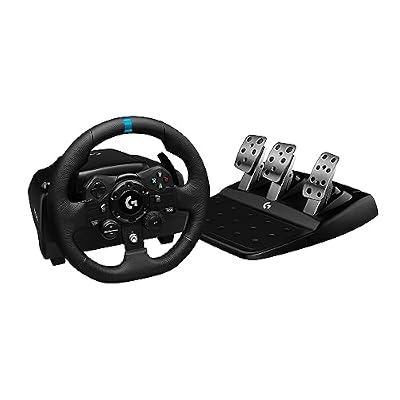
The G923 for Xbox is the most flexible wheel here, built for the two devices where cloud racing with a wheel actually happens. Plug it into an Xbox Series X, Xbox Series S, or Xbox One for Xbox Cloud Gaming on that console, or into a PC for GeForce Now and Xbox Cloud Gaming through a browser or the PC app. Its Trueforce feedback, listed at up to 1000 Hz, passes finer detail to your hands, such as surface changes, rather than only broad shakes. The rim carries console controls, and dual clutch launch control is built in. The pedals include throttle, brake, and clutch, and the brake uses a progressive spring that firms up as it travels, helping when streamed latency makes a light brake tap feel vague. The wheel turns through 900 degrees, mounting by a built-in desk clamp.
Specs
| Spec | Detail |
|---|---|
| Compatibility | Xbox Series X and S, Xbox One, PC |
| Force feedback | Yes, Trueforce up to 1000 Hz |
| Rotation | 900 degrees |
| Pedals | Throttle, brake, and clutch |
| Mounting | Desk clamp and bolt points |
2. Thrustmaster T248 X Racing Wheel and Pedal Set

The T248 X is the Xbox and PC version of the Thrustmaster T248, for players who like information on the wheel itself. A small built-in display in the center of the rim can show speed, gear position, and lap timing, depending on the game, and lets you change force feedback type and rotation angle directly from the wheel. Its force feedback comes from a hybrid drive system combining belt and gears, with three presets that can be changed on the fly. The wheel offers 25 action buttons, including two dual-position encoders. The magnetic T3PM pedal set has three pedals and four brake pressure modes. Officially licensed for Xbox Series X and S and Xbox One, with PC compatibility listed, it fits Xbox Cloud Gaming on console and GeForce Now on PC.
Specs
| Spec | Detail |
|---|---|
| Compatibility | Xbox Series X and S, Xbox One, PC |
| Force feedback | Yes, hybrid drive, three presets |
| Display | Built-in race dashboard display |
| Rotation | Adjustable, up to 900 degrees |
| Pedals | Three magnetic pedals |
| Mounting | Desk clamp |
3. Logitech G29 Driving Force Racing Wheel and Floor Pedals
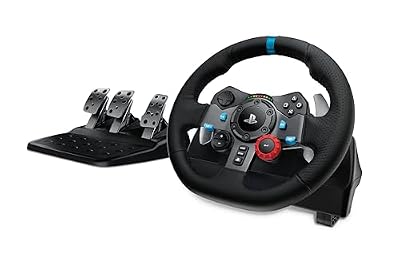
The G29 is the long-running PlayStation and PC wheel in the Logitech Driving Force line, and a sensible budget pick for PC cloud play. Its route is the PC: plug it into a computer running GeForce Now or Xbox Cloud Gaming in a browser, and the wheel controls the streamed game. It does not fit Xbox console cloud play, since it is built for PlayStation consoles and PC. Force feedback comes from a dual-motor system with helical gearing, described by Logitech as smooth and quiet. The pedals include throttle, brake, and clutch. The wheel turns through 900 degrees, and the base clamps to a desk or bolts to a rig. An optional shifter is sold separately. Newer wheels offer finer feedback, but for a first wheel used mainly for streamed arcade and simcade racing, it is a reasonable trade.
Specs
| Spec | Detail |
|---|---|
| Compatibility | PlayStation 5, PlayStation 4, PC, Mac |
| Force feedback | Yes, dual motor, helical gearing |
| Rotation | 900 degrees |
| Pedals | Throttle, brake, and clutch |
| Mounting | Desk clamp and bolt points |
4. Thrustmaster T300 RS GT Racing Wheel Set

The T300 RS GT is the premium pick here for PC cloud play, earning that place through its drive system. Where the Logitech wheels above use gears, the T300 uses a belt-driven system with a brushless motor. Belt drive tends to feel smoother and quieter than gear drive, with less cogging when a wheel is held at a steady angle through a long corner. For streamed racing, where the picture already carries a little latency, a smoother wheel helps you trust what your hands feel. The detachable rim is styled after a grand touring wheel, 11 inches across. The base is compatible with PlayStation 5 and PlayStation 4 as well as PC, so the PC cloud route is GeForce Now or browser-based Xbox Cloud Gaming. The GT Edition pairs the base with a three-pedal metal set and an adjustable brake pedal, rather than the two-pedal set sold with the standard T300 RS. It needs a solid desk or rig, since a light folding table can flex under a belt-driven base.
Specs
| Spec | Detail |
|---|---|
| Compatibility | PlayStation 5, PlayStation 4, PC |
| Force feedback | Yes, belt driven, brushless motor |
| Rotation | 1080 degrees |
| Wheel diameter | 11 inches |
| Pedals | Three metal pedals |
| Mounting | Desk clamp and bolt points |
5. Hori Racing Wheel Apex for PlayStation 5, PlayStation 4, and PC

The Hori Racing Wheel Apex is the budget pick, honest about what it leaves out. It does not list a force feedback motor, so there is no powered resistance pulling the wheel back into corners or shaking it over rough surfaces. Instead, it centers itself with spring resistance. That makes it a poor match for serious sim racing, but a fair match for casual arcade racing, kart racers, and family sessions. Its rotation is 270 degrees, much shorter than the 900 degrees of the Logitech wheels, so it suits arcade titles with quick steering but cannot reproduce the slow, wide steering of a road car. The pedal set has two pedals, accelerator and brake, with no clutch. The wheel is officially licensed by Sony, covering PlayStation 5 and PlayStation 4, and PC compatibility is listed as well. For cloud play, the realistic route is PC, through GeForce Now or a browser session.
Specs
| Spec | Detail |
|---|---|
| Compatibility | PlayStation 5, PlayStation 4, PC |
| Force feedback | No force feedback motor listed |
| Rotation | 270 degrees |
| Pedals | Accelerator and brake, two pedals |
| Mounting | Desk clamp |
| Shifter | Not included |
How to Choose
Start with the device, not the wheel. If your cloud racing happens on an Xbox console, the wheel must be built for Xbox, which points to the Logitech G923 for Xbox or the Thrustmaster T248 X. If it happens on a PC, any wheel in this guide with PC compatibility works, since the PC runs the cloud app or browser and the wheel plugs into the PC. No wheel here plugs directly into a phone cloud app, so phone-only players should stay with a controller made for mobile play. Next, decide how much feedback matters. Force feedback wheels push back against your hands and tell you when grip is fading, which helps in sim-style racing, and that early warning matters more in streamed play, where the picture can lag behind your input. A wheel without force feedback, such as the Hori Apex, is lighter, but it cannot warn you about a slide before you see it on screen. Three pedals with a clutch suit manual gearboxes, while two pedals are enough for arcade racing. Finally, check mounting: a desk clamp needs a flat, sturdy edge, so measure the desk before ordering.
Who Should Skip
Skip a racing wheel entirely if most of your cloud play happens on a phone or tablet with no PC or console in the loop. These wheels need a USB connection to a PC or a compatible console. Skip the premium belt-driven pick if your desk is light or folding, since the Thrustmaster T300 RS GT needs a stable surface. Skip force feedback wheels if you mainly play kart racers or party racing games, where steering is deliberately simple. A wheel and pedal set also take up more room than a controller in a drawer.
FAQ
Can I use a racing wheel with Xbox Cloud Gaming?
Yes, when the wheel is plugged into a device that runs Xbox Cloud Gaming and is built for that device. On an Xbox console, use an Xbox-compatible wheel such as the Logitech G923 for Xbox or the Thrustmaster T248 X. On a PC, use a PC-compatible wheel with the browser or app.
Does a racing wheel work with GeForce Now?
Yes, on a PC. GeForce Now runs in a browser or app on the computer, and a PC-compatible wheel plugged into that computer controls the streamed game. Install any driver listed by the manufacturer first.
Is force feedback worth it for streamed racing games?
For sim-style and simcade racing, yes. Force feedback gives an early signal when grip fades, which helps when the streamed picture lags behind your hands. For arcade and kart racing, the benefit is smaller.
Do I need a wheel stand for cloud gaming?
Not always. A desk clamp works well on a flat, sturdy desk and is the simplest setup. A stand or rig helps when the desk edge is too thin or rounded for a clamp, or when the pedals slide on the floor.
Final Verdict
The Logitech G923 for Xbox is the best racing wheel for cloud gaming for most players, covering both real cloud routes, Xbox console and PC, with strong force feedback and a three-pedal set. The Thrustmaster T248 X is the best Xbox alternative, with its built-in display and magnetic pedals, while the Thrustmaster T300 RS GT is the smoothest choice for PC cloud racing on a solid desk. The Logitech G29 is a capable budget route into PC cloud racing, and the Hori Apex is the budget pick for casual play without force feedback.










