If long sessions leave your wrist aching, tingling or simply tired, the mouse is the first part of the setup worth rethinking. A standard flat gaming mouse holds your forearm in a pronated, palm-down twist for hours. Vertical mice rotate the hand toward a neutral handshake posture, sculpted shells support the palm so the fingers can relax, and trackballs remove arm movement from aiming altogether. Each approach changes which muscles do the work, and each carries a different gaming trade-off.
One boundary needs stating plainly: no mouse treats, cures or prevents carpal tunnel syndrome. It is a medical condition involving the median nerve, and a different mouse shape is only a comfort and posture option some players find easier on the wrist and forearm. If you have persistent numbness, tingling, weakness or pain, see a clinician rather than shopping your way around it.
The second boundary is gaming credentials. Most ergonomic mice are office products with office sensors and a 125 Hz report rate, a real step down from 1,000 Hz esports polling. This guide grades every pick on both axes: how completely it changes your posture, and how much performance you give up. One pick is a genuine gaming mouse in a vertical shell; the rest are comfort-first designs whose limits are stated openly. As an Amazon Associate we earn from qualifying purchases.
How to Choose a Mouse When Your Wrist Is the Priority
Start with the shape family. Vertical mice, usually tilted between about 45 and 57 degrees, produce the biggest posture change: the forearm stays closer to neutral and the wrist stops resting its weight on the desk edge. They take days or weeks to aim with confidently, and flick shots feel strange at first. Sculpted flat mice keep the familiar palm-down orientation but fill the palm and add a thumb rest, reducing finger tension without relearning your aim. Trackballs keep the hand and arm still while a thumb rolls the ball, suiting small desks and sore shoulders, but they are the hardest format to aim with in shooters.
Check the sensor and polling rate honestly. For strategy titles, MMOs and single-player adventures, a 4,000 DPI office sensor at 125 Hz is perfectly usable. For competitive shooters it is a genuine handicap: cursor updates arrive eight times less often than on a 1,000 Hz gaming mouse. Ranked FPS players should weight the gaming-grade pick in this guide heavily.
Fit the mouse to your hand size. Vertical mice are not one-size products: a shell built for medium-to-large hands forces a small hand to stretch for the buttons, creating exactly the finger tension you are trying to avoid. The picks below are split by hand size, including a left-handed version.
Mind weight and connectivity. A heavier mouse moved thousands of times a session adds up, so lighter is generally kinder, although trackballs sidestep the question because the device never moves. Wireless removes cable drag, another constant source of wrist work. Look for both Bluetooth and a 2.4 GHz receiver if you switch between a gaming PC and a laptop, and check platform support, since configuration software is not universal.
Fix the rest of the desk too. Mouse height relative to your elbow, armrest position and break habits matter as much as shell shape. Players doing a full comfort overhaul often pair a gentler mouse with an ergonomic keyboard chosen for carpal tunnel comfort, since a split or tented keyboard addresses the same forearm rotation from the other side of the desk.
1. Keychron M5 8K — The Vertical Mouse That Is Actually Built for Gaming
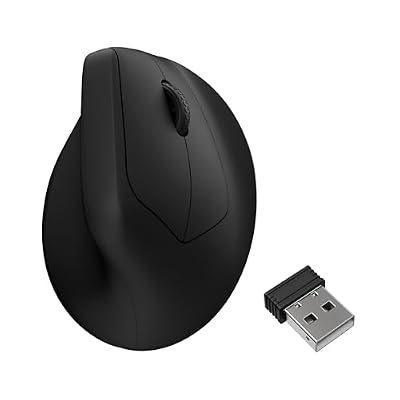
The M5 8K is the exception in this category: a vertical mouse with specifications that belong on an esports product page. Its shell tilts the hand to roughly 47 degrees, shallower than the Logitech vertical models below, which makes it the easiest vertical shape for existing gamers to adapt to. Inside is a PixArt PAW3950 sensor rated to 30,000 DPI and 750 IPS, with polling up to 8,000 Hz over the 2.4 GHz receiver or wired. This is the one pick here that asks for no performance compromise in competitive play.
The rest of the hardware supports that positioning. Huano switches rated for 80 million clicks sit under the main buttons, there are six buttons including a thumb-side horizontal scroll wheel that maps well to lean, ping or inventory functions, and the mouse weighs 95 g, light for a vertical design. Connectivity is tri-mode, remapping runs through Keychron’s browser-based Launcher, and battery life is rated up to 140 hours in Bluetooth mode, dropping as polling rises.
Choose the M5 8K if you play fast games and want the strongest gaming specification available in a handshake grip. Its 47-degree tilt is a smaller posture change than a 57-degree shell, so players chasing the most upright wrist position may prefer the Logitech models below.
Specs
- Form factor: Right-handed vertical, approximately 47-degree tilt
- Sensor: PixArt PAW3950 optical, up to 30,000 DPI, 750 IPS
- Polling rate: Up to 8,000 Hz (2.4 GHz and wired)
- Switches: Huano mechanical, 80-million-click rating
- Buttons: 6, including thumb scroll wheel
- Weight: 95 g
- Connectivity: 2.4 GHz receiver, Bluetooth, USB-C wired
- Battery: Rechargeable, rated up to 140 hours over Bluetooth
- Platform support: Windows, macOS, Linux (browser-based configuration)
2. Logitech MX Vertical — The Full 57-Degree Handshake for Medium and Large Hands

The MX Vertical is the reference design for this category. Its 57-degree angle puts the hand in a true handshake posture, with a textured thumb rest and a shape sized for medium-to-large right hands. Logitech positions the design around reduced forearm and wrist pressure compared with a conventional mouse, and the tall shell supports the hand rather than asking the fingers to grip and drag a low body across the pad. For players moving away from a flat mouse because of forearm ache, this is the most complete posture change here.
The gaming limits need to be equally clear. The sensor tops out at 4,000 DPI, plenty of range, but the mouse reports at an office-grade 125 Hz and is tuned for smooth desktop tracking rather than high-speed flicks. That suits RPGs, strategy games, simulation titles and casual shooters, and feels a step behind in ranked FPS play. At 135 g it is heavy by gaming standards, although the vertical grip means you push it with the whole hand rather than pinching it.
Battery life is a strength: up to four months per charge, with a USB-C quick charge returning hours of use from about a minute plugged in. It pairs with up to three devices over Bluetooth or the included receiver.
Specs
- Form factor: Right-handed vertical, 57-degree angle, medium-to-large hands
- Sensor: Optical, 400 to 4,000 DPI adjustable
- Polling rate: 125 Hz (office-grade)
- Buttons: 6
- Weight: 135 g
- Dimensions: 120 x 79 x 78.5 mm
- Connectivity: Bluetooth, USB receiver, USB-C wired while charging
- Battery: Rechargeable, up to 4 months per charge
- Platform support: Windows, macOS, Linux, ChromeOS, iPadOS
3. Logitech Lift — The Vertical Option for Small and Medium Hands, Including Left-Handers
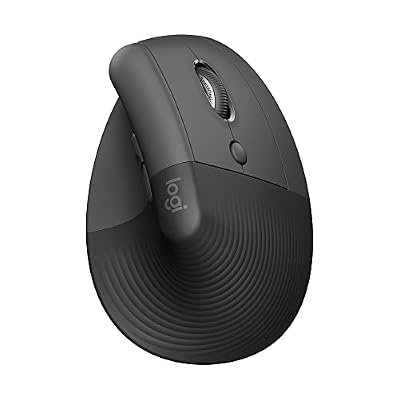
Most vertical mice are built large, which quietly excludes a lot of players. The Lift scales the same 57-degree handshake concept down for small-to-medium hands, with a soft thumb rest, quiet clicks and a compact shell smaller hands can reach across without stretching. Crucially, Logitech also sells a left-handed version in Graphite, one of the very few vertical mice left-handed players can buy at all, making the Lift the default recommendation for that group.
Gaming performance is firmly in the comfort-first camp. The sensor reaches 4,000 DPI, which covers slower-paced games comfortably, but like the MX Vertical it is an office tracking setup, and fast competitive aiming is not what it is built for. Treat it as the mouse for strategy games, city builders, MMOs and relaxed single-player sessions, where posture is the entire point.
Practical details are strong: a single AA battery rated for up to 24 months, Bluetooth or Logi Bolt connection, and support for Windows, macOS, iPadOS, ChromeOS, Linux and Android. If the MX Vertical sounds right but your hands are smaller, this is the same idea in the correct size, and correct sizing matters more for comfort than any specification on this page.
Specs
- Form factor: Vertical, 57-degree angle, small-to-medium hands; left-handed version available
- Sensor: Optical, up to 4,000 DPI adjustable
- Buttons: 6 (4 customizable)
- Weight: 125 g
- Dimensions: 108 x 70 x 71 mm
- Connectivity: Bluetooth, Logi Bolt USB receiver
- Battery: 1 x AA, rated up to 24 months
- Platform support: Windows, macOS, iPadOS, ChromeOS, Linux, Android
4. Logitech MX Master 3S — The Sculpted Flat Mouse for Players Who Will Not Go Vertical

Not everyone adapts to a vertical mouse. The MX Master 3S is the fallback for that group: a conventional flat orientation, but a deeply sculpted shell that fills the palm, a pronounced thumb rest with a side scroll wheel, and a shape that lets the hand rest on the mouse instead of hovering and pinching. It changes forearm rotation far less than the vertical picks, so the comfort gain is smaller and mostly about palm support and relaxed fingers, but it asks for zero relearning.
Its Darkfield sensor tracks on almost any surface including glass, at up to 8,000 DPI, the highest ceiling among the Logitech picks here. That headline needs context: it still reports at an office-grade rate and weighs 141 g, so it is a smooth, precise-feeling mouse for turn-based games, RPGs and management titles rather than a competitive FPS tool. The MagSpeed scroll wheel and thumb wheel are genuinely useful in inventory-heavy and strategy games.
It connects over Bluetooth or the included Logi Bolt receiver, pairs with three devices, and runs for a rated 70 days per USB-C charge. Choose it if vertical mice do not suit you, or if your discomfort is mostly in the fingers and palm rather than the forearm.
Specs
- Form factor: Right-handed sculpted ergonomic, flat orientation
- Sensor: Darkfield optical, 200 to 8,000 DPI, tracks on glass
- Buttons: 7, plus MagSpeed main wheel and thumb wheel
- Weight: 141 g
- Dimensions: 124.9 x 84.3 x 51 mm
- Connectivity: Bluetooth, Logi Bolt USB receiver, USB-C wired while charging
- Battery: Rechargeable, rated up to 70 days per charge
- Platform support: Windows, macOS, Linux, ChromeOS, iPadOS, Android
5. Logitech MX Ergo S — The Trackball That Removes Arm Movement Entirely

The MX Ergo S attacks the problem from a different direction: the mouse never moves. Your hand rests on a sculpted, tilted shell while your thumb rolls a large ball to move the cursor, so sweeping arm and wrist movements disappear from gaming altogether. The metal tilt plate adjusts between 0 and 20 degrees, angling the shell toward a more neutral forearm position, and the stationary format needs no mouse pad space at all.
Expect the steepest learning curve in this guide. Thumb-ball aiming is workable and even precise for strategy, RPG, simulation and turn-based titles once the muscle memory forms, and a precision mode button slows the cursor for fine adjustments. It is not a competitive shooter solution: the 512 to 2,048 DPI range is built for control, not flicks, and most FPS players will find thumb aiming limiting however long they practise.
The Ergo S charges over USB-C, connects to two devices over Bluetooth or its Logi Bolt receiver, and carries six programmable buttons. Choose it if moving a mouse across a pad is what aggravates your wrist or shoulder, and your library leans patient rather than twitch-based.
Specs
- Form factor: Stationary thumb trackball, sculpted shell, adjustable 0 or 20-degree tilt
- Sensor: Optical trackball, 512 to 2,048 DPI with precision mode
- Buttons: 6 programmable, including precision mode button
- Connectivity: Bluetooth, Logi Bolt USB receiver (2-device switching)
- Battery: Rechargeable over USB-C
- Platform support: Windows, macOS
Which One Should You Buy?
Competitive players who need a handshake grip without surrendering performance should start with the Keychron M5 8K, the only pick here with a flagship sensor and high polling. Players who want the most upright posture should choose by hand size: the MX Vertical for medium-to-large hands, the Lift for small-to-medium hands and left-handers. Players who reject vertical shapes but want palm support get the MX Master 3S, and players whose wrists object to moving a mouse at all get the MX Ergo S trackball, provided their games are unhurried.
Whichever shape you choose, give it at least a week of regular play before judging it, keep sensitivity high enough that small hand movements cover the screen, and take breaks. And to return to the most important point here: a more comfortable mouse is a reasonable step for gaming comfort, but ongoing numbness, tingling or weakness is a reason to book a medical appointment, not a reason to buy a more expensive mouse.