Studio One is not a demanding program to install, but it is a demanding program to mix on. PreSonus publishes modest minimum requirements, and every laptop below clears them several times over. What separates these four machines is how they behave once a session grows: dozens of plugin instances, large sampled instruments loaded into RAM, and an audio interface that has to stay glitch-free at a low buffer size while you record.
The picks below cover both platforms Studio One runs on. Two are Macs, which suit producers who want a quiet machine and a short setup path, and two are Windows laptops, one compact and one built to be upgraded over time. Each one is checked against the same criteria: single-core speed and core count for plugin loads, memory and storage, the ports your interface and controllers need, the screen you will stare at for whole sessions, and the warranty behind the exact model.
As an Amazon Associate we earn from qualifying purchases.
What Studio One actually needs
PreSonus’s published system requirements for Studio One set the floor: Windows 10 (64-bit) or Windows 11, or a recent macOS release, an Intel Core i3 or AMD A10 class processor or better (with native Apple silicon support on Mac), 4 GB of RAM as a minimum with 8 GB or more recommended, and 40 GB of free drive space for the program and its content. Treat that as the level at which Studio One opens, not the level at which it mixes comfortably.
In practice, three things decide how a laptop feels in Studio One. The first is per-core CPU performance: a single track’s plugin chain runs on one core, so a fast core matters as much as the core count, while the total core count decides how many tracks and instruments can play back at once. The second is RAM, because sampled instruments load into memory; 16 GB is a workable baseline and 32 GB gives large libraries room to breathe. The third is storage speed and capacity, since projects, samples and exports fill a drive quickly. Every laptop here starts at 16 GB of RAM and a fast NVMe SSD, and the two 32 GB Windows and Mac configurations are aimed at heavier sessions.
One factor no spec sheet will give you is DPC latency on Windows, the driver behaviour that decides whether low-buffer recording stays free of clicks and dropouts. Manufacturers do not publish it, and it cannot be inferred from the processor model. The honest approach is to buy from a seller with a workable return window, then test the machine with your own interface at your working buffer size during that window. Macs sidestep most of this because Core Audio handles the audio path consistently across Apple’s own hardware.
The four laptops at a glance
| Laptop | CPU | RAM | Storage | Screen | Best for |
|---|---|---|---|---|---|
| Apple MacBook Pro 14-inch (M4) | Apple M4, 10 cores | 16 GB unified | 512 GB SSD | 14.2-inch Liquid Retina XDR, 3024 x 1964 | Most producers, one machine for everything |
| Apple MacBook Air 15-inch (M4) | Apple M4, 10 cores | 16 GB unified | 512 GB SSD | 15.3-inch Liquid Retina, 2880 x 1864 | Silent recording and writing sessions |
| ASUS ROG Zephyrus G14 (2025) | Ryzen AI 9 HX 370, 12 cores | 32 GB LPDDR5X | 1 TB SSD | 14-inch OLED, 2880 x 1800, 120 Hz | Maximum plugin headroom in a small Windows laptop |
| Lenovo Legion Pro 5i Gen 10 | Core Ultra 9 275HX, 24 cores | 32 GB DDR5 | 1 TB SSD, second slot free | 16-inch OLED, 2560 x 1600, 165 Hz | Desktop replacement you can upgrade later |
Apple MacBook Pro 14-inch with M4

The base MacBook Pro 14 is the straightforward recommendation for most Studio One users. Its M4 chip pairs four performance cores with six efficiency cores, and the performance cores are what carry long plugin chains at low buffer sizes. The active cooling fan lets the chip hold its speed through long mixdown renders in a way the fanless Air cannot, and the 16 GB of unified memory in this configuration is enough for full band sessions and moderate orchestral templates.
Ports are a genuine strength for studio work: three Thunderbolt 4 ports take your interface, an external sample drive and a dock without competing for the same connector, and there is an HDMI port, an SD card slot, a MagSafe charging port and a headphone jack. The Liquid Retina XDR screen is bright and sharp enough for dense mixer views. The trade-offs are fixed hardware: memory and storage are part of the chip package and cannot be upgraded after purchase, so the configuration you order is the configuration you keep. Apple backs it with a one-year limited warranty, with AppleCare+ available as an extension.
Specs
- Processor: Apple M4, 10-core CPU (4 performance, 6 efficiency), 10-core GPU
- Memory: 16 GB unified memory, not upgradeable
- Storage: 512 GB SSD, not upgradeable
- Display: 14.2-inch Liquid Retina XDR, 3024 x 1964, ProMotion up to 120 Hz
- Ports: 3 x Thunderbolt 4 (USB-C), HDMI, SDXC card slot, MagSafe 3, 3.5 mm headphone jack
- Battery: 72.4 Wh; Apple rates up to 24 hours of video playback
- Weight: 3.4 lb (1.55 kg)
- Warranty: 1-year Apple limited warranty, AppleCare+ optional
Apple MacBook Air 15-inch with M4
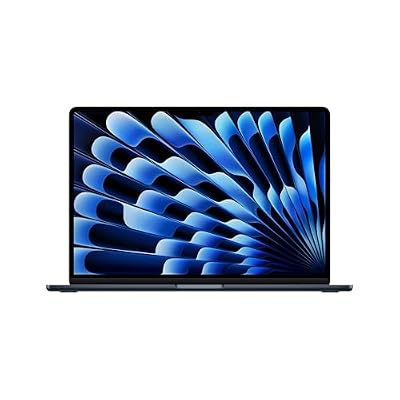
The MacBook Air is the pick for recording, because it has no fan at all. Nothing spins up during a vocal take, which makes it the safest laptop here to use in the same room as a sensitive microphone. It runs the same M4 chip as the Pro, with the same 10-core layout and the same 16 GB of unified memory in this configuration, and the larger 15.3-inch screen gives Studio One’s mixer and arrangement views more room than the 13-inch model.
The compromises are thermal and physical. With no fan, sustained heavy work such as long offline renders runs at reduced speed compared with the Pro, and the port count drops to two Thunderbolt 4 ports plus MagSafe charging and a headphone jack, so an interface, a drive and a MIDI controller will likely share a hub. Storage and memory are again fixed at purchase. For writing, tracking and moderate mixes it is more machine than most home studios need, and Apple covers it with the same one-year limited warranty as the Pro.
Specs
- Processor: Apple M4, 10-core CPU (4 performance, 6 efficiency), 10-core GPU
- Memory: 16 GB unified memory, not upgradeable
- Storage: 512 GB SSD, not upgradeable
- Display: 15.3-inch Liquid Retina, 2880 x 1864
- Ports: 2 x Thunderbolt 4 (USB-C), MagSafe 3, 3.5 mm headphone jack
- Cooling: fanless, fully silent under load
- Battery: 66.5 Wh; Apple rates up to 18 hours of video playback
- Weight: 3.3 lb (1.51 kg)
- Warranty: 1-year Apple limited warranty, AppleCare+ optional
ASUS ROG Zephyrus G14 (2025)
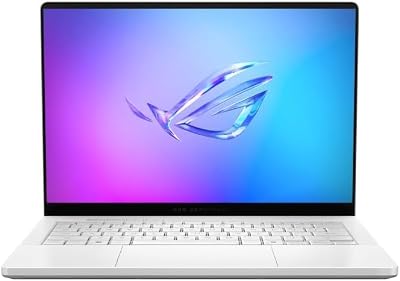
The Zephyrus G14 is the Windows answer to the MacBook Pro: a 14-inch laptop with a genuinely powerful processor. Its Ryzen AI 9 HX 370 runs 12 cores and 24 threads at up to 5.1 GHz according to ASUS, which gives Studio One both the per-core speed for heavy track chains and the thread count for large sessions. The 32 GB of memory is the joint-highest in this guide, and the RTX 5070 Ti graphics card is more than a DAW needs, but it makes the machine a credible second role as a gaming or video laptop.
Connectivity covers studio gear well: a USB4 port with DisplayPort and power delivery for Thunderbolt-class interfaces and docks, a second USB-C port, two USB-A ports for dongles and controllers, HDMI 2.1, a microSD reader and a headphone jack. The 3K OLED screen runs at 120 Hz with full DCI-P3 coverage per ASUS. Memory is soldered and cannot be upgraded, so 32 GB is both the strength and the ceiling; the single M.2 SSD can be replaced with a larger drive. ASUS includes a one-year warranty on US retail units.
Specs
- Processor: AMD Ryzen AI 9 HX 370, 12 cores / 24 threads, up to 5.1 GHz (ASUS specification)
- Graphics: NVIDIA GeForce RTX 5070 Ti Laptop GPU, 12 GB GDDR7
- Memory: 32 GB LPDDR5X, soldered, not upgradeable
- Storage: 1 TB PCIe 4.0 NVMe SSD, single M.2 slot, replaceable
- Display: 14-inch OLED, 2880 x 1800, 120 Hz, 100 percent DCI-P3
- Ports: USB4 Type-C, USB 3.2 Gen 2 Type-C, 2 x USB 3.2 Gen 2 Type-A, HDMI 2.1, microSD reader, 3.5 mm combo jack
- Battery: 73 Wh
- Weight: 3.31 lb (1.50 kg)
- Warranty: 1-year ASUS warranty
Lenovo Legion Pro 5i Gen 10

The Legion Pro 5i is the desktop replacement of the group, and the only laptop here that treats upgrading as part of the plan. The Core Ultra 9 275HX brings 24 cores (eight performance and sixteen efficiency) with performance cores boosting to 5.4 GHz per Intel’s specification, which is the most playback headroom in this guide for very large sessions. The 32 GB of DDR5 memory ships as two 16 GB SO-DIMM sticks in two slots, so it can be replaced later, and the storage layout pairs the fitted 1 TB SSD with a second free M.2 slot for a dedicated sample-library drive.
At 16 inches with an OLED screen running at 165 Hz in this configuration, it is also the biggest display here, which suits long editing sessions at a fixed desk. The port selection is the fullest of the four: Thunderbolt 4, a second USB-C with power delivery, three USB-A ports, HDMI 2.1, wired Ethernet and a headphone jack, so interfaces, control surfaces and licence dongles all connect without a hub. The costs are size and fan noise under load; this is a machine that lives on a desk rather than in a vocal booth. Lenovo supplies a one-year warranty as standard.
Specs
- Processor: Intel Core Ultra 9 275HX, 24 cores (8 performance + 16 efficiency) / 24 threads, P-cores up to 5.4 GHz
- Graphics: NVIDIA GeForce RTX 5070 Laptop GPU, 8 GB GDDR7
- Memory: 32 GB DDR5-5600 (2 x 16 GB SO-DIMM), two slots, upgradeable
- Storage: 1 TB PCIe SSD, second M.2 2280 slot free for expansion
- Display: 16-inch OLED, 2560 x 1600, 165 Hz, 500 nits (Lenovo specification for this configuration)
- Ports: Thunderbolt 4, USB-C 10 Gbps with power delivery, 3 x USB-A, HDMI 2.1, RJ-45 Ethernet, 3.5 mm combo jack
- Battery: 80 Wh
- Weight: from 5.6 lb (2.55 kg)
- Warranty: 1-year Lenovo warranty
How to choose between them
Start with your platform. If your plugins, interface drivers and collaborators already live in the Mac world, the MacBook Pro 14 is the default: quiet enough for most rooms, powerful enough for most sessions, and simple to connect. Choose the MacBook Air instead if recording in the same room as the microphone is your priority and your sessions stay moderate; its silence is a real studio feature, not a gimmick.
On Windows, the choice is portability against serviceability. The Zephyrus G14 matches the Macs for travel while offering 32 GB of memory and a stronger graphics card, but its memory is fixed forever. The Legion Pro 5i is the pick for a fixed studio desk and the longest service life, because its memory and storage can grow with your sample library. If your setup splits between a main rig and something tiny for sketching tracks away from the desk, our guide to the best mini laptops covers the compact end of the market.
Whichever you choose, spend your first days with it on verification rather than installation: connect your interface, set your normal buffer size, and record and play back a busy session. That test, done inside the return window, tells you more about a laptop’s fitness for Studio One than any specification on this page.