- Top Pick: Sapphire Pulse Radeon RX 9070 XT
- Runner-up: ASUS Prime GeForce RTX 5070 Ti
- Also consider: MSI GeForce RTX 5070 Ti Ventus 3X OC
Windows gamers who move to Linux usually miss two programs first: their GPU vendor’s control panel and a good tuning utility. Radeon Software, the NVIDIA App and MSI Afterburner simply do not exist for Linux, and what ships with the drivers covers only fragments of the job. LACT, short for Linux GPU Control Application, is the open-source project built to fill that gap in one place.
It is not a monitoring widget with a settings page bolted on. LACT splits the work between a privileged system daemon and a desktop client, applies fan curves, power caps and clock offsets from boot, and covers AMD, NVIDIA and Intel graphics with honestly different depths of control for each vendor. This guide explains what it can actually change on each vendor’s hardware, where the limits sit, and which current cards pair best with it.
As an Amazon Associate, we earn from qualifying purchases.
Quick answer
LACT is a free Linux GPU control application that pairs a root daemon with a GTK interface to show clocks, temperatures, power draw and fan speeds, and to set fan curves, power caps and clock or voltage offsets where the driver allows. It covers AMD most deeply, NVIDIA through NVML, and Intel for monitoring and power caps.
What LACT shows and controls
On the monitoring side, LACT reports the card’s model and VBIOS version, VRAM size and type, compute-unit counts, current GPU and memory clocks, temperatures, fan speed, and live power draw. It also shows the power-cap range the driver exposes (current, minimum, maximum and default values), Vulkan capability information and Resizable BAR status, and it can chart power, temperature and frequency history or export readings to a file.
Control is where the vendors diverge. On AMD cards, which LACT drives through the amdgpu kernel interface, control is deepest: custom fan curves, power-cap changes, performance-level and power-state selection, GPU and VRAM clock offsets, voltage offsets, and firmware thermal targets on RDNA 3 and newer cards. Unlocking AMD overclocking requires the amdgpu overdrive kernel parameter, and LACT’s interface includes a helper that enables it for you. On NVIDIA cards, LACT works through NVML, so it needs the proprietary driver with its CUDA libraries installed, and a recent driver for clock offsets. There it offers fan curves, power-cap changes and core and memory clock offsets; voltage is only adjustable indirectly through a voltage-frequency curve editor, and the project itself notes that parts of that support rest on undocumented driver behaviour. On Intel cards, support is monitoring, power caps and basic clock limits, with no fan or voltage control.
LACT also supports settings profiles that can switch automatically based on which program is running, or when GameMode reports a game has started, so a quiet desktop profile and a full-power gaming profile can coexist without manual toggling.
The daemon and client split
The design decision that defines LACT is that a system service, lactd, does the actual hardware work, while the GTK application and the command-line client only talk to it. The service runs under systemd, applies your saved configuration at boot, and keeps working with no graphical session at all, which is why the same setup serves a desktop, a living-room PC or a headless box configured through its YAML config file.
That split is also a permissions question. Clients reach the daemon over a Unix socket owned by the wheel or sudo group, and the config file can name a different admin user or group. Anyone who can write to that socket can change fan speeds, power limits and clocks on your machine, so group membership deserves the same care you would give sudo rights. The flip side of boot-time application is persistence: a profile you save is reapplied every start until you change it, which matters for the risk discussion below.
How LACT compares with CoreCtrl and vendor tools
CoreCtrl is the closest relative: it also offers per-program profiles on Linux, but it covers AMD cards only. LACT is the option when a machine mixes vendors, or when an NVIDIA or Intel card needs attention too. Against the vendor routes, the contrast is starker. AMD ships no official Linux control panel at all. NVIDIA’s own nvidia-settings clock controls depend on the X11-only Coolbits option and die with your session, while nvidia-smi can set a power limit but offers no fan curves and no friendly profile system. Because LACT’s daemon talks to the driver rather than the display server, the same configuration works identically on Wayland and X11, and survives logouts and reboots.
The risks, stated plainly
Nothing here is a promise of extra performance, and this guide makes no benchmark claims. Overclocking and undervolting trade stability for whatever headroom your individual silicon has: push too far and the symptoms are driver resets, corrupted frames, crashed games and lost work. Because the daemon reapplies settings at boot, an unstable profile can greet you at every login until you remove or reset the configuration, so change one value at a time, keep the stock values written down, and stress-test before you trust a profile. Warranty positions on overclocking vary by board maker and region and tuning can affect coverage, so check your card maker’s terms if that matters to you. LACT writes within the ranges the driver exposes, but staying inside those ranges does not guarantee any given card is stable there.
Five current cards that pair well with LACT
Sapphire Pulse Radeon RX 9070 XT

The RDNA 4 flagship is the card LACT controls most completely: fan curve, power cap, clock and voltage offsets and power states are all on the table once overdrive is enabled. Sapphire’s Pulse trim keeps the design compact and dual-fan, and AMD rates the reference boost clock at up to 2970 MHz.
Specs:
- GPU: AMD Radeon RX 9070 XT (RDNA 4)
- Memory: 16GB GDDR6, 20 Gbps
- Boost clock: up to 2970 MHz, as Sapphire states
- Outputs: 2x HDMI, 2x DisplayPort
- Interface: PCIe 5.0 x16
- Model: 11348-03-20G
PowerColor Hellhound Radeon RX 9070
The non-XT 9070 gives up some compute units but keeps 16GB of memory and the same full LACT feature set, which makes it the calmer AMD option for a quiet, undervolted build. AMD rates the RX 9070 boost clock at up to 2520 MHz, and PowerColor’s Hellhound cooler is its triple-fan gaming trim.
Specs:
- GPU: AMD Radeon RX 9070 (RDNA 4)
- Memory: 16GB GDDR6, 20 Gbps
- Boost clock: up to 2520 MHz, as AMD states
- Outputs: HDMI and DisplayPort
- Interface: PCIe 5.0 x16
ASUS Prime GeForce RTX 5070 Ti

For NVIDIA owners, LACT supplies the fan curves and clock offsets that the official Linux tooling lacks. The Prime card is ASUS’s 2.5-slot, SFF-ready design with a dual BIOS, and its 16GB of GDDR7 suits high-resolution play. Under LACT you get fan control, power-cap changes and offsets through NVML; voltage stays indirect.
Specs:
- GPU: NVIDIA GeForce RTX 5070 Ti (Blackwell)
- Memory: 16GB GDDR7, 256-bit
- Boost clock: 2482 MHz, as ASUS states
- Outputs: HDMI 2.1 and DisplayPort 2.1
- Design: 2.5-slot, dual BIOS
- Model: PRIME-RTX5070TI-16G
MSI GeForce RTX 5070 Ti Ventus 3X OC
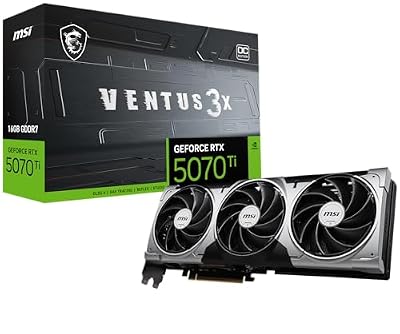
MSI’s Ventus is the workmanlike triple-fan take on the same GPU, factory overclocked and without lighting extras. It pairs with LACT exactly as the ASUS card does, so the choice between them is about cooler size, outputs and the boost clock MSI states, not about Linux support.
Specs:
- GPU: NVIDIA GeForce RTX 5070 Ti (Blackwell)
- Memory: 16GB GDDR7, 28 Gbps, 256-bit
- Boost clock: 2497 MHz, as MSI states
- Outputs: 3x DisplayPort 2.1a, 1x HDMI 2.1b
- Model: G507T16V3C
ASUS Prime GeForce RTX 5070 OC Edition
 find alternatives
The step-down Blackwell card still gets LACT fan curves, power caps and clock offsets, and the Prime OC Edition’s 2.5-slot body fits smaller cases that reject triple-slot designs. Note that this is the factory-overclocked OC Edition listing; the non-OC Prime RTX 5070 is a separate product with its own listing.
Specs:
- GPU: NVIDIA GeForce RTX 5070 (Blackwell)
- Memory: 12GB GDDR7
- Outputs: HDMI 2.1 and DisplayPort 2.1
- Design: 2.5-slot, SFF-ready, dual BIOS
- Model: PRIME-RTX5070-O12G
How to choose
Start from the control depth you actually want. If fan curves plus full clock and voltage control matter most, buy AMD: LACT’s amdgpu path is its most complete. If you prefer NVIDIA, accept the offsets-only model and make sure you run the proprietary driver, with a recent release for clock-offset support. Whatever the vendor, check LACT’s hardware-support list for your exact card before buying, since support is tracked per model. On the newest AMD cards, also confirm your distribution’s kernel is current enough for the driver support LACT relies on. Finally, follow the card maker’s own power-supply recommendation, and leave thermal headroom in the case if you plan to raise power caps rather than lower them.
Who should skip this
Skip LACT if your machine runs only an integrated GPU, since there is little to control and less to gain. Skip it if your distribution release is one the project README warns lacks the dependencies it needs, or if you are not comfortable running a privileged system service. Intel Arc owners who specifically want fan control should also skip it, because LACT does not expose fan control on Intel hardware. And if you never intend to touch a fan curve, power cap or clock, a simple monitoring overlay is the lighter tool for you.
FAQ
Does LACT work on Wayland?
Yes. The daemon talks to the GPU driver directly and does not depend on a graphical session, so the same configuration applies on Wayland and X11 desktops, and even on machines with no desktop at all.
Do I need root to use LACT?
The daemon runs as a system service because changing power limits and clocks requires privilege. Day-to-day use does not: your user account just needs access to the daemon’s socket, which by default belongs to the wheel or sudo group.
Can LACT damage my graphics card?
LACT writes settings through the same driver interfaces the vendors expose, and within the ranges those interfaces report. It cannot promise stability, though: an aggressive overclock or undervolt can crash your system, and a bad saved profile is reapplied at boot until you reset it. Work in small steps and keep stock values noted.
Does LACT replace MangoHud or CoreCtrl?
No. MangoHud is a monitoring overlay and shows readings without changing hardware behaviour, so the two complement each other. CoreCtrl overlaps more, but it is AMD-only; LACT is the broader tool when NVIDIA or Intel hardware is involved.
Final verdict
LACT is the closest thing Linux has to a universal GPU control panel: one daemon, one interface, and a feature set that is genuinely deep on AMD, useful on NVIDIA and honest about its Intel limits. It asks for a privileged service and a little care with profiles, and in return it removes one of the most common reasons gamers kept a Windows install around. Pair it with an RDNA 4 card for the full experience, or with a Blackwell card for the fan and power control NVIDIA never shipped, and it earns its place in a Linux gaming setup.