American Truck Simulator is one of the easiest modern games to run well, and that changes what “best” means. SCS Software’s own published system requirements set the floor: a minimum of an Intel Core i5-6400 or AMD Ryzen 3 1200, 8 GB of RAM and a GeForce GTX 660 or Radeon RX 460 with 2 GB of VRAM, and a recommended tier of a Core i5-9600 or Ryzen 5 3600, 12 GB of RAM and a GeForce GTX 1660 or Radeon RX 590. Every current gaming laptop clears that recommended tier, most of them by a wide margin. So this guide is not a race for the fastest graphics card. It ranks laptops on what actually shapes long hours in ATS: screen size and quality, storage room for map DLC and mods, single-core CPU strength for the game’s lightly threaded engine, ports for a wheel and pedals, and upgrade paths that keep the machine relevant.
Honesty first: an extreme GPU is wasted on this game alone. ATS leans on one or two CPU threads, and once a laptop passes the recommended spec, extra graphics tiers buy headroom for high scaling settings and graphics mods, not a different experience. Money is better spent on a bigger or sharper screen, a 1 TB SSD and 16 GB of RAM. The four picks below are ordered with that logic: a budget machine with one clear upgrade to make, a balanced all-rounder, a full-power RTX 4060 for mod-heavy players, and a 17.3-inch QHD machine for immersion without an external monitor. If your laptop also has to run other simulation titles, our guide to the best gaming laptop for golf simulator setups applies the same screen-and-headroom thinking to a different sim.
As an Amazon Associate we earn from qualifying purchases.
Acer Nitro V 15 ANV15-51-51H9 — Best Budget Pick
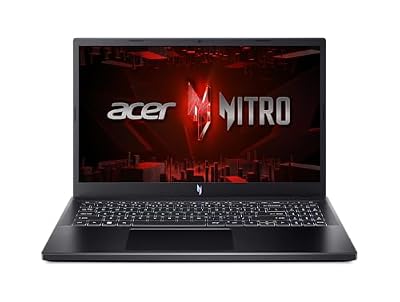
The Nitro V 15 is the cheapest sensible way into ATS on a new laptop. Its Core i5-13420H and GeForce RTX 4050 with 6 GB of GDDR6 sit comfortably above SCS’s recommended CPU and GPU, so the game runs at high settings on the 15.6-inch 1080p 144 Hz IPS panel with room to spare for scaling above 100 percent. The 512 GB PCIe Gen 4 SSD covers the base game’s 25 GB install many times over, and Acer leaves a second M.2 slot free for a storage upgrade when the DLC map collection grows.
The one honest catch is memory: this configuration ships with 8 GB of DDR5, which meets the minimum requirement but falls short of the 12 GB SCS recommends, and ATS with a browser, Discord and mod manager open will feel it. The fix is cheap and simple because both RAM slots are accessible SODIMMs — adding a second stick is the first upgrade to budget for, and it turns this into a fully recommended-spec machine. Ports suit a sim desk well: HDMI 2.1 for an external screen, three USB-A ports for a wheel, pedals and a shifter, and Gigabit Ethernet for stable Convoy multiplayer sessions. This is the pick for new ATS players who want a low entry cost and are happy to add a RAM stick later.
Specs
- CPU: Intel Core i5-13420H (8 cores, up to 4.6 GHz)
- GPU: NVIDIA GeForce RTX 4050 Laptop GPU, 6GB GDDR6
- Display: 15.6-inch IPS, 1920 x 1080, 144 Hz
- RAM: 8GB DDR5, 2 SODIMM slots (upgradeable)
- Storage: 512GB PCIe Gen 4 SSD, second M.2 slot free
- Ports: USB-C with DisplayPort, 3x USB-A, HDMI 2.1, RJ-45 Ethernet
- Wireless: Wi-Fi 6, Bluetooth 5.1
- Weight: approx. 2.1 kg
- Warranty: 1-year Acer limited warranty
Lenovo LOQ 15ARP9 — Best Balanced Pick

The LOQ 15ARP9 is the balanced point of this guide: strong where ATS benefits, with no money spent on graphics tiers the game cannot use. The Ryzen 7 7435HS brings eight Zen 3+ cores, and Lenovo’s own PSREF documentation rates the RTX 4060 in this platform at a 105 W TGP, which is enough to run ATS at high settings with 200 percent scaling and popular graphics mods at 1080p. The 15.6-inch panel runs at 144 Hz with full sRGB coverage and 300-nit brightness per the same PSREF sheet, a step up in colour quality from basic gaming panels, which matters in a game you mostly look at for hours at a time.
This listing is a reseller-configured variant with 32 GB of DDR5 and a 1 TB SSD, so check the exact configuration on the product page before ordering; the platform itself has two SODIMM slots and two M.2 2280 slots, so memory and storage stay upgradeable either way. One trade-off to know: the 7435HS has no integrated graphics, so unplugged battery life is short. For a laptop that lives plugged in on a sim desk, that is a fair exchange for the price. Ports cover a full wheel setup — USB-C with DisplayPort 1.4, three USB-A, HDMI 2.1 and Ethernet — and Lenovo’s base warranty on the platform is one year. This is the pick for most ATS players who want headroom for mods and other games without overspending.
Specs
- CPU: AMD Ryzen 7 7435HS (8 cores / 16 threads, up to 4.5 GHz)
- GPU: NVIDIA GeForce RTX 4060 Laptop GPU, 8GB GDDR6, 105 W TGP (Lenovo PSREF)
- Display: 15.6-inch IPS, 1920 x 1080, 144 Hz, 100% sRGB, 300 nits, G-SYNC
- RAM: 32GB DDR5 in this listing, 2 SODIMM slots
- Storage: 1TB PCIe SSD, two M.2 2280 slots in total
- Ports: USB-C 3.2 Gen 2 with DisplayPort 1.4, 3x USB-A, HDMI 2.1, RJ-45 Ethernet
- Wireless: Wi-Fi 6
- Warranty: 1-year base warranty
ASUS TUF Gaming A15 FA507NV-EH74 — Best Full-Power RTX 4060

Not all RTX 4060 laptops are equal, because makers choose the power limit. ASUS states a 140 W maximum TGP for the RTX 4060 in this TUF Gaming A15 in its own listing, the top of the chip’s laptop range, and pairs it with a MUX switch so the discrete GPU can drive the display directly. For ATS itself that power is headroom rather than necessity, but it earns its place if you run the game at 300 percent scaling with weather and lighting mods, or split your time with heavier titles. The Ryzen 7 7735HS supplies eight cores, and the 15.6-inch 144 Hz panel covers the full sRGB gamut with G-SYNC support.
The supporting hardware is complete: 16 GB of DDR5-4800 across two SODIMM slots, a 1 TB PCIe SSD with a second M.2 slot free, a 90 Wh battery that is large for the class, and a port set built for a desk — USB4 Type-C, a second USB-C with DisplayPort, two USB-A, HDMI 2.1 and Ethernet. ASUS backs it with a one-year warranty. This is the pick for mod-heavy ATS players and anyone who wants one laptop that stays capable across their whole library for years.
Specs
- CPU: AMD Ryzen 7 7735HS (8 cores / 16 threads)
- GPU: NVIDIA GeForce RTX 4060 Laptop GPU, 8GB GDDR6, up to 140 W max TGP
- Display: 15.6-inch IPS, 1920 x 1080, 144 Hz, 100% sRGB, G-SYNC, MUX switch
- RAM: 16GB DDR5-4800, 2 SODIMM slots
- Storage: 1TB PCIe SSD, two M.2 slots in total
- Ports: USB4 Type-C, USB-C 3.2 Gen 2 with DisplayPort, 2x USB-A, HDMI 2.1, RJ-45 Ethernet
- Wireless: Wi-Fi 6
- Battery: 90 Wh
- Warranty: 1-year ASUS warranty
Acer Nitro 17 AN17-41-R7G3 — Best Big Screen

If the screen is the experience, this is the pick. The Nitro 17 stretches ATS across a 17.3-inch QHD (2560 x 1440) IPS panel at 165 Hz with G-SYNC, so interstate horizons, dashboard detail and mirror views all get more room than any 15.6-inch 1080p machine can give, without buying an external monitor. The Ryzen 7 7840HS is the strongest CPU in this guide for the game’s lightly threaded engine, and the RTX 4060 has no trouble driving ATS at QHD given the game’s modest demands — this is exactly the situation where resolution, not graphics tier, is the right place to spend.
Storage and memory match the brief: 16 GB of DDR5 in two SODIMM slots and a 1 TB PCIe Gen 4 SSD, with the chassis offering room to grow both. Connectivity is the richest here too, with a USB4 Type-C port, HDMI 2.1, Ethernet, Wi-Fi 6E and a microSD reader, plus a 90 Wh battery. The cost is size: at roughly 3.0 kg this is a desk machine that travels between rooms, not a daily carry. This is the pick for players building a fixed sim corner around the laptop’s own screen, and for anyone who finds 15.6 inches too small for long hauls.
Specs
- CPU: AMD Ryzen 7 7840HS (8 cores / 16 threads, up to 5.1 GHz)
- GPU: NVIDIA GeForce RTX 4060 Laptop GPU, 8GB GDDR6
- Display: 17.3-inch IPS, 2560 x 1440 (QHD), 165 Hz, G-SYNC
- RAM: 16GB DDR5, 2 SODIMM slots
- Storage: 1TB PCIe Gen 4 SSD
- Ports: USB4 Type-C, USB-C 3.2 Gen 2, 3x USB-A, HDMI 2.1, RJ-45 Ethernet, microSD reader
- Wireless: Wi-Fi 6E, Bluetooth 5.1
- Battery: 90 Wh
- Weight: approx. 3.0 kg
Which One Should You Buy?
Start from the game’s real demands rather than a spec-sheet arms race. Every pick here exceeds SCS’s recommended requirements, so the decision is about screen, storage and upgrade plans. The Nitro V 15 costs the least and becomes a complete recommended-spec machine with one added RAM stick. The LOQ 15ARP9 is the balanced default, with a 105 W RTX 4060, a colour-accurate panel and generous memory and storage in this configuration. The TUF Gaming A15 runs its RTX 4060 at the full 140 W and suits players who stack graphics mods or play heavier games alongside ATS. The Nitro 17 trades portability for the biggest, sharpest screen.
Two practical notes apply to all four. First, count your USB-A ports before buying a wheel: a wheel base, pedals and a shifter can fill three ports quickly, and every pick here provides at least two USB-A plus USB-C for a hub. Second, use the Ethernet port for Convoy multiplayer if your router is within cable reach; a wired connection removes the Wi-Fi dropouts that end group hauls. What you can safely skip is the tier above these machines — for American Truck Simulator on its own, flagship GPUs and 4K OLED panels add cost without changing the drive.