Immersive learning covers very different lessons: a student walking around a labelled 3D heart, a trainee following steps pinned to a real machine, a language class reading prompts overlaid on physical objects, and a lecture group watching a large virtual screen while still seeing the room. No single headset type does all of that, so this guide separates the categories.
True augmented reality means optical see-through optics: the learner looks directly through a transparent lens while digital content is drawn over the real world. Enterprise devices built that way, such as the HoloLens class, anchor content to rooms with depth sensors and hand tracking. The second category is video-passthrough mixed reality: cameras capture the room and screens inside a closed headset redraw it with digital objects blended in. Meta Quest headsets work this way, and for most schools they are the practical option because the software libraries and standalone operation already exist. The third category is display glasses: light, transparent glasses that act mainly as a wearable monitor. They are genuinely see-through, but most have limited or no room anchoring, so they suit guided viewing, subtitles and virtual screens rather than fully spatial simulations.
One honest limit shapes the picks below. The best-known enterprise optical AR headsets are not normal Amazon US retail products. Microsoft has discontinued the HoloLens 2, sold through enterprise channels, and glasses such as the Vuzix M400 and Lenovo ThinkReality A3 are likewise sold mainly through business channels, with no verifiable Amazon US listing found for this guide. They are context here, not picks. Every product below is verified as sold on Amazon US, and each section labels its category.
As an Amazon Associate we earn from qualifying purchases.
How to Choose an AR Headset for Learning
Connection platform comes first. Standalone headsets run lessons on the device itself and work with classroom management platforms. Tethered glasses depend on the attached host, so the real platform is that host: its operating system, app store and accounts. Check that the learning apps a school uses publish a version for that platform first.
Display and field of view decide what a lesson can show. Resolution per eye controls how readable labels stay. Field of view controls how much of a scene a learner can take in without turning their head: wide fields suit spatial simulations, while the narrower fields of display glasses suit a single screen or prompt card. Brightness matters mainly for glasses in lit classrooms.
Tracking decides whether content stays put. Six-degrees-of-freedom (6DoF) inside-out tracking lets a learner walk around a virtual object that stays anchored in place, with hand tracking or controllers as input. Three-degrees-of-freedom (3DoF) systems track head rotation only, enough for viewing and selection. Glasses with no positional tracking should be treated as screens, not simulation devices.
Microphone and audio matter for language and remote lessons. Built-in microphones handle voice answers, language practice and remote expert sessions. Open speakers let a teacher still talk to the room, while closed headsets isolate the learner, which helps focus but needs a supervision plan for younger students. Readers comparing headsets for adjacent uses may also find our guide to the best headsets for machine learning useful, since microphone quality and platform support overlap.
Classroom practicalities close the decision. Shared devices need wipeable interfaces, straps that fit different head sizes, and a plan for glasses wearers. Battery runtime sets the longest lesson block a standalone headset can cover, and fleet buyers should confirm a device management option exists first.
1. Meta Quest 3 (512 GB) — Best Passthrough Pick for Spatial Lessons

Category: video-passthrough mixed reality, standalone. The Quest 3 is the strongest all-round learning pick here because it combines full-colour passthrough, 6DoF tracking, hand tracking and Touch Plus controllers in a device that needs no PC. Learners see their real desk and classmates while virtual models, labels and instructions are blended into the room, covering most immersive lesson formats schools run, from anatomy models to virtual field trips.
Its display is the sharpest in this guide, at 2064 x 2208 pixels per eye through pancake lenses, with a 110-degree horizontal field of view published by Meta, which makes labelled diagrams and small text usable. The Snapdragon XR2 Gen 2 processor and 8 GB of memory run standalone apps, and the 512 GB storage holds a large shared library on one device that rotates between classes. Built-in microphones support voice interaction, and the depth projector improves how virtual objects sit against real surfaces.
The limits are the usual ones for a closed headset: no eye contact with a teacher while wearing it, and an average runtime Meta publishes at about 2.2 hours, so timetables should plan around lesson blocks. It suits schools and training centres wanting one fleet device for spatial lessons.
Specs
- Display: 2064 x 2208 per eye, LCD, pancake lenses; 110 x 96 degree field of view; 90 Hz
- Processor, memory, storage: Snapdragon XR2 Gen 2, 8 GB RAM, 512 GB
- Tracking and passthrough: Inside-out 6DoF, hand tracking, Touch Plus controllers; full-colour cameras with depth projector
- Audio, microphone, connectivity: Integrated speakers, microphone array, Wi-Fi 6E, Bluetooth, USB-C
- Weight and battery: 515 g; about 2.2 hours average runtime (manufacturer figure)
2. Meta Quest 3S (128 GB) — Best for a Whole Classroom Fleet

Category: video-passthrough mixed reality, standalone. The Quest 3S runs the same Snapdragon XR2 Gen 2 platform and standalone learning software as the Quest 3, making it the natural fleet purchase: a school can equip a full class set and run the same lesson apps on every unit, with the Quest 3 reserved for a teacher station. It keeps full-colour passthrough, 6DoF tracking, hand tracking and Touch Plus controllers, so the lesson formats are the same.
The compromises are optical. Resolution is 1832 x 1920 pixels per eye through Fresnel lenses, and the field of view narrows to 96 by 90 degrees. Labelled models and video lessons remain clear, but fine text is less crisp, so text-heavy material is better demonstrated on the teacher unit. Storage is 128 GB, enough for a managed set of lesson apps but quick to fill.
Meta publishes an average runtime of about 2.5 hours, slightly longer than the Quest 3, which helps back-to-back scheduling. Built-in microphones cover voice answers and language exercises. It suits schools buying in quantity, where a headset per learner matters more than the sharpest display.
Specs
- Display: 1832 x 1920 per eye, Fresnel lenses; 96 x 90 degree field of view
- Processor, memory, storage: Snapdragon XR2 Gen 2, 8 GB RAM, 128 GB
- Tracking and passthrough: Inside-out 6DoF, hand tracking, Touch Plus controllers; full-colour passthrough cameras
- Audio, microphone, connectivity: Integrated speakers, built-in microphones, Wi-Fi, Bluetooth, USB-C
- Weight and battery: 514 g; about 2.5 hours average runtime (manufacturer figure)
3. XREAL One — Best See-Through Glasses for Guided Viewing

Category: optical see-through display glasses, tethered. The XREAL One is a different tool from the Quest headsets: transparent glasses that put a large virtual screen in front of the learner while the real room stays directly visible, with no camera redraw in between. That suits guided viewing: lecture capture, subtitled video, step prompts and reference material checked while keeping eyes on a teacher or workbench.
The listing specifies a 147-inch virtual screen, a 50-degree field of view and a 120 Hz refresh rate, driven by the built-in X1 chip with native 3DoF tracking, so the screen holds its position against head rotation. Three adjustable lens transparency levels darken the lenses in bright rooms. Connection is by USB-C to a compatible phone, computer, Mac or handheld, and the host supplies content and power, so there is no battery and no standalone app platform.
The limits must be stated plainly. Native 3DoF is not room anchoring, there are no controllers and no hand tracking in the glasses, and it cannot run spatial simulation libraries built for standalone headsets. Built-in audio and a microphone support calls and language apps on the host. It suits individual learners, caption-based accessibility setups, and trainers wanting prompts in view during practice.
Specs
- Display: 1080p per eye Micro-OLED, 147-inch virtual screen (listing figure); 50-degree field of view; 120 Hz
- Tracking and lens: Native 3DoF via XREAL X1 chip; 3 adjustable electrochromic transparency levels
- Connection platform: USB-C DisplayPort to compatible phones, PC, Mac and handhelds; powered by the host
- Audio, microphone, input: Built-in speakers and microphone; no controllers, input from the host device
4. VITURE Pro XR — Best Display Glasses for Shared Reading and Video Lessons

Category: optical see-through display glasses, tethered. The VITURE Pro XR competes directly with the XREAL One as a wearable screen, and its distinguishing feature for education is per-eye myopia adjustment, from 0.00 to -5.00 diopters. A nearsighted learner can dial in focus instead of wearing glasses under the frame, removing a common friction point when glasses pass between students.
The manufacturer specifies dual Micro-OLED panels at 1920 x 1080 per eye, a 135-inch virtual display, a 120 Hz refresh rate and up to 1000 nits of perceived brightness, with an electrochromic film that darkens the lenses for lit rooms. At 77 g it wears like ordinary glasses for a full lesson. Harman-tuned audio is built into the temples, and connection is a single USB-C cable to a compatible host, so the host defines the software: video lessons and remote classes work, while room-anchored simulation does not, because the glasses provide no positional tracking.
It suits reading-heavy and video-heavy learning, study spaces where a private screen helps focus, and learners who need diopter adjustment.
Specs
- Display: Micro-OLED, 1920 x 1080 per eye, 135-inch virtual display; 46-degree field of view; 120 Hz; up to 1000 nits perceived (manufacturer figures)
- Focus and lens: Per-eye myopia adjustment from 0.00 to -5.00 diopters; electrochromic dimming film
- Connection platform: USB-C DisplayPort to compatible phones, PC, Mac and handhelds; powered by the host
- Audio, microphone, weight: Built-in Harman audio, microphone via host connection; 77 g
5. Rokid AR Spatial Bundle (Max 2 Glasses with Station 2) — Best Multi-Screen Study Setup
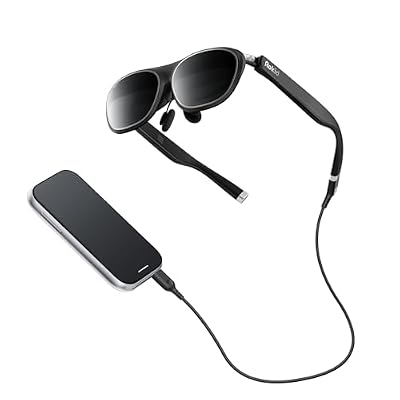
Category: optical see-through display glasses with a standalone spatial computer. This bundle pairs Rokid Max 2 glasses with the Station 2, a pocketable host that gives the glasses their own Android-based platform instead of borrowing a phone. The listing describes a three-screen spatial display of up to 360 inches, which maps onto study work: source text on one screen, notes on a second and a video feed on a third, while the room stays visible.
The Max 2 glasses use Micro-OLED displays with a 50-degree field of view and 600 nits of brightness, at 120 Hz according to the listing. The Station 2 supplies the computing, battery and controls, and provides the 3DoF spatial behaviour plain display glasses lack, so screens can be pinned in space rather than following every head movement. The glasses also connect directly to phones, laptops and handhelds by USB-C.
This is still a screen-centred system, not a room-scanning simulation headset: there is no depth-tracked anchoring and no hand tracking, so it fits research, revision and multi-source lessons rather than walk-around training. It suits older students and home study without a multi-monitor desk.
Specs
- Display: Micro-OLED, three-screen spatial display up to 360 inches (listing figure), 215-inch single-screen mode; 50-degree field of view; 120 Hz; 600 nits
- Tracking and platform: 3DoF spatial screens via the included Station 2 (Android-based); glasses also connect by USB-C to compatible phones, laptops and handhelds
- Audio, microphone, included: Built-in speakers, microphone support via the host; Max 2 glasses, Station 2, charging cable, case, manual and warranty card (listing contents)
Which Headset Fits Which Learner
For spatial lessons, the choice is between the two Quest headsets: the Quest 3 for the clearest text and the teacher’s unit, the Quest 3S for equipping every seat. For lessons watched, read or captioned while the real world stays in view, glasses are the better tool: the XREAL One for a single large screen, the VITURE Pro XR where diopter adjustment helps shared use, and the Rokid bundle for multi-screen work.
Programmes that need true optical AR with depth-anchored instructions on real equipment, the HoloLens pattern, should budget for enterprise channels and per-seat software contracts rather than Amazon listings. That prevents the costliest mistake here: buying an excellent device from the wrong category.
Frequently Asked Questions
Can display glasses run the same learning apps as a Quest headset?
No. Display glasses show what their host sends them, as a screen, while Quest headsets run their own standalone library with tracked controllers and hand input.
Are passthrough headsets the same as AR glasses?
Not exactly. Passthrough headsets redraw camera video on internal screens. Optical glasses let the learner see the room directly, preserving eye contact but limiting how solid virtual objects look.
What matters most for a classroom fleet?
Device management, wipeable fit, runtime per lesson block and the same software on every unit.