As an Amazon Associate we earn from qualifying purchases
Choosing the best parts for building a gaming PC is less about buying the fastest component in every category and more about buying parts that work well together. A balanced list leaves room to upgrade later without replacing half the machine.
This guide builds one coherent platform around AMD’s AM5 socket: a gaming-focused CPU, a strong 1440p graphics card, a full-featured B650 motherboard, a 32GB DDR5 memory kit, and a fast 2TB NVMe SSD. The remaining pieces — case, power supply, cooler, and operating system — then follow logically from those choices.
If you are still deciding between building from parts and starting from a complete desktop, our guide to the best building a gaming desktop options for 2026 is a useful companion before you commit to a parts list.
The Parts List at a Glance
| Part | Pick | Key specification from the listing | Upgradeability |
|---|---|---|---|
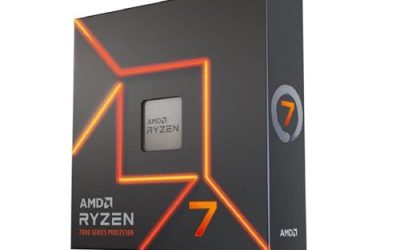
| CPU | AMD Ryzen 7 7800X3D | 8 cores, 16 threads, AM5, 3D V-Cache | Drop-in AM5 successors on the same socket, subject to a BIOS update |
| GPU | ASUS Prime GeForce RTX 4070 SUPER OC Edition | 12GB GDDR6X, PCIe 4.0, DLSS 3 | Replaceable at any time; PCIe slot is standard |
| Motherboard | MSI MAG B650 Tomahawk WiFi | AM5, ATX, DDR5, PCIe 4.0, Wi-Fi 6E | Supports Ryzen 7000, 8000 and 9000 series processors per the listing |
| RAM | Corsair Vengeance DDR5 32GB (2x16GB) | DDR5-6000, CL36, AMD EXPO | Two slots used, two free on the board for a later capacity increase |
| SSD | Samsung 990 PRO 2TB | PCIe Gen4 M.2 2280, sequential reads up to 7,450 MB/s | Additional M.2 and SATA drives can be added later |
The logic is simple: AM5 and DDR5 are the current platform, so none of these parts is a dead end. The CPU and GPU handle today’s games, the board and memory support them properly, and the storage is large enough that you are not deleting games every month.
1. CPU: AMD Ryzen 7 7800X3D

AMD Ryzen 7 7800X3D — ASIN B0BTZB7F88
The Ryzen 7 7800X3D is listed on Amazon as an 8-core, 16-thread desktop processor. Its defining feature is AMD’s 3D V-Cache technology, which stacks additional cache on the processor. Games are unusually sensitive to cache because they repeatedly access similar data, so this design is aimed squarely at gaming rather than at heavy multi-threaded production work.
Why it suits this build:
- Eight cores is the sweet spot for current games, which rarely benefit from far higher core counts.
- The AM5 socket matches the motherboard and DDR5 memory in this list, so there is no compatibility compromise.
- It pairs sensibly with a high-end mid-range GPU: neither part is wildly out of proportion to the other.
Who should choose it: players focused on high frame rates at 1080p and 1440p, including competitive titles where the CPU often sets the ceiling. Who should look elsewhere: builders whose PC is mainly a workstation for rendering or video encoding may prefer a higher core count processor from the same AM5 family, which this motherboard platform can also accommodate.
Note that this processor has no bundled cooler in the way some lower-tier chips do, so budget for a separate tower air cooler or liquid cooler when you complete the build.
2. GPU: ASUS Prime GeForce RTX 4070 SUPER OC Edition

ASUS Prime GeForce RTX 4070 SUPER OC Edition — ASIN B0D7KTZHXN
The graphics card is the single most important part for gaming performance, and the ASUS Prime listing describes this card as SFF-Ready, with 12GB of GDDR6X memory, PCIe 4.0 connectivity, DLSS 3 support, HDMI 2.1a, and DisplayPort 1.4a outputs.
That specification maps to a clear use case:
- 1440p gaming is the natural target, with high settings in demanding titles and high refresh rates in lighter ones.
- 1080p high-refresh gaming is comfortably covered, including competitive play.
- 4K gaming is possible in many titles, especially with DLSS upscaling and frame generation doing part of the work, but 4K at maximum settings in the most demanding releases is a step beyond this tier.
The SFF-Ready designation also matters for case choice, although you should still confirm the exact card length against your chosen case’s clearance. DLSS 3 uses AI-based upscaling and frame generation to raise frame rates beyond native rendering. It does not replace raw performance, but it extends the useful life of the card as games get heavier.
3. Motherboard: MSI MAG B650 Tomahawk WiFi

MSI MAG B650 Tomahawk WiFi — ASIN B0BHCCNSRH
A motherboard does not add frame rates directly, but it decides what you can plug in now and upgrade to later. The Amazon listing for this board describes it as an ATX gaming motherboard for AMD Ryzen 9000, 8000, and 7000 series processors, using the AM5 socket and DDR5 memory, with PCIe 4.0, M.2 storage support, SATA 6Gb/s, USB 3.2 Gen 2, HDMI and DisplayPort outputs, Wi-Fi 6E, Bluetooth 5.3, and 2.5Gbps LAN.
Those details make it the right foundation for this list:
- AM5 and DDR5 support match the CPU and memory exactly.
- Support across three Ryzen generations, as described in the listing, is the core of the upgrade story: a future CPU upgrade does not automatically mean a new board.
- Built-in Wi-Fi 6E and Bluetooth remove the need for separate adapters for wireless networking and controllers.
- Multiple storage options mean the single SSD in this list is a starting point, not a limit.
Choose a B650 board like this one if you want a full-size ATX build with room to grow. If you are planning a very small case, look instead for a micro-ATX or mini-ITX AM5 board — but check that it still offers the M.2 slots, memory slots, and connectivity you need, because smaller boards trade away expansion.
4. RAM: Corsair Vengeance DDR5 32GB (2x16GB) 6000MHz

Corsair Vengeance DDR5 32GB (2x16GB) — ASIN B0CJ8ZHMVF
The Amazon listing for this Corsair Vengeance kit describes 32GB of DDR5 memory in two 16GB modules, running at 6000MHz with CL36 timings, with AMD EXPO and Intel XMP support, under model number CMK32GX5M2E6000Z36.
For a gaming build in this class, 32GB is the sensible capacity. It handles current games alongside a browser, voice chat, and background applications, with headroom for streaming or light content creation. A two-module kit runs in dual-channel mode and, on a four-slot board like the Tomahawk, leaves two slots empty for a later upgrade.
DDR5-6000 is a well-matched speed for AM5, and AMD EXPO support means the board can load the kit’s rated profile from the BIOS. Remember to enable that profile — memory left at default settings runs slower than its rating.
5. SSD: Samsung 990 PRO 2TB

Samsung 990 PRO SSD 2TB — ASIN B0BHJJ9Y77
The Amazon listing for the Samsung 990 PRO describes a 2TB NVMe M.2 PCIe Gen4 drive in the 2280 form factor, model MZ-V9P2T0B/AM, with sequential read speeds of up to 7,450 MB/s, aimed at high-end computing, gaming, and heavy-duty workstations.
Storage affects a gaming PC in two ways. Load times and asset streaming benefit from a fast NVMe drive, and modern games increasingly assume SSD storage. Capacity also matters: game installs are large, and a 2TB drive holds a substantial library alongside Windows before you need a second drive. Because the motherboard provides additional storage expansion, that upgrade is easy — add another M.2 or SATA drive later rather than replacing this one.
How the Rest of the Build Follows
The five parts above are the decisions that matter most. The remaining components follow from them:
Power supply
Size the power supply to the CPU and GPU combination, with headroom for transient peaks and a future graphics card upgrade. Choose a reputable unit with the connectors this GPU requires and enough wattage margin that you are not replacing it at the first upgrade. Do not reuse an old, unknown power supply in a new build — it protects everything else in the system.
Case and cooling
The motherboard is ATX, so the case must accept an ATX board. Confirm GPU length clearance, choose a case with genuine airflow rather than a sealed front panel, and pair the CPU with a capable tower air cooler or liquid cooler. Good airflow helps every part in this list sustain its performance during long sessions.
Operating system and peripherals
You will still need an operating system license, plus a monitor that matches the build. Pairing this GPU with an old 60Hz display wastes its main advantage; a 1440p high-refresh monitor is the natural match. Keyboard, mouse, and headset can carry over from an existing setup.
Which Configuration Suits Which Need?
- Competitive 1080p player: This exact list is more than sufficient. The X3D CPU supports very high frame rates, and you could step the GPU down a tier and still be well served — but keeping this GPU gives you 1440p headroom if you change monitors.
- 1440p all-rounder: This is the configuration the list was built for. CPU, GPU, 32GB of RAM, and 2TB of storage are all in proportion, with no obvious bottleneck to fix first.
- Occasional 4K player: Keep the platform and accept DLSS-assisted 4K, or treat the GPU as your planned first upgrade. The AM5 board, memory, and storage all carry over unchanged.
- Streamer or creator on the side: Keep the same five parts and prioritise the second SSD and, later, more memory using the board’s free slots. The platform supports that growth without a rebuild.
- Builder on a tighter budget: Keep the motherboard, memory, and storage approach, and scale the CPU and GPU down within the same AM5 and DDR5 platform. You preserve the upgrade path, which is the most valuable thing a first build can have.
Verdict
The best parts for building a gaming PC are not a random collection of well-reviewed components; they are a platform. This AM5 list — Ryzen 7 7800X3D, RTX 4070 SUPER, B650 Tomahawk WiFi, 32GB of DDR5-6000, and a 2TB Samsung 990 PRO — is balanced for 1440p gaming today and honest about its limits at native 4K. More importantly, every part leaves a door open: a newer AM5 CPU later, a stronger GPU at any time, more memory in the free slots, and more storage in the spare connections. Build this, enable the memory profile, keep the drivers current, and upgrade the GPU first when the time comes.
FAQ
Do all five parts work together without adapters?
Yes, as listed. The CPU uses the AM5 socket the motherboard provides, the memory is DDR5 as the board requires, the graphics card uses a standard PCIe slot, and the SSD fits the board’s M.2 storage support. Confirm GPU length and cooler height against your case before ordering.
Is 32GB of RAM enough, or should I buy more now?
For gaming, 32GB is the right amount for this tier. The board leaves memory slots free, so adding capacity later is straightforward if your workload changes to heavier creation or virtualisation work.
What should I upgrade first in a few years?
The graphics card, almost always. It ages fastest for gaming, it is the easiest part to swap, and the AM5 platform, memory, and storage in this list are designed to remain useful through that upgrade.
Can I use these parts in a small case?
The GPU is described as SFF-Ready in its listing, but the motherboard is full ATX, so this exact combination needs an ATX case. For a small build, keep the CPU, GPU, RAM, and SSD, and substitute a smaller AM5 motherboard.
Do I need Wi-Fi if I use a wired connection?
Not for gaming itself — the board also provides 2.5Gbps wired LAN per its listing. Built-in Wi-Fi 6E and Bluetooth are still useful for flexibility, controllers, and headsets.