Fallout 4 is an older open-world game, but the Commonwealth is dense, mods add heavier textures and scripts, and built-up settlements stress a system in ways a requirements list does not capture. The best gaming laptop for Fallout 4 is therefore about headroom: a capable CPU, a dedicated GPU, fast storage, and a display and cooling system that stay comfortable in long sessions.
As an Amazon Associate we earn from qualifying purchases.
This guide covers laptops currently listed on Amazon US that comfortably exceed the game’s published baseline and also make sense for other titles. Each pick is checked on CPU and GPU, GPU power limits where the listing states them, display, RAM and SSD, ports, warranty, and documented upgradeability. No frame-rate figures are promised, because results vary with settings, mods, drivers, and configuration.
What Fallout 4 Actually Needs
Bethesda’s published minimum calls for 8GB of RAM, a dedicated graphics card from a much older generation, and around 30GB of storage. The recommended specification steps up CPU and GPU, but still sits well below a modern gaming laptop. A current RTX-class machine is not struggling with the base game; your decision should turn on quality of life.
Mods change the equation. Texture packs, lighting changes, and large settlements benefit from more RAM, more SSD space, and more GPU memory. Fast NVMe storage also helps when moving between interior and exterior cells. Aim for at least 16GB of RAM, a dedicated RTX GPU, and 512GB of SSD space as a floor, with 1TB preferred if you keep several games and mod folders installed. All four laptops below meet that standard.
Quick Comparison
| Laptop | CPU listed | GPU listed | RAM / SSD | Display listed |
|---|---|---|---|---|
| ASUS ROG Strix G16 (G614JV-AS74) | Intel Core i7-13650HX | RTX 4060 Laptop | 16GB DDR5 / 1TB Gen4 SSD | 16-inch FHD 165Hz |
| Lenovo Legion 5 | AMD Ryzen 7 260 | RTX 5060 8GB | 16GB DDR5 / 1TB SSD | 15.1-inch 2560 x 1600 OLED 165Hz |
| MSI Katana 15 (B13VEK-277US) | Intel Core i7-13620H | RTX 4050 6GB GDDR6 | 16GB DDR5 / 1TB SSD | 15.6-inch FHD IPS 144Hz |
| Acer Nitro V (ANV15-51-723D) | Intel Core i7-13620H | RTX 4050 Laptop | 16GB DDR5 / 1TB SSD | 15.6-inch FHD IPS 165Hz |
Confirm CPU, GPU, RAM, SSD, and display on the Amazon listing before ordering, as configurations can change. Each section gives the ASIN so you can verify you are viewing the same configuration.
Best Gaming Laptop for Fallout 4 Picks
1. ASUS ROG Strix G16 (G614JV-AS74)

The ASUS listing names an Intel Core i7-13650HX, an NVIDIA GeForce RTX 4060 Laptop GPU, 16GB of DDR5-4800 memory, and a 1TB PCIe Gen4 SSD, running Windows 11 Home, with Wi-Fi 6E. It also states the RTX 4060 in this model at 140W Max TGP. That matters: laptops sharing a GPU name can behave differently if power limits differ, so check the stated limit rather than assuming.
For Fallout 4, this gives generous headroom. The HX-class CPU suits a world with many objects and scripts, the 1TB SSD leaves room for mods and saves, and the listed 16-inch FHD 165Hz panel with 100% sRGB coverage suits play and everyday use. Check ports, warranty terms, and upgradeability for the exact G614JV-AS74 configuration; do not assume slot counts from a different Strix variant.
2. Lenovo Legion 5

This Legion 5 listing describes a 15.1-inch 2560 x 1600 OLED display at 165Hz, an AMD Ryzen 7 260 processor, NVIDIA GeForce RTX 5060 graphics with 8GB of memory, 16GB of DDR5 RAM, and a 1TB SSD, with Wi-Fi 7 and RJ45 Ethernet named. Its product description gives the Ryzen 7 260 as an 8-core, 16-thread part and states a 115W TGP for the RTX 5060.
The display is the reason to choose it. If you want a sharper OLED panel rather than 1080p, this configuration stands out, while its CPU, GPU, RAM, and SSD all sit well above the game’s baseline. Check warranty wording carefully, especially where a seller has upgraded a configuration, as coverage for upgraded parts can differ from manufacturer coverage. Confirm ports and documented RAM and SSD expansion for this specific configuration too.
3. MSI Katana 15 (B13VEK-277US)

The MSI listing names an Intel Core i7-13620H, NVIDIA GeForce RTX 4050 graphics with 6GB of GDDR6 memory, 16GB of DDR5-4800 RAM, and a 1TB NVMe SSD, with Windows 11 Home. Its display is a 15.6-inch Full HD IPS panel at 144Hz.
For Fallout 4 at 1080p, that is a sensible match: double the RAM of the published minimum, a modern dedicated GPU, and enough SSD capacity for a modded install without deleting other games. The 144Hz panel also helps faster-paced titles. Before ordering, check the port selection, including the Type-C connection in the product title, and the warranty for the exact seller. Verify upgradeability for the B13VEK-277US specifically, not another Katana generation.
4. Acer Nitro V (ANV15-51-723D)
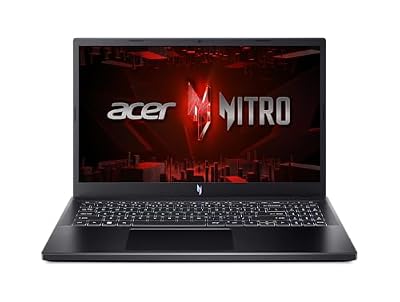
Acer’s listing names an Intel Core i7-13620H, an NVIDIA GeForce RTX 4050 Laptop GPU, 16GB of DDR5 memory, and a 1TB Gen 4 SSD, with Wi-Fi 6 and a backlit keyboard. The display is a 15.6-inch FHD IPS panel at 165Hz. Listing information also shows a maximum RAM size of 32GB, a useful documented clue if a memory upgrade interests you.
Compared with the Katana, this Nitro V pairs a similar CPU and GPU class with a higher-refresh display. For a Fallout 4 player who also plays action titles on the same machine, that 165Hz panel is the distinguishing point. Confirm the final configuration, ports, and warranty at checkout, as close Nitro V model codes can mean a different CPU, GPU, or screen.
How to Choose
CPU, GPU, and Power Limits
Start with the GPU name, then look for a stated power limit. A higher documented limit generally gives a GPU more room to sustain performance, alongside cooling and settings. For Fallout 4 alone, any RTX 4050, RTX 4060, or RTX 5060 above is well beyond the original recommended hardware. Weigh what else you play, whether you use graphics mods, and whether you play at 1080p or a higher native resolution like the Legion’s panel.
Display
A 1080p 144Hz or 165Hz panel is the natural partner for RTX 4050 and RTX 4060 configurations. A 2560 x 1600 OLED looks sharper, but higher resolution asks more of the GPU in newer games. If you use an external monitor, check HDMI and USB-C display options on the exact listing. For more on port and docking choices, see our guide to the best gaming laptop with Thunderbolt connectivity.
RAM, SSD, and Upgradeability
Choose 16GB of RAM as a minimum for a new purchase; treat 8GB as a compromise, even though it matches the game’s published minimum. For storage, 1TB is comfortable for Fallout 4, mods, and other titles. Upgradeability is per model: memory slots, removable memory, and a second SSD slot are not universal, and seller-upgraded listings can differ from factory ones. Documented limits, such as the Acer listing’s stated maximum memory, beat assumptions based on a model name.
Ports and Warranty
List what you connect — headset, controller, external drive, monitor, wired networking — and match it against the listing instead of buying adapters later. Ethernet, named on some listings here, helps with large downloads. Read warranty terms for the exact seller: factory and seller-upgraded configurations may have different support for changed parts.
FAQ
Can these laptops run Fallout 4 with mods?
Their RAM, SSD capacity, and RTX graphics exceed the base game’s requirements, giving headroom for many mods. Load orders vary, and a heavy texture or scripting setup can stress any system, so add mods gradually, back up saves, and watch install size.
Is 16GB of RAM enough?
Yes. It is double the published minimum of 8GB and sensible for gaming and multitasking. If you run many background apps or plan to keep the laptop for years, documented memory expansion may be worth prioritising.
Should I choose 1080p or higher resolution?
Choose 1080p for a straightforward match with RTX 4050 or RTX 4060 hardware across many games. Choose the Legion’s 2560 x 1600 OLED if sharpness and contrast matter most and you accept that newer games ask more of the GPU at native resolution. You can lower in-game resolution when needed.
How much SSD space do I need?
Far less than 1TB for the base game alone, but mods, saves, and other games add up. A 1TB drive avoids frequent uninstalling and leaves space for downloads and updates, which is why every pick here lists that capacity.
Does GPU wattage matter for Fallout 4?
Less than for the newest games, but it is still worth checking where a listing states it. Power limits help explain differences between laptops sharing a GPU name and affect sustained performance in longer sessions and other games.
Conclusion
The ASUS ROG Strix G16 is the balanced choice here, with its listed RTX 4060 configuration, stated 140W Max TGP, 16GB of RAM, and 1TB SSD. The Lenovo Legion 5 is the pick for a sharper OLED display, while the MSI Katana 15 and Acer Nitro V cover 1080p play with 1TB storage and high-refresh screens.
Whichever you choose, verify the exact ASIN configuration, display, ports, warranty, and upgrade details on the Amazon listing before ordering. That check ensures the laptop that arrives is the one described here, ready for the Commonwealth and the rest of your library.