As an Amazon Associate we earn from qualifying purchases
Best microSD Cards for Tablets
A microSD slot is the cheapest storage upgrade a tablet can have, but the card you put in it decides whether the extra space feels like real storage or like a bottleneck. A card that is fine for a folder of PDFs can stutter badly when an app runs from it, and a card bought purely on its headline read speed may carry the wrong ratings for the job you have in mind. This guide explains the markings that matter for tablet use — the U1 and U3 speed classes, the V10 and V30 video classes, and the A1 and A2 Application Performance Classes defined by the SD Association — then recommends four verified cards covering app storage, media libraries and large collections.
One check comes before everything else: confirm your tablet actually has a microSD slot and note the maximum card capacity its manufacturer states. Many Android tablets, Amazon Fire tablets and Chromebooks include a slot, while iPads have never offered one, and some recent Android models have dropped it. The tablet maker also sets the capacity ceiling — a slot that accepts cards up to 512GB will not use a larger card properly — so match the card to the figure in your tablet’s published specifications.
How to Choose a microSD Card for a Tablet
Start with what the card will hold
Tablet cards do two different jobs. The first is media storage: downloaded films, music, photos, ebooks and documents. That work is mostly sequential — large files read and written in long streams — so almost any modern Class 10 card handles it well. The second job is running apps and games from the card, which is random-access work: thousands of tiny reads and writes scattered across the card. That is the job the Application Performance Class exists to measure, and where unrated cards feel slow.
UHS-I speed classes: U1, U3, V10 and V30
Every card in this guide uses the UHS-I bus, the interface tablet slots support. On top of that bus sit minimum-write guarantees. UHS Speed Class 1 (U1) guarantees a minimum sustained write speed of 10MB/s, and UHS Speed Class 3 (U3) raises that floor to 30MB/s. The Video Speed Class marks say the same thing in a second notation: V10 certifies a 10MB/s minimum sustained write and V30 certifies 30MB/s. For a tablet, U1 and V10 are enough for media storage and Full HD recording. U3 and V30 matter if the card will also serve a camera or action cam, or if you regularly move very large files and want the higher guaranteed floor rather than just a peak figure.
Headline read speeds — the “up to” numbers on the packaging — are manufacturer-rated maximums measured under the maker’s own test conditions, often with a specific reader. They describe how fast a big file can come off the card in ideal conditions, not how the card behaves day to day in a tablet slot. Use them to rank cards within a brand’s own range, and let the class marks carry the real decision.
A1 and A2: the ratings that matter for apps
The SD Association created the Application Performance Class because sequential speeds say nothing about app behaviour. A1 requires a minimum of 1,500 random read IOPS and 500 random write IOPS, plus a 10MB/s minimum sustained sequential write. A2 raises the random figures substantially — 4,000 random read IOPS and 2,000 random write IOPS — with the same 10MB/s sequential floor. A2 reaches those numbers using command queuing and cache functions, which need host support, so an A2 card in an older tablet may behave much like an A1 card. Even so, if you plan to install apps or games on the card, A1 is the minimum mark to accept and A2 is the one to prefer; if the card will only ever hold media files, the A rating matters far less.
Capacity: buy for the library, respect the slot limit
Cards here run from 256GB to 512GB, and the ranges behind them run wider. A 256GB card comfortably holds a large offline video library, a photo collection and a working set of apps for most people. Step up to 512GB if you download whole series for travel, keep a big game library on the card, or shoot a lot of video on the tablet itself. Whatever size you choose, stay at or under the maximum capacity your tablet’s maker publishes for its slot.
Adoptable storage: useful, but not universal
On Android, some tablets offer to format a card as internal (adoptable) storage, merging it with the built-in drive so apps install to it automatically. Support is the tablet maker’s decision, not Android’s alone: several major brands omit the option entirely, and the same brand may offer it on one model and not the next, so check the maker’s support pages for your exact tablet before buying a card with that plan in mind. A card formatted this way is encrypted to that one tablet — it cannot be pulled out and read in another device — and the tablet will warn that a slow card degrades overall performance, which is why an A2-rated card is the sensible choice for this role. If your tablet treats the card only as portable storage, you can still move media, documents and, on many models, some app data to it manually.
If you are comparing cards for other devices as well, our roundup of the best microSD cards for emulation covers the handheld and retro-console side of the same cards.
The Best microSD Cards for Tablets
| Product | Capacity | Classes | Manufacturer-rated speeds | Best for |
|---|---|---|---|---|
| SanDisk Extreme 256GB | 256GB | C10, U3, V30, A2 | Up to 190MB/s read, up to 130MB/s write | Apps and games on the card |
| Samsung EVO Select 256GB | 256GB | C10, U3, V30, A2 | Up to 160MB/s read | All-round tablet expansion |
| Samsung PRO Plus 512GB | 512GB | C10, U3, V30, A2 | Up to 180MB/s read, up to 130MB/s write | Large libraries, 4K capture |
| SanDisk Ultra 512GB | 512GB | C10, U1, A1 | Up to 150MB/s read | Media storage on a budget of space |
SanDisk Extreme 256GB (SDSQXAV-256G-GN6MA)
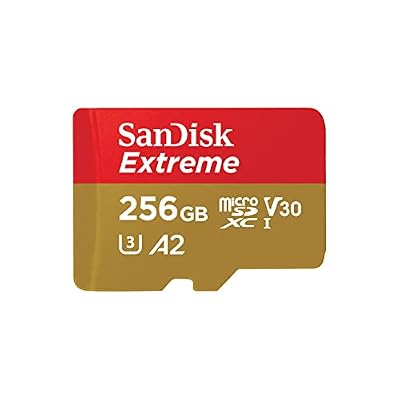
SanDisk’s Extreme line is the straightforward recommendation when the card will run apps as well as store files. The A2 rating certifies the highest random-access floor in this guide — at least 4,000 random read IOPS and 2,000 random write IOPS under the SD Association’s definitions — exactly the workload an installed game or app generates. The U3 and V30 marks guarantee a 30MB/s minimum sustained write, and SanDisk rates the card at up to 190MB/s read and up to 130MB/s write under its own test conditions. It ships with a full-size SD adapter for moving files through a laptop slot. For a tablet used as a genuine second device — games, productivity apps, offline media — this is the balanced pick.
- Amazon: https://www.amazon.com/dp/B09X7CRKRZ
Samsung EVO Select 256GB (MB-ME256SA/AM)

Samsung’s EVO Select is its mainstream tablet and phone card, sold through Amazon, and the current generation raises the rated read speed to up to 160MB/s. It carries the same U3, V30 and A2 marks as the SanDisk Extreme, so the certified floors — 30MB/s sustained write and A2 random performance — are identical; the differences sit in the peak figures and in Samsung’s own durability claims, covering protection against water, temperature extremes, X-rays and magnets. Samsung positions this card explicitly for smartphones and tablets, and the included SD adapter makes it easy to manage a media library from a computer.
- Amazon: https://www.amazon.com/dp/B0CWPMKX5Y
Samsung PRO Plus 512GB (MB-MD512SA/AM)
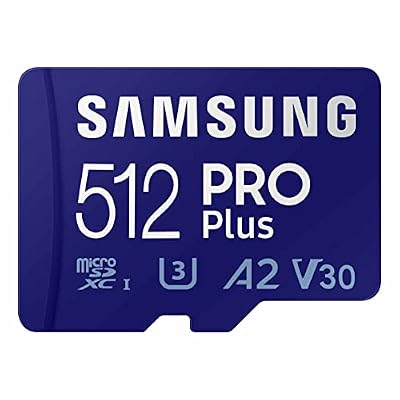
The PRO Plus is Samsung’s step-up card, and at 512GB it doubles the room of the picks above while keeping the full set of marks: C10, U3, V30 and A2. Samsung rates it at up to 180MB/s read and up to 130MB/s write, figures it notes are reached with a compatible Samsung reader; in a tablet slot, the certified U3/V30 floor and A2 random performance are what you will actually feel. This is the card for a tablet that doubles as a travel media server, holds a large installed game library, or records long stretches of 4K video. Samsung backs the line with a 10-year limited warranty, which suits a card you intend to leave in the slot for years.
- Amazon: https://www.amazon.com/dp/B0C1PRYPYX
SanDisk Ultra 512GB (SDSQUAC-512G-GN6MA)
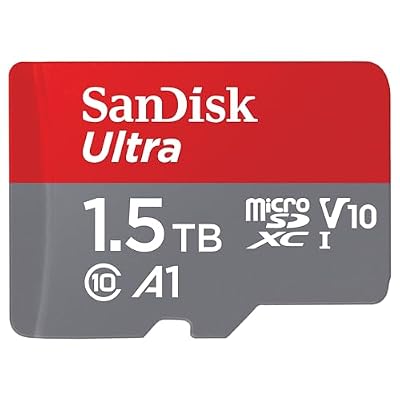
The Ultra is SanDisk’s media-focused line, and its ratings tell that story honestly: C10 and U1 with an A1 app rating, and a manufacturer-rated read speed of up to 150MB/s. The U1 floor of 10MB/s sustained write is plenty for streaming downloads, photo libraries and documents, and A1 still certifies a basic random-access level — 1,500 read and 500 write IOPS — for lighter app use. What you give up versus the cards above is the U3/V30 write guarantee and A2 headroom, which matter for heavy app installs and 4K recording, not for a film and ebook library. If your tablet’s card slot is essentially a media vault, this is the sensible capacity-first choice, and SanDisk publishes a 10-year limited warranty for the line.
- Amazon: https://www.amazon.com/dp/B0B7NVXLLM
Who Should Choose What
- You run apps or games from the card: take an A2 card. The SanDisk Extreme 256GB is the default pick; the Samsung PRO Plus 512GB is the same idea with twice the room.
- You want one card that does a bit of everything: the Samsung EVO Select 256GB matches the Extreme’s certified class marks and adds Samsung’s durability protections.
- The card is a media vault for films, music and books: the SanDisk Ultra 512GB gives the most space for that job, and its U1/A1 ratings are honestly sufficient for it.
- Your tablet lacks a microSD slot: none of these cards can help directly; a USB-C card reader is the workaround, and speeds will depend on the reader and port.
FAQ
Can I use a microSD card in an iPad?
Not directly — iPads have no microSD slot. You can read a card through a USB-C card reader on iPads with a USB-C port, but the card cannot become part of the iPad’s internal storage the way it can in an Android tablet.
What is the difference between A1 and A2 on a microSD card?
Both are Application Performance Classes from the SD Association, certifying random-access speed for running apps. A1 guarantees at least 1,500 random read IOPS and 500 random write IOPS; A2 guarantees 4,000 and 2,000 respectively. Both also require a 10MB/s minimum sustained sequential write. A2’s figures rely on command queuing and cache features that need host support.
Is U3 necessary for a tablet card?
Only for some jobs. U3 guarantees a 30MB/s minimum sustained write, which matters for 4K video recording and very large file transfers. For media playback, documents and downloads, a U1 card with its 10MB/s floor is sufficient, though an A rating still helps if apps will live on the card.
Why does my tablet show less space than the card’s stated capacity?
Card makers measure capacity in decimal gigabytes, while operating systems report in binary units, and formatting and system functions reserve a further portion. Every manufacturer states this in its own documentation, so a card reporting noticeably less than its label capacity is behaving normally.
Should I format my card as internal storage?
Only if your tablet offers it — support varies by brand and model — and only with a fast card, ideally A2-rated. Formatting as internal storage encrypts the card to that tablet, so it cannot be read elsewhere, and a slow card will drag down the whole device. For media you move between devices, keep the card as portable storage instead.