The Intel Core i7 badge covers more ground than almost any other label in laptop shopping. In the sub-1000 class it can mean a 10-core H-series chip in a thin chassis with a low-power graphics card, or a 14-core HX processor borrowed from the desktop line paired with a full-power GPU, and those two machines game very differently despite sharing a badge and a budget. The five laptops below are the i7 configurations that make the most sense in this class: each is sold on Amazon US under the exact listing linked in its section, and each is compared on its exact chip class, GPU power limits, display, memory, storage, ports, warranty and upgrade paths rather than on the badge alone.
One honesty note: prices in this class move constantly, and no laptop is promised to sit under the threshold in the title on any given day. Treat the threshold as the class these machines compete in, check the live figure on the listing, and judge each model on the hardware below. For the wider picture beyond the i7 filter, start with our guide to the best laptop for gaming under 1000 dollars, then come back for the Intel-specific differences.
As an Amazon Associate we earn from qualifying purchases.
How to Read an i7 Badge Before You Compare Anything Else
The suffix matters more than the number. An i7-13650HX is a 13th-generation HX chip with 14 cores (6 performance and 8 efficiency cores) built on desktop-class silicon with a much higher power budget. An i7-13620H is a 13th-generation H chip with 10 cores (6 performance and 4 efficiency cores) designed for thinner machines. Both are fast, but the HX part sustains heavy multi-core loads longer, which shows up in CPU-heavy strategy games, emulation and streaming while gaming. The H part usually arrives in a lighter chassis with a lower-power GPU beside it.
Generation shifts the baseline. A 12th-generation i7-12700H has 14 cores and remains capable, but pairs with DDR4 or early DDR5 platforms. A 14th-generation i7-14650HX moves to 16 cores and higher sustained power, and normally sits above this budget class unless a listing is being cleared. Newer Intel naming drops the i entirely: a Core 7 240H is a different, newer line and is not an i7, however similar the badge looks in a listing title.
GPU power limits decide gaming performance. Two laptops can both carry a GeForce RTX 4060 and perform noticeably differently because the manufacturer sets the graphics power limit. Where a maker publishes the figure, it is stated below; where the listing does not publish one, that absence is stated too, because an unpublished limit is itself useful information.
Check what you can upgrade. Every pick below uses socketed SO-DIMM memory rather than soldered RAM, which is not guaranteed in this class. Storage differs more: some chassis offer a second empty M.2 slot, while others require replacing the fitted drive. Those details are stated per model, because a cheap upgrade path is worth real money over the machine’s life.
Acer Predator Helios Neo 16 (PHN16-71-76H5): The Full-Power Pick

The Helios Neo 16 is the pick for buyers who want the strongest hardware combination in this class. Its Core i7-13650HX is the 13th-generation HX chip with 14 cores and boost clocks up to 4.9 GHz, and Acer pairs it with a GeForce RTX 4060 that Acer’s specification rates at up to 140W of graphics power, the highest published figure in this roundup. The 16-inch display runs at 1920 by 1200 in a 16:10 aspect ratio at 165Hz with G-SYNC support, which suits both fast shooters and taller strategy or productivity layouts.
Memory is 16GB of DDR5-4800 in two SO-DIMM slots with a 32GB ceiling, and storage is a 512GB PCIe Gen 4 SSD with a second M.2 slot free, so both upgrade paths stay open. Ports are the most complete here: Thunderbolt 4 over USB-C, USB-A ports, HDMI 2.1, Ethernet and a microSD reader, plus Killer Wi-Fi 6E. The trade-off is size and weight; this is a desk-first machine. Acer sells it with a standard one-year warranty. Choose it if the laptop will mostly stay plugged in and you want the most CPU and GPU headroom in the class.
Specs
- Model: Acer Predator Helios Neo 16, configuration PHN16-71-76H5
- CPU: Intel Core i7-13650HX (13th generation HX, 14 cores, up to 4.9 GHz)
- GPU: NVIDIA GeForce RTX 4060, 8GB GDDR6, up to 140W graphics power (Acer published figure)
- Display: 16-inch IPS, 1920 x 1200, 165Hz, G-SYNC
- Memory: 16GB DDR5-4800 (2 SO-DIMM slots, up to 32GB)
- Storage: 512GB PCIe Gen 4 SSD, second M.2 slot available
- Ports: Thunderbolt 4 (USB-C), USB-A ports, HDMI 2.1, Ethernet, microSD reader
- Wireless: Killer Wi-Fi 6E, Bluetooth
- Warranty: 1-year manufacturer warranty
GIGABYTE G6 KF (G6 KF-H3US853SH): The 16-Inch Value Pick

The G6 KF is the pick for buyers who want a 16-inch screen and an RTX 4060 without paying for HX silicon they may not need. Its Core i7-13620H is the 13th-generation H-series chip with 10 cores boosting to 4.9 GHz, more than sufficient to feed the RTX 4060 in GPU-bound games, and the 16-inch 1920 by 1200 display runs at 165Hz. Gigabyte does not headline a graphics power figure for this SKU in its listing, so buyers comparing it against the Helios Neo 16 should treat the Acer’s published 140W as the known quantity and the G6 as the mid-range implementation typical of its thinner chassis.
Upgradeability is a strength: 16GB of DDR5 sits in two SO-DIMM slots, and the chassis carries two M.2 slots in total, so storage can grow alongside the fitted 512GB Gen 4 SSD. The port selection is unusually complete, with USB-C, two generations of USB-A, HDMI 2.1, mini DisplayPort, a microSD reader, separate headphone and microphone jacks and Ethernet. Wi-Fi 6E and Bluetooth 5.2 are built in, and Gigabyte sells it with a standard one-year warranty. Choose the G6 KF for the larger 16:10 screen and strong connectivity, when the HX processor is not a priority.
Specs
- Model: GIGABYTE G6 KF, configuration G6 KF-H3US853SH
- CPU: Intel Core i7-13620H (13th generation H, 10 cores, up to 4.9 GHz)
- GPU: NVIDIA GeForce RTX 4060, 8GB GDDR6 (no headline power figure published for this SKU)
- Display: 16-inch IPS, 1920 x 1200, 165Hz
- Memory: 16GB DDR5 (2 SO-DIMM slots)
- Storage: 512GB PCIe Gen 4 SSD, two M.2 slots in total
- Ports: USB-C, USB-A ports, HDMI 2.1, mini DisplayPort, microSD reader, Ethernet, headphone and microphone jacks
- Wireless: Wi-Fi 6E, Bluetooth 5.2
- Warranty: 1-year manufacturer warranty
MSI Katana 15 (B13VFK-1264US): The 1TB Storage Pick

The Katana 15 is the pick for buyers whose game library is the immediate problem. It ships with a 1TB NVMe SSD, double the storage of most of this class, alongside the same Core i7-13620H found in the Gigabyte: a 13th-generation H chip with 10 cores boosting to 4.9 GHz. The GeForce RTX 4060 is backed by MSI’s Cooler Boost 5 cooling and a discrete graphics mode through its MUX design, which lets the display connect directly to the GPU. The 15.6-inch screen runs at 1920 by 1080 and 144Hz, well matched to the GPU at this resolution.
This configuration also ships with Windows 11 Pro rather than Home, which matters to buyers who need its management features. Memory is 16GB of DDR5 in two SO-DIMM slots with a 64GB ceiling per MSI’s specification, and a second M.2 slot means the storage can still grow. Ports include USB-C with DisplayPort, USB-A ports, HDMI 2.1 and Ethernet. MSI sells it with a standard one-year warranty. Choose the Katana 15 to install a large library on day one, in the smaller 15.6-inch chassis, with the Pro edition of Windows.
Specs
- Model: MSI Katana 15, configuration B13VFK-1264US
- CPU: Intel Core i7-13620H (13th generation H, 10 cores, up to 4.9 GHz)
- GPU: NVIDIA GeForce RTX 4060, 8GB GDDR6, MUX discrete graphics mode
- Display: 15.6-inch IPS-level, 1920 x 1080, 144Hz
- Memory: 16GB DDR5 (2 SO-DIMM slots, up to 64GB)
- Storage: 1TB NVMe PCIe Gen 4 SSD, second M.2 slot available
- Ports: USB-C with DisplayPort, USB-A ports, HDMI 2.1, Ethernet
- Operating system: Windows 11 Pro
- Warranty: 1-year manufacturer warranty
Dell G15 5530: The HX Pick With the 165Hz Screen

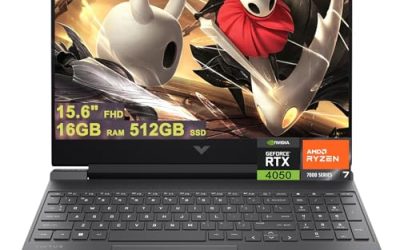
The G15 5530 is the pick for buyers who want HX processor headroom in a more restrained chassis. Its Core i7-13650HX is the same 14-core 13th-generation HX chip as the Acer’s, boosting to 4.9 GHz. The graphics step down a tier to a GeForce RTX 4050 with 6GB of GDDR6, so this machine trades GPU muscle for CPU muscle relative to the Helios Neo 16; the 15.6-inch 1920 by 1080 display runs at 165Hz, the fastest panel among the 15.6-inch picks, suiting esports titles where the RTX 4050 can push high frame rates at reduced settings.
Memory is 16GB of DDR5-4800 across two SO-DIMM slots, storage is a 512GB SSD, and a second M.2 slot keeps both upgrade paths open. Ports cover USB-C with DisplayPort, USB-A ports, HDMI 2.1 and Ethernet, with Wi-Fi 6 built in, and Dell’s Alienware Command Center handles performance modes. Dell sells the G15 with a standard one-year warranty and the service network that comes with the brand. Choose it if your games are CPU-sensitive or you split time with demanding workloads, and you accept a lower GPU tier in exchange.
Specs
- Model: Dell G15 5530
- CPU: Intel Core i7-13650HX (13th generation HX, 14 cores, up to 4.9 GHz)
- GPU: NVIDIA GeForce RTX 4050, 6GB GDDR6
- Display: 15.6-inch, 1920 x 1080, 165Hz
- Memory: 16GB DDR5-4800 (2 SO-DIMM slots)
- Storage: 512GB SSD, second M.2 slot available
- Ports: USB-C with DisplayPort, USB-A ports, HDMI 2.1, Ethernet
- Wireless: Wi-Fi 6, Bluetooth
- Warranty: 1-year manufacturer warranty
MSI Cyborg 15 (A13VE-218US): The Lightweight Pick

The Cyborg 15 is the pick for buyers who actually carry their gaming laptop. At roughly 1.98 kg it is the lightest machine here by a clear margin, with a partly translucent chassis. The trade for that portability is graphics power: MSI’s published specification caps the GeForce RTX 4050 at 45W of maximum graphics power, well below full-power implementations, so this is a machine for esports titles, older AAA games and 1080p play at moderate settings rather than maximum detail. The Core i7-13620H is unaffected; it is the same 10-core 13th-generation H chip as in the Katana and the Gigabyte, so everyday and CPU-bound performance stays strong.
The 15.6-inch display runs at 1920 by 1080 and 144Hz. Memory is 16GB of DDR5 in two SO-DIMM slots, but storage expansion means replacing the fitted 512GB NVMe SSD, since the chassis carries a single M.2 slot; buyers with large libraries should budget for a bigger drive swap later. Ports include USB-C with DisplayPort, two USB-A ports, HDMI 2.1 and Ethernet, and MSI sells it with a standard one-year warranty. Choose the Cyborg 15 if the laptop travels daily and gaming happens in shorter sessions, and you accept the low-power GPU as the price of the light chassis.
Specs
- Model: MSI Cyborg 15, configuration A13VE-218US
- CPU: Intel Core i7-13620H (13th generation H, 10 cores, up to 4.9 GHz)
- GPU: NVIDIA GeForce RTX 4050, 6GB GDDR6, 45W maximum graphics power (MSI published figure)
- Display: 15.6-inch IPS-level, 1920 x 1080, 144Hz
- Memory: 16GB DDR5 (2 SO-DIMM slots)
- Storage: 512GB NVMe SSD, single M.2 slot (upgrade means replacing the drive)
- Ports: USB-C with DisplayPort, 2x USB-A, HDMI 2.1, Ethernet
- Weight: about 1.98 kg
- Warranty: 1-year manufacturer warranty
Which i7 Laptop Should You Buy?
Start with the chip class, not the badge. If your games or workloads are CPU-heavy, the two HX machines, the Acer Helios Neo 16 and the Dell G15 5530, carry the 14-core i7-13650HX; between them, the Acer adds the stronger RTX 4060 at a published 140W and the larger screen, while the Dell answers with the faster 165Hz panel and Dell’s service network. If your gaming is GPU-bound, the H-series i7-13620H in the Gigabyte G6 KF and MSI Katana 15 is the balanced route: the Gigabyte for the 16-inch 165Hz screen and ports, the Katana for double storage and Windows 11 Pro. If the machine travels daily, the MSI Cyborg 15 is the only pick built around portability, and its 45W GPU figure tells you exactly what that costs in gaming headroom.
Whichever model you choose, verify three things on the live listing before ordering: the exact CPU suffix, because an H and an HX chip share a badge but not a performance class; the RAM and SSD sizes of the specific configuration, because these lines sell in several variants; and the warranty terms attached to that listing. In this class, the buyer who reads the suffix and the slots gets a machine that lasts, while the buyer who shops the badge alone can end up with a very different laptop than expected.