

- Top Pick: Logitech G600 MMO Gaming Mouse
- Runner-up: Corsair Scimitar RGB Elite Wired Gaming Mouse
- Also consider: Razer Tartarus V2 Gaming Keypad
An MMO is a service you log into for years, through a self-updating launcher, an anti-cheat layer, and a patch cycle that can change the rules overnight. So the Linux question is not just whether a title launches today, but whether its launcher, anti-cheat and update rhythm tolerate Linux over time.
This article is a status map, not an install guide. The step-by-step pieces already exist elsewhere in this cluster, including the Battle.net install walkthrough and the anti-cheat status checks. Here the focus is the landscape: which major MMOs run, how each gets there, and where the patch-day risks sit. Every status reflects what ProtonDB, the launcher projects and publishers document, and can change when a big patch lands.
As an Amazon Associate, we earn from qualifying purchases.
Quick answer
Most big MMOs run on Linux today. Final Fantasy XIV and Guild Wars 2 play through Proton, World of Warcraft works through Battle.net under Wine, and ESO runs on Steam. None of the four uses kernel-level anti-cheat. The real risk is patch day: launchers and runners break more often than the games themselves.
The status map at a glance
| Game | Linux route | Anti-cheat state |
|---|---|---|
| Final Fantasy XIV | Steam Proton, or XIVLauncher | None |
| World of Warcraft | Battle.net under Wine (GE-Proton) | Warden, user-space |
| Guild Wars 2 | Steam Proton, or standalone under Wine | None blocking |
| The Elder Scrolls Online | Steam Proton, or standalone under Wine | None blocking |
| RuneScape, EVE Online, Albion Online | Native Linux client or launcher | Publisher-supported |
| Lost Ark, Black Desert | No working route | Not enabled for Linux, or blocking |
Final Fantasy XIV: the XIVLauncher game
Final Fantasy XIV has no native Linux client and no official support from Square Enix. The Steam version runs through Proton and holds a Gold rating on ProtonDB. The route most Linux players use is XIVLauncher, a community-built replacement launcher with its own tuned Wine build, which patches more reliably than the official launcher, long prone to hanging under Wine.
On anti-cheat, FFXIV is the simplest case here: no anti-cheat client, nothing kernel-level, just server-side checks. The caveat is legal, not technical. Square Enix’s terms prohibit third-party tools generally, and XIVLauncher is an unendorsed one; no enforcement against its users has been reported, but the arrangement rests on tolerance, not permission. Patch-day risk concentrates in the launchers; XIVLauncher sometimes needs a short catch-up window after expansions.
World of Warcraft: the game is fine, the launcher is the job
World of Warcraft also has no Linux client — Blizzard supports Windows and macOS — but it has run under Wine for most of its life. The standard route is Battle.net installed through Lutris or Bottles, or added to Steam as a non-Steam game, with the game on GE-Proton or Wine. Trackers rate it as working well, with two footnotes: in-game voice chat fails under Wine, and Battle.net is the fragile part.
Blizzard’s Warden anti-cheat is why WoW survives on Linux. Warden works at application level, inside the game’s own environment; it is not a kernel driver, does not refuse Wine, and playing through Wine has never been a bannable offence. The patch-day risk is almost never the game — it is the Battle.net agent, whose updates have repeatedly left Wine installs stuck until the Lutris script or runner catches up.
Guild Wars 2: the quiet best case
Guild Wars 2 is the lowest-drama option among the big MMOs. It runs through Proton at the top end of ProtonDB’s ratings on Steam, and under Wine through Lutris standalone. Nothing in its stack fights the compatibility layer: no anti-cheat client blocks Linux, and the move to a DirectX 11 renderer removed an older translation headache. ArenaNet patches frequently but in small increments, so launcher breakage rarely applies. It is the closest thing here to a normal Steam game.
The Elder Scrolls Online: runs well, launcher permitting
The Elder Scrolls Online runs on Linux through Steam and Proton, with community ratings in the same healthy band, and the standalone version runs under Wine through Lutris. ZeniMax does not list Linux as supported, so official help is not guaranteed, but the game is a well-behaved Proton title with no kernel-level anti-cheat. Its patch-day risk sits in its own launcher, which handles ESO’s large update downloads and has needed adjustments under Wine. The game is stable; its delivery mechanism is the friction.
The native exceptions and the wider field
Three long-running MMOs remove the compatibility question entirely. RuneScape offers an official native Linux client. EVE Online’s publisher, CCP, ships an official Linux launcher running the game on a maintained Wine build. Albion Online has a native Linux client. Linux is a supported target for all three, making their patch-day risk the lowest here.
Beyond those, the field splits by anti-cheat. Warframe runs through Proton at the top of the community ratings. New World is playable through Proton because its publisher enabled the Linux support built into its Easy Anti-Cheat setup — the same product can be a wall or a door depending on the publisher. Star Wars: The Old Republic and The Lord of the Rings Online also run, with community-documented setups.
The ones that do not run
Two major MMOs remain closed. Lost Ark uses Easy Anti-Cheat without the Linux support enabled, so it refuses to start under Proton, and no community workaround changes that. Black Desert’s anti-cheat stack likewise blocks Linux play. For both, the barrier is a publisher decision, not a technical limit, and only the publisher can lift it.
Shared risks: what actually breaks after big patches
Across every game above, the same four failure points repeat. First, launchers: self-updating apps — Battle.net, the official FFXIV launcher, the ESO launcher — change their internals on their own schedule and are the most common cause of a broken install. Second, runner churn: a new Proton or Wine release occasionally regresses a game, which is why players pin a known-good runner per game. Third, anti-cheat updates, which can break a setup by changing what they check. Fourth, addons, which break on patch day everywhere.
The habits follow from that list. Keep the launcher and game in one prefix. Note which runner works before a big patch, so rolling back is a setting, not a research project. Expect expansion launches to cost a day. Back up your main MMO’s prefix: reinstalling is a download measured in hours.
How to choose
Choose by the game first and by tinkering tolerance second, because no amount of Linux skill makes a blocked anti-cheat title run. For the least maintenance, start with Guild Wars 2 on Steam or a native-client game — RuneScape, EVE Online or Albion Online. If your home is FFXIV or World of Warcraft, both are proven, heavily documented Linux games, but budget patience around major patches. If you split time between MMOs, favour Steam versions: one client beats four launcher installs. If your main game is Lost Ark or Black Desert, choose a dual-boot or a different game.
Who should skip this
Skip the Linux MMO plan if your main game sits in the blocked group above — no effort changes a publisher-side anti-cheat decision. Skip it if you raid on a fixed schedule and cannot absorb a patch-day evening repairing a launcher. Skip it if you rely on official support, because none of the big four lists Linux as supported. And skip it if you will not keep a backup per game.
Gear that suits long MMO sessions
MMO play rewards buttons and storage: hotbars want programmable inputs, and modern installs are huge. One Linux note applies to all five picks — the vendor suites have no Linux versions, so save profiles to onboard memory; open tools such as Piper and OpenRazer cover configuration.
Logitech G600 MMO Gaming Mouse

The long-running MMO mouse design: a twelve-button thumb grid plus a G-Shift button that doubles its output, aimed at hotbar-heavy games. Onboard-memory profiles make it practical on Linux.
Specs:
– Buttons: 20 programmable, 12-button thumb grid
– Sensor: laser, up to 8,200 DPI
– Connection: wired USB
– Profiles: onboard memory with G-Shift layer
Corsair Scimitar RGB Elite Wired Gaming Mouse
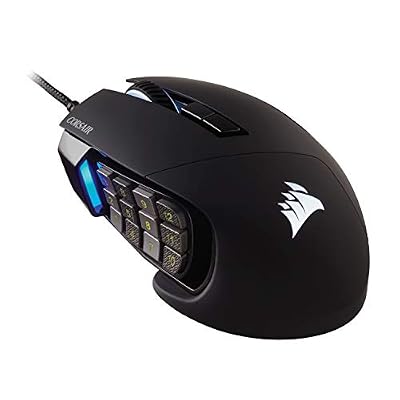
Corsair’s take on the same idea: a twelve-button side panel that slides to sit under your thumb, plus an optical sensor for faster games. Profiles live in onboard memory and travel with the mouse.
Specs:
– Buttons: 17 programmable, adjustable Key Slider panel
– Sensor: PixArt PMW3391 optical, up to 18,000 DPI
– Connection: wired USB
– Profiles: onboard memory
Razer Tartarus V2 Gaming Keypad

A one-handed keypad that moves the hotbar off the keyboard: thirty-two programmable keys, an eight-way thumb pad, and an adjustable palm rest. On Linux, OpenRazer provides the support the official suite does not.
Specs:
– Keys: 32 programmable
– Switches: Razer mecha-membrane
– Thumb controls: 8-way directional pad plus thumb button
– Palm rest: adjustable
Samsung 990 PRO 2TB NVMe SSD

FFXIV, WoW and ESO with expansions are each large installs, and patching writes a lot of data. A fast two-terabyte drive keeps several installed at once.
Specs:
– Interface: PCIe 4.0 x4, NVMe
– Form factor: M.2 2280
– Sequential read: maker-rated up to 7,450 MB/s
– Sequential write: maker-rated up to 6,900 MB/s
– Capacity: 2TB
SteelSeries Arctis Nova 7 Wireless Gen 2 Gaming Headset

A wireless headset with simultaneous game and phone audio suits long, social MMO sessions. The maker-stated battery figure covers a week of evening play.
Specs:
– Drivers: 40 mm neodymium
– Wireless: 2.4 GHz dongle and Bluetooth, simultaneous
– Battery life: maker-stated 50 hours or more
– Microphone: retractable, AI noise-cancelling
– Platforms: PC, PlayStation, Switch, mobile
FAQ
Can I be banned for playing an MMO on Linux?
For the games that run, playing through Wine or Proton is not by itself treated as cheating by their publishers. The grey area is third-party tooling: FFXIV’s terms prohibit such tools generally, so XIVLauncher use rests on publisher tolerance, not written permission.
Which MMO needs the least maintenance on Linux?
The native-client games — RuneScape, EVE Online and Albion Online — where Linux is a supported target. Among the big four, Guild Wars 2 on Steam has the calmest patch cycle.
Why did my MMO stop working after a patch?
Most often the launcher changed, not the game. Self-updating launchers such as Battle.net are the usual cause, followed by a runner update that regressed the title. Recovery means waiting for the launcher’s install script or a GE-Proton update, or rolling back to the previous runner.
Do MMO addons work on Linux?
Generally yes. Addons that live inside the game’s own folder, as WoW and ESO addons do, work the same under Wine as on Windows. Addon managers are the friction point: some need Wine themselves, and all can break on patch day.
Final verdict
MMOs turned out to be one of Linux gaming’s better stories because the genre’s biggest games mostly avoided kernel-level anti-cheat, so the compatibility layer was allowed to work. FFXIV, World of Warcraft, Guild Wars 2 and ESO are all genuinely playable long-term homes on Linux, and RuneScape, EVE Online and Albion Online go further with official support. The price of admission is not performance — it is patch-day patience, one pinned runner per game, and a backup habit.










