As an Amazon Associate we earn from qualifying purchases
Frames per second is not one target. A competitive player chasing a 240Hz monitor in Counter-Strike 2 or Valorant needs a different machine from someone who wants a demanding AAA game to stay smooth on a 1440p high-refresh display. The best gaming PC for FPS is therefore the one whose CPU, GPU, memory and storage are balanced for your resolution, your refresh rate and the settings you are actually willing to use.
This guide compares four prebuilt desktops currently sold on Amazon US, from an accessible esports starting point to a high-end X3D system. Each pick is matched to a specific FPS job, and the comparison table below makes the trade-offs — especially upgradeability — easy to see before you buy.
Quick Picks: Which FPS Need Fits Which PC?
- Esports at 1080p, sensible starting point: Skytech Nebula — Ryzen 5 5500 and RTX 4060
- Esports at 1080p with a modern upgrade path: iBUYPOWER SlateMesh — Ryzen 5 7600 and RTX 4060 on DDR5
- Very high frame rates and 1440p high refresh: CLX Set — Ryzen 7 9800X3D and RTX 4070 Super
- AAA gaming at high refresh with headroom to spare: CyberPowerPC Gamer Xtreme — Ryzen 9 9900X and RTX 5070
If you are still deciding how much frame rate your monitor and games really demand, our roundup of dedicated high-FPS gaming PCs is a useful companion before you narrow down a configuration here.
Comparison Table: CPU, GPU, RAM, SSD and Upgradeability
| PC | CPU | GPU | RAM | SSD / storage | Upgradeability |
|---|---|---|---|---|---|
| Skytech Nebula (B0D9KVXPP6) | AMD Ryzen 5 5500, 3.6 GHz (4.2 GHz Turbo Boost) | NVIDIA RTX 4060 8GB GDDR6X | 16GB DDR4 3200 | 1TB SSD | AM4 / DDR4 platform: GPU and storage upgrades are straightforward, but the CPU and memory path is a generation behind |
| iBUYPOWER SlateMesh (B0CCZYRNHK) | AMD Ryzen 5 7600, 6 cores / 12 threads | NVIDIA RTX 4060 8GB | 16GB DDR5 5200 | 500GB NVMe SSD | AM5 / DDR5 platform: stronger long-term CPU and memory path, but the small SSD will likely be the first upgrade |
| CLX Set (B0DN3VMK8S) | AMD Ryzen 7 9800X3D, 4.7 GHz | NVIDIA GeForce RTX 4070 Super 12GB | 32GB DDR5 5600 RGB | 1TB NVMe M.2 SSD plus 4TB HDD | B650 ATX motherboard listed: full-size board, generous storage already fitted, 750W power supply listed |
| CyberPowerPC Gamer Xtreme (B0DXVFWSS7) | AMD Ryzen 9 9900X, 4.4 GHz | NVIDIA GeForce RTX 5070 12GB | 32GB DDR5 | 1TB PCIe 4.0 SSD | Current-generation CPU and DDR5 platform: strong base for a later GPU or storage upgrade |
Specifications above are taken from the Amazon US listings checked for this article. Where a listing notes that a graphics card brand may vary, the GPU model is the fixed part of the specification and the card maker is not.
The Picks in Detail
1. Skytech Nebula — The Esports Starting Point

ASIN: B0D9KVXPP6 — View on Amazon
The Skytech Nebula pairs an AMD Ryzen 5 5500 (3.6 GHz, up to 4.2 GHz Turbo Boost) with an NVIDIA RTX 4060 8GB GDDR6X graphics card, 16GB of DDR4 3200 memory, a 1TB SSD, a 650W Gold power supply, Wi-Fi and Windows 11 Home, according to its Amazon listing.
That combination is aimed squarely at 1080p. Esports titles are comparatively light on the GPU and respond well to reduced settings, so an RTX 4060-class card is a rational match for a 144Hz or 165Hz monitor in games such as Valorant, Counter-Strike 2, Apex Legends and Rocket League. The 1TB SSD is also a practical plus: room for several large games without immediate juggling.
The honest limitation is the platform. DDR4 and the AM4 generation mean a future CPU upgrade eventually becomes a motherboard and memory change as well. For a player who wants a complete esports PC now and plans to replace the whole system later, that is an acceptable trade. For piece-by-piece upgrading over years, the next pick makes more sense.
Best for: 1080p esports and lighter shooters on a high-refresh monitor, with competitive settings rather than maximum settings.
2. iBUYPOWER SlateMesh — Same GPU Class, Better Upgrade Path

ASIN: B0CCZYRNHK — View on Amazon
The iBUYPOWER SlateMesh (model SlateMeshA5N4601) uses an AMD Ryzen 5 7600 — a 6-core, 12-thread processor — with an NVIDIA GeForce RTX 4060 8GB video card, 16GB of DDR5 5200 memory, a 500GB NVMe SSD and Windows 11 Home, per its Amazon listing.
On day one, its gaming role overlaps with the Nebula: 1080p esports at high refresh, and 1080p AAA gaming with settings chosen sensibly. The reason to choose it is what happens later. The Ryzen 5 7600 belongs to AMD’s AM5 generation and uses DDR5 memory, so the platform leaves more room for a future processor and memory upgrade than a DDR4 system does. For FPS-focused players, that matters, because esports frame rates at low settings are often limited by the CPU once the GPU has enough headroom.
The compromise is storage. A 500GB NVMe SSD fills quickly when a single modern game can claim a large share of it, so budget-minded buyers should treat a second or larger SSD as a planned upgrade rather than a surprise. The good news is that storage is one of the easiest upgrades to make, and it does not require changing the platform.
Best for: 1080p high-refresh players who want a current-generation platform they can keep upgrading, and who accept a small starter SSD.
3. CLX Set — Built Around a High-FPS Processor

ASIN: B0DN3VMK8S — View on Amazon
The CLX Set is specified for buyers who measure success in frame rate first. Its Amazon listing shows an AMD Ryzen 7 9800X3D processor at 4.7 GHz, a GeForce RTX 4070 Super 12GB graphics card, 32GB of DDR5 5600 RGB memory, a 1TB NVMe M.2 SSD alongside a 4TB hard drive, a B650 chipset ATX motherboard, a 360mm AIO liquid cooler, a 750W power supply, Wi-Fi and Windows 11 Home.
Two parts of that specification matter most for FPS. The first is the 9800X3D itself: AMD’s X3D processors are built with extra cache aimed at gaming workloads, which is exactly the kind of design that helps in CPU-sensitive esports and simulation titles where the graphics card is not the only limit. The second is the RTX 4070 Super with 12GB of graphics memory, which moves the realistic target up to 1440p high refresh in many games, as well as very high frame rates at 1080p.
The supporting hardware is equally considered. With 32GB of RAM there is headroom for gaming alongside voice chat and recording software, and a 1TB NVMe drive for active games plus a 4TB hard drive solves the storage problem that affects smaller systems. A full ATX B650 board also makes expansion easier to plan than a compact proprietary chassis.
Best for: Competitive players who want very high frame rates without giving up 1440p, and anyone whose library and multitasking habits justify 32GB of RAM and generous storage from the start.
4. CyberPowerPC Gamer Xtreme — AAA Power at High Refresh
ASIN: B0DXVFWSS7 — View on Amazon
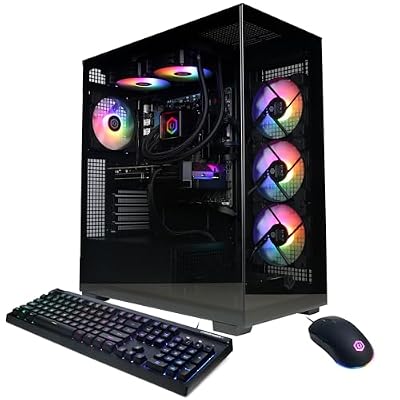
The CyberPowerPC Gamer Xtreme (model GXiVR8080A41) combines an AMD Ryzen 9 9900X at 4.4 GHz with a GeForce RTX 5070 12GB graphics card, 32GB of DDR5 memory, a 1TB PCIe 4.0 SSD, Wi-Fi readiness and Windows 11 Home, according to its Amazon listing.
This is the pick for the reader whose FPS question is not about esports at all. In a demanding AAA game at 1440p, the graphics card does most of the work, and settings such as ray tracing and texture quality decide whether a high-refresh monitor is fed properly. An RTX 5070-class GPU with 12GB of memory, backed by a Ryzen 9 processor and 32GB of DDR5, has the most headroom here for that job — including for players who stream or record while they play.
The one specification to plan around is the 1TB SSD: fast PCIe 4.0 storage, but a library of large AAA titles will fill it, so heavy collectors should expect to add capacity later — a straightforward upgrade.
Best for: 1440p AAA gaming at high refresh, players who turn settings up rather than down, and gamers who stream or create content on the same machine.
How to Match a Configuration to Your FPS Need
Esports titles: prioritise the CPU and the monitor
In Valorant, Counter-Strike 2, League of Legends or Rocket League at 1080p with competitive settings, frame rates can rise high enough that the processor, memory and game engine become the limit before the graphics card does. That is why the CLX Set’s X3D processor exists in this line-up, and why the AM5-based iBUYPOWER is a smarter long-term esports buy than its GPU alone suggests. Match the PC to your monitor: there is little value in a system built for extremely high frame rates if your display cannot show them.
AAA games at high refresh: prioritise the GPU
In a modern single-player or large-scale multiplayer title at 1440p, the balance flips. The graphics card carries the load, graphics memory matters more, and features such as upscaling become part of how a target frame rate is reached. That is the CyberPowerPC’s territory, with the CLX Set close behind for players who split their time between AAA releases and competitive games.
RAM and SSD: the quiet frame-rate factors
Sixteen gigabytes of RAM remains workable for focused gaming, but 32GB gives high-refresh players more room when a game shares the machine with chat, capture and background apps. Storage speed rarely changes average FPS directly, yet an NVMe SSD keeps loading and texture streaming from becoming the interruption that breaks a session — and capacity decides how many large games stay installed and ready.
Verdict
There is no single best gaming PC for FPS, because FPS itself is two different goals wearing one name. Choose the Skytech Nebula (B0D9KVXPP6) for a complete 1080p esports starting point, or the iBUYPOWER SlateMesh (B0CCZYRNHK) if the same GPU class on a newer, more upgradeable platform matters more than storage. Choose the CLX Set (B0DN3VMK8S) when frame rate is the priority and you want an X3D processor, 32GB of memory and room for a big library. Choose the CyberPowerPC Gamer Xtreme (B0DXVFWSS7) when AAA visuals at 1440p high refresh — with streaming headroom — define what a good frame rate means to you.
FAQ
How much FPS do I actually need?
It depends on your monitor. A 144Hz or 165Hz display is a satisfying target for most players, while competitive esports players often choose 240Hz or higher. Your PC only needs to sustain frame rates your display can present, so start from the monitor when setting a target.
Is the CPU or GPU more important for FPS?
Both, in different situations. At 1080p with competitive settings in esports titles, the CPU frequently sets the ceiling. At 1440p with high settings in AAA games, the GPU usually does. Balanced systems avoid paying heavily for one while starving the other.
Is 16GB of RAM enough for high-FPS gaming?
For a focused gaming session in most current titles, 16GB can be enough, as the two RTX 4060 systems here show. If you stream, record, or keep many applications open while playing, 32GB — as fitted to the CLX Set and the CyberPowerPC — is the more comfortable choice.
Can these prebuilt PCs be upgraded later?
Generally, yes, but the ease differs. The AM5 and DDR5 systems (iBUYPOWER, CLX and CyberPowerPC) offer a more current platform for processor and memory upgrades, while the DDR4-based Nebula is best treated as a system to enjoy now and replace more completely later. Storage and graphics card upgrades are the most straightforward changes on any of them; always confirm power supply capacity and physical clearance against the specific new component before buying it.