

- Top Pick: Redragon K617 Fizz
- Runner-up: Redragon K552 Kumara
- Also consider: Redragon K630 Dragonborn
The middle rung of the keyboard ladder is where a board stops being a fixed purchase and becomes a platform. At this level, the switches sit in sockets rather than solder, so a player who begins with clicky switches can move to quiet linears later without buying a new keyboard.
This guide focuses on that modding step up: swappable sockets, PBT keycaps on one pick, steadier stabilizers, and detachable cables. Every board below is wired, and each model takes a different route through layout and switch feel.
As an Amazon Associate, we earn from qualifying purchases.
Quick answer
Pick the Redragon K617 Fizz if you want one board to mod for years: its sockets accept both 3-pin and 5-pin switches, the cable detaches, and the compact layout leaves mouse room. The K552 Kumara suits players who need a full function row, while the MageGee MK-STAR61 adds PBT keycaps and pre-lubed switches.
How to choose
Socket type comes first. Hot-swap boards use one of two socket styles: some accept nearly any MX-style switch with three or five pins, while others are built around slimmer Outemu-style pins and reject wider switch housings. A board that takes both pin counts gives you the widest pick of replacement switches later, so check the listing wording before ordering a switch set.
Keycaps come second. Most boards at this rung ship with ABS caps, which feel smooth and show shine on the busiest keys over time. PBT caps keep their texture longer and carry legends that do not fade, which is why the single PBT pick in this guide stands out.
Stabilizers decide how the big keys behave. The space bar, enter, and shift keys ride on stabilizer bars, and a board with well-seated stabilizers sounds even across the bar instead of rattling at one end. Listings rarely promise stabilizer tuning, so favor boards whose makers describe factory-fitted stabilizers.
Layout shapes the whole desk. A 61-key board frees the most mouse room, an 81-key board restores dedicated arrow keys, and an 87-key tenkeyless board keeps the function row for strategy and MMO players. All five picks are wired, which keeps input direct.
However a listing is worded, check the current price on the Amazon product page before ordering, since rung placement is a guide rather than a promise.
Redragon K617 Fizz

The K617 Fizz is the purest modding pick in this guide. Its sockets accept both 3-pin and 5-pin switches, so nearly any MX-style switch set you buy later will drop in without clipping pins. That makes it the board most likely to survive several rounds of experimentation, from the stock linear red switches to something heavier, quieter, or more tactile.
The 61-key layout keeps the footprint small and leaves a wide lane for low-sensitivity mouse movement. The cable detaches at the board, so the keyboard packs into a bag without a bent connector and a damaged cable can be replaced on its own. White and grey keycaps give it a lighter look than most boards at this rung, and the listed software support covers lighting and key assignments. Players who rely on a function row will use layer keys here; for everyone else, the Fizz is the board this rung exists for.
Specs:
– Layout: 60 percent layout, 61 keys
– Switch: Linear red, hot-swappable
– Socket support: 3-pin and 5-pin switches as listed
– Connection: Wired, detachable Type-C cable
– Backlight: RGB
– Keycaps: White and grey color keycaps as listed
– Software: Pro driver and software support as listed
Redragon K552 Kumara
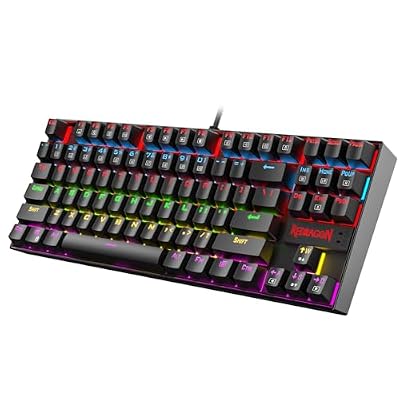
The K552 Kumara is the pick for players who want hot-swap freedom without giving up the function row. Its 87-key tenkeyless frame keeps F1 through F12 in their own row, which matters in strategy titles and MMO rotations. The current listing describes hot-swap red switches, so a worn switch can be pulled and replaced rather than soldered.
A metal rim gives the case a firmer feel than the all-plastic boards around it. Rainbow LED backlighting runs under the keys, and anti-ghosting with N-key rollover is listed, so crowded key combinations register as pressed. The wired USB connection keeps things simple: plug in, and the board is ready.
The Kumara’s sockets follow the narrower Outemu-style pattern described by owner guides for this model family, so plan switch purchases around 3-pin sets rather than assuming every 5-pin switch will fit.
Specs:
– Layout: Tenkeyless, 87 keys
– Switch: Red switches, hot-swap as listed
– Connection: Wired USB
– Backlight: Rainbow LED
– Frame: Metal rim as listed
– Keys: Anti-ghosting with N-key rollover as listed
MageGee MK-STAR61
The MK-STAR61 is the finish pick of the group: it is the one board here that pairs hot-swap sockets with PBT keycaps. The five-sided dye-sublimated PBT caps keep their legends crisp and their surface texture through long sessions, and they give the board a drier sound than ABS caps.
The switches arrive pre-lubed from the factory, which smooths the travel of the stock linear set and removes the first job most modders queue up. An EVA silencer foam layer sits inside the case to soften bottom-out noise, and the listing notes spare switches and a puller in the box. Full N-key rollover is listed, and the board runs wired on Windows and Mac systems as listed.
The record behind this pick is a UK layout variant, so confirm the layout wording on the product page matches the key arrangement you want before ordering.
Specs:
– Layout: 60 percent layout, 61 keys
– Switch: Pre-lubed linear switches, hot-swappable
– Keycaps: PBT, five-sided dye-sublimated as listed
– Sound treatment: EVA silencer foam as listed
– Connection: Wired
– Backlight: RGB
– Keys: N-key rollover as listed
– In the box: Spare switches and puller as listed
Redragon K630 Dragonborn

The K630 Dragonborn takes the compact route with a plainer brief: 61 keys, hot-swappable linear red switches, and wired RGB in a black case. Where the Fizz leans on two-tone keycaps and broad socket support, the Dragonborn leans on simplicity, with pro driver support listed for remapping and macros.
Hot-swap sockets mean the stock red switches are a beginning rather than a commitment. A player who finds linears too light can move to a tactile set on the keys that matter, such as the movement cluster, and leave the rest alone. The compact frame leaves generous mouse room, and the wired link keeps response direct.
This is the pick for a second desk or a first modding board, where a straightforward feature list is a virtue. It gives up the PBT caps of the MageGee and the metal rim of the Kumara, and in return keeps the modding door open at the simpler end of the rung.
Specs:
– Layout: 60 percent layout, 61 keys
– Switch: Linear red, hot-swappable
– Connection: Wired
– Backlight: RGB
– Software: Pro driver support as listed
– Color: Black as listed
HUO JI E-Yooso Z-88

The Z-88 fills the gap between the compact boards and the tenkeyless Kumara. Its 81 keys restore dedicated arrow keys and a navigation cluster, which helps in menu-heavy titles and everyday typing, while the frame stays smaller than a full board.
It is also the clicky pick. The blue switches give a sharp audible snap that some players use as confirmation of each press, and the sockets are hot-swappable for 3-pin switches, so the board can be quieted later with a linear set. A metal panel tops the case, RGB backlighting runs across the board, and the cable detaches. Silver and white coloring sets it apart from the black boards here, and players who share a room should weigh the click first, since blue switches carry through a quiet house.
Specs:
– Layout: Compact, 81 keys
– Switch: Blue switches, clicky, hot-swappable for 3-pin switches as listed
– Panel: Metal panel as listed
– Connection: Wired, detachable cable as listed
– Backlight: RGB
– Color: Silver and white as listed
– Compatibility: Mac and PC as listed
When to Step Up or Down a Rung
Step down when the board only needs to be a first mechanical keyboard for one game and one desk. Best Gaming Keyboards Under $30 for First Mechanical Setups covers that ground, where soldered switches are acceptable because the plan is to play rather than mod. If you will never pull a switch, the $30 rung is the honest stop.
Step up when your list adds gasket-mounted feel, wireless freedom, or rapid-trigger switches for competitive play. Best Gaming Keyboards Under $75 for Wireless and Rapid Play is where those features gather, and the $75 rung makes sense once a cable gets in your way.
Stay on this $40 rung when switch swapping is the point of the purchase. This is the level where sockets, PBT caps, and detachable cables arrive together, and the lowest point where a board can change character over time instead of being replaced.
Who should skip
Skip this rung if you need wireless today, since every pick here is wired and board-moving freedom belongs to the rung above. Skip it if you need a number pad, because none of these five boards carries one. Skip it if you want a rapid-trigger board for high-level competitive play, since standard mechanical switches are the technology at this level. And skip hot-swap entirely if pulling switches sounds like a chore, because a fixed board from the rung below will serve you just as well.
FAQ
Do hot-swap sockets wear out over time?
Sockets are built for repeated changes, but they are small metal contacts, so treat them gently: pull switches straight up with the tool and seat replacements without forcing the pins. Used with care, a socket board handles years of occasional changes.
Will any replacement switch fit these boards?
Not always. Boards that accept 3-pin and 5-pin switches, like the K617 Fizz, take nearly any MX-style set. Boards built around narrower Outemu-style sockets take 3-pin sets and may reject wider housings, so match the switch pin style to the board listing before ordering.
Is a 61-key board enough for gaming?
For shooters and most action titles, yes: the compact frame frees mouse room and the missing keys live on a function layer. If your games lean on F-row abilities or dedicated arrows, the 87-key Kumara or the 81-key Z-88 will feel more natural.
What tools do I need to change switches?
Only the puller that ships with these boards. The keycap comes off first, then the switch pulls straight out of its socket, and the replacement presses in until it seats. No soldering iron and no opening the case.
Final verdict
The Redragon K617 Fizz defines this rung: open 3-pin and 5-pin sockets, a detachable cable, and a compact frame make it the board most likely to grow with its owner. The K552 Kumara adds a function row and a metal rim, the MageGee MK-STAR61 adds PBT keycaps and factory-lubed switches, the K630 Dragonborn keeps the formula simple, and the HUO JI Z-88 restores arrow keys with a clicky voice. Before ordering any of them, check the current price on the Amazon product page, and confirm the socket style matches the switch sets you plan to try.










