

- Top Pick: MageGee MK-BOX
- Runner-up: Newmen GM326
- Also consider: Redragon K521
A first gaming keyboard has one job: feel like a clear step up from a bundled board, without turning a small desk into a cable puzzle. At this rung every pick is wired, and that is a strength rather than a compromise. A cable means no batteries to charge, no pairing menus, and no connection drops mid-match. The boards below split into two honest camps: compact mechanical boards with real switches under each key, and membrane boards that borrow the gaming look while staying quiet.
You also need to know what this rung leaves out. Keycaps are basic ABS on nearly everything here, cases are light plastic, and software support is thin or missing. One board below offers pluggable switch sockets, but gasket mounts, foam kits, and premium keycap sets live higher up the ladder. Treat this as a board you will enjoy now, so a later upgrade is a choice rather than a guess.
As an Amazon Associate, we earn from qualifying purchases.
Quick answer
Buy the MageGee MK-BOX first. Its 68-key wired layout keeps dedicated arrow keys, the linear red switches feel smooth for gaming and long typing, and the detachable USB-C cable makes it easy to move between a PC and a laptop. Pick the Newmen GM326 instead if you want pluggable switches and a volume knob in a slightly larger frame.
How to choose
Pick the layout before anything else. Compact boards in the 61-key and 68-key class free up a wide sweep of mouse room, which matters for wide mouse swings in shooters. The trade: function row and arrow keys sit on a layer, reached with the Fn key. The 68-key MK-BOX keeps physical arrow keys, softening that curve. An 82-key board like the Newmen GM326 restores a function row, and full-size boards like the Redragon K521 and the NPET K10 keep the number pad for data entry.
Understand membrane versus mechanical in plain terms. A mechanical board has an individual switch under every key, so each press feels distinct, and on some boards a worn switch is replaceable. A membrane board presses a rubber sheet instead; it feels softer and quieter, and shrugs off small spills better. If you play late in a shared room, membrane quiet is a genuine feature. If you want crisp feedback you can feel through a firefight, mechanical wins.
Match the switch to your ears and fingers. Linear red switches travel smoothly with no bump and no click, which suits fast repeated presses and late sessions in shared rooms. Every mechanical board in this guide uses them, so your real choice is layout and size rather than switch noise. Clicky switches live on other boards if you ever want that snap.
Keep expectations in proportion. Boards drift above and below this rung over time, so check the current price on the Amazon product page before you order, and confirm the layout and switch type there match your plan.
MageGee MK-BOX

The MK-BOX earns the top spot by removing the two biggest frictions of a first compact board. Dedicated arrow keys mean no Fn layer just to move through a document, and the detachable USB-C cable packs flat for a laptop bag, while a damaged cable is a quick swap rather than a dead keyboard. The linear red switches give a smooth, even press that works for gaming and long typing sessions alike, and the single-color LED backlight keeps legends readable in a dim room.
The keycaps are ABS, so the most used keys will shine over time, and the switches are fixed rather than pluggable. Neither matters much on a first board, which exists to teach you what layout and switch feel you like.
Specs:
– Layout: 68 keys, compact class with dedicated arrow keys
– Switch: Red mechanical switch, linear
– Backlight: LED white backlight
– Connection: Wired, detachable USB-C cable
– Keycaps: ABS
– Compatibility: Windows and Mac, per the listing
Newmen GM326

The GM326 is the tinkering pick of this rung. Its 82-key layout keeps a function row that the smallest boards give up, and under the white keycaps sit hot-swappable sockets for 3-pin switches, so a switch pulls out and a different one presses in with no soldering. The fitted red switches are linear and smooth, and a knob on the frame turns volume up or down without leaving a game. Rainbow LED backlighting rounds out the gaming look.
The give-ups are plain. The rainbow lighting runs as one glow rather than per-key color, the keycaps are ABS, and the case is light plastic. None of that blocks the point of this board: it is the one pick that lets a first owner learn switch feel by swapping, while still covering typing with a full function row.
Specs:
– Layout: 82 keys, 75 percent class with function row
– Switch: Red mechanical switch, linear, hot-swappable 3-pin sockets
– Backlight: Rainbow LED
– Connection: Wired USB-C
– Extra control: Multi-function knob, per the listing
– Keycaps: ABS
– Weight: 1.73 pounds, per the listing record
Redragon K521
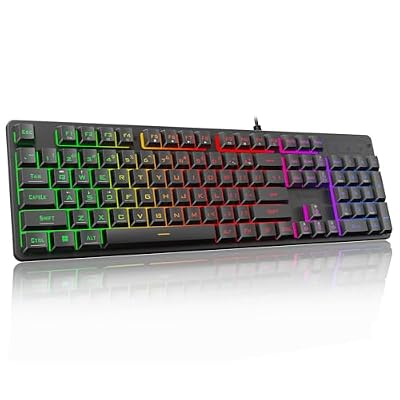
The K521 is the full-size membrane pick for players who want the gaming look with none of the layer learning. All 104 keys are present, including the number pad and the function row, and the keys use a mechanical-feeling membrane design that stays softer and quieter than real switches. The rainbow LED backlight has its own one-touch button for turning the glow on or off, with three breathing modes and four brightness levels for dim rooms. Nineteen-key anti-ghosting covers the usual movement clusters, and twelve multimedia keys handle volume and playback from the board.
Be clear about the trade: there are no individual switches here, so nothing swaps later, and the rainbow glow is a single wash of color rather than per-key lighting. What you get instead is calm and coverage: a spill-resistant frame, quiet presses for shared rooms, and one familiar shape for school, work, and play. Measure your desk first, because a full-size board leaves less room for wide mouse swings.
Specs:
– Layout: 104 keys, full size with number pad
– Switch: Membrane, mechanical-feeling design
– Backlight: Rainbow LED with one-touch on/off button
– Lighting modes: 3 breathing modes, 4 brightness levels
– Anti-ghosting: 19 keys
– Multimedia: 12 multimedia keys
– Connection: Wired USB
– Build: Spill resistant, per the listing
MageGee TS91

The TS91 shows the membrane side of this rung at its most sensible. It keeps the tiny 61-key footprint that small desks love, wraps it in a build the listing describes as waterproof, and uses a membrane design with a mechanical style feel, so presses stay soft and quiet. RGB backlighting gives it the gaming look, and the listing names PC, Mac, PS4, and Xbox One as compatible systems.
Be clear about what you are buying: this is not a mechanical keyboard, and no membrane board gives the distinct, springy press of individual switches. What it gives instead is calm. Late-night sessions stay hushed, a spilled drink is less of a disaster, and the wired connection just works. For a shared family desk, that calm has real value.
Specs:
– Layout: 61 keys, compact class
– Switch: Membrane, mechanical-feel design
– Backlight: RGB
– Connection: Wired USB
– Build: Listing describes a waterproof design
– Compatibility: PC, Mac, PS4, and Xbox One, per the listing
NPET K10

The K10 is the full-size answer in a guide full of small boards. All 104 keys are present, including the number pad, so your daily typing stays familiar while the gaming side of the desk gets its upgrade. The membrane keys are quiet, the board is spill resistant, and the RGB backlight runs in zones across the wide frame. Multimedia keys along the top handle volume and playback without leaving a game.
Size is the decision here. A full-size board leaves less room for wide mouse movement, so measure your desk before you commit. In return: no layers to learn, no missing keys, and one shape that covers school, work, and play.
Specs:
– Layout: 104 keys, full size with number pad
– Switch: Membrane, quiet keys
– Backlight: RGB
– Connection: Wired USB
– Keycaps: Double-shot ABS, per the product record
– Size: 17.32 x 5.51 x 0.98 inches, per the product record
When to Step Up or Down a Rung
There is no rung below this one, so the only question is whether to stay at $30 or climb. Stay here if this is your first board, your desk is small, or you are still learning which layout and switch feel suit you. What you learn about your own preferences here is worth more than any single feature.
Step up when your wish list names things this rung cannot give. When you want hot-swap sockets across a whole lineup of boards, thicker PBT keycaps, and deeper software, read Best Gaming Keyboards Under $40 with Hot Swap Switch Boards and compare the $40 rung. When you want to cut the cable entirely and chase faster response for competitive play, Best Gaming Keyboards Under $75 for Wireless and Rapid Play covers the $75 rung, where wireless links and rapid input boards become realistic.
Who should skip
Skip this rung if you want wireless today, since every board here is wired. Skip the compact boards if your work leans on a number pad all day, because only the K521 and the K10 keep the pad. Skip the membrane boards if a distinct mechanical press is the whole point of this upgrade. And skip this level if you plan to rebuild a board from day one: gasket structures, foam kits, and premium keycap sets belong to the higher rungs.
FAQ
Is a membrane keyboard a bad first gaming keyboard?
No. A membrane board like the TS91 or the K10 is quiet, simple, and forgiving of spills, and handles everyday gaming well. A mechanical board gives a more distinct press and, on the GM326, switches you can swap later. Choose by your room and your ears, not by a label.
Which switch type suits a shared room?
Linear red switches, like those in the MK-BOX and the GM326, are the safer roommate choice because they make no click and only a soft bottom-out sound. The membrane boards, the TS91, the K521, and the K10, are quieter still, with a soft press and no switch snap.
Will these keyboards work with a laptop?
Yes. All five boards connect over a USB cable, and the MK-BOX uses a detachable USB-C cable that packs flat for travel. A laptop with only USB-C ports may need a small adapter for boards that end in a plain USB plug.
Can I change the switches on these boards later?
On one of them. The Newmen GM326 has hot-swappable sockets for 3-pin switches, so you can pull a switch and press in another with no soldering. The MK-BOX listing does not describe pluggable sockets, so treat its switches as fixed, and membrane boards have no individual switches to change.
Final verdict
For a first mechanical setup, buy the MageGee MK-BOX: it keeps arrow keys, feels smooth, and travels well. Buy the Newmen GM326 if you want sockets to experiment with, a function row, and a volume knob. Choose the Redragon K521 for a full-size membrane board with a one-touch backlight button, the MageGee TS91 for quiet compact membrane play, and the NPET K10 for full size with double-shot keycaps. Whichever you pick, check the current price on the Amazon product page and confirm the switch type and layout there first.










