

- Top Pick: Glorious Model O
- Runner-up: Glorious Model D
- Also consider: ASUS ROG Gladius III Core
A stiff mouse cable can ruin an otherwise good setup. It catches on the edge of a desk, pulls against a fast flick, and adds a small tug that your hand has to fight on every swipe. A paracord mouse cable solves that problem by staying light, soft, and flexible, so the mouse moves the way your hand intends it to move.
This guide looks at the best paracord mouse cable options in a practical way. Instead of listing loose replacement cords with unclear compatibility, it focuses on complete mice that ship with a proven paracord cable, plus one wireless model that includes a paracord cable for wired play. Each pick below is judged on cable feel, shape, weight, sensor, and everyday usability, so you can choose the one that fits your grip and your games.
As an Amazon Associate, we earn from qualifying purchases.
Quick Answer
The best paracord mouse cable experience comes from the Glorious Model O for most players, thanks to its light Ascended Paracord cable, ambidextrous shape, and low weight. The Glorious Model D suits right-handed palm and claw players, while the ASUS ROG Gladius III Core is a strong ergonomic alternative. Choose the ZOWIE EC2-C for a simple, driverless setup.
Glorious Model O
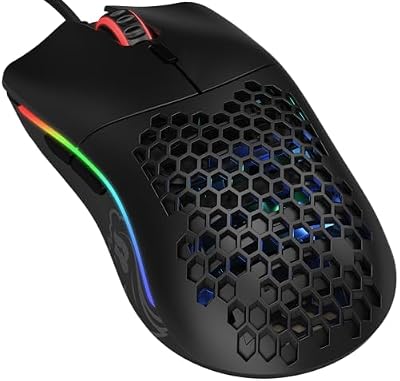
The Glorious Model O remains the classic example of what a paracord cable should feel like. Its Ascended Paracord cable is soft and light enough that it almost disappears during play, which is exactly the point. The cable does not coil into a stiff loop, it does not drag across the pad, and it does not pull the mouse back toward the desk edge after a wide swipe. For fast-paced shooters and MOBA games, that freedom matters more than any single sensor number.
Specs
- Cable: Ascended Paracord, ultra flexible
- Weight: 67 grams
- Sensor: Pixart 3360 optical sensor
- Maximum sensitivity: 12000 DPI
- Buttons: 6 programmable buttons
- Switches: Omron mechanical switches
- Feet: PTFE mouse feet
- Shape: Ambidextrous honeycomb shell
- Lighting: RGB lighting
Glorious Model D

The Glorious Model D takes the same Ascended Paracord cable and puts it on an ergonomic, right-handed shell. That change matters if the ambidextrous Model O never felt quite right in your hand. The Model D fills the palm more naturally, supports the thumb on the left side, and gives palm and claw players a more relaxed resting position during long sessions.
Specs
- Cable: Ascended Paracord, ultra flexible
- Weight: 68 grams
- Sensor: Pixart 3360 optical sensor
- Maximum sensitivity: 12000 DPI
- Buttons: 6 programmable buttons
- Switches: Omron mechanical switches
- Feet: PTFE mouse feet
- Shape: Right-handed ergonomic honeycomb shell
- Lighting: RGB lighting
ASUS ROG Gladius III Core

The ASUS ROG Gladius III Core brings the ROG Paracord cable to a more traditional, solid-shell mouse. The cable is extremely flexible and light, and it is designed to reduce snags and keep movement smooth across the pad. If you like the idea of paracord but you do not want a honeycomb shell, this is the most direct alternative in this roundup.
Specs
- Cable: ROG Paracord, flexible and lightweight
- Weight: 72 grams
- Sensor: Optical sensor
- Maximum sensitivity: 12000 DPI
- Buttons: 5 buttons
- Switches: Push-fit switch sockets for compatible switches
- Feet: PTFE mouse feet
- Shape: Right-handed ergonomic solid shell
- Configuration: Gear Link web-based configuration
ASUS ROG Gladius III Wireless AimPoint

The ASUS ROG Gladius III Wireless AimPoint is the flexible option in this list, because it works as a wireless mouse and as a wired mouse with its included ROG Paracord cable. That dual role makes it useful if you want wireless freedom most of the time, but you still want a proper paracord cable for charging, for wired play, or for tournaments where a wired connection is preferred.
Specs
- Cable: 2 metre ROG Paracord for wired play
- Weight: 79 grams
- Sensor: ROG AimPoint optical sensor
- Maximum sensitivity: 36000 DPI
- Connectivity: 2.4 GHz wireless, Bluetooth, and wired USB
- Buttons: 6 programmable buttons
- Switches: Hot-swappable ROG Micro Switches
- Feet: PTFE mouse feet
- Shape: Right-handed ergonomic shell
- Extras: Grip tape and USB dongle extender included
BenQ ZOWIE EC2-C

The BenQ ZOWIE EC2-C is the simplest pick in this roundup, and that simplicity is its main strength. It is a driverless, right-handed ergonomic mouse with a paracord cable that is built to reduce drag and bounce during fast movements. There is no software to install, no lighting to configure, and no extra mode to manage. You plug it in, set the DPI with the button on the underside, and play.
Specs
- Cable: Paracord cable with raised attachment point
- Sensor: Optical sensor
- Maximum sensitivity: 3200 DPI
- Scroll wheel: 24-step scroll wheel
- Buttons: 5 buttons
- Shape: Right-handed ergonomic, medium size
- Software: Driverless, no software required
- Grip: Suits palm and claw grips
- Connection: Wired USB
How to Choose
Start with the cable itself. A good paracord cable should feel soft, light, and loose when you lift it, and it should not spring back into a tight coil. Look for a cable exit point that sits high enough to clear the pad, and check whether the cable is fixed or detachable. A detachable cable is easier to replace, while a fixed cable is often lighter and simpler.
Next, match the shape to your grip. Ambidextrous mice suit players who switch grips or who want a symmetrical feel. Right-handed ergonomic mice suit palm and claw players who want support under the thumb and along the palm. Weight matters too, but only in context. A light mouse with a stiff cable still feels held back, while a slightly heavier mouse with a truly flexible cable can feel faster in real play.
Who Should Skip
Skip a paracord mouse cable setup if you already play wireless and never want a cord on your desk at all. A paracord cable is far better than a stiff rubber cable, but it is still a cable, and it still needs a clear path across your desk. If your desk is crowded, or if you move your mouse between rooms often, wireless will suit you better.
Frequently Asked Questions
What is a paracord mouse cable?
A paracord mouse cable is a mouse cable wrapped in a soft, braided paracord-style sheath. The sheath is light and flexible, so the cable bends easily, resists kinking, and creates less drag than a standard rubber cable. The result is a wired mouse that feels closer to wireless during fast movements.
Is a paracord cable better than a wireless mouse?
It depends on what you value. A paracord cable gives you a constant wired connection with no battery to charge and no wireless signal to manage, while still keeping cable drag low. A wireless mouse gives you complete freedom from cords, but it needs charging and a receiver. Many players keep both options and choose based on the game or the setting.
Can I replace a stiff mouse cable with a paracord cable?
Some mice support replacement cables, but compatibility depends on the connector inside the mouse, the cable length, and the shell design. A replacement cable that fits one model may not fit another, even from the same brand. If you are unsure, choosing a mouse that already ships with a paracord cable is safer than trying to modify a mouse yourself.
How do I stop a paracord cable from dragging?
Route the cable with a little slack, keep it clear of desk edges, and use a mouse bungee if you have one. A bungee lifts the cable off the pad and gives it a clean path to the mouse. You can also route the cable behind the monitor or through a cable channel, as long as the cord still has enough slack for wide swipes.
Final Verdict
The best paracord mouse cable setup for most players is the Glorious Model O, because it pairs a proven Ascended Paracord cable with a light, ambidextrous shell that works across many games and grip styles. The Glorious Model D is the better choice for right-handed players who want ergonomic comfort, while the ASUS ROG Gladius III Core is the best solid-shell alternative.
If you want wireless freedom plus a proper paracord cable for wired play, choose the ASUS ROG Gladius III Wireless AimPoint. If you want a simple, driverless mouse with a clean cable path, choose the BenQ ZOWIE EC2-C. Whichever pick you choose, focus on cable feel and shape first. Those two factors decide whether a paracord setup actually feels drag-free in daily play.










