iRacing rewards a different kind of gaming desktop than most shooters or open-world games. The simulation is famously sensitive to single-core CPU performance, because the physics and draw calls for a full grid of cars lean heavily on one fast main thread. A desktop that looks strong on a spec sheet can still feel uneven in a crowded race start if its processor cannot sustain high single-core speed, while a modest graphics card can run a single 1080p screen comfortably. Triple monitors and VR change the equation again: three screens multiply the pixel count the GPU must render, and a headset needs a consistently high frame rate with very stable frame times to stay comfortable.
This guide compares five prebuilt desktops currently sold on Amazon US, using the exact configuration of each listing rather than the wider product line. Every pick is measured against iRacing’s own published system requirements, then matched to the display setup it suits best: a single screen, triple monitors, or VR. If you are still weighing a prebuilt against a self-built machine in general, the broader overview of the best PC for gaming covers that wider decision; this page stays focused on what iRacing specifically needs.
As an Amazon Associate we earn from qualifying purchases.
The floor: iRacing’s published system requirements
Start with the requirements iRacing itself publishes, because they are the floor every pick below has to clear. The minimum tier calls for a 4-core CPU, 16 GB of RAM and a graphics card with 6 GB of dedicated memory, running 64-bit Windows 11 with DirectX 11. The recommended tier steps up to a 6-core CPU, 16 GB of RAM and an 8 GB graphics card. The high-end tier asks for 8 or more cores, 32 GB of RAM and a graphics card with 10 GB or more of memory. On storage, the base install needs far less space than the full content library: downloading every car and track pushes the requirement to roughly 225 GB, so a small SSD fills up faster than the headline install size suggests.
Treat those tiers honestly. The minimum is enough to run a test session, not enough to hold high settings in a full online grid. The recommended tier is the realistic starting point for a single screen at medium settings, and iRacing’s own guidance points VR users at the recommended tier as a bare minimum. Triple-monitor and high-refresh VR setups sit beyond even the high-end tier in practice, because the official numbers were not written for three displays or for the frame-time consistency a headset demands. That gap is exactly what separates the picks below.
What actually matters for iRacing
Single-core CPU speed first. In a large field, the processor feeding the simulation is usually the limiting factor before the graphics card is. A newer architecture with strong per-core performance protects the minimum frame rate at race starts and in traffic, which is where stutters are most distracting mid-corner.
GPU headroom scales with pixels. A single 1080p or 1440p monitor is a light load by modern standards. Three 1440p monitors approach the pixel count of high-end single-screen gaming, and VR renders two views at a high refresh rate. Cards with 8 GB of memory suit a single screen; 12 GB and 16 GB cards are the safer match for triples and VR, matching iRacing’s own high-end guidance of 10 GB or more.
RAM and storage are easy to get right. Every pick below meets the 16 GB minimum. Systems with 32 GB already match the high-end tier and leave room for overlays, telemetry tools and voice chat running alongside the sim. For storage, 1 TB or more keeps the full car and track library, replays and other games comfortable; a 500 GB drive works but needs managing.
Upgradeability protects the purchase. Sim racing hardware tends to stay in service for years, and the display setup often grows from one screen to triples or VR. A standard tower on a current platform, with room to add memory, storage and a stronger graphics card later, is worth more than a sealed box with slightly better launch-day numbers.
1. Skytech Gaming King 95 — the strongest iRacing pick here

The King 95 pairs the processor sim racers ask for most with the graphics headroom triples and VR need. Its Ryzen 7 9800X3D is an 8-core chip listed at 4.7 GHz with boost to 5.2 GHz, and its large cache design is built for exactly the kind of latency-sensitive, single-thread-heavy workload iRacing presents. The RTX 5070 Ti carries 16 GB of GDDR7 memory, comfortably above iRacing’s high-end graphics guidance, and the system ships with 32 GB of DDR5 memory and an 850 W Gold ATX 3 power supply, both published in the listing.
Specs
| Component | Specification |
|---|---|
| CPU | AMD Ryzen 7 9800X3D, 8 cores, 4.7 GHz (5.2 GHz boost) |
| GPU | NVIDIA GeForce RTX 5070 Ti, 16 GB GDDR7 |
| RAM | 32 GB DDR5 5600 RGB |
| SSD | 1 TB Gen4 NVMe SSD |
| Upgradeability | AM5 DDR5 platform; published 850 W Gold ATX 3 PSU leaves published headroom for a future GPU swap; 360 mm AIO liquid cooling fitted |
Best for: triple-monitor rigs and VR headsets, and single-screen drivers who want the CPU ceiling to stop being a concern. This is the pick for a dedicated sim rig that will grow.
2. MSI Aegis R2 AI — high-end power with the largest storage here

The Aegis R2 AI configuration listed here combines an Intel Core Ultra 9 285 with an RTX 5070 Ti 16 GB graphics card, 32 GB of DDR5 memory and a 2 TB M.2 NVMe SSD, the largest drive in this guide. MSI lists the system as VR-Ready, and the 16 GB graphics card plus the high core count put it in the same performance conversation as the King 95 for demanding display setups. The extra storage is a genuine practical advantage for iRacing, whose full content library is large before replays and other titles are added.
Specs
| Component | Specification |
|---|---|
| CPU | Intel Core Ultra 9 285 |
| GPU | NVIDIA GeForce RTX 5070 Ti, 16 GB |
| RAM | 32 GB DDR5 |
| SSD | 2 TB M.2 NVMe SSD |
| Upgradeability | Full tower with air cooling and USB Type-C; RAM, storage and GPU are the practical upgrade paths — confirm spare slot counts and PSU rating on the exact listing before planning a GPU swap |
Best for: VR and triple-screen drivers who also keep a large game library installed, and buyers who prefer an Intel platform at the top end. Single-screen drivers can run it easily, but its headroom is aimed higher.
3. CyberPowerPC Gamer Xtreme GXiVR8080A41 — triples-ready Ryzen 9 balance
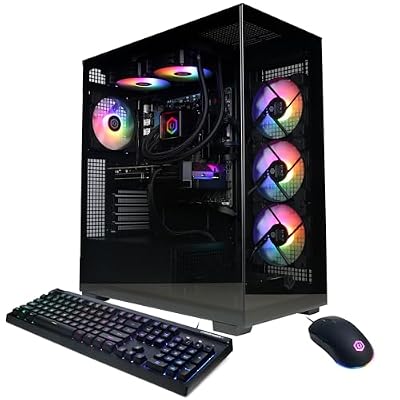
This Gamer Xtreme configuration uses a Ryzen 9 9900X listed at 4.4 GHz, a 12-core processor that clears iRacing’s high-end core guidance, paired with an RTX 5070 carrying 12 GB of memory. That graphics memory figure matters: it sits above the 10 GB high-end threshold iRacing publishes, which is the tier triples and VR should be shopping in. With 32 GB of DDR5 memory and a 1 TB PCIe 4.0 SSD, the rest of the configuration matches the high-end floor without weak points.
Specs
| Component | Specification |
|---|---|
| CPU | AMD Ryzen 9 9900X, 4.4 GHz |
| GPU | NVIDIA GeForce RTX 5070, 12 GB |
| RAM | 32 GB DDR5 |
| SSD | 1 TB PCIe 4.0 SSD |
| Upgradeability | AM5 DDR5 platform; memory, storage and GPU upgrades follow standard tower practice — verify the fitted PSU wattage on the listing before a larger GPU upgrade |
Best for: triple-monitor setups at 1080p or 1440p per screen and VR at sensible settings, plus streamers and multitaskers who use the extra cores outside the sim. It is the balanced high-end option rather than the outright flagship.
4. CyberPowerPC Gamer Xtreme VR GXiVR8040A14 — strong CPU for a single screen

This configuration leads with an Intel Core i7-13700F listed at 2.1 GHz base clock, a many-core processor whose per-core performance suits iRacing’s main thread well, and pairs it with an RTX 4060 Ti in its 16 GB form. That extra graphics memory over the more common 8 GB version helps texture loads and gives a single high-refresh 1440p screen comfortable room. Memory is 16 GB of DDR5, which meets iRacing’s recommended tier but not the 32 GB high-end figure, so a memory upgrade is the obvious first improvement later.
Specs
| Component | Specification |
|---|---|
| CPU | Intel Core i7-13700F, 2.1 GHz |
| GPU | NVIDIA GeForce RTX 4060 Ti, 16 GB |
| RAM | 16 GB DDR5 |
| SSD | 1 TB NVMe SSD |
| Upgradeability | DDR5 platform with a clear first upgrade to 32 GB RAM; GPU replacement is possible in a standard tower, subject to the fitted PSU — check its rating on the exact listing |
Best for: single-screen drivers at 1080p or 1440p who want CPU strength for full grids, including large oval and road fields. It can drive triple 1080p screens at reduced settings, but it is not the VR pick in this list; the first three systems are better matched to a headset.
5. iBUYPOWER SlateMesh SlateMeshA5N4601 — the single-screen starting point

The SlateMesh is the entry point of this guide and it still clears iRacing’s recommended tier where it counts: a 6-core Ryzen 5 7600, an RTX 4060 with 8 GB of memory and 16 GB of DDR5 memory at 5200 MHz. That combination is well matched to a single 1080p screen and can run a single 1440p display at adjusted settings. The compromise is storage: the 500 GB NVMe SSD holds the sim and its full content library, but leaves limited room for much else, so budget for added storage if the library grows.
Specs
| Component | Specification |
|---|---|
| CPU | AMD Ryzen 5 7600, 6 cores |
| GPU | NVIDIA GeForce RTX 4060, 8 GB |
| RAM | 16 GB DDR5 5200 |
| SSD | 500 GB NVMe SSD |
| Upgradeability | AM5 DDR5 platform shared with far stronger Ryzen chips; practical first upgrades are a second memory stick or larger kit and added SSD capacity, then a GPU swap subject to PSU headroom |
Best for: new iRacing members on a single 1080p screen and drivers stepping up from an older PC. It is not a triple-monitor or VR recommendation; buy it for today’s single screen, with the AM5 platform keeping tomorrow’s CPU upgrade possible in the same socket family.
Which desktop fits which display setup?
Single screen, 1080p or 1440p: the SlateMesh covers 1080p, and the GXiVR8040A14 is the stronger 1440p and large-grid choice. Both meet or clear the recommended tier, and neither forces you to pay for graphics headroom a single panel cannot use.
Triple monitors: start at the GXiVR8080A41, whose 12 GB graphics card and 12-core Ryzen 9 match the pixel load, and step up to the King 95 or Aegis R2 AI for triple 1440p at higher settings. The 8 GB cards in this guide should stay on one screen.
VR: the King 95 and Aegis R2 AI, with 16 GB graphics cards and 32 GB of system memory, are the two picks aligned with the demands iRacing’s own guidance implies for headsets. The GXiVR8080A41 is the next step down for VR at moderated settings.
Before you buy
Check the exact configuration on the listing, not just the model name: prebuilt lines reuse names across different CPUs, graphics cards and drive sizes, and the ASIN identifies the specific build reviewed here. Confirm the graphics card’s memory size, since cards with the same name ship in different capacities and iRacing’s tiers are written in memory figures. Count your display cables before ordering, because triples need three outputs from the graphics card. Finally, remember that a wheel and pedal set, and the screens or headset themselves, sit outside the desktop budget entirely.
Any of the five systems above will run iRacing; the right choice is the one whose CPU strength and graphics memory match the screens you actually race on, with enough upgrade room for the rig you plan to build next.