

- Top Pick: Logitech G PRO X 2 LIGHTSPEED
- Runner-up: SteelSeries Arctis Nova 7 Wireless Gen 2
- Also consider: Audeze Maxwell
Most wireless gaming headsets work on Linux the moment the dongle goes in, because PipeWire sees a standard USB audio device. What does not survive the move is the Windows companion suite, and with it the battery readout, the sidetone slider, the EQ presets and the auto-off timer. Those settings live inside the headset, reachable over its USB control channel, and on Windows only the vendor app bothers to ask.
HeadsetControl is the open-source tool that asks. It is a small command-line program, published under the GPL, that speaks the headsets’ own HID protocol directly, with no vendor software between. On a supported model it restores most of the controls Linux players are usually told to live without. This guide explains what it can and cannot change, how its list should drive a purchase, and five wireless headsets that appear on it.
As an Amazon Associate, we earn from qualifying purchases.
Quick answer
HeadsetControl is a free, open-source command-line tool that talks directly to supported USB gaming headsets on Linux. On a listed model it restores the controls the Windows suite normally owns: battery level, sidetone, EQ presets, lights and auto-off timers. Five supported wireless headsets are covered below, each checked against the project list before inclusion.
What HeadsetControl actually controls
The project documentation lists features longer than most Linux players expect. Battery status comes first: charge level, and on some models voltage and estimated time remaining, readable at any moment instead of guessed from a blinking LED. Sidetone is the headline feature the project was built around, setting how much of your own voice feeds back into your ears, in fine steps. Equalizer support covers stored presets and, on many models, custom curves, with parametric EQ on a small number of devices.
Beyond that sit the smaller controls. An inactive-time setting adjusts the auto power-off timer. Chat-mix balances game and chat audio on models that support it. Microphone options include mic volume, mute LED brightness and rotate-to-mute behaviour where the hardware offers them. Some headsets also expose notification light control, voice prompt toggles and Bluetooth power-on behaviour. Nothing here touches the audio path itself: PipeWire still handles playback and recording, and the tool only writes settings to the device, where they persist.
The supported list is the specification
HeadsetControl only works with headsets its developers have reverse-engineered, and the project maintains a per-device capability table. That table, not the product box, is the specification a Linux buyer should read. Each row marks which features a model supports, and the marks matter: two headsets from the same brand can differ, with one offering sidetone, battery and EQ while its sibling offers battery alone.
Three reading rules follow from the table. First, exact model and variant matter, because some features are verified only on specific hardware revisions; the project notes that sidetone status reading on the Arctis Nova 7 is verified on the second-generation hardware. Second, absence is information: the HyperX Cloud III Wireless does not appear on the list, although the older Cloud II Wireless and Cloud Alpha Wireless do, so its sidetone and battery stay locked to the Windows app. Third, a few Corsair models route sidetone through ALSA instead, a quirk the project documents for the HS80 and its relatives. If a headset is not named in the table, assume none of these controls exist on Linux.
Front ends and everyday workflow
The core tool is a terminal program, installed through distro channels the project documents: a PPA for Ubuntu and Debian, a COPR repository for Fedora, the AUR on Arch, and a NixOS package, alongside release builds. Installation also drops udev rules so the headset can be reached without administrator rights. Everyday use is a handful of short commands to read battery, set sidetone or change the auto-off timer, and a capabilities flag prints which features your model exposes before you rely on them.
Players who never want a terminal are covered by community front ends. On Linux these include a GNOME Shell extension, tray applications that show charge and offer sidetone and chat-mix controls, a battery notification daemon, and a fuller Qt-based window and tray app. Because the command-line tool can also print its results as JSON or YAML, it feeds status bars and scripts too, which is how many players surface a battery readout on the desktop.
What HeadsetControl cannot do
The limits are as important as the features. HeadsetControl has no firmware update function: firmware still belongs to the vendor’s Windows software, so an update means a Windows machine, a dual boot or a virtual machine with USB passthrough. Virtual surround processing also stays vendor-side. DTS Headphone:X on HyperX and Logitech headsets, Sonar on SteelSeries models and mic processing suites such as Blue VO!CE are software engines that run on the host, and no HID settings tool replaces them.
The same applies to anything the hardware never exposed. If a feature is missing from a model’s row in the capability table, no front end can invent it. Finally, settings written by a vendor app and by HeadsetControl can fight: the project warns that HyperX’s NGENUITY, while running, writes its own saved values back over changes made elsewhere. On Linux that conflict is mostly theoretical, but dual-boot users should change each setting in one place only.
Five supported wireless headsets
Logitech G PRO X 2 LIGHTSPEED

Logitech’s esports flagship is one of the better-documented models in the table, with sidetone, battery status, the auto-off timer, EQ presets and custom EQ available. It is the rare pro headset whose Linux feature set nearly matches its Windows one, Blue VO!CE aside.
- Drivers: 50 mm graphene dynamic drivers
- Connections: LIGHTSPEED USB dongle, Bluetooth, 3.5 mm cable
- Battery life: up to 50 hours, as stated by Logitech
- Microphone: detachable 6 mm boom
- Weight: 345 g
- HeadsetControl support: sidetone, battery, auto-off timer, EQ presets and custom EQ
SteelSeries Arctis Nova 7 Wireless Gen 2

The Nova 7 row is one of the longest in the table: sidetone, battery, chat-mix, EQ, microphone volume, mute LED brightness and a volume limiter are all exposed, and the second-generation hardware is the variant verified for sidetone status. Simultaneous game and phone audio suits players who mix sources.
- Drivers: 40 mm neodymium magnetic drivers
- Connections: 2.4 GHz USB-C dongle and Bluetooth, usable at the same time
- Battery life: over 50 hours, as stated by SteelSeries, with USB-C fast charge
- Microphone: retractable ClearCast Gen 2 boom
- Weight: about 326 g
- HeadsetControl support: sidetone, battery, chat-mix, EQ, mic controls, volume limiter
Audeze Maxwell
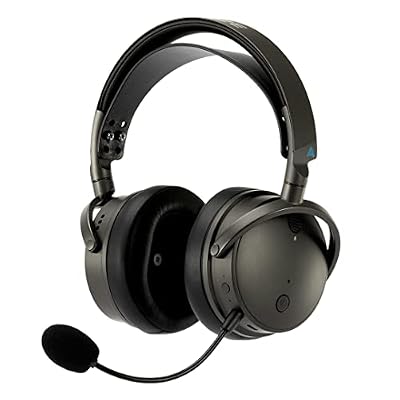
Maxwell is the audiophile outlier, built around large planar magnetic drivers, and HeadsetControl covers it well: sidetone, battery, chat-mix, rotate-to-mute, auto-off timer, EQ presets and custom EQ, plus a volume limiter. The version tabled here is the Xbox and PC model; both versions work on Linux over dongle and USB.
- Drivers: 90 mm planar magnetic drivers
- Connections: low-latency wireless USB dongle, Bluetooth, USB wired
- Battery life: up to 80 hours, as stated by Audeze
- Microphone: detachable boom with maker-described AI noise filtering
- Weight: 490 g
- HeadsetControl support: sidetone, battery, chat-mix, EQ, rotate-to-mute, volume limiter
HyperX Cloud Alpha Wireless

The Cloud Alpha Wireless is the battery marathon entry: HeadsetControl reads that battery, sets sidetone and adjusts the auto-off timer. What it does not get is EQ, which is absent from its row, so DTS processing and the NGENUITY equalizer remain Windows-only. Buy it for endurance and simplicity, not tuning.
- Drivers: 50 mm dual-chamber dynamic drivers
- Connection: 2.4 GHz USB dongle for PC and PlayStation, no Bluetooth
- Battery life: up to 300 hours, as stated by HyperX
- Microphone: detachable, noise-cancelling
- Weight: 335 g with microphone, as stated by HyperX
- HeadsetControl support: sidetone, battery, auto-off timer
Logitech G535 LIGHTSPEED

The G535 is the lightest, simplest headset here, and its row is correspondingly short: sidetone, battery status and the auto-off timer. That is still the difference between guessing charge from memory and reading it in the tray, the whole point of the tool at this end of the range.
- Drivers: 40 mm neodymium drivers
- Connection: LIGHTSPEED USB receiver for PC and PlayStation
- Battery life: up to 33 hours, as stated by Logitech
- Microphone: flip-to-mute boom
- Weight: 236 g
- HeadsetControl support: sidetone, battery, auto-off timer
How to choose
Start with the capability table, not the shop page. Find the exact model you are considering, read its row, and confirm the specific controls you care about are marked, because support is granted per feature, not per brand. A player who lives on voice chat should weight sidetone and chat-mix; a player who tunes sound should require the EQ columns; everyone with a wireless headset benefits from a battery readout.
Then check the variant. Generation and platform versions of the same headset can carry different hardware IDs, and the project sometimes verifies features on one revision only. Decide which losses you accept before buying: firmware updates will always mean a trip to Windows, and if a headset’s headline feature is a software surround engine, it is a Windows feature whatever the box implies. The five above were chosen because their rows are explicit, so the Linux feature set is known rather than hoped for.
Who should skip this
Skip the tool, and shop differently, if your headset is not on the supported list: the audio will still work under PipeWire, but none of these controls will appear, and a model chosen for its Windows suite will disappoint. Skip it if firmware updates are a routine need rather than an occasional chore, since every update still requires the vendor’s Windows software. Bluetooth-only headsets and earbuds are also out of scope, because HeadsetControl speaks to USB devices and their dongles. And if you never touch sidetone, EQ or power timers, the plain PipeWire experience may already be everything you need.
FAQ
Does HeadsetControl work with any USB gaming headset?
No. It works only with the models on the project’s supported-device list, where each headset’s protocol has been individually implemented. Any USB headset still plays audio on Linux through PipeWire, but battery, sidetone and EQ controls exist only for listed models.
Is the HyperX Cloud III Wireless supported?
Not at the time of writing. The supported list names the wired Cloud 3 with sidetone only, plus the Cloud II Wireless and Cloud Alpha Wireless with battery support. The Cloud III Wireless is absent, so on Linux its suite features stay unreachable even though its audio works.
Can HeadsetControl update my headset firmware?
No. The tool reads and writes settings only and has no firmware flashing function. Firmware updates remain the job of the vendor’s Windows software, so plan on a Windows machine, dual boot or a virtual machine with USB passthrough for those rare occasions.
Do settings changed on Linux carry over to Windows or console?
Yes, in the way that matters. The values are written to the headset itself rather than stored in a Linux config file, so sidetone level, EQ preset and auto-off behaviour travel with the hardware. Only the host-side software engines, such as virtual surround, stay behind on Windows.
Final verdict
HeadsetControl turns the supported-device list into the most honest spec sheet in Linux gaming audio. Buy a headset whose row is long, and the Windows suite becomes optional: battery, sidetone, EQ and power behaviour are all reachable from a terminal or a tray icon. Buy outside the list and those controls do not exist on Linux. Of the five here, the Arctis Nova 7 Gen 2 exposes the most controls, the G PRO X 2 covers the esports brief, the Maxwell adds planar drivers and chat-mix, the Cloud Alpha Wireless trades EQ for unmatched endurance, and the G535 proves even the basics are worth having.










