Choosing a micro ATX AM5 board is less about the chipset badge and more about three limits that only surface after the build: whether the power design can feed a future higher-core Ryzen, how many M.2 drives fit without losing lanes, and which BIOS version the board ships with. Two boards can share a name, a socket and a memory type yet behave very differently once a Ryzen 8000 APU or a third SSD enters the picture.
This guide is for builders shrinking a Ryzen gaming PC into a compact case, anyone upgrading an early AM5 system, and first-time builders who want four memory slots without a full-size tower. Every pick below was chosen from the names and specifications printed on its Amazon product page, then matched to the build it suits. If you are still deciding on a form factor, start with our roundup of the best micro ATX motherboards before narrowing down to AM5.
Quick Picks
As an Amazon Associate we earn from qualifying purchases.
| Product | Best for | Key spec from title |
|---|---|---|
| GIGABYTE B650M AORUS Elite AX | Keeping one board through a later CPU upgrade | 12+2+2 power phase, PCIe 5.0 M.2 |
| ASRock B850M Pro-A WiFi | Running three NVMe drives in a small case | DDR5 8000+ (OC), 256GB, PCIe 5.0 |
| MSI PRO B650M-A WiFi | A tidy work-and-play PC without gaming styling | Wi-Fi 6E, Bluetooth 5.3, 2.5Gbps LAN |
| ASRock B650M Pro RS WiFi | Three M.2 sockets on the older B650 platform | DDR5 7200+ (OC), PCIe 5.0 M.2 |
| GIGABYTE B850M Eagle WIFI6E ICE | A white-themed compact build | 8+2+2 power phase, PCIe 5.0, 2x M.2 |
How to Choose
Chipset and BIOS support
B650 and B850 share the AM5 socket and DDR5 memory, and neither chipset name changes gaming performance by itself. What differs is the platform detail around it: the B850 listings here add a PCIe 5.0 x16 graphics slot and ship with newer BIOS baselines, while B650 boards may sit in older stock. Every listing in this guide names Ryzen 9000, 8000 and 7000 support, yet a board built before a CPU launch can still need a firmware update before it boots that chip. A Q-Flash, Flash BIOS or BIOS Flashback button solves this without an older processor installed, so treat that button as a requirement, not a bonus.
Memory and M.2 slots
All five boards carry four DDR5 DIMM slots, the main reason to pick micro ATX over Mini-ITX, but the ceilings printed on the listings diverge. The ASRock B850M Pro-A WiFi title quotes DDR5 8000+ (OC) and 256GB, while the MSI and the B650M Pro RS WiFi listings quote 7200 MHz-class speeds. Treat those figures as overclocked ratings that depend on the CPU’s memory controller, and favour two-module kits when chasing them. Storage splits the field further: the two ASRock boards fit three M.2 sockets, the Gigabyte and MSI boards fit two, and the third ASRock socket on the Pro RS runs at reduced width.
VRM design and CPU pairing
The phase counts in the listing titles tell a useful story when matched to the processor. Gigabyte’s AORUS Elite AX quotes a 12+2+2 design, the Eagle WIFI6E ICE quotes 8+2+2, and the ASRock boards use 8+2+1 Dr.MOS layouts. A Ryzen 5 gaming chip runs comfortably on any of them. A Ryzen 9 asked to hold all-core boost through long renders or shader compiles is a different load, and the stronger design gives it more headroom before temperatures force clocks down. Compact cases restrict airflow around the socket area, which makes that margin worth more here than in a full tower.
Ports, networking and board size
Networking barely separates these five: every listing includes Wi-Fi 6E and a 2.5G wired connection. The differences sit in the smaller print. Gigabyte’s listings highlight USB-C 3.2 Gen 2, MSI’s title spells out HDMI, DisplayPort and Bluetooth 5.3, and front-panel headers vary, so confirm your case’s USB-C lead has a matching header. Size is the other trade. A micro ATX board measures roughly 244 x 244 mm and drops into smaller cases, but a long graphics card can cover the second slot and crowd the front-panel and fan headers along the bottom edge.
The 5 Best Options
GIGABYTE B650M AORUS Elite AX

Builders who expect to swap in a stronger Ryzen chip in a couple of years get the most from this board. Its 12+2+2 power phase design, quoted right in the Amazon listing title, is the strongest in this group, and a PCIe 5.0 M.2 slot covers a fast boot drive while Q-Flash handles firmware updates before the CPU goes in. Storage tops out at two M.2 sockets, so it suits a one- or two-drive build rather than a growing SSD collection. Wi-Fi 6E and 2.5GbE are already on board, which keeps the rear panel simple.
Specs
- Socket AM5, AMD B650 chipset, mATX form factor
- Supports Ryzen 9000, 8000 and 7000 Series processors
- DDR5 memory
- 12+2+2 power phase design
- PCIe 5.0 M.2 slot
- USB-C 3.2 Gen 2
- Wi-Fi 6E and 2.5GbE LAN
- EZ-Latch and Q-Flash
Best for: a compact gaming build planned around a later CPU upgrade.
Watch out for: only two M.2 sockets, so count your drives before ordering.
ASIN: B0BH6XND27
ASRock B850M Pro-A WiFi

Three M.2 sockets on a board this size is the headline here: one PCIe Gen5 x4 and two PCIe Gen4 x4, enough to keep games, captures and project files on separate drives without a SATA cable in sight. The listing title also quotes the joint-highest memory figures in this guide, DDR5 8000+ (OC) with a 256GB ceiling, alongside a PCIe 5.0 x16 graphics slot and BIOS Flashback for CPU-free updates. Its 8+2+1 Dr.MOS design is the modest part of the package, better matched to Ryzen 5 and Ryzen 7 gaming loads than to sustained all-core work on the biggest chips.
Specs
- Socket AM5, AMD B850 chipset, micro ATX form factor
- Supports Ryzen 9000, 8000 and 7000 Series processors
- DDR5 up to 8000+ MHz (OC), 256GB maximum
- PCIe 5.0 support
- M.2 slots and SATA3 6.0 Gb/s ports
- Wi-Fi 6E
- 2.5G LAN
- BIOS Flashback
Best for: a small build that stores everything on NVMe drives.
Watch out for: the third M.2 socket drops to x2 width with some Ryzen 8000 processors, so check the manual against your CPU.
ASIN: B0DS6KDMF5
MSI PRO B650M-A WiFi

Nothing about the ProSeries styling shouts gaming, which is exactly the point for a machine that works during the day. The Amazon listing title confirms Wi-Fi 6E, Bluetooth 5.3 and 2.5Gbps LAN, plus HDMI and DisplayPort outputs that matter if the build starts on integrated graphics. Storage and expansion stay at PCIe 4.0 throughout, a sensible match for the Gen4 drives most people already own, and MSI’s Flash BIOS button covers firmware updates. It is the calm, businesslike option here, aimed at Ryzen 5 and Ryzen 7 builds with one or two SSDs.
Specs
- Socket AM5, AMD B650 chipset, mATX form factor
- Supports Ryzen 9000, 8000 and 7000 Series processors
- DDR5 memory, 7200 MHz listed memory speed
- PCIe 4.0 expansion slots
- M.2 and SATA 6Gb/s storage
- USB 3.2 Gen 2, HDMI and DisplayPort
- Wi-Fi 6E, Bluetooth 5.3 and 2.5Gbps LAN
Best for: a dual-purpose office and gaming PC in a shared space.
Watch out for: MSI notes the second M.2 slot is unavailable with Ryzen 8500 and 8300 processors, leaving APU builds a single socket.
ASIN: B0BHBZRW66
ASRock B650M Pro RS WiFi

Staying on B650 does not have to mean giving up the third SSD. The Pro RS WiFi mirrors its B850 sibling with three M.2 sockets, one of them PCIe 5.0 as the listing title states, and pairs them with DDR5 support quoted at 7200+ (OC). The compromises are documented rather than hidden: the third socket runs at PCIe 4.0 x2, and the graphics slot is PCIe 4.0 instead of 5.0, which changes nothing for a current-generation card. Add BIOS Flashback and four SATA ports for bulk drives, and it becomes the flexible-storage pick for builders who prefer the mature B650 platform.
Specs
- Socket AM5, micro ATX form factor
- Supports Ryzen 9000, 8000 and 7000 Series processors
- DDR5 up to 7200+ (OC)
- PCIe 5.0 M.2 slot
- Wi-Fi 6E
- 2.5G LAN
Best for: three NVMe drives without moving up to a B850 board.
Watch out for: the third M.2 socket runs at x2 width, so put your slowest drive in it.
ASIN: B0C5Y4SRKF
GIGABYTE B850M Eagle WIFI6E ICE
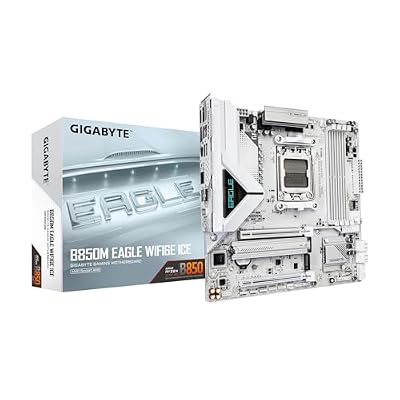
Every other board in this guide is black, so the white ICE finish decides this pick before the spec sheet opens. Underneath the colour scheme sits a current B850 platform: the Amazon listing describes DDR5 support up to 8200 MT/s, a PCIe 5.0 x16 slot and a PCIe 5.0 M.2 slot among its two M.2 sockets, driven by an 8+2+2 power design. EZ-Latch fittings speed up GPU and drive swaps, and the title’s 3-year warranty is stated up front. It is the natural foundation for a white compact build that still wants modern storage and graphics connectivity.
Specs
- Socket AM5, AMD B850 chipset, mATX form factor, ICE finish
- Supports Ryzen 9000, 8000 and 7000 Series processors
- DDR5, up to 8200 MT/s per the listing description
- 8+2+2 power phase design
- 2x M.2 slots with PCIe 5.0 support
- USB-C port
- Wi-Fi 6E and 2.5GbE LAN
- EZ-Latch, 3-year warranty
Best for: a white-themed compact build on the newer B850 platform.
Watch out for: Ryzen 8000 processors narrow the graphics slot’s lane width, so confirm the pairing if an APU is planned.
ASIN: B0FFQM1JXG
Which One Fits Your Situation
You plan to upgrade the CPU before the motherboard
Buy the AORUS Elite AX. Its 12+2+2 power design leaves room for a higher-core Ryzen later, Q-Flash updates the firmware without an older chip on hand, and the PCIe 5.0 M.2 slot keeps a fast boot drive current. The two-socket storage limit is the price of that headroom, so accept it only if your drive count stays low.
Your storage keeps outgrowing one drive
Start with the B850M Pro-A WiFi, whose three full-width M.2 sockets separate system, games and media cleanly. If the build is already committed to B650 parts or the Pro-A is out of stock, the Pro RS WiFi offers the same three-socket layout, accepting an x2 third socket and a PCIe 4.0 graphics slot in exchange.
The PC has to look at home in an office
Choose the MSI PRO B650M-A WiFi. The plain ProSeries design raises no eyebrows on a desk at work or in a living room, Bluetooth 5.3 pairs everyday peripherals, and the HDMI and DisplayPort outputs let an APU build skip the graphics card entirely. PCIe 4.0 storage is no handicap for office work mixed with evening gaming.
You are building around a white case
The Eagle WIFI6E ICE is the only white board in this guide, and its B850 platform avoids the spec compromises themed builds often force. PCIe 5.0 reaches both the graphics slot and one M.2 socket, DDR5 support is quoted up to 8200 MT/s, and EZ-Latch hardware makes the build itself easier to keep tidy.
Common Mistakes
- Choosing by chipset name alone, when slot layout and BIOS baseline matter more than the B650 or B850 badge.
- Assuming every M.2 socket runs at full width with any CPU, even though Ryzen 8000 processors cut lanes on several boards here.
- Skipping the maker’s CPU support list and minimum BIOS version before pairing a board with a new Ryzen 9000 chip.
- Filling all four DIMM slots and expecting the headline overclocked memory speed, which is rated for two-module kits.
- Forgetting that a long graphics card can cover the second slot and the bottom-edge headers on a 244 mm board.
Frequently Asked Questions
Does B850 give higher frame rates than B650?
No. The chipset does not change CPU or GPU performance, so the same processor and graphics card produce the same frame rates on either platform. B850 earns consideration through platform details instead: a PCIe 5.0 x16 graphics slot on the boards here, higher quoted memory ceilings and newer BIOS baselines for recent Ryzen launches.
Will a Ryzen 9000 processor work straight out of the box?
Usually, but not always. Each listing names Ryzen 9000 support, yet a board from early stock can predate the firmware that recognises the chip. Check the maker’s support page for the minimum BIOS version, and favour boards with a flash button, since every pick here can update with no processor installed.
How many NVMe drives can a micro ATX board hold?
Two or three, depending on the model. The ASRock Pro-A WiFi and Pro RS WiFi fit three M.2 sockets into the micro ATX footprint, while the Gigabyte and MSI picks fit two and leave four SATA ports for bulk storage. Check lane sharing before buying, because some sockets narrow or switch off with certain processors.
Can I reuse my DDR4 memory on an AM5 board?
No. AM5 is a DDR5-only platform, and DDR4 modules neither fit the slots nor appear on any support list for these boards. Budget for a DDR5 kit when moving from an older system, and pick a two-module set from the board maker’s memory support list for the best chance of reaching its rated speed.