

- Top Pick: NIMO 15.6 AI Creator Laptop, 6 Core AMD R5-6600H 16GB RAM 512GB SSD FHD IPS
- Best Value: HP 17 Laptop, 17.3" FHD Display, 8GB DDR5 RAM, 512GB SSD, AMD Ryzen 5 Processor(Beats i7-1165G7, Up to 4.3GHz), Windows 11 Pro, Alpacatec Accessories, Silver, Video Editing Laptop
- Premium Choice: NIMO 17.3 AI Laptop, 12 Core AMD Ryzen 9 HX 370 64GB RAM 2TB SSD Radeon 890M, with eGPU Dock with RX 7600M XT 8GB GDDR6 for Video Editing, AI Tasks & Remote Streaming, 2-Yr Warranty
Video editing is one of the most memory-hungry things you can do on a PC. Editors hold large project files, cached previews and effect data in RAM, and the more of your timeline the system can keep in memory, the smoother scrubbing, playback and switching between clips becomes. Run short on memory and the application starts swapping to disk, where stutters, laggy previews and slow saves creep in. That is why capacity comes first for editing, with speed close behind. This guide rounds up the best RAM for video editing in 2026, focused on high-capacity, dual-channel DDR4 kits that keep an editing timeline responsive.
- Best RAM for Video Editing at a Glance
- 1. Corsair Vengeance RGB Pro 32GB (2x16GB) DDR4 3200 (PC4-25600) C16
- 2. CORSAIR VENGEANCE LPX DDR4 RAM 32GB (2x16GB) Up to 3200MHz CL16-20-20-38
- 3. G.SKILL RipjawsV Series DDR4 RAM (XMP) 32GB (2x16GB) 3200MT/s CL16-18-18-38
- 4. CORSAIR VENGEANCE LPX DDR4 RAM 16GB (2x8GB) 3600MHz CL18-22-22-42
- 5. Corsair Vengeance LPX DDR4 RAM 16GB (2x8GB) 3200MHz CL16-18-18-36
- 6. CORSAIR VENGEANCE LPX DDR4 RAM 16GB (2x8GB) 3000MHz CL15-17-17-35
- How to Choose RAM for Video Editing
- Frequently Asked Questions
- Related Guides
- Related Articles
- Related Guides
Our picks were chosen on what genuinely helps a video editor: enough capacity to hold timelines and caches, dual-channel configurations for bandwidth, a sensible speed and timing balance, and value. We have avoided quoting invented benchmark numbers — instead we explain where each kit fits and who it is for, with prices from around $119 up to around $240. The list spans a solid 16GB starting kit and a range of 32GB performance kits, including higher-frequency and RGB options. Below is an at-a-glance comparison of all six, then a closer look at each and a buyer’s guide built around capacity, dual-channel and speed — the things that actually matter for editing.
As an Amazon Associate we earn from qualifying purchases at no extra cost to you.




🛒 Best Price Today on Amazon
Prime members get fast, free shipping on everything above, plus member-only deals. New members get a 30-day free trial — cancel anytime.
Best RAM for Video Editing at a Glance
| Memory Kit | Best For | Standout Spec | Approx Price |
|---|---|---|---|
| Corsair Vengeance RGB Pro 32GB 3200 C16 | 32GB editing with RGB | 2x16GB, CL16, RGB | around $130 |
| CORSAIR Vengeance LPX 32GB 3200 CL16 | Low-profile 32GB workhorse | 2x16GB, CL16, low profile | around $220 |
| G.SKILL Ripjaws V 32GB 3200 CL16 | 32GB value performance | 2x16GB, XMP, CL16 | around $240 |
| CORSAIR Vengeance LPX 16GB 3600MHz CL18 | Higher-speed 16GB starter | 2x8GB, 3600MHz | around $130 |
| Corsair Vengeance LPX 16GB 3200MHz CL16 | Budget 16GB editing entry | 2x8GB, CL16, low profile | around $119 |
| CORSAIR Vengeance LPX 16GB 3000MHz CL15 | Tight-timing 16GB kit | 2x8GB, CL15 timing | varies |
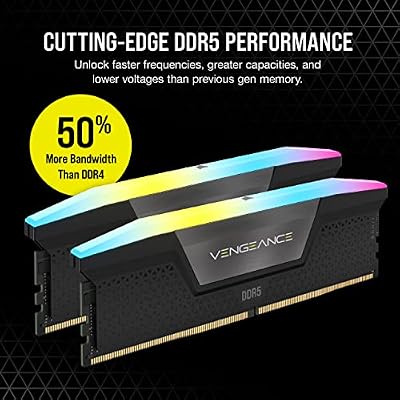
1. Corsair Vengeance RGB Pro 32GB (2x16GB) DDR4 3200 (PC4-25600) C16

CORSAIR Vengeance RGB DDR5 RAM 32GB (2x16GB) Up to 6000MHz CL30-36-36-76 1.40V AMD EXPO Intel XMP Desktop Computer Memory - Gray (CMH32GX5M2B6000Z30K)


As an Amazon Associate we earn from qualifying purchases. Product prices and availability are accurate as of the date/time indicated.
The Corsair Vengeance RGB Pro 32GB kit is our lead pick for video editing because it nails the capacity editors actually need and looks the part doing it. It delivers 32GB across two 16GB modules at 3200MHz with a tight CL16 timing, topped with Corsair’s well-regarded RGB lighting and iCUE control. At around $130 it pairs the editing-friendly 32GB capacity with attractive looks at a strong price.
For video editing this is exactly the intent it serves. The 32GB capacity lets an editor keep more of a timeline, cached previews and effect data in memory, which keeps scrubbing and playback smooth and reduces the disk-swapping that causes stutters on a 16GB system. The dual-channel layout feeds the CPU the bandwidth editing software loves, the CL16-at-3200 balance keeps it responsive, and the RGB suits a creator who also enjoys a good-looking build. For 32GB of capable, dual-channel editing memory, this kit is the standout.
Pros: 32GB capacity ideal for editing, dual-channel CL16 3200, attractive iCUE RGB.
Cons: RGB adds a little cost; 3200MHz rather than the fastest DDR4.
2. CORSAIR VENGEANCE LPX DDR4 RAM 32GB (2x16GB) Up to 3200MHz CL16-20-20-38

CORSAIR Vengeance LPX DDR4 RAM 32GB (2x16GB) Up to 3200MHz CL16-20-20-38 1.35V Intel XMP AMD EXPO Computer Memory – Black (CMK32GX4M2E3200C16)


As an Amazon Associate we earn from qualifying purchases. Product prices and availability are accurate as of the date/time indicated.
The Corsair Vengeance LPX 32GB kit is the low-profile workhorse pick for editors. It offers the same editing-friendly 32GB capacity across two 16GB modules at up to 3200MHz with CL16, in Corsair’s famously slim LPX heat spreaders that clear tall coolers and tight cases. At around $220 it is a proven, no-nonsense kit for a serious editing workstation.
For video editing, the LPX 32GB kit prioritises substance over flash. The 32GB capacity comfortably holds large timelines and caches so the system rarely resorts to disk swapping, the dual-channel CL16-at-3200 configuration keeps playback and scrubbing responsive, and the low-profile design fits builds where RGB modules would foul the CPU cooler. Corsair’s LPX line has a long track record of reliability and broad compatibility. For a dependable, clearance-friendly 32GB editing kit, the Vengeance LPX is an easy recommendation.
Pros: 32GB editing capacity, dual-channel CL16 3200, low-profile LPX clearance, reliable.
Cons: No RGB; plain styling, and priced above some 32GB rivals.
3. G.SKILL RipjawsV Series DDR4 RAM (XMP) 32GB (2x16GB) 3200MT/s CL16-18-18-38

G.SKILL RipjawsV Series DDR4 RAM (XMP) 32GB (2x16GB) Up to 3200MT/s* CL16-18-18-38 1.35V Intel AMD Desktop Computer Memory U-DIMM - Black (F4-3200C16D-32GVK)


As an Amazon Associate we earn from qualifying purchases. Product prices and availability are accurate as of the date/time indicated.
The G.SKILL Ripjaws V 32GB kit is the value 32GB performance pick. It matches the desirable editing spec — 32GB across two 16GB modules at 3200MT/s with a tight CL16 timing — and supports XMP for one-click setup to its rated speed. At around $240 it is a popular, well-proven kit with a low-profile heat spreader and a strong compatibility track record for editing builds.
For video editing, the Ripjaws V delivers the capacity and bandwidth that keep a timeline fluid. The 32GB capacity holds large projects, previews and effect caches in memory so the editor scrubs and plays back smoothly without disk-swapping stutters, the dual-channel CL16-at-3200 layout keeps it responsive, and XMP makes hitting the rated speed effortless in the BIOS. G.SKILL’s reputation for solid DDR4 adds confidence. For a dependable, tight-timing 32GB editing kit that just works, the Ripjaws V is a smart choice.
Pros: 32GB editing capacity, dual-channel CL16 3200MT/s, easy XMP, trusted reliability.
Cons: XMP must be enabled in BIOS for full speed; plain styling.
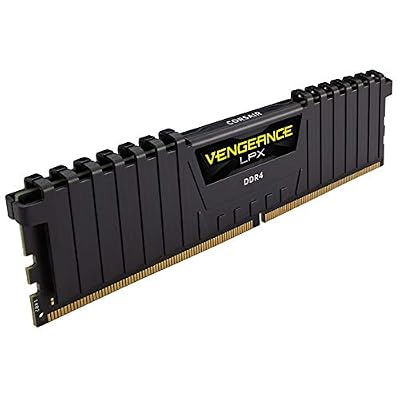
4. CORSAIR VENGEANCE LPX DDR4 RAM 16GB (2x8GB) 3600MHz CL18-22-22-42

CORSAIR VENGEANCE LPX DDR4 RAM 16GB (2x8GB) 3600MHz CL18-22-22-42 1.35V Intel AMD Desktop Computer Memory - Black (CMK16GX4M2D3600C18)

As an Amazon Associate we earn from qualifying purchases. Product prices and availability are accurate as of the date/time indicated.
The Corsair Vengeance LPX 16GB 3600MHz kit is the higher-speed starter pick. It is a 2x8GB dual-channel kit that steps the frequency up to 3600MHz with a CL18 timing, in the slim low-profile LPX design. At around $130 it suits an editor on a 16GB budget who wants extra memory bandwidth from a faster data rate.
For video editing, this kit is best understood as an entry-level capacity at a higher speed. 16GB is the practical minimum for editing — fine for shorter projects, lighter codecs and 1080p work, though larger 4K timelines will benefit from more — and the 3600MHz frequency gives the dual-channel pair extra bandwidth that editing software can use. The low-profile LPX form fits tight builds. If you are starting at 16GB but want the faster data rate, and plan to add a second matched kit later, this is a sensible, quick option.
Pros: Higher 3600MHz speed, dual-channel 16GB, low-profile LPX, extra bandwidth for editing.
Cons: 16GB is modest for heavy 4K editing; CL18 is looser than CL16.
5. Corsair Vengeance LPX DDR4 RAM 16GB (2x8GB) 3200MHz CL16-18-18-36

CORSAIR Vengeance DDR5 32GB (2 x 16GB) Up to 6000MHz AMD Intel RAM | Desktop Gaming Memory, AMD EXPO & Intel XMP 3.0 Compatible, CL30, Grey, CMK32GX5M2B6000Z30


As an Amazon Associate we earn from qualifying purchases. Product prices and availability are accurate as of the date/time indicated.
The Corsair Vengeance LPX 16GB 3200MHz kit is the budget editing-entry pick. It is a 2x8GB dual-channel kit at 3200MHz with a tight CL16 timing, in the slim low-profile LPX design, and at around $119 it is the most affordable kit on this list. For an editor building on a budget or starting out, it covers the fundamentals.
For video editing, this kit is the affordable way to get a balanced 16GB dual-channel foundation. The 3200MHz CL16 combination is the DDR4 sweet spot for responsiveness, and the dual-channel layout delivers the bandwidth editing software expects. 16GB is the practical floor for editing — comfortable for 1080p and lighter projects, with 4K and heavy multitasking favouring 32GB — so treat this as a strong starting point you can later supplement with a matched kit. As an affordable, well-balanced entry kit for an editing build, the LPX 16GB is a sensible buy.
Pros: Affordable 16GB, dual-channel CL16 3200 sweet spot, low-profile LPX, great entry value.
Cons: 16GB limits heavy 4K timelines; best as a starting point to expand later.
6. CORSAIR VENGEANCE LPX DDR4 RAM 16GB (2x8GB) 3000MHz CL15-17-17-35

CORSAIR Vengeance RGB DDR5 RAM 32GB (2x16GB) 6400MHz CL36-48-48-104 1.35V AMD EXPO Intel XMP 3.0 Desktop Computer Memory – Gray (CMH32GX5M2B6400Z36)


As an Amazon Associate we earn from qualifying purchases. Product prices and availability are accurate as of the date/time indicated.
Rounding out the list is the Corsair Vengeance LPX 16GB 3000MHz kit, the tight-timing pick. It is a 2x8GB dual-channel kit running at 3000MHz with a notably tight CL15 timing, in the slim low-profile LPX design. It offers a responsive, low-latency 16GB foundation for an editing build, with the same broad compatibility the LPX line is known for.
For video editing, this kit trades a little frequency for a tighter CL15 timing, which keeps memory response snappy. The 3000MHz dual-channel pair still delivers solid bandwidth for editing software, and the low CAS latency aids responsiveness when scrubbing and switching clips. As with the other 16GB kits here, it is best seen as a capable entry capacity — ideal for 1080p and lighter projects, with 4K and heavier work favouring 32GB — and the slim LPX form fits tight builds. For a low-latency 16GB editing foundation, it is a dependable, well-built option that rounds out the list.
Pros: Tight CL15 timing, dual-channel 16GB, low-profile LPX, responsive and reliable.
Cons: 16GB capacity and 3000MHz speed suit lighter editing more than heavy 4K.
How to Choose RAM for Video Editing
For video editing, capacity is the single most important spec, more so than for most other tasks. Editors hold large timelines, cached previews and effect data in memory, and running short forces the system to swap to disk, where stuttering playback, laggy scrubbing and slow saves appear. 16GB — as on the Vengeance LPX 16GB kits here — is the practical floor, fine for 1080p and lighter projects, while 32GB kits such as the Vengeance RGB Pro, LPX 32GB and Ripjaws V give the headroom that 4K timelines, heavy effects and multitasking really want. Buy as much capacity as your projects and budget allow.
Always buy RAM as a matched dual-channel kit rather than single modules. Two modules running in dual channel deliver markedly more memory bandwidth than a single stick of the same total capacity, and editing software is bandwidth-hungry, so this matters. Every kit on this list is a matched 2x8GB or 2x16GB pair for exactly that reason. The kits are also tested to run together at their rated speed and timing, which avoids the compatibility headaches of mixing mismatched sticks — important for a stable editing workstation.
Speed and timing matter, but they come after capacity for editing. A 3200MHz kit with a tight CL16 timing — the configuration shared by the Vengeance RGB Pro, LPX 32GB and Ripjaws V — is the DDR4 sweet spot, balancing strong bandwidth with snappy response. A faster 3600MHz kit like the LPX 16GB adds bandwidth at a slightly looser timing, while a tight CL15 kit like the LPX 3000MHz prioritises low latency. The differences are real but secondary: a 32GB kit at 3200 CL16 will serve an editor far better than a 16GB kit at a higher speed.
Finally, confirm compatibility and remember to enable the rated speed. These are all DDR4 kits, so check your motherboard accepts DDR4 and supports the speed you choose, and note that kits rated at 3200MHz or 3600MHz usually run at a slower default until you enable their XMP profile in the BIOS — do not skip that step. Decide on your capacity first (32GB for serious 4K work, 16GB as a budget start you can expand), buy a matched dual-channel kit, aim for a sensible speed and timing, and pick the kit on this list that fits your editing workload. That is how you keep a timeline responsive.
Frequently Asked Questions
How much RAM do I need for video editing?
Capacity is the priority for editing. 16GB, like the Vengeance LPX 16GB kits here, is the practical floor — fine for 1080p and lighter projects — but it can fill quickly with larger files and effects. For 4K timelines, heavy effects and comfortable multitasking, a 32GB kit such as the Vengeance RGB Pro, LPX 32GB or Ripjaws V gives valuable headroom and keeps playback smooth. Buy as much capacity as your projects and budget allow.
Does RAM speed matter for video editing?
It matters, but less than capacity. A 3200MHz kit with a tight CL16 timing — the sweet spot shared by several kits here — gives a good balance of bandwidth and responsiveness, and editing software does benefit from memory bandwidth. However, a larger 32GB kit at 3200 CL16 will help an editor far more than a smaller 16GB kit at a higher speed. Get the capacity right first, then optimise speed and timing.
Why does my editor stutter or lag during playback?
Often it is running short on RAM. When memory fills, the system swaps data to disk, which is far slower, causing the laggy scrubbing, stuttering previews and slow saves editors dread. Moving from 16GB to a 32GB kit like the Vengeance RGB Pro lets the application keep more of the timeline and caches in fast memory, which commonly smooths out playback and scrubbing on demanding projects.
Should I buy one RAM module or a matched kit?
Always buy a matched dual-channel kit where you can. Two modules in dual channel deliver markedly more bandwidth than a single stick of the same total capacity, and editing software is bandwidth-hungry. Matched kits — every option on this list is a 2x8GB or 2x16GB pair — are also tested to run together at their rated speed and timing, avoiding the instability that can come from mixing mismatched modules in an editing workstation.
Related Guides
- Best RAM for Gaming
- Best DDR4 RAM Kits
- Best NVMe SSDs for Editing
- Best CPUs for Video Editing
- Best Monitors for Content Creation
- Best Budget Gaming Setup
Affiliate Disclosure: As an Amazon Associate, we earn from qualifying purchases. If you click a link and make a purchase, we may earn a small commission at no extra cost to you. Prices and availability are accurate as of publication and may change.










