

Photo editing is one of the most memory-hungry things you can do on a PC. The moment you stack adjustment layers in Photoshop, stitch a panorama, open a folder of 40-megapixel RAW files in Lightroom, or run a batch export, your system starts holding huge amounts of uncompressed image data in RAM. When it runs out, the application falls back to slow scratch-disk swapping and everything turns sluggish. That is why, for photo work, capacity is the single most important spec — more than headline frequency or flashy timings. This guide rounds up the best RAM for photo editing in 2026, leading with the 32GB kits that give your editor the headroom it craves.
- Best RAM for Photo Editing at a Glance
- 1. Crucial 32GB DDR4 RAM Kit (2x16GB) 3200MHz CL22 Laptop Memory (SODIMM)
- 2. Corsair Vengeance RGB Pro 32GB (2x16GB) DDR4 3200 (PC4-25600) C16 Desktop Memory
- 3. CORSAIR Vengeance LPX 32GB (2x16GB) DDR4 up to 3200MHz CL16 Desktop Memory
- 4. CORSAIR Vengeance LPX 16GB (2x8GB) DDR4 3600MHz CL18 Desktop Memory
- 5. Corsair Vengeance LPX DDR4 16GB (2x8GB) 3200MHz CL16 Desktop Memory
- 6. CORSAIR Vengeance LPX 16GB (2x8GB) DDR4 3000MHz CL15 Desktop Memory
- How to Choose RAM for Photo Editing
- Frequently Asked Questions
- Related Guides
- Related Articles
- Related Guides
Every kit here is DDR4, the standard the vast majority of mainstream and older editing rigs still use, and our picks are ordered with the photo editor’s priorities front and centre: we lead with high-capacity 32GB kits, then cover solid 16GB options for entry-level or laptop-paired setups and tighter budgets. Prices run from around $119 to around $245. One important note up front: the Crucial 32GB kit is laptop (SODIMM) memory, which is perfect if you edit on a notebook but will not fit a desktop — we flag the form factor on every product so you buy the right shape. Below is an at-a-glance comparison, then a closer look at each kit and a buyer’s guide focused on what actually keeps a photo workflow smooth.
As an Amazon Associate we earn from qualifying purchases at no extra cost to you.


🛒 Best Price Today on Amazon
Prime members get fast, free shipping on everything above, plus member-only deals. New members get a 30-day free trial — cancel anytime.
Best RAM for Photo Editing at a Glance
| Memory Kit | Best For | Standout Spec | Approx Price |
|---|---|---|---|
| Crucial 32GB DDR4 3200 CL22 (Laptop SODIMM) | 32GB on a laptop | 2x16GB SODIMM, 3200MHz | around $245 |
| Corsair Vengeance RGB Pro 32GB 3200 C16 | Desktop 32GB with RGB | 2x16GB, CL16, RGB | around $130 |
| Corsair Vengeance LPX 32GB up to 3200 CL16 | Low-profile 32GB build | 2x16GB, CL16, low profile | around $223 |
| Corsair Vengeance LPX 16GB 3600 CL18 | Entry editing, faster clocks | 2x8GB, 3600MHz | around $130 |
| Corsair Vengeance LPX 16GB 3200 CL16 | Budget 16GB starter | 2x8GB, CL16, low profile | around $119 |
| Corsair Vengeance LPX 16GB 3000 CL15 | Tight-timing 16GB value | 2x8GB, CL15 | around $115 |
1. Crucial 32GB DDR4 RAM Kit (2x16GB) 3200MHz CL22 Laptop Memory (SODIMM)

Crucial 32GB Kit (16GBx2), 260-pin SODIMM, DDR4 PC4-19200,
As an Amazon Associate we earn from qualifying purchases. Product prices and availability are accurate as of the date/time indicated.
The Crucial 32GB DDR4-3200 kit is the photo editor’s pick for one specific but very common scenario: editing on a laptop. It is a 2x16GB SODIMM kit — laptop form factor — rated at 3200MHz, and 32GB is the capacity sweet spot for serious photo work, giving Lightroom and Photoshop room to hold large RAW files and deep layer stacks without choking. At around $245 it is the premium option here, and the price reflects both the 32GB capacity and the laptop modules.
This is the kit to buy if your editing rig is a notebook with two SODIMM slots, because doubling a typical laptop to 32GB transforms how it handles high-resolution images. Crucial is a Micron brand with an excellent reliability and compatibility record, and the modules downclock gracefully to match older laptop chipsets. Just be certain about the form factor: these are SODIMMs and will not fit a desktop motherboard. For 32GB of dependable photo-editing memory in a laptop, this Crucial kit is the natural choice.
Pros: Full 32GB for layers and RAW files, laptop SODIMM form factor, reliable Crucial/Micron quality.
Cons: Laptop SODIMM only — will not fit a desktop; highest price here.
2. Corsair Vengeance RGB Pro 32GB (2x16GB) DDR4 3200 (PC4-25600) C16 Desktop Memory

CORSAIR Vengeance RGB DDR5 RAM 32GB (2x16GB) Up to 6000MHz CL30-36-36-76 1.40V AMD EXPO Intel XMP Desktop Computer Memory - Gray (CMH32GX5M2B6000Z30K)
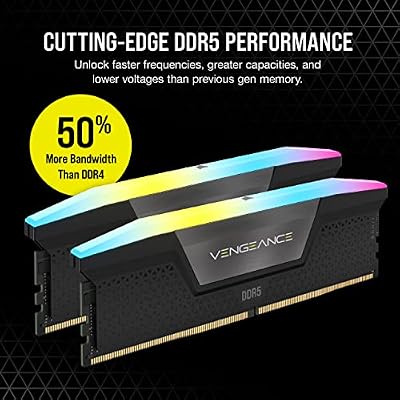


As an Amazon Associate we earn from qualifying purchases. Product prices and availability are accurate as of the date/time indicated.
The Corsair Vengeance RGB Pro 32GB kit is the desktop photo-editing pick that looks as good as it performs. It delivers the all-important 32GB across two 16GB DIMMs at 3200MHz with a tight CL16 timing, and tops it with Corsair’s well-regarded RGB lighting tied into iCUE. For a creator’s desktop where 32GB of headroom is the goal and a little glow is welcome, it hits the mark.
This is the kit for the photographer building or upgrading a desktop tower who wants generous capacity without overthinking it. The 32GB comfortably holds large RAW files, multi-layer compositions and several open applications at once, the CL16 timing at 3200MHz keeps the memory responsive, and the RGB lets the build match a coordinated setup. These are full-height DIMMs for a desktop, so check clearance under tall air coolers. For desktop photo work with style, the Vengeance RGB Pro is an easy recommendation.
Pros: Full 32GB desktop capacity, tight CL16 at 3200MHz, attractive iCUE RGB lighting.
Cons: Taller RGB heat spreaders can clash with big air coolers; desktop DIMMs only.
3. CORSAIR Vengeance LPX 32GB (2x16GB) DDR4 up to 3200MHz CL16 Desktop Memory

CORSAIR Vengeance LPX DDR4 RAM 32GB (2x16GB) Up to 3200MHz CL16-20-20-38 1.35V Intel XMP AMD EXPO Computer Memory – Black (CMK32GX4M2E3200C16)


As an Amazon Associate we earn from qualifying purchases. Product prices and availability are accurate as of the date/time indicated.
The Corsair Vengeance LPX 32GB kit is the low-profile desktop pick for photo editors who value clearance and quiet competence over lighting. It provides the same desirable 32GB at up to 3200MHz with a CL16 timing, all in Corsair’s famously slim LPX heat spreaders that slide under tall CPU coolers and into tight cases. At around $223 it is a proven workhorse for a serious editing tower.
This is the kit for the photographer who wants 32GB of reliable memory and would rather not gamble on cooler clearance or pay for RGB. The 32GB capacity keeps Lightroom catalogues, Photoshop layers and background apps running smoothly together, the CL16 latency keeps things snappy, and the low-profile design fits practically any build. It is a long-standing favourite among creators precisely because it just works. For dependable, no-drama 32GB desktop memory for photo editing, the Vengeance LPX is hard to fault.
Pros: Full 32GB at CL16 3200MHz, low-profile heat spreaders for easy cooler clearance, proven reliability.
Cons: No RGB and plain styling; desktop DIMMs, not for laptops.
4. CORSAIR Vengeance LPX 16GB (2x8GB) DDR4 3600MHz CL18 Desktop Memory

CORSAIR VENGEANCE LPX DDR4 RAM 16GB (2x8GB) 3600MHz CL18-22-22-42 1.35V Intel AMD Desktop Computer Memory - Black (CMK16GX4M2D3600C18)
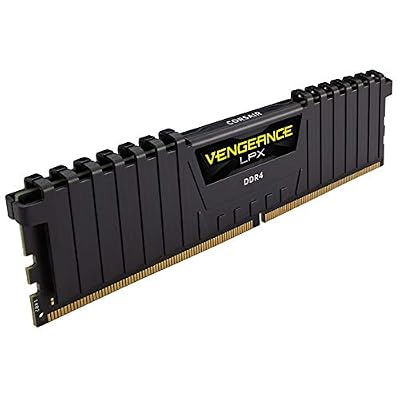

As an Amazon Associate we earn from qualifying purchases. Product prices and availability are accurate as of the date/time indicated.
The Corsair Vengeance LPX 16GB 3600MHz kit is the entry editing pick for those who want faster clocks at a smaller capacity. It is a 2x8GB desktop kit running at 3600MHz with a CL18 timing in the slim LPX form factor, trading the 32GB headroom of the kits above for higher bandwidth at around $130. For lighter photo work or a starter editing PC, it is a sensible stepping stone.
This is the kit to choose if you edit smaller images, work with fewer layers, or are assembling a budget desktop and plan to add a second 16GB kit later. The 3600MHz speed gives the memory subsystem extra bandwidth, the low-profile design fits anywhere, and Corsair’s quality is dependable. Be honest with yourself, though: heavy RAW editing and big panoramas will want more than 16GB, so treat this as an entry point rather than a forever solution for demanding photo work.
Pros: Faster 3600MHz clocks, low-profile LPX design, good entry point for lighter editing.
Cons: 16GB is tight for heavy RAW/layer work; CL18 is looser than CL16 kits.
5. Corsair Vengeance LPX DDR4 16GB (2x8GB) 3200MHz CL16 Desktop Memory

CORSAIR Vengeance DDR5 32GB (2 x 16GB) Up to 6000MHz AMD Intel RAM | Desktop Gaming Memory, AMD EXPO & Intel XMP 3.0 Compatible, CL30, Grey, CMK32GX5M2B6000Z30


As an Amazon Associate we earn from qualifying purchases. Product prices and availability are accurate as of the date/time indicated.
The Corsair Vengeance LPX 16GB 3200MHz kit is the budget 16GB starter for photo editors. It pairs the DDR4 sweet-spot combination of a 3200MHz data rate and a tight CL16 timing across two 8GB DIMMs, in the slim LPX form factor, for around $119 — the most affordable way onto this list. For an entry editing build it covers the basics well.
This is the kit for someone starting out in photo editing on a tight budget, or for pairing with a second matching kit down the road to reach 32GB. The CL16 latency at 3200MHz keeps everyday editing responsive, the low-profile heat spreaders clear any cooler, and Corsair’s reputation for reliability removes the guesswork. As with the other 16GB kits here, understand that ambitious RAW and multi-layer work will eventually push past 16GB — but as an affordable, dependable foundation, this kit delivers.
Pros: DDR4 sweet-spot 3200MHz CL16, lowest price here, low-profile and reliable.
Cons: 16GB limits heavy editing; you may want to upgrade to 32GB later.
6. CORSAIR Vengeance LPX 16GB (2x8GB) DDR4 3000MHz CL15 Desktop Memory

CORSAIR Vengeance RGB DDR5 RAM 32GB (2x16GB) 6400MHz CL36-48-48-104 1.35V AMD EXPO Intel XMP 3.0 Desktop Computer Memory – Gray (CMH32GX5M2B6400Z36)


As an Amazon Associate we earn from qualifying purchases. Product prices and availability are accurate as of the date/time indicated.
Rounding out the photo-editing list is the Corsair Vengeance LPX 16GB 3000MHz kit, the tight-timing value pick. It runs at 3000MHz with an especially tight CL15 timing across two 8GB DIMMs in the slim LPX form factor. The slightly lower frequency is offset by that quick CL15 latency, making it a responsive, affordable 16GB option for an entry editing PC.
This is the kit for the budget builder who appreciates that low latency, not just raw megahertz, contributes to a snappy memory subsystem. The CL15 timing keeps response quick, the 16GB capacity handles lighter photo editing and everyday multitasking, and the low-profile LPX design fits any case or cooler. Like the other 16GB kits, it is best viewed as an entry point for demanding RAW work, but for value-focused editors who want tight timings without paying for 32GB up front, it is a smart, dependable choice that completes the list.
Pros: Very tight CL15 latency, low-profile design, affordable and reliable 16GB.
Cons: 3000MHz is slightly slower than the 3200/3600 kits; 16GB caps heavy editing.
How to Choose RAM for Photo Editing
For photo editing, start with capacity, because it is the spec that most directly governs how smoothly your editor runs. Modern RAW files, deep layer stacks, panorama stitching and batch exports all consume large amounts of memory, and once you exhaust it the application swaps to disk and grinds. 32GB — as offered by the Crucial, Vengeance RGB Pro and Vengeance LPX 32GB kits here — is the comfortable target for serious work in Lightroom and Photoshop, while 16GB suits lighter editing or a starter build you intend to expand. When in doubt, buy more capacity.
Form factor is the make-or-break detail that catches people out. Desktop motherboards take full-size DIMMs, while laptops use smaller SODIMM modules — the two are not interchangeable. Of the kits here, the Crucial 32GB is a SODIMM (laptop) kit and the rest are desktop DIMMs, so confirm what your machine accepts before you order. If you edit on a notebook, the Crucial kit is the standout 32GB option; if you are building or upgrading a tower, choose one of the Corsair desktop kits.
Speed and timing matter, but less than capacity for this workload. All these kits are DDR4, and the classic sweet spot is 3200MHz at a tight CL16, as on the Vengeance RGB Pro, the LPX 32GB and the LPX 16GB 3200 kits. A faster 3600MHz kit (the LPX 16GB 3600) adds bandwidth, while a tight CL15 at 3000MHz (the LPX 16GB 3000) trades a little frequency for quicker response. For photo editing these differences are real but secondary — do not sacrifice 16GB extra capacity to chase a faster clock.
Finally, buy a matched dual-channel kit, enable XMP, and respect cooler clearance. Every kit here is a matched 2-DIMM (or 2-SODIMM) set tested to run together in dual channel, which delivers far more bandwidth than a lone module. After installing, enable the XMP profile in the BIOS so the kit actually runs at its rated speed rather than a slower default. On a desktop, the RGB Pro’s taller heat spreaders can clash with large air coolers, whereas the low-profile LPX kits fit almost anywhere. Set your capacity first, match the form factor to your machine, then pick the kit on this list that fits your budget and build.
Frequently Asked Questions
How much RAM do I need for photo editing?
For serious photo editing, aim for 32GB. Large RAW files, many adjustment layers, panorama stitching and batch exports consume a lot of memory, and 32GB — as in the Crucial, Vengeance RGB Pro and Vengeance LPX 32GB kits here — gives Lightroom and Photoshop the headroom to stay responsive. 16GB is workable for lighter editing or smaller images, but heavy work will quickly appreciate the extra capacity.
Will the Crucial 32GB kit work in my desktop?
No — the Crucial 32GB kit in this guide is laptop (SODIMM) memory and will not fit a desktop motherboard, which uses full-size DIMMs. It is an excellent choice for upgrading a notebook with two SODIMM slots to 32GB. For a desktop tower, choose one of the Corsair desktop kits, such as the Vengeance RGB Pro or Vengeance LPX 32GB.
Does RAM speed matter for photo editing, or just capacity?
Capacity matters most by a wide margin — running out of RAM forces slow disk swapping that no amount of speed can fix. Once you have enough capacity, a faster kit (like the 3600MHz LPX) or a tighter timing (like the CL15 LPX) offers a modest extra benefit. The practical advice is simple: never trade away capacity to buy a faster clock for photo work.
Should I get DDR4 or DDR5 for editing?
It depends entirely on your motherboard and CPU platform — they are not interchangeable, and every kit in this guide is DDR4. If your existing or planned build is a DDR4 platform, these kits are ideal and excellent value. If you are building a brand-new system on a DDR5 platform, you would buy DDR5 instead. Confirm what your board supports before purchasing.
Related Guides
- Best RAM for Gaming
- Best Monitors for Content Creation
- Best NVMe SSDs
- Best DDR4 RAM Kits
- Best Gaming PCs
- Best CPUs for Your Build
Affiliate Disclosure: As an Amazon Associate, we earn from qualifying purchases. If you click a link and make a purchase, we may earn a small commission at no extra cost to you. Prices and availability are accurate as of publication and may change.










