

- Top Pick: Amazon Basics Stereo 2.0 Speakers for PC or Laptop with Volume Control, 3.5mm Aux Input, USB-Powered, 1 Pair, Black
- Best Value: FUNLOGY Speaker – 14W Stereo PC Speakers, USB Powered, Compact Size with 30° Tilt Design, Volume Dial Control, for Desktop, Laptop, Monitor, Gaming Consoles, Black
- Premium Choice: Amazon Basics USB-Powered Computer Speakers with Volume Control for Desktop or Laptop PC, Compact Size, Headphone Jack, Portable, Plug-N-Play, Black
A workstation needs speakers that tell you the truth. Whether you are editing video, mixing a podcast, monitoring a call, or simply working through a long day, the goal is clear, honest desktop audio that reproduces dialogue and detail accurately rather than hyping bass for entertainment. That favours near-field designs — speakers meant to sit close on a desk and image cleanly at short range — and a balanced tuning that does not fatigue your ears over hours. This guide rounds up the best workstation speakers in 2026, from powered bookshelf monitors that lean toward a reference sound to compact 2.0 and 2.1 systems that fit any desk, so you can match clarity to your space and budget.
- Best Workstation Speakers at a Glance
- 1. Edifier R1280T Powered Bookshelf Speakers – 2.0 Active Near Field Studio Monitor
- 2. Bose Companion 2 Series III Multimedia Speakers – for PC (3.5mm AUX & PC In)
- 3. Logitech Z313 2.1 Multimedia Speaker System with Subwoofer, Full Range Audio, 50W
- 4. Logitech Z130 PC Speakers, Full Stereo Sound, Strong Bass, 3.5mm Audio Input
- 5. Logitech S150 USB Speakers with Digital Sound
- 6. Redragon GS520 RGB Desktop Speakers, 2.0 Channel PC Computer Stereo Speaker
- How to Choose Workstation Speakers
- Frequently Asked Questions
- Related Guides
- Related Articles
Our picks were chosen on what matters for desktop work: clarity and balance, near-field imaging at short range, connectivity for a PC and other sources, physical desk footprint, and value. We have included a wide spread — from a tiny USB-powered pair around $16 up to a powered bookshelf set around $120 — because the right workstation speakers depend on whether audio fidelity is central to your job or simply needs to be clean and reliable. The list spans near-field bookshelf monitors, a respected balanced multimedia pair, a 2.1 system with a subwoofer, and ultra-compact desktop options. We are honest about where each fits: some are reference-leaning, others are everyday desktop audio. Below is an at-a-glance comparison, then a closer look at each and a buyer’s guide built around clarity, connectivity and desk fit.
As an Amazon Associate we earn from qualifying purchases at no extra cost to you.







🛒 Best Price Today on Amazon
Prime members get fast, free shipping on everything above, plus member-only deals. New members get a 30-day free trial — cancel anytime.
Best Workstation Speakers at a Glance
| Speakers | Best For | Standout Spec | Approx Price |
|---|---|---|---|
| Edifier R1280T Powered Bookshelf | Reference-style clarity | 2.0 active near-field monitors | around $120 |
| Bose Companion 2 Series III | Balanced everyday work | Refined 2.0, PC and aux inputs | around $100 |
| Logitech Z313 2.1 System | Fuller sound with sub | 2.1 with subwoofer, 50W system | around $60 |
| Logitech Z130 PC Speakers | Tidy desktop stereo | Compact 2.0, 3.5mm input | around $25 |
| Logitech S150 USB Speakers | Plug-and-play USB audio | USB digital sound, no power brick | around $16 |
| Redragon GS520 RGB Desktop | Budget 2.0 with lighting | 2.0 stereo, RGB, USB powered | around $28 |
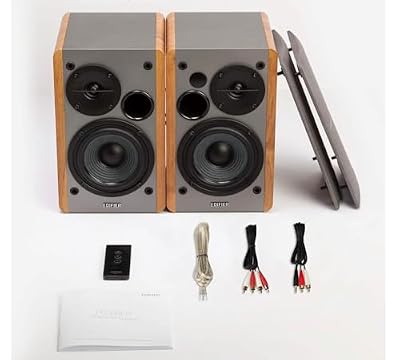
1. Edifier R1280T Powered Bookshelf Speakers – 2.0 Active Near Field Studio Monitor

Edifier R1280T Powered Bookshelf Speakers -2.0 Near Field Studio Monitor | 2.0 Active Near Field Studio Monitor Speaker - Wooden Enclosure - 42 Watts RMS Power




As an Amazon Associate we earn from qualifying purchases. Product prices and availability are accurate as of the date/time indicated.
The Edifier R1280T leads the workstation list because it brings genuine near-field monitor character to a desktop price. As a 2.0 active bookshelf pair, it is designed to sit close and image cleanly, with a relatively flat, uncoloured tuning that favours clarity over exaggerated bass. It includes physical bass and treble controls, dual RCA inputs for two sources, and a remote, all for around $120 — the most capable set here for serious desktop listening.
This is the pick for a workstation where audio clarity actually matters: editing video, monitoring a podcast, checking dialogue levels, or just wanting honest sound through a long working day. The near-field design keeps imaging tight at desk distance, the balanced tuning lets you hear detail without a bass-heavy veil, and the dual inputs let you wire in a PC and a second device at once. While not a calibrated professional reference monitor, the R1280T is the closest thing on this list and the standout choice when clarity leads.
Pros: Near-field 2.0 design, balanced reference-leaning tuning, bass/treble controls, dual RCA inputs.
Cons: Largest footprint here; not a calibrated studio reference monitor.
2. Bose Companion 2 Series III Multimedia Speakers – for PC (3.5mm AUX & PC In)

HyperX Cloud III – Wired Gaming Headset, PC, PS5, Xbox Series X|S, Angled 53mm Drivers, Spatial Audio, Memory Foam, Durable Frame, Ultra-Clear 10mm Mic, USB-C, USB-A, 3.5mm – Black




As an Amazon Associate we earn from qualifying purchases. Product prices and availability are accurate as of the date/time indicated.
The Bose Companion 2 Series III is the refined everyday-work pick. It is a compact 2.0 multimedia system tuned for clear, pleasant sound at a desk, with Bose’s signature smoothness, both a PC input and a 3.5mm aux input, and a headphone jack on the front. At around $100 it trades raw monitor neutrality for an easy, balanced presentation that is comfortable across music, video and voice all day.
This is the set to choose for a workstation where you want clean, fatigue-free audio that simply sounds good without fuss — calls, reference listening, background music and video review. The two-input layout lets you keep a PC and a phone or laptop connected together, the front headphone jack is handy for private listening, and the compact stereo pair tidies neatly onto a desk. It is more of an enjoyable, well-balanced everyday speaker than a clinical monitor, which suits the many workstations where comfort matters as much as accuracy.
Pros: Refined balanced sound, dual PC and aux inputs, front headphone jack, compact desk size.
Cons: Pricey for a 2.0 pair; tuned for pleasant listening rather than flat neutrality.
3. Logitech Z313 2.1 Multimedia Speaker System with Subwoofer, Full Range Audio, 50W
The Logitech Z313 is the fuller-sound pick, the one workstation set here with a dedicated subwoofer. It is a 2.1 system with two compact satellites and a down-firing sub, rated around 50 watts in total, with a wired control pod for volume, headphones and power. At around $60 it adds low-end weight that the 2.0 sets cannot match, for users who want more body to their desktop audio.
This is the system to choose when your workstation also doubles for media and you want a fuller, more cinematic sound without losing usable clarity for everyday tasks. The subwoofer fills in the low frequencies for video and music, the satellites keep the desk tidy, and the control pod puts volume and a headphone jack within easy reach. Be clear that a 2.1 system emphasises body and bass over the flat near-field accuracy of the bookshelf monitors — so it is the right call if you value a richer sound, and the wrong one if reference neutrality is the priority.
Pros: Adds a subwoofer for fuller low end, tidy satellites, handy wired control pod, good value.
Cons: Bass emphasis over flat accuracy; sub takes extra desk or floor space.
4. Logitech Z130 PC Speakers, Full Stereo Sound, Strong Bass, 3.5mm Audio Input

Logitech MK120 Full Size Wired Keyboard and Mouse Combo - Black | Full size wired keyboard, optical wired mouse, USB plug-and-play, Windows only, pc and laptop compatible




As an Amazon Associate we earn from qualifying purchases. Product prices and availability are accurate as of the date/time indicated.
The Logitech Z130 is the tidy desktop-stereo pick. It is a simple, compact 2.0 pair powered from the wall, with a single 3.5mm input, front-mounted volume control and a headphone jack. At around $25 it is an affordable, no-frills way to get clean stereo sound on a workstation without a subwoofer or extra cabling.
This is the set for a workstation that just needs reliable, clear stereo for calls, video and everyday audio in a small space. The compact satellites take up little room, the single 3.5mm connection is plug-and-play with any PC or laptop, and the front controls are easy to reach. It is marketed with ‘strong bass,’ but in practice this is a modest, everyday desktop speaker rather than a monitor — a sensible, low-cost pick when you want simple, dependable sound and do not need reference accuracy or heavy low end.
Pros: Compact and affordable, simple 3.5mm input, front volume and headphone jack, tidy on a desk.
Cons: Everyday tuning rather than reference; limited low-end depth from small drivers.
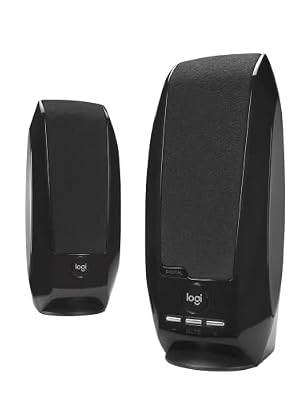
5. Logitech S150 USB Speakers with Digital Sound

Logitech S150 USB Speakers with Digital Sound


As an Amazon Associate we earn from qualifying purchases. Product prices and availability are accurate as of the date/time indicated.
The Logitech S150 is the plug-and-play USB pick, and at around $16 it is the cheapest set on this list. It draws both audio and power over a single USB connection, so there is no power brick and no separate audio cable — just one lead to your PC. As a tiny, clutter-free desktop pair, it is built for convenience rather than fidelity.
This is the set to choose for a secondary workstation, a tidy minimalist desk, or any PC where you simply need clear voice and basic audio with zero fuss. USB power and digital audio mean one cable and instant setup, the compact satellites barely occupy any space, and the digital connection avoids analogue hiss. It will not satisfy a critical editor — the small drivers and budget build are everyday-grade — but for hassle-free calls, video and light listening on a clean desk, the S150 is a practical, inexpensive choice.
Pros: Single-cable USB audio and power, no power brick, ultra-compact, very affordable.
Cons: Small drivers and budget sound; everyday convenience rather than fidelity.
6. Redragon GS520 RGB Desktop Speakers, 2.0 Channel PC Computer Stereo Speaker
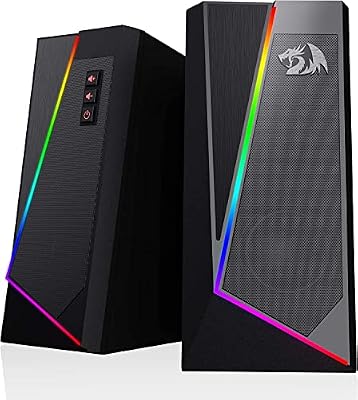
Redragon GS520 Wired 2.0 Channel Stereo Sound Desktop RGB Computer Speakers | Enhanced Auido Quality, Plug & Play USB Powered PC Gaming Speaker, 6 Colorful Backlight Modes, Easy-Access Volume Control


As an Amazon Associate we earn from qualifying purchases. Product prices and availability are accurate as of the date/time indicated.
Rounding out the list is the Redragon GS520, the budget pick with a bit of flair. It is a compact 2.0 USB-powered stereo pair with a 3.5mm audio connection and built-in RGB lighting, available for around $28. It is squarely an entertainment-leaning desktop speaker rather than a work monitor, but it covers basic workstation audio cheaply while adding some desk-side colour.
This is the set for a workstation that doubles as a casual setup and where a splash of RGB is welcome — a home office that flips to gaming after hours, for instance. USB power and a 3.5mm jack make setup simple, the compact size keeps the desk clear, and the lighting adds character. Be honest about its purpose, though: the GS520 is tuned for fun and looks more than reference clarity, so it suits light work audio and entertainment rather than critical editing. As an affordable, lively desktop pair, it rounds out the budget end of the list.
Pros: Affordable, compact USB-powered 2.0, simple 3.5mm input, RGB lighting for desk flair.
Cons: Entertainment-tuned with RGB focus; not intended as a clarity-first work monitor.
How to Choose Workstation Speakers
Choosing workstation speakers begins with deciding how important audio accuracy is to your work. If you edit video, mix audio, or rely on hearing detail and dialogue clearly, prioritise a near-field, balanced design like the Edifier R1280T that reproduces sound honestly rather than hyping bass. If you mainly need clean, pleasant audio for calls, video and background music, a refined everyday pair like the Bose Companion 2 or a simple stereo set will serve you well. Be honest with yourself about whether fidelity is central or simply needs to be reliable.
Speaker configuration shapes the character of the sound. A 2.0 setup — two speakers, no subwoofer — like the Edifier, Bose, Logitech Z130 and S150, keeps things tidy and, in monitor designs, tends toward flatter, more accurate output ideal for clarity-focused work. A 2.1 system like the Logitech Z313 adds a subwoofer for fuller low end, which suits a workstation that doubles for media but emphasises body over neutrality. Choose 2.0 for accuracy and a clean desk, or 2.1 if you want richer, more cinematic sound.
Connectivity and power delivery affect how the speakers fit your setup. Check the inputs: dual-input sets like the Edifier and Bose let you connect a PC and a second device at once, while single-input pairs are simpler but tie up to one source. Consider how they are powered too — a USB-powered pair like the S150 needs only one cable and no wall adapter, ideal for a minimalist or secondary desk, whereas mains-powered speakers usually drive larger, fuller-sounding drivers. Match the connections and power to your devices and how tidy you want the desk to be.
Finally, weigh the physical footprint against your desk and set a budget that reflects the role. Bookshelf monitors like the Edifier deliver the best sound but need real desk space, while compact pairs like the Z130, S150 and GS520 tuck into tight setups. Decide how much room you can give up, be realistic about whether you need reference clarity or just clean everyday audio, and pick the workstation speakers on this list that match your priority. The best workstation speakers are the ones that present your work accurately, fit your desk, and stay comfortable to listen to all day.
Frequently Asked Questions
What is the difference between workstation speakers and regular PC speakers?
Workstation speakers prioritise clear, balanced, near-field audio so you can hear detail and dialogue accurately for editing, calls and long work sessions, rather than emphasising bass for entertainment. Near-field designs like the Edifier R1280T are meant to sit close on a desk and image cleanly at short range. Many regular PC speakers are tuned for fun and bass instead, which is fine for casual use but less ideal when clarity is the job.
Do I need a subwoofer for a workstation?
Not usually. For clarity-focused work, a 2.0 setup without a subwoofer — like the Edifier or Bose pairs — gives flatter, more accurate sound and a tidier desk. A 2.1 system with a subwoofer, such as the Logitech Z313, adds fuller low end that suits a workstation doubling for media and music, but it emphasises body over neutrality. Choose a sub only if you value a richer sound over flat accuracy.
Are powered bookshelf monitors better than compact desktop speakers for work?
For audio fidelity, generally yes. Powered bookshelf monitors like the Edifier R1280T use larger drivers and near-field tuning that reproduce detail more accurately than tiny desktop pairs, which is why they lead this list for clarity. The trade-off is size: they need real desk space. Compact pairs like the Logitech Z130 or S150 are tidier and cheaper, and fine when clean everyday audio matters more than reference accuracy.
Can I use one set of speakers for both work and gaming?
Yes. A balanced pair like the Edifier R1280T or Bose Companion 2 handles work clarity and games and media comfortably, while a 2.1 system like the Z313 adds low-end weight for entertainment. If you want a livelier, casual setup with lighting, the Redragon GS520 leans toward fun over accuracy. Decide whether work clarity or entertainment body matters more, then pick the set that fits both your desk and your priorities.
Related Guides
- Best PC Speakers
- Best Computer Speakers
- Best Studio Monitors
- Best Gaming Headsets
- Best Microphones for Streaming
- Best Desks for Your Setup
Affiliate Disclosure: As an Amazon Associate, we earn from qualifying purchases. If you click a link and make a purchase, we may earn a small commission at no extra cost to you. Prices and availability are accurate as of publication and may change.










