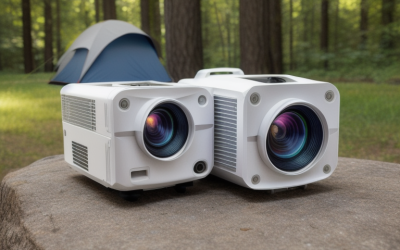
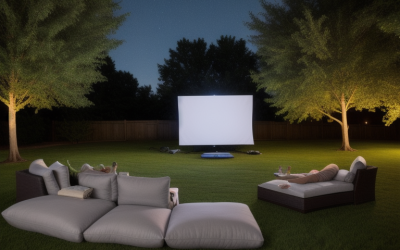
Budget projectors come in two flavors that look similar in a search grid: tiny all-in-one smart units that promise big screens, and more traditional home cinema models from established brands. They solve different problems. One group is built for convenience and a bedroom wall; the other is built to produce a brighter, more reliable picture in a real living room.
This guide is for first-time buyers, students, gamers who want a second screen, and families planning backyard movie nights without moving into premium territory. The trade-offs to focus on are brightness, since lower-tier models vary widely, native resolution versus “supports 4K” claims, and whether you want built-in apps or a cleaner picture from a plain HDMI device.
Quick Picks
| Product | Best for | Key spec from the title |
|---|---|---|
| YGSKK Mini Projector | Bedroom movie nights | 1080P, Wi-Fi, Bluetooth, built-in apps, electric focus |
| Aurzen Roku TV D1R air | Portable and outdoor streaming | Native 1080P, Roku TV, USB-C powered |
| Wireless Mini Projector with WIFI 6 | Flexible screen sizes | Wi-Fi 6, Bluetooth, 17 to 130-inch screen range |
| Epson Home Cinema 980 | A traditional living-room image | 3-chip 3LCD, 1080p |
| Epson EpiqVision Flex CO-FH02 | Bright, portable all-rounder | Full HD, 3,000 lumens, Android TV, Bluetooth |
| Android 14 Smart Projector | Quiet smart streaming | Native 1080P, 550 ANSI lumens, under 30dB |
How to Choose
Brightness and the room you have
Brightness is the spec that decides whether a projector is usable in daylight. ANSI lumens is a standardized measurement, while plain “lumens” or “color/white brightness” claims can be looser. A dark room forgives modest numbers, but a living room with windows needs more light. Read the listing for the type of figure and check the full spec sheet when it is unclear. As a rule of thumb, larger pictures spread the same light thinner, so pick a screen size that suits your room rather than the maximum on the box.
Native versus supported resolution
Native resolution is what the imaging chip actually produces. A projector may accept a 4K signal and still show a 1080p image, which is common at this tier. Look for the word “native” in the title or bullets, and be skeptical of projectors that list several resolutions without saying which one is real.
Light technology and picture quality
3LCD projectors show red, green and blue at the same time, which means color brightness tends to match white brightness. DLP and single-chip designs behave differently. The Epson listings name 3LCD, so look for equivalent terms elsewhere. Ask yourself whether you are watching in a dim room or a bright one, and weigh picture uniformity accordingly.
Smart features, inputs and noise
Built-in apps are convenient, but an HDMI port gives you the freedom to plug in a console, a PC or your own streaming stick. Check which smart platform the projector uses, how many ports it has and whether the title gives a noise level in decibels. Fan noise matters more in a quiet bedroom than at a backyard party.
The 6 Best Options
YGSKK Mini Projector

A compact smart projector for a bedroom or dorm. The listing names Wi-Fi, Bluetooth, built-in apps and an electric focus feature, which means you can set it down, adjust it and start watching without a separate streaming device. It targets casual viewing rather than a theater setup. A stand or small tripod helps, since the right height and angle matter as much as the focus motor, and a blank wall or a pull-down screen will give the best result.
- Strength: electric focus makes setup easy.
- Strength: Wi-Fi, Bluetooth and apps in one small box.
- Limit: the title is cut off, so check the full spec sheet for brightness and native resolution.
Skip it if you need a bright picture for a room with daylight, or if you plan to use it as the main display for daily viewing.
Aurzen Roku TV D1R air
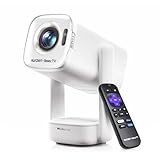
A portable projector with Roku TV built in, native 1080P and USB-C power. It suits people who know Roku, want streaming without extra hardware and may move the projector between a bedroom, a patio and a campsite with a power bank. Because it lists native 1080P, it is a safer read than projectors that only mention supported resolutions.
- Strength: Roku TV and Wi-Fi built in.
- Strength: native 1080P and USB-C power support.
- Limit: no lumen figure appears in the title.
Skip it if you want a traditional lamp-style home theater picture.
Wireless Mini Projector with WIFI 6

A generic-brand mini projector with Wi-Fi 6, Bluetooth, a rotatable design and a stated 17 to 130-inch screen range. The title mentions 4K and 1080P support, which is the phrase to read carefully: supported is not the same as native. Wide size ranges like this are also best treated as maximums, since the picture dims and softens as it grows.
- Strength: wide screen-size range from 17 to 130 inches.
- Strength: Wi-Fi 6 and Bluetooth for wireless use.
- Limit: native resolution and brightness are not clear in the title.
Skip it if you want a known brand name or published brightness data before you buy. Anyone who cares about warranty clarity and clear support channels should weigh that against the flexible size range.
Epson Home Cinema 980
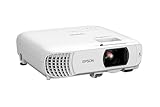
The title names a 3-chip 3LCD design with 1080p output, which suggests the most traditional picture engine on this list. It suits a living room where you want steady color and are happy to connect your own source rather than rely on built-in apps. A streaming stick, a console or a laptop will plug in without fuss, and the picture engine is the main reason to look at it.
- Strength: 3LCD technology with a 1080p image.
- Strength: an established home cinema brand.
- Limit: the title lists no lumen figure or ports, so check the full spec sheet.
Skip it if you want a built-in smart platform or a pocketable body.
Epson EpiqVision Flex CO-FH02

This model combines Full HD 1080p, 3-chip 3LCD, 3,000 lumens of both color and white brightness, Android TV and Bluetooth in a portable body. It is a strong candidate if you want the brightness to handle a lit room along with built-in streaming. The portable format also means you can carry it from the living room to the backyard for a weekend watch party.
- Strength: 3,000 lumens of color and white brightness.
- Strength: Android TV and Bluetooth for wireless use.
- Limit: the title does not detail ports, so verify HDMI options.
Skip it if you want the smallest, lightest projector or a full 4K image.
Android 14 Smart Projector

A generic-brand smart projector with Android 14, Wi-Fi 6, Bluetooth 5.4, 550 ANSI lumens, native 1080P and a stated fan noise under 30dB. It fits a quiet bedroom where you want modern wireless specs and a lower noise claim. The Android 14 label and 2026 branding in the listing point to a newer software base, but confirm which apps are supported on the spec sheet.
- Strength: 550 ANSI lumens with native 1080P.
- Strength: Wi-Fi 6, Bluetooth 5.4 and a low fan-noise claim.
- Limit: the title is cut off, so check the full spec sheet for ports and focus.
Skip it if you need much brighter output for a room with windows.
Which One Fits Your Situation
A bedroom or dorm with the lights off
The Android 14 Smart Projector and the YGSKK both fit. The first lists 550 ANSI lumens and a noise claim, and the second leans on electric focus and built-in apps.
A living room with some daylight
Look at the Epson EpiqVision Flex first because of its stated 3,000 lumens, which is the strongest brightness claim on this list. The Epson Home Cinema 980 is the other option when picture quality and a traditional 3LCD design matter more than apps.
Backyard or camping nights
The Aurzen Roku TV D1R air, with USB-C power and Roku TV, is the simplest outdoor match. Follow the manufacturer’s instructions for outdoor use and keep cables away from damp ground.
A PC or console gaming side screen
Choose a model with an HDMI port you can verify on the listing, and read any input-lag details. For a desk or a dorm, a projector on a shelf behind you can replace a monitor for movie nights, though a monitor is still sharper for fast games. The Epson models are the safer first look for steady image quality.
Common Mistakes
- Trusting “4K supported” as proof of a native 4K picture.
- Comparing “lumens” from one listing against ANSI lumens from another.
- Ignoring room light and expecting a mini projector to work at noon.
- Skipping port checks, then discovering there is no HDMI input for a console.
- Putting the projector at a steep angle and forgetting keystone and focus settings.
Frequently Asked Questions
Are budget projectors good enough for movies?
Yes, in a dim room. Brightness and contrast limit performance in daylight, so plan your viewing spot and screen surface accordingly. A wall painted white or a basic screen will help more than any setting.
What does 3LCD mean?
It is a design that uses three imaging chips for red, green and blue, which helps color brightness match white brightness. The two Epson models in this guide use it.
Do I need a screen?
A clean white wall works for casual viewing. A dedicated screen can improve contrast and color, especially in rooms with some ambient light.
Can I use a projector for gaming?
Yes, with an HDMI input and a reasonable input lag. Check the listing for any gaming-mode notes before you choose, and keep expectations modest for fast competitive titles, where a monitor will respond more quickly than most budget projectors.