A dorm projector replaces a TV you probably cannot fit, mount or justify leaving behind at the end of the year. It needs to work on a bare wall or a bedsheet, run without a cable box, and not drown out a roommate. The catch is that many small projectors advertise “4K” on the box while the actual panel is lower, so the first job is separating what the projector displays from what it can merely accept.
This guide is for students, apartment renters and gamers with limited space who want a movie screen, a console display or a second monitor. The three trade-offs that matter most are native resolution, the brightness needed for a room with a window, and the built-in smart platform. A projector with Roku or Google TV built in skips the extra streaming stick, though you should still check the full spec sheet on each listing.
Quick Picks
| Product | Best for | Key spec from the listing |
|---|---|---|
| Aurzen Roku TV D1R air | Portable, USB-C powered use | Native 1080P, Roku TV built in, power bank supported |
| HAPPRUN Google TV Projector | App-heavy streaming | Native 1080P, Google TV, 4K decoding, Bluetooth |
| Smart 4K Projector with Google TV Stick | Brighter rooms | 3000 ANSI, auto lens cap, bundled Google TV stick |
| Pignynt Google TV Projector | Hands-free setup | 4K AI auto focus, voice control, WiFi 6, Bluetooth 5.0 |
| ELEPHAS Roku TV Projector | Smart home users | Roku TV built in, works with Alexa and Google Home, Dolby Audio |
| Official Google TV Smart Projector | Voice-led streaming | 4K supported, Google voice, Dolby Audio |
How to Choose
Native resolution versus supported resolution
Native resolution is the panel’s real pixel count, and “4K supported” or “4K decoding” means the projector accepts a 4K signal but may display it at a lower resolution. Look for the word “native” on the listing, such as native 1080P, and read the specification table. If a listing only says “supports 4K,” treat the native panel as unknown and check the full spec sheet.
ANSI lumens and room light
ANSI lumens measure brightness under a standard method, while loose terms such as “3000 bright” or very large lumen figures without ANSI are marketing numbers. A dorm usually has overhead lights and a window, so a brighter projector helps in daytime, and darkness helps any projector. Match brightness with how dark you can make the room, and keep your screen size modest to preserve contrast.
Smart platform, inputs and apps
Roku TV and Google TV are built-in platforms with their own app stores, while projectors that run a basic system may need an external stick. If you plan to connect a console or PC, check for an HDMI input, and look for a USB port for power or media. Bluetooth can send audio to headphones or a speaker, which matters in shared rooms.
Setup, throw distance and noise
Auto focus and keystone correction make a dorm setup easier when the projector sits on a shelf or bed. Check the throw distance, which is how far the projector must sit to produce a given screen size, against the space in your room. Fan noise is rarely in the title, so look at the product Q&A and specs, and keep the projector off your pillow so it can breathe.
The 6 Best Options
Aurzen Roku TV D1R air
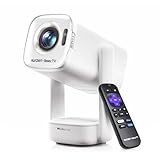
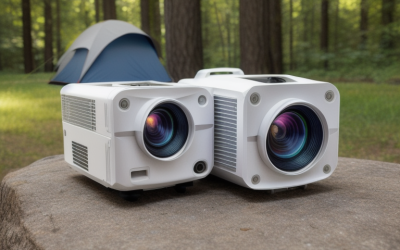
This compact white projector has Roku TV built in, WiFi and Bluetooth, and is described as USB-C powered with power bank support. Native 1080P is stated in the title, which makes it the clearest on resolution in this group. It suits students who move between a desk, a bed and a common room. Because power can come from a USB-C source, it can run from a power bank for a movie night without hunting for an outlet.
- Strength: native 1080P panel stated in the title.
- Strength: Roku TV built in and USB-C power, with power bank support.
- Limit: the title does not give an ANSI lumen figure, so check the full spec sheet for brightness.
Skip it if you need a projector for a bright room with sunlight.
HAPPRUN Google TV Projector

The HAPPRUN is listed as an official licensed Google TV projector with native 1080P, Bluetooth, 4K decoding, Dolby audio and AirPlay. It suits a dorm where roommates use different phones, since both casting styles are named in the title. A Google TV interface also makes it easy to sign in to the services you already use on your phone or laptop.
- Strength: native 1080P with Google TV and a wide app library.
- Strength: Dolby and AirPlay support in the listing text.
- Limit: the title is cut off, so check the full spec sheet for brightness and inputs.
Skip it if you want a native 4K panel.
Smart 4K Projector with Google TV Stick

This projector bundles a Google TV stick and lists 3000 ANSI, an auto lens cap, WiFi and Bluetooth, and built-in apps. The ANSI figure is the useful part, since it sets expectations for a brighter room. The bundled stick means you do not need to buy a separate streaming device to get started.
- Strength: 3000 ANSI is stated in the title.
- Strength: bundled Google TV stick and an auto lens cap protect the lens.
- Limit: it says “4K” without a native label, so check the full spec sheet for panel resolution.
Skip it if you only watch in a fully dark room and want the smallest unit.
Pignynt Google TV Projector

The Pignynt lists built-in Google TV, 4K AI auto focus, voice control, WiFi 6 and Bluetooth 5.0 in a portable body. It suits a student who moves the projector often and wants it to focus itself after each move. Voice control is handy when the remote is buried under a blanket, and the Bluetooth listing means a headset or speaker can handle sound.
- Strength: AI auto focus cuts down on manual adjustment.
- Strength: WiFi 6 and Bluetooth 5.0 for streaming and audio.
- Limit: “3000 Bright” is not an ANSI figure, so check the full spec sheet for real brightness.
Skip it if you want a stated native 1080P or 4K panel.
ELEPHAS Roku TV Smart Projector
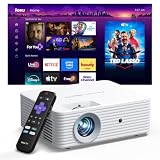
This white mini projector has Roku TV built in, WiFi and Bluetooth, Dolby Audio and works with Alexa and Google Home. It suits a dorm already built around smart speakers or voice assistants. Dolby Audio is named in the listing, so check how the built-in speaker sounds against an external one before relying on it.
- Strength: Roku TV built in, so no extra stick is needed.
- Strength: Alexa and Google Home compatibility is listed.
- Limit: the title lists no resolution or brightness, so check the full spec sheet.
Skip it if you want confirmed 1080P or ANSI figures before ordering.
Official Google TV Smart Projector
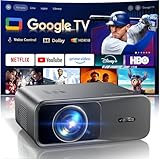
This listing is a smart projector with Google TV, WiFi, Bluetooth, Google voice and Dolby Audio, with “4K supported” in the title. It is aimed at casual streaming and outdoor movie nights. In a dorm, it works for casual viewing, and its Google voice feature can search for a movie without typing on a remote.
- Strength: Google voice and built-in apps reduce the need for an external device.
- Strength: Dolby Audio is listed.
- Limit: “4K supported” does not mean native 4K, so check the full spec sheet.
Skip it if native resolution is your top concern.
Which One Fits Your Situation
A bed-wall movie setup in a small room
The Aurzen Roku TV D1R air stands out for native 1080P and USB-C power. Pair it with a power bank when you move it from a desk to a shelf.
A bright dorm with a window
The model with 3000 ANSI in its title is the one with a stated brightness standard. Close the blinds for contrast regardless of the projector. A dark wall color or a blanket over the window does more for picture quality than any single spec.
A console or PC gaming night
Choose one with an HDMI input confirmed on the listing, and connect a PC or console. The HAPPRUN lists native 1080P, which suits gaming and streaming, though confirm its ports on the full listing.
A smart-home dorm
The ELEPHAS suits a room with Alexa or Google Home, and the Pignynt suits someone who likes voice control and automatic focus.
Common Mistakes
- Reading “4K supported” as a native 4K panel.
- Trusting large brightness numbers with no ANSI label.
- Ignoring the throw distance and finding the image is too small or too big for the wall.
- Skipping an HDMI input check when you plan to connect a console or PC.
- Placing the projector on soft bedding where its vents can be blocked.
Frequently Asked Questions
Do I need a projector screen in a dorm?
A smooth white wall is usually enough. A screen or a tensioned white sheet can improve evenness and contrast, but the room’s light matters more.
Can a dorm projector replace a monitor?
For movies and casual gaming, yes. For desk work or competitive play, a monitor is sharper and has less delay, so treat a projector as a big-screen extra. Many students keep a monitor on the desk for work and use the projector for evenings and weekends.
Can I use headphones with a projector?
Many models list Bluetooth for headphones and speakers. Check the listing for output options, and use headphones to keep the room quiet at night.
Does a built-in platform replace a streaming stick?
Often it does, because Roku TV and Google TV include apps. Check the app list and the account sign-in steps on the listing. If a service you rely on is missing, a separate stick plugged into the HDMI input is the fallback.