A golf simulator screen is a rougher environment than a living-room wall. Balls hit it at speed, the hitting area is only a few feet from the lens, and you stand close enough to the beam to cast a shadow if the projector is placed carelessly. That changes what matters when you shop: throw distance, brightness and response time count for more than a long list of smart features.
This guide is for anyone building a net-and-screen bay in a garage, basement or spare room, and for people who want the same projector to double as a sports and gaming display. The three trade-offs to weigh are short throw versus a conventional lens, lumens versus the amount of ambient light in your room, and whether you want a simulator-focused model or a flexible home theater projector.
Quick Picks
| Product | Best for | Key spec from the title |
|---|---|---|
| Optoma GT2400HDR | Brighter rooms and dedicated bays | 1080p, 4,200 lumens, short throw, laser |
| Optoma GT2300HDR | Controlled-light bays | 1080p, 3,600 lumens, short throw, laser |
| BenQ AH30ST | Simple golf-focused setup | Full HD, short throw, 4LED DLP |
| BenQ TK710STi | Mixed golf, movies and gaming | 4K HDR, 3200 lumens, short throw, laser, 240Hz gaming |
| 5000 ANSI 4K projector | Large rooms with a longer projection path | 4K, 5000 ANSI, auto focus, built-in apps |
How to Choose
Throw distance and room fit
A short-throw lens fills a large screen from a short distance, which keeps the projector out of your swing path and your shadow off the picture. Find the throw ratio on the listing or the manufacturer’s spec sheet, then multiply it by your screen width to see how far back the projector must sit. Measure from the lens to the screen, not from the wall, and compare the answer with your ceiling height and net position.
Brightness in ANSI or listed lumens
ANSI lumens is a standardized way to measure light output, so it is the number to trust when the listing gives it. A brighter lamp or laser holds up better when the bay has windows, overhead lights or a launch monitor with its own glow. Dim, light-controlled rooms are more forgiving. If the listing does not say whether the figure is ANSI, check the full spec sheet.
Resolution, input lag and refresh
Full HD is plenty for ball flight and course graphics at typical screen sizes, and 4K adds sharper text and fairways. Look for a stated input lag figure and any gaming mode, since lag can make the on-screen shot feel disconnected from the real one. Also confirm the resolution is native or supported, because those are different things.
Inputs, light source and upkeep
Check the HDMI port count and version, because a simulator PC, a streaming stick and a console may all need to connect. Laser and LED light sources avoid lamp swaps, while traditional lamps need replacements. Look for fan-noise notes, mounting options and whether the unit can be ceiling-mounted or placed on a table. Quiet fans matter in a small bay where the projector sits a few feet from your ears, and a ceiling mount keeps cables and hardware clear of flying clubs.
The 5 Best Options
Optoma GT2400HDR
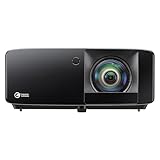
This is the brighter of the two Optoma short-throw models listed here, and the title calls it golf-simulation ready. It suits a dedicated bay where the room is not fully dark and you want the picture to stay punchy when a launch monitor or overhead light is on. Short-throw projectors like this also let you place the unit on a shelf or ceiling mount close to the screen, which frees up floor space for your stance and swing.
- Strength: 4,200 lumens with a laser light source.
- Strength: low input lag for gaming is part of the listing.
- Limit: the title says 1080p, so you do not get 4K sharpness.
Skip it if you want a native 4K image or a projector that doubles as a big movie-night centerpiece; check the full spec sheet for inputs and mounting details.
Optoma GT2300HDR
The sibling of the model above, with a lower stated brightness. It fits garages and basements where you control the light, and where a short-throw laser projector will sit close to the screen above or in front of the hitting area. It also works as a gaming display thanks to the low input lag claim, so a PC or console can share the screen on rainy days.
- Strength: 3,600 lumens, short throw and laser light.
- Strength: also marketed for low-lag gaming.
- Limit: less light output than the GT2400HDR if your room has windows.
Skip it if the room gets bright in the afternoon or you plan a very large screen.
BenQ AH30ST

BenQ lists this one as a golf simulation projector with a Full HD short-throw 4LED DLP design. It suits a straightforward bay build where you want the projector placed close, a simple image and a light source that does not depend on replaceable lamps. Players who already own a launch monitor and only need a screen-filling picture will find it a natural fit.
- Strength: short-throw design aimed at simulator use.
- Strength: 4LED light source in a Full HD DLP package.
- Limit: the title gives no lumen figure, so check the full spec sheet for brightness.
Skip it if brightness is your top concern or you want the highest-resolution image available.
BenQ TK710STi

This is the most flexible pick on the list. It combines a short-throw lens with a 4K HDR claim, 3200 lumens, a laser light source and Android TV, so it can serve golf, football, movies and console play in the same room without swapping hardware. A stated 4ms input lag and 240Hz gaming mode also make it attractive for PC players.
- Strength: 4K HDR with a short-throw lens and laser light.
- Strength: 4ms input lag and 240Hz gaming per the title.
- Limit: lumens are lower than the Optoma GT2400HDR.
Skip it if the bay is bright and you only care about golf; the full spec sheet will confirm simulator compatibility details.
5000 ANSI 4K Projector (VIDAA)

This model is not marketed as a golf projector, so treat it as a general-purpose option. With a stated 5000 ANSI lumens and 4K, it can fill a larger room with light, and it brings official apps, voice control, auto focus and a 65W audio system for casual viewing. Think of it as the long-throw wildcard for a spacious sports room rather than a purpose-built simulator unit.
- Strength: 5000 ANSI lumens for bright rooms.
- Strength: built-in apps, Wi-Fi, Bluetooth and auto focus.
- Limit: no short-throw claim in the title, so check the throw ratio before planning a close mount.
Skip it if your bay is shallow or you need a projector that sits just above the hitting area.
Which One Fits Your Situation
A dedicated garage bay with controlled lighting
The Optoma GT2300HDR or the BenQ AH30ST makes sense here. Both are short-throw designs and both are built around the golf-simulation idea. Choose the Optoma if you want laser light and a stated brightness, or the BenQ if you prefer a simple 4LED setup. In either case, measure the throw distance first and check the full spec sheet for the supported picture size range, so the image fills your screen without spilling onto the net frame.
A bright room, basement window or shared space
The Optoma GT2400HDR has the higher lumen figure of the short-throw group. If the room is truly large and the projection path is long, the 5000 ANSI model is worth checking as long as the throw ratio matches your layout.
A simulator that doubles as a gaming and movie room
The BenQ TK710STi is the strongest all-rounder. Its gaming-oriented specs and Android TV platform let a PC, console or streaming source share the same screen, and the short throw keeps shadows away when you play a round. On a day when nobody is practicing, the same room can host a football match or a console session with friends.
Common Mistakes
- Buying on lumens alone and ignoring the throw ratio, which decides whether the projector fits your ceiling.
- Forgetting that a projector placed at the hitting end of a bay can still catch stray shots without a protective plan; follow the manufacturer’s installation and safety instructions.
- Assuming 4K on the title means native 4K; check whether the resolution is native or supported.
- Ignoring ambient light from windows, doors and overhead fixtures.
- Choosing a projector before the screen, then finding the image size does not match, and skipping a count of the HDMI inputs you need for a simulator PC, a console and a streaming stick.
Frequently Asked Questions
Do I need a short-throw projector for a golf simulator?
Not always, but it is the easiest way to keep the projector out of the swing zone and your shadow off the screen. A conventional lens works if the room is deep enough and the mount is well placed.
Are laser projectors better than lamp models?
Laser and LED light sources avoid lamp replacement and tend to turn on quickly. Lamp models can still work well, but the light source is an upkeep factor worth checking on the listing.
How bright should the projector be?
It depends on your room. Dark rooms need less light output, while bays with windows or bright overhead fixtures benefit from the higher figures. Compare ANSI lumens where listed, and remember that a larger screen spreads the same light over more area.
Can I use the same projector for gaming?
Yes, if it lists low input lag or a gaming mode and has the ports you need. The Optoma pair and the BenQ TK710STi both mention gaming in their titles.