

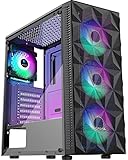
- Top Pick: MUSETEX Y6 PC Case, Pre-Installed 7 Infinity Mirror PWM ARGB Fans, ATX Mid Tower Computer Case, Gaming PC Case with Type-C, 270° Full View Tempered Glass, Black
- Best Value: MUSETEX ATX PC Case 7 PWM ARGB Fans Pre-Installed, Type-C Mid Tower Computer Case with Full-View Dual Tempered Glass, Gaming PC Case, Black(K2)
- Premium Choice: Lian Li V100-ATX Mid-Tower PC Case-Black-V100RX | Side I/O USB-C | Dust Filiter | Support 420mm GPUs & 360mm Radiator | Included GPU Bracket | LED & Display Platform (V100RX)
A case that ships with fans solves a problem that catches first-time builders off guard: an empty chassis moves no air at all. Buy a bare case and you must plan for intake and exhaust fans, plus the cables and hub to power them. Cases with fans included remove that step, and the better ones arrive with a sensible layout already set up. The catch is that fan count alone says little, and some listings pack in many small ARGB fans while saying nothing about the mesh and filters that actually let air pass.
This 2026 guide is for builders assembling a gaming or creator PC in an ATX mid tower who want cooling and lighting sorted out of the box. Seven designs are covered: two color versions of the same Antec case were folded into one entry, and two Lian Li listings were set aside because their titles never state that fans are included. Everything below is drawn from the product titles, so confirm fan sizes and any included hub on the listing page before ordering.
Quick Picks
As an Amazon Associate we earn from qualifying purchases at no extra cost to you.



| Product | Best for | Key spec from the title |
|---|---|---|
| MUSETEX Y6 | Showy lighting with many fans | 7 infinity mirror PWM ARGB fans |
| MUSETEX K2 | Full glass look | 7 PWM ARGB fans, dual tempered glass |
| MUSETEX NN8 | Mesh front, simpler build | 6 PWM ARGB fans, USB 3.0 x 2 |
| Antec C5 ARGB | Liquid cooling and clean cables | 7 fans, 360mm radiator support |
| MOROVOL 621 | Airflow-first mesh front | 4 RGB fans, diamond mesh |
| FOIFKIN F600 | Panoramic glass with Type-C | 7 PWM ARGB fans, 270-degree glass |
| HYTE Y50 | Colorful dual-chamber build | 4 aRGB fans, rear connect compatible |
How to Choose
Count fans, then check where they sit
Six or seven fans sound impressive, but placement matters more. Front intake with rear and top exhaust is the pattern that moves air through a standard tower. A case with four fans behind a mesh front can cool as well as one with seven behind solid glass. Look for wording about mesh panels and dust filters, not only the number of fans, and remember that every fan adds a little noise at full speed. Fans that respond to temperature through PWM are quieter than fixed-speed units during web browsing and office work.
PWM and ARGB are different features
PWM means the motherboard can control fan speed, which keeps noise down at idle. ARGB means addressable lighting, which needs its own header or controller, while plain RGB fans in entry-level models often have simpler lighting control. Check that your motherboard has the headers your fans need, or that the case includes a hub, because seven fans can outnumber the headers on a basic board. A single splitter or hub can solve this, but it adds one more piece to hide behind the panels.
Match the case to your cooling and board plans
If you plan a 360mm radiator for liquid cooling, look for that support in the title, as with the Antec listing. If your motherboard uses back-connect power and headers, look for cases that state rear-connect compatibility. All of these are ATX mid towers, so measure your graphics card and cooler against the stated case space before ordering. Look up the clearance figures on the listing page, since titles rarely include them. A tall air cooler and a long graphics card can collide with front fans or radiators, so leave a few millimeters of margin. If the listing omits a number, ask the seller rather than guessing.
Where budget cases cut corners
Glass panels look premium, but they can trap heat when the front is also closed. Entry-level cases often use thin steel, limited cable routing room, and weak dust filtering. Front panel ports are another place to look: Type-C is nice to have, but a couple of USB 3.0 ports cover most everyday needs. Also check whether the case ships with a tempered glass panel secured by thumbscrews, which makes later upgrades easier.
The 7 Best Options
MUSETEX Y6
The Y6 pairs seven pre-installed infinity mirror PWM ARGB fans with an ATX mid tower, a Type-C front port, and 270-degree full view tempered glass in black. It targets builders who want a lighting display from day one and prefer not to shop for fans separately. A first-time builder who wants a finished look without tuning will find it approachable.
- Strength: seven PWM fans cover cooling and lighting without extra purchases.
- Strength: the wraparound glass shows off the inside of the build.
- Trade-off: infinity mirror fans are about looks, and the title says little about dust filters or mesh.
Skip it if you want a subtle case or plan to hide the interior behind a closed desk setup. The lighting is the whole point of this design, and it is wasted if nobody sees it.
MUSETEX K2
The K2 lists seven pre-installed PWM ARGB fans, a Type-C front connector, and full-view dual tempered glass in black. It is a showcase case with the same fan count as the Y6, and it suits a builder who wants glass on two sides and plans to fill the case with matching lit parts, such as memory and a cooler.
- Strength: PWM control lets the motherboard manage fan speed.
- Strength: dual glass panels give a view from the front and side.
- Trade-off: more glass can reduce open airflow compared with a mesh front.
Skip it if you want a quiet, understated build or maximum intake.
MUSETEX NN8
The NN8 offers six pre-installed PWM ARGB fans, a polygonal mesh front, an opening tempered glass side panel, and two USB 3.0 ports. The mesh front suggests better air intake than the solid-glass designs, which makes it a practical choice for a warm room. It also fits a buyer who wants lighting but cares more about temperatures than showpiece looks.
- Strength: the mesh front helps air reach the intake fans.
- Strength: an opening side panel can make installation easier.
- Trade-off: no Type-C port is listed, only USB 3.0.
Skip it if you need a Type-C front port for newer drives and phones. Builders who rarely use front ports will not notice the omission.
Antec C5 ARGB
Offered in black and white, the C5 lists seven ARGB PWM fans, 270-degree seamless tempered glass, a dual-chamber layout, back-connect motherboard support, and 360mm radiator support. Both colors share the same feature list, so choose the one that matches your room and parts. Builders who like a clean, bright setup often lean toward the white version, while the black one blends into dark desks.
- Strength: 360mm radiator support suits a liquid cooler now or later.
- Strength: the dual-chamber layout can keep cables out of view.
- Trade-off: back-connect parts require a compatible motherboard.
Skip it if you want a mesh-front case or a board with standard connectors only. Check the radiator size against your cooler too, since 360mm support only matters if you buy a matching unit.
MOROVOL 621
This ATX airflow mid tower has four pre-installed RGB fans, a diamond-shaped mesh front, a tempered glass side panel, and USB 3.0. The mesh front aims at cooling more than looks, which suits a first build with a mid-range graphics card and a simple lighting plan, and it keeps the project approachable for people who do not want to learn lighting software.
- Strength: the mesh front prioritizes air intake.
- Strength: tempered glass on the side still shows the build.
- Trade-off: four RGB fans, not PWM or ARGB, mean simpler control and less lighting detail.
Skip it if you want advanced lighting control or more than four fans.
FOIFKIN F600
The F600 lists pre-installed 7 PWM ARGB fans, an ATX mid-tower layout, panoramic 270-degree glass, and Type-C in black. It competes with the MUSETEX showcase designs on paper and gives buyers another look at a similar feature set. Shoppers comparing near-identical designs can treat it as a second option and decide on warranty terms and styling.
- Strength: PWM ARGB fans and Type-C appear in one title.
- Strength: the panoramic glass shows the whole interior.
- Trade-off: the brand is less established, so check the warranty terms.
Skip it if you want an established manufacturer, a mesh front, or a long track record of firmware and part support. Ask the seller how replacement panels are handled.
HYTE Y50
This is a dual-chamber ATX chassis with four aRGB fans, listed as one 120mm plus a 360mm reverse set, and rear-connect motherboard compatibility, in a Strawberry Milk pink finish. It is the style-first pick, aimed at buyers who care about color as much as cooling. A themed desk with pink or pastel accessories is the natural setting for it.
- Strength: a distinctive color and a rear-connect layout.
- Strength: the title spells out the fan sizes, which helps planning.
- Trade-off: four fans are fewer than rival listings, and pink is a taste choice.
Skip it if you want a neutral color or the highest fan count. A black or white case is easier to match with existing parts and resell later.
Which One Fits Your Situation
You plan to add liquid cooling
The Antec C5 ARGB states 360mm radiator support, which makes it the natural pick. Pair it with a motherboard that supports back-connect parts to take full advantage of the layout, and plan cable lengths for the rear chamber before you start.
You want airflow first
The MOROVOL 621 and the MUSETEX NN8 both list mesh fronts. The NN8 adds PWM ARGB fans, while the 621 keeps lighting simpler and may suit a plainer desk.
You want a lighting showcase
The MUSETEX Y6, the MUSETEX K2, and the FOIFKIN F600 each list seven fans. Choose the Y6 for infinity mirror fans or the K2 for dual glass. Use a hub so all fans share one lighting header.
You want a color theme
The HYTE Y50 in pink stands out for style, and its rear-connect compatibility suits a tidy build.
Common Mistakes
- Counting fans without checking for mesh panels and filters.
- Forgetting that ARGB fans need compatible headers or a hub.
- Ignoring graphics card length and cooler height against case space.
- Buying a back-connect case without a compatible motherboard.
- Choosing a closed glass front and expecting cool temperatures, or leaving the plastic film on panels during the build.
Related guides
- Aio Liquid Coolers For High Performance Gaming
- How To Lower Input Delay In Competitive Shooters
- Wireless Gaming Headsets Under 100 For Pc
Frequently Asked Questions
Are included fans good enough?
For most builds, yes, although quality varies by maker. You can swap them later if noise or lighting bothers you, and most standard sizes are easy to replace.
Do I need a fan hub?
Often yes. Count the fan headers on your motherboard and compare them with the number of fans in the case.
Is more glass worse for cooling?
It can be if the front is also closed, because heat has fewer ways out. A mesh front helps air reach the fans even with a glass side panel, which is why the mesh-front cases here suit warm rooms.
Will these fit a Micro-ATX board?
ATX cases usually fit smaller boards too, but confirm on the listing. Smaller boards leave more empty space, which can affect airflow planning.

















