

- Top Pick: Sceptre New 22-Inch Gaming Monitor, FHD 1080p, Up to 144Hz, HDMI, DisplayPort, Built-in Speakers, Machine Black (E225W-FW144 Series, 2026)
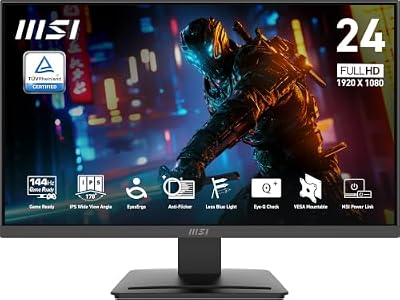
- Best Value: msi PRO MP243L E14 24-inch IPS 1920 x 1080 (FHD) Gaming Office Monitor, 144Hz, Free-Synch, HDR Ready, HDMI, VGA Port,VESA Mountable, Tilt, 4-Side Slim Bezel,1ms, Black
- Premium Choice: ASUS TUF Gaming 24” (23.8” viewable) 1080P Monitor (VG249QE5A) – FHD, 144Hz Overclock to 146Hz, IPS, Extreme Low Motion Blur Sync, 1ms, Speakers, Variable Overdrive, DisplayWidget Center, 3yr Warranty
A 144Hz monitor used to cost $400. Now you can get one for under $150, sometimes under $130 during sales. The catch isn’t the refresh rate anymore, it’s what the manufacturer cut to hit that price. Knowing where the corners get cut is the difference between a monitor that feels great for three years and one that gets replaced in six months.
As an Amazon Associate we earn from qualifying purchases at no extra cost to you.



What actually matters at this price point
At $130-$250, you’re choosing between three panel types: VA, IPS, and the occasional cheap TN. Refresh rate is no longer the hard part of this budget, panel quality and build consistency are. A 144Hz VA panel and a 144Hz IPS panel at the same price will behave very differently in actual games.
VA panels give you better contrast and deeper blacks, which matters in dark games like horror titles or anything with a lot of shadow detail. The trade-off is smearing in fast motion. On cheap VA panels, dark objects moving against dark backgrounds leave a trail. It’s called black smear, and it’s a real failure mode, not a theoretical one. If you play fast shooters, it’s noticeable.
IPS panels at this price fix the smearing problem and give you better color accuracy and viewing angles, but contrast is weaker, usually around 1000:1 compared to VA’s 3000:1 or higher. Blacks look more gray. For competitive games where you need to see movement clearly, IPS is the safer pick. For single-player and atmospheric games, VA often looks better despite the smear.
Cheap TN panels still exist under $150 and I’d skip them unless you’re buying strictly for esports and nothing else. Color and viewing angles are noticeably worse, and the price gap to a budget IPS panel has shrunk to almost nothing.
Panel type comparison
| Panel Type | Contrast | Motion Clarity | Color/Viewing Angles | Best For |
|---|---|---|---|---|
| VA | High (3000:1+) | Can smear in dark scenes | Good, narrows off-angle | Single-player, dark/atmospheric games |
| IPS | Lower (~1000:1) | Clean, minimal smear | Best, wide angles | Competitive shooters, mixed use |
| TN | Low | Fast, but dated tech | Weak, narrow angles | Pure esports, tightest budgets |
Resolution trade-offs
Most cheap 144Hz monitors are 1080p at 24-27 inches. That’s not a bad thing. At 1080p, even a mid-range graphics card can actually push 144 frames per second in most games, so you get the full benefit of the refresh rate. If you jump to a cheap 1440p 144Hz monitor, you need noticeably more GPU power to hit that frame rate, and if your card can’t keep up, the extra resolution doesn’t help you much. A $150 1080p monitor paired with a GPU that can actually hit 144fps beats a $220 1440p monitor paired with a GPU that tops out at 90fps.
If your GPU is already a few years old or budget-tier, stick with 1080p. If you’re also upgrading your GPU or already have something recent and mid-range or better, 1440p 144Hz monitors have come down enough in price to be worth considering, usually $200-280 for a decent VA or IPS panel.
Specs that don’t mean what they imply
Response time listed as “1ms” on a budget monitor is almost always a marketing number measuring the fastest possible pixel transition under ideal conditions, not real-world performance. Don’t use it to compare monitors. If you want an actual sense of motion handling, look for independent review footage of ghosting and smear tests rather than trusting the spec sheet.
“144Hz” alone doesn’t guarantee the panel supports variable refresh rate sync (FreeSync or G-Sync compatibility) without tearing or flickering. Most budget monitors now support FreeSync, but implementation quality varies. Cheaper models sometimes have a narrow FreeSync range, like 48-144Hz, and outside that range VRR just turns off. That’s fine for most people, but if your frame rates often dip below 48fps, you won’t get the benefit when you need it most.
What to actually buy
For a pure budget build focused on fast games, look at 144Hz 1080p IPS monitors. You’ll get clean motion and good color for not much money, and the resolution matches what budget-to-mid GPUs can actually push.
If you mostly play single-player or atmospheric games and don’t mind occasional smear in dark scenes, a 144Hz VA gaming monitor gets you better contrast for similar money.
If your GPU can reliably hit 100+ fps at higher resolution, it’s worth stepping up to a 1440p 144Hz monitor instead of staying at 1080p. The sharper image is noticeable on desktop use too, not just games.
When the cheapest option is genuinely fine
If you’re coming from a 60Hz monitor, almost any 144Hz panel at any price point will feel like a big upgrade. The jump from 60 to 144Hz is more noticeable than the jump from a mediocre panel to a great one. Don’t overspend chasing marginal panel improvements if your real upgrade is just getting off 60Hz in the first place. Save the extra money for the GPU that lets you actually hit those frame rates, that’s usually the better investment.

















