Your grip decides how a mouse feels long before its sensor or polling rate matters. A palm player who rests the whole hand on the shell needs a tall, supportive shape, while a fingertip player who steers with only the fingertips needs a short, light body that pivots freely. Pick the wrong shape and every match ends with a cramped hand, a slipping pinky, or a wrist that aches after an hour. Pick the right one and the mouse disappears, leaving only your aim.
This guide matches five gaming mice to the three main grip styles: palm, claw, and fingertip. Each pick comes from its Amazon listing title and specifications, so the sensor, weight, and button count below are the numbers the manufacturer publishes. Read the hand-size advice first, then choose the mouse built for the way your hand actually sits.
Quick Picks
As an Amazon Associate we earn from qualifying purchases.
| Product | Best for | Key spec from title |
|---|---|---|
| Razer DeathAdder V3 Pro | Palm grip players with medium to large hands | 63g lightweight, Focus Pro 30K optical sensor |
| Logitech G502 HERO | Palm and claw players who want many buttons | HERO 25K sensor, 25,600 DPI, 11 programmable buttons |
| Logitech G PRO X Superlight 2 | Claw and fingertip players chasing a light shell | 60g pro-grade, 44k DPI sensor, 8kHz report rate |
| Razer Viper V2 Pro | Fingertip players who flick fast in shooters | 58g ultra lightweight, 30K DPI optical sensor |
| Logitech G305 LIGHTSPEED | Claw and fingertip players on a smaller budget | HERO 12K sensor, 12,000 DPI, 250h battery life |
How to Choose
Identify your grip first
Watch how your hand lands on your current mouse before you shop. Palm grip means the whole palm and all fingers rest on the shell, with the wrist doing most of the work. Claw grip means the palm touches the rear while the fingers arch down onto the buttons, giving a mix of control and speed. Fingertip grip means only the fingertips touch the mouse, with the palm floating above it and the wrist pivoting the aim. Each style pushes you toward a different shape, so name yours honestly. A player who forces a fingertip mouse into a palm grip will fight the shell all match long.
Match length and height to your hand
Measure from the base of your palm to the tip of your middle finger, then compare that number with the mouse length in the listing. Palm players usually want a mouse close to their hand length, because a shell that ends short leaves the palm unsupported and the wrist bent. Claw and fingertip players can go shorter, since the palm floats or only the rear touches. Height matters just as much: a tall hump fills a palm grip and supports the hand, while a low, flat shell lets fingertips wrap and lift the mouse easily. Width decides comfort too, since a narrow body suits small hands and a wide body suits large ones.
Weight changes how a grip feels
A heavy mouse anchors a palm grip and steadies slow, deliberate aim, which is why some palm players prefer shells above 100 grams with tuning weights. The same weight punishes a fingertip player, because lifting and flicking a heavy body strains the fingers and slows resets. Light mice under 65 grams reward claw and fingertip styles, where quick stops and fast direction changes matter most. If you switch between styles mid-match, aim for the middle ground around 70 to 90 grams. Check the listed weight before you buy, and remember that a battery or a set of tuning weights adds grams the headline number may hide.
Buttons and shape work together
Extra buttons help only when your grip can reach them without shifting. Palm players rest the thumb along the side, so a row of thumb buttons sits naturally under it, and a wide ergonomic shell keeps the hand steady while those buttons are pressed. Claw players arch their fingers, which puts the side buttons and the scroll wheel in easy reach but makes a very wide shell awkward to pinch. Fingertip players hold the mouse lightly, so a simple layout with two side buttons and a firm scroll wheel usually works better than a crowded panel. Count the buttons you actually use in your main games, then pick a shell that lets your grip reach them.
The 5 Best Options
Razer DeathAdder V3 Pro

The DeathAdder V3 Pro is the natural home for palm grip players who want an ergonomic shell that fills the hand without dragging it down. Its tall, right-handed curve supports the palm and gives the thumb a long resting edge, while the 63-gram body keeps flicks quick for a mouse of this size. Five programmable buttons cover the essentials without crowding the side, and the long battery life means a full week of evening sessions between charges. Medium and large hands get the most from this shape, since the length suits a relaxed, full-contact grip.
Specs
- Sensor: Focus Pro 30K optical sensor
- Weight: 63 grams
- Buttons: 5 programmable buttons
- Switches: Optical Switches Gen-3
- Connectivity: HyperSpeed wireless
- Battery: Up to 90 hours
Best for: Palm grip players with medium to large hands who want an ergonomic wireless mouse.
Watch out for: The right-handed shape does not suit left-handed players, and the smooth shell can feel slippery if your hands run warm.
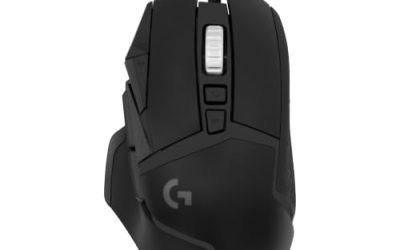
Logitech G502 HERO

The G502 HERO suits palm and relaxed claw players who want a button-heavy mouse with a shape that locks the hand in place. Its tall right-handed shell, textured thumb rest, and wide body give a palm grip plenty of contact, while the eleven programmable buttons put abilities, weapons, and macros under the thumb and fingers. Five removable 3.6-gram weights let you tune the balance toward the front or the rear until the mouse sits the way your grip expects. The HERO 25K sensor tracks from 100 to 25,600 DPI with no smoothing, filtering, or acceleration in its published specifications.
Specs
- Sensor: HERO 25K optical sensor, 100 to 25,600 DPI
- Weight: 121 grams, plus five removable 3.6-gram weights
- Buttons: 11 programmable buttons
- Scroll wheel: Dual-mode hyper-fast scroll wheel
- Memory: On-board memory for profiles
- Connectivity: Wired
Best for: Palm and claw players who play games with many abilities and want a tunable, button-rich mouse.
Watch out for: At 121 grams it is heavy for fingertip players, and the large shell can overwhelm small hands.
Logitech G PRO X Superlight 2

The Superlight 2 is built for claw and fingertip players who want almost nothing between their hand and the mousepad. Its symmetrical shell measures the same on both sides, so the fingers can pinch and lift it cleanly, and the 60-gram weight makes fast flicks and quick resets feel effortless. The HERO 2 sensor reaches 44,000 DPI in the listing, and the LIGHTFORCE hybrid switches pair an optical sensor with a mechanical feel for fast, consistent clicks. Five programmable buttons keep the layout simple, and USB-C charging tops the battery up between sessions.
Specs
- Sensor: HERO 2 sensor, up to 44,000 DPI
- Weight: 60 grams
- Buttons: 5 programmable buttons
- Switches: LIGHTFORCE hybrid optical-mechanical switches
- Report rate: Up to 8kHz
- Battery: Up to 95 hours
- Connectivity: LIGHTSPEED wireless, USB-C charging
Best for: Claw and fingertip players who want a very light symmetrical mouse for fast shooters.
Watch out for: There is no dedicated DPI button on the shell, so changing sensitivity mid-match takes a software profile or a reassigned button.
Razer Viper V2 Pro

The Viper V2 Pro is the lightest mouse in this guide, and that is exactly why fingertip players love it. At 58 grams the symmetrical shell lifts and resets with almost no effort, while the low profile lets the fingertips wrap the buttons and steer with small wrist pivots. On-mouse DPI controls sit underneath, so the top stays clean for the two main buttons and the scroll wheel. The Focus Pro 30K sensor and Gen-3 optical switches give fast, consistent tracking and clicks, and the 90-hour battery keeps the mouse running through long sessions without a cable.
Specs
- Sensor: Focus Pro 30K optical sensor
- Weight: 58 grams
- Buttons: 5 programmable buttons
- Switches: Optical Switches Gen-3
- Connectivity: HyperSpeed wireless
- Battery: Up to 90 hours
- Extras: On-mouse DPI controls, USB Type-C cable included
Best for: Fingertip players who want the lightest possible mouse for fast flick aim.
Watch out for: The low, narrow shell gives palm players little to hold, and the DPI controls sit underneath, so they are awkward to reach mid-match.
Logitech G305 LIGHTSPEED

The G305 LIGHTSPEED is the budget pick for claw and fingertip players who want wireless freedom without a flagship shell. Its compact, egg-shaped body suits smaller hands and arched fingers, and the 99-gram weight stays light enough for quick lifts while feeling planted during slow aim. A single AA battery powers up to 250 hours of play, so there is no charging cable to manage, and the receiver stores inside the battery compartment for travel. Six programmable buttons cover the basics, and the HERO sensor reaches 12,000 DPI for accurate tracking across the speeds most players use.
Specs
- Sensor: HERO sensor, up to 12,000 DPI
- Weight: 99 grams with battery
- Buttons: 6 programmable buttons
- Connectivity: LIGHTSPEED wireless, 1ms report rate
- Battery: Up to 250 hours on one AA battery
- Memory: On-board memory
Best for: Claw and fingertip players with smaller hands who want a cheap, long-lasting wireless mouse.
Watch out for: It connects only through its USB receiver, with no Bluetooth, and the AA battery adds weight that a rechargeable model would not.
Which One Fits Your Situation
You rest your whole hand and play long sessions
Pick the Razer DeathAdder V3 Pro if your hand is medium or large and you want the lightest ergonomic shell for a palm grip. Pick the Logitech G502 HERO instead if you play games with many abilities and want thumb buttons and a tunable weight system. Both fill a palm grip well, so let your button needs decide.
You arch your fingers and play fast shooters
Pick the Logitech G PRO X Superlight 2, since its 60-gram symmetrical shell and simple layout suit a claw grip that flicks and resets constantly. The Razer Viper V2 Pro is the lighter alternative when you want the fastest possible resets in long ranked sessions and do not mind a lower, narrower body.
You steer with fingertips and want maximum speed
Pick the Razer Viper V2 Pro, because at 58 grams it is the lightest mouse here and its low profile lets fingertips control every movement. The Logitech G PRO X Superlight 2 is the close second for players who want a slightly taller shell, a familiar symmetrical shape, and USB-C charging.
You want a grip-friendly mouse without spending much
Pick the Logitech G305 LIGHTSPEED, which gives claw and fingertip players a compact wireless shell and a 250-hour battery at a lower tier than the flagship picks in this guide. Its egg shape suits smaller hands, and the receiver stores inside the body for easy travel between home, school, and work.
Common Mistakes
- Buying a mouse for its sensor alone and ignoring whether the shell fits your grip style.
- Choosing a heavy mouse for a fingertip grip, which strains the fingers and slows resets.
- Picking a low, symmetrical shell for a palm grip, leaving the hand unsupported and the wrist bent.
- Ignoring hand size, so a large shell overwhelms small hands or a small shell cramps large ones.
- Forgetting to check the connection type, then finding the mouse has no Bluetooth or needs a receiver you did not expect.
Frequently Asked Questions
What is the best mouse grip for gaming?
There is no single best grip, because the right choice depends on your hand size and how you aim. Palm grip suits relaxed, long sessions with an ergonomic shell. Claw grip balances control and speed for fast shooters. Fingertip grip gives the quickest flicks with a light mouse. Try each style for a few days and keep the one that feels natural.
How do I know which grip style I use?
Look at your hand on the mouse during a match. If the whole palm rests on the shell, you use a palm grip. If the palm touches the rear and the fingers arch down, you use a claw grip. If only the fingertips touch and the palm floats, you use a fingertip grip. Most players mix styles, so name the one you use most.
Does mouse weight matter for grip style?
Yes, weight matters more than many players expect. Palm grips handle heavy mice well because the whole hand shares the load. Claw grips do best around 60 to 90 grams, where the mouse is light enough to flick but steady enough to control. Fingertip grips want the lightest mouse possible, since only the fingers lift and move it.
Can I switch grip styles on the same mouse?
You can switch between claw and fingertip on a light symmetrical mouse, since both styles use a floating palm. Switching to a palm grip is harder, because it needs a taller, longer shell to support the hand. If you want to change styles, pick a medium-weight symmetrical mouse and give your hand a week to adjust.