A gaming mouse rarely dies all at once. The sensor keeps tracking and the switches keep clicking long after the small feet on the underside have worn thin, picked up grit, or started to drag. When the glide turns scratchy or uneven, the real decision is not whether to buy a whole new mouse. It is which replacement feet match your mouse, your pad, and the feel you want: fast and loose, or slower with more stopping power.
The picks below suit players whose stock feet have gone rough, glass pad users who need feet made for hard surfaces, and owners of one specific mouse who want a drop-in set cut to its base. Every pick below comes from its Amazon listing title and stated details, with material, dot count, thickness, and fit taken from what the listing itself says.
Quick Picks
As an Amazon Associate we earn from qualifying purchases
| Product | Best for | Key spec from title |
|---|---|---|
| Hystar Aero Glides | Glass pad users who want a quiet glide | 40 high-density PTFE dots for glass mousepads |
| Wallhack PTFE Dot Silent | Tuning glide across cloth and glass pads | 7mm x 7mm PTFE dots, universal fit |
| PWNAGE SmoothGlide for G Pro X 2 | G Pro X 2 owners who want a drop-in set | PTFE feet with 3M adhesive, cut for GPX 2 |
| X-Raypad Jade Speed | Speed with control on cloth or glass | Curved-edge dots for cloth and glass pads |
How to Choose
PTFE or UPE: pick the glide material first
Most replacement feet use PTFE, the slick plastic that stock feet are usually made from, while others use UPE or UHMW-PE, a denser polyethylene built for longer wear. PTFE gives the familiar fast glide and is the safer default if you liked how your mouse felt when it was new. UPE tends to feel a touch slower at first and holds its shape longer on rough or glass pads, which suits players who value steady control over raw speed. Check the listing title for the material before anything else, because two dot packs that look identical can glide very differently once they are on the mouse.
Thickness changes the feel more than the brand does
Replacement feet usually run from about 0.6mm to 1.0mm thick, and that small gap matters. Thinner feet keep the mouse closer to the pad and preserve the sensor height your aim is used to, while thicker feet lift the base slightly and can make the glide feel floatier. Dot packs also vary in diameter, commonly 6mm or 6.5mm, and smaller dots mean less contact with the pad, which speeds the glide up. If your mouse already sits low or your pad is soft, a thicker set can change the feel more than you expect, so match the thickness to what your mouse shipped with when you can.
Model-specific sets fit; universal dots adapt
A set cut for one mouse model drops straight onto the base in the exact shape of the stock feet, with no trimming and no guesswork about placement. Universal dot packs work the other way: you place small round or square dots around the sensor in whatever pattern suits your grip and pad. Dots fit almost any mouse, which makes them the better choice if you own several mice or an uncommon model with no dedicated set. The trade-off is fiddling: a dot placed too close to the sensor or hanging over an edge can catch, so plan the layout before you peel the backing.
Adhesive and installation decide whether feet stay put
Nearly all replacement feet stick on with pre-applied adhesive, and some listings name 3M adhesive specifically. A strong bond keeps feet from shifting mid-game, but it also makes removal harder later, so clean the base properly first. Peel the old feet off, wipe away residue with isopropyl alcohol, and let the base dry completely before pressing the new set on firmly. Skipping the cleaning step is the most common reason a fresh set peels at a corner within days. Keep a spare set in the drawer, since feet are small, easy to lose, and wear out again with heavy use.
The 4 Best Options
Hystar Aero Glides
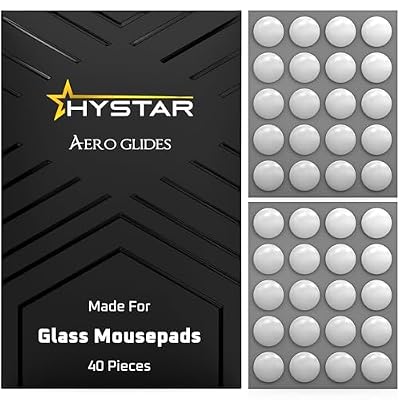
Glass pads punish ordinary feet: the hard surface wears PTFE down faster and makes every scratch audible. The Hystar Aero Glides are built for that exact situation, with forty high-density PTFE dots shaped for glass mousepads and rounded, polished edges that keep the glide quiet. The dot format lets you tune the layout around the sensor instead of being locked into one footprint, and the pack holds enough dots for more than one mouse or a second swap later. If your pad is glass and your current feet sound rough, this is the set to start with.
Specs
- Material: high-density PTFE
- Count: 40 dots
- Made for: glass mousepads
- Edges: rounded and polished
- Use: quiet glide
Best for: glass pad users who want a quiet, fast glide from a dot pack.
Watch out for: the listing is aimed at glass pads, so check how the dots feel on a soft cloth pad before committing to a full layout.
Wallhack PTFE Dot Silent

Wallhack takes a modular approach: instead of one fixed shape, you get small 7mm x 7mm PTFE squares that you arrange on the mouse base to balance speed against control. Fewer dots mean less contact and a faster glide; more dots add stability and braking. The universal fit works across mice, and the listing states smooth gliding on both cloth and glass pads, so one pack can serve a main mouse and a spare, or follow you if you switch pads. The Silent variant adds a damping layer aimed at keeping the glide quiet on hard surfaces.
Specs
- Material: PTFE
- Size: 7mm x 7mm dots
- Fit: universal
- Pads: cloth and glass
- Layout: modular, adjust dot count and placement
- Model number: WSX10001
Best for: players who switch between cloth and glass pads and want to tune the glide.
Watch out for: square dots need careful placement near curved base edges, so dry-fit the layout before peeling the adhesive backing.
PWNAGE SmoothGlide for G Pro X 2

If you own a Logitech G Pro X 2 Superlight, a model-specific set removes all the guesswork. The PWNAGE SmoothGlide feet are cut for the GPX 2 base, made from PTFE with rounded edges, and backed with 3M adhesive. You peel off the worn stock feet, press these into the same recesses, and the mouse keeps its original footprint and sensor height. That matters for players who have built muscle memory around one shape and do not want a dot layout changing how the mouse sits on the pad. The white color matches light-colored shells.
Specs
- Material: PTFE
- Fit: Logitech G Pro X 2 Superlight (GPX 2)
- Edges: rounded
- Adhesive: 3M
- Color: white
Best for: G Pro X 2 owners who want a drop-in replacement with no trimming.
Watch out for: this set fits only the G Pro X 2, so confirm your exact mouse model before buying, since the first-generation Superlight has a different base.
X-Raypad Jade Speed

The X-Raypad Jade Speed set is the all-rounder of this group: curved-edge dots designed for both cloth and glass pads, with a speed-leaning feel and wear resistance stated in the listing. The curved edges matter more than they sound, because a sharp dot edge catches on cloth weave and wears a groove into the pad over time. Jade Speed dots suit players who want a faster glide than stock without giving up stopping control, and the universal dot format fits most mice. The line sells in several colors, so the dots you receive depend on the variant you select on the listing.
Specs
- Material: PTFE
- Edges: curved
- Pads: cloth and glass
- Feel: speed with control
- Wear: abrasion resistance stated in the listing
Best for: players who want one universal set that works on either pad type.
Watch out for: this line comes in several color variants, so check the exact variant on the listing before buying.
Which One Fits Your Situation
You play on a glass pad
Glass rewards feet made for it and punishes the rest. The Hystar Aero Glides are the pick here, with forty high-density PTFE dots and rounded, polished edges designed for glass mousepads. Place dots around the sensor and test the glide before pressing them down hard, since glass shows every placement mistake.
You switch between cloth and glass pads
The Wallhack PTFE Dot Silent set covers both surfaces from one pack, and its modular dots let you add or remove contact points when you change pads. Start with fewer dots for speed on cloth, then add a couple if the glide feels too loose on glass. Because the dots are universal, the same pack can also refresh a second mouse, so you are not locked into one base shape.
You own a Logitech G Pro X 2 Superlight
Skip the universal packs and take the PWNAGE SmoothGlide set cut for the GPX 2. A model-specific fit keeps the original footprint and sensor height, so your aim stays exactly where your muscle memory expects it. Installation is a straight swap into the stock recesses, with no trimming and no layout decisions to get wrong.
You are replacing feet for the first time
The X-Raypad Jade Speed dots are a forgiving first set: universal fit, curved edges, and a design that works on cloth and glass alike. You can experiment with placement across mice, and the speed-with-control feel is close to what most stock feet aim for. Keep the leftover dots for the next swap, since the first set rarely lasts forever.
Common Mistakes
- Buying feet cut for the wrong mouse model: check the exact model name on the listing, not just the brand, since one generation can change the base shape.
- Skipping the cleaning step: old adhesive residue stops new feet from bonding, and a corner that lifts on day one rarely sticks again.
- Placing dots over the sensor opening: a dot too close to the sensor can block tracking or catch on the pad edge.
- Choosing the thickest feet by default: extra thickness lifts the mouse and changes sensor height, which can feel strange if you are used to thin stock feet.
- Throwing away the spares: feet wear out again, and a dot pack with leftovers saves a second purchase a few months later.
Frequently Asked Questions
How often should gaming mouse feet be replaced?
It depends on how much you play and how hard your pad is. Heavy daily use on a glass or hard pad wears feet down in a few months, while light use on a soft cloth pad can last much longer. When the glide feels scratchy, uneven, or loud compared to when the mouse was new, the feet are due for a swap.
Are universal dot skates as good as model-specific feet?
Both work, but they suit different buyers. Model-specific feet match the stock footprint exactly and keep the original feel, which matters for players with strong muscle memory. Universal dots fit almost any mouse and let you tune the layout, but placement takes care and a bad layout can catch or feel uneven.
Can I use PTFE feet on a glass mousepad?
Yes, and most PTFE feet glide well on glass, but not every set is made for it. Glass wears soft feet faster, so look for listings that name glass pads specifically, like the Hystar Aero Glides here, and prefer rounded or polished edges that keep the glide quiet on a hard surface.
How do I remove old mouse feet without damaging the mouse?
Peel a corner up slowly with a fingernail or a plastic tool, working around the edge instead of yanking from the middle. Warm the feet slightly with a hair dryer on low if the adhesive resists, then wipe the base with isopropyl alcohol to remove residue before fitting the new set.