The real decision in an RTS match is not how fast the mouse can move, but how many commands it can carry. Matches are won by selecting squads, queuing production, jumping the camera between bases, and hitting control groups without looking away from the fight. A mouse with only two side buttons pushes all of that work onto the left hand, while a button-heavy mouse puts production, army selection, and camera jumps under the thumb.
Players coming from StarCraft II, Age of Empires IV, or Company of Heroes will find the shortlist below built around that workload, whether they run large armies or small skirmish forces. Each of the four mice was picked from its Amazon listing: button counts, sensor figures, connection type, and battery life where the listing states it, so the comparison rests on published specifications rather than guesswork.
Quick Picks
As an Amazon Associate we earn from qualifying purchases.
| Product | Best for | Key spec from title |
|---|---|---|
| Logitech G502 HERO | One mouse for RTS and other genres | HERO 25K sensor, 25,600 DPI, 11 buttons |
| Razer Naga V2 Pro | Maximum buttons with swappable side plates | 19+1 programmable buttons, Focus Pro 30K sensor |
| Corsair Scimitar RGB Elite | Fixed 12-button thumb grid for control groups | 17 programmable buttons, 18,000 DPI sensor |
| Logitech G604 LIGHTSPEED | Wireless play with a thumb cluster | 15 programmable controls, 240-hour battery |
How to Choose
Button count and layout: control groups live on the thumb
RTS input is a stream of small commands: select an army, queue units, jump the camera, cast an ability. Extra buttons matter here more than in a shooter, because every command on the mouse is one the left hand does not have to reach for. A 12-button grid, as on the Naga V2 Pro and Scimitar, can hold control groups plus production keys. A six-button thumb cluster, as on the G604, covers the essentials with less to learn. Layout matters as much as count: buttons you cannot find without looking will go unused, so a grid you can slide, like the Scimitar’s Key Slider, or plates you can swap, like the Naga’s, help the layout fit your thumb.
Sensor precision: steady tracking beats a big DPI number
The cursor in an RTS never rests: minimap clicks, box selects, edge scrolling, and precise clicks on single units fill every minute. What matters is tracking that stays consistent at the sensitivity you actually use, usually somewhere between 800 and 1,600 DPI. Every mouse here lists a ceiling far above that range, from 16,000 to 30,000 DPI, so the headline number should not decide the purchase. More useful are adjustable steps and on-the-fly switching: the G502 HERO has a dedicated DPI-shift button for fine clicks, and the Scimitar RGB Elite adjusts in single-DPI steps, so you can tune the feel in small increments instead of jumping between coarse presets.
Shape, weight, and comfort for long matches
RTS matches run long, and a mouse that cramps the hand after an hour costs more than any sensor figure. All four mice here use right-handed ergonomic shapes with a thumb rest, which suits palm grips and the steady hand position strategy games ask for. The G502 HERO adds an adjustable weight system with five small weights, so you can tune the heft instead of accepting one fixed feel. Wired models keep the shape simple with no battery inside, while wireless models trade a little bulk for freedom from cable drag. Before buying, compare the shape against your grip and hand size, since a mouse that fits poorly will punish you across a long session.
Wired or wireless, software, and profiles
A wired mouse never needs charging and keeps the connection simple, which is why the G502 HERO and Scimitar RGB Elite suit players who want zero upkeep. Wireless has caught up for RTS play: the Naga V2 Pro lists up to 300 hours of battery life, and the G604 lists up to 240 hours on a single AA battery, so charging is a rare chore either way. Software matters as much as hardware, since macros and control-group binds are set in G HUB, Synapse, or iCUE, and onboard memory carries those profiles to another computer. Check that the software runs on your system before buying, and confirm whether the mouse stores profiles on the device itself.
The 4 Best Options
Logitech G502 HERO

The G502 HERO is the all-rounder of this shortlist, and the easiest pick for an RTS player who also plays other genres. Eleven programmable buttons cover control groups, production, and camera jumps, while the dual-mode hyper-fast scroll wheel switches between stepped and free spinning for fast map movement. The HERO 25K sensor tracks up to 25,600 DPI, and a dedicated DPI-shift button drops sensitivity for precise clicks on single units. Five small tuning weights let you adjust the heft, and onboard memory keeps your profiles on the mouse itself.
Specs
- Sensor: HERO 25K optical sensor, 200–25,600 DPI
- Buttons: 11 programmable buttons
- Scroll wheel: dual-mode hyper-fast scroll wheel
- Weights: adjustable weight system with five 3.6 g weights
- Memory: on-board memory
- Connection: wired, PC/Mac
Best for: RTS players who want one mouse for strategy, shooters, and everyday use.
Watch out for: right-handed shape only; confirm the wired cable suits your desk layout.
Razer Naga V2 Pro

The Naga V2 Pro is the button-heaviest mouse here, built for players who want the whole command set under the thumb. Three magnetic side plates swap between 2, 6, and 12-button layouts, giving up to 19 plus 1 programmable buttons, so the 12-button plate can hold control groups and production hotkeys while the 2-button plate keeps things simple for other genres. The Focus Pro 30K optical sensor and HyperScroll Pro wheel handle fast map movement, and the listed battery life reaches up to 300 hours, so wireless play rarely interrupts a session.
Specs
- Buttons: up to 19+1 programmable buttons
- Side plates: 3 swappable magnetic plates with 2, 6, and 12 buttons
- Sensor: Focus Pro 30K optical sensor
- Wheel: HyperScroll Pro wheel
- Switches: Optical Mouse Switches Gen-3
- Battery: up to 300 hours
- Connection: wireless
Best for: RTS players who want every control group and production hotkey on the mouse.
Watch out for: large right-handed body; the wireless charging puck is not included in the box.
Corsair Scimitar RGB Elite
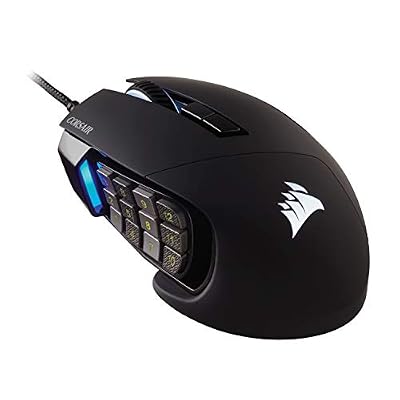
The Scimitar RGB Elite is the fixed-grid option, with twelve mechanical side buttons arranged for the thumb and a patented Key Slider that moves the whole grid forward or back to match your grip. Seventeen programmable buttons in total leave room for control groups, production, and camera commands, while the PixArt PMW3391 sensor tracks natively at up to 18,000 DPI with adjustment in single-DPI steps. Onboard profile storage carries your binds to another computer, and the braided cable keeps the wired connection tidy.
Specs
- Buttons: 17 programmable buttons, including 12 side buttons
- Side panel: patented Key Slider control system repositions the side buttons
- Sensor: PixArt PMW3391 native 18,000 DPI optical sensor, adjustable in 1 DPI steps
- Switches: Omron switches listed at 50 million clicks
- Cable: braided cable
- Memory: onboard profile storage
- Compatibility: PC, Mac, PS5, PS4, Xbox
Best for: RTS players who want a fixed thumb grid they can slide to fit their grip.
Watch out for: wired only, so cable routing matters; macros are set in the iCUE software.
Logitech G604 LIGHTSPEED

The G604 is the wireless pick for players who want plenty of buttons without a full twelve-button grid. Fifteen programmable controls include six thumb buttons, enough for the main control groups and production keys, and the HERO 16K sensor tracks up to 16,000 DPI. Dual connectivity switches between LIGHTSPEED wireless and Bluetooth, and a single AA battery lasts up to 240 hours in LIGHTSPEED mode or up to five and a half months over Bluetooth. The dual-mode hyper-fast scroll wheel adds another input for cycling units or map positions.
Specs
- Controls: 15 programmable controls, including 6 thumb buttons
- Sensor: HERO 16K sensor, 100–16,000 DPI
- Connectivity: LIGHTSPEED wireless and Bluetooth
- Battery: up to 240 hours on 1 AA battery in LIGHTSPEED mode; up to 5.5 months in Bluetooth mode
- Scroll wheel: dual-mode hyper-fast scroll wheel
- Memory: on-board memory
Best for: wireless RTS play with a thumb cluster and long battery life.
Watch out for: Bluetooth mode runs at a lower report rate, so use LIGHTSPEED for matches.
Which One Fits Your Situation
You run large armies with many control groups
Pick the Razer Naga V2 Pro with the 12-button plate, or the Corsair Scimitar RGB Elite. Both put a full grid under the thumb, so control groups, production buildings, and camera jumps all sit on the mouse. The Naga adds wireless freedom and swappable plates for other genres, while the Scimitar’s Key Slider tunes the grid position to your thumb. Either way, spend a practice match learning the grid before ranked play.
You play RTS games plus shooters and want one mouse
Pick the Logitech G502 HERO. Eleven buttons are enough for RTS control groups and production, while the shape, DPI-shift button, and adjustable weights translate directly to shooter play. The Naga V2 Pro can do the same job with its 2-button plate, but the G502 keeps the setup simpler and the wired connection removes battery checks entirely.
You want wireless play and a tidy desk
Pick the Logitech G604 LIGHTSPEED. Fifteen programmable controls cover the main RTS commands, the six thumb buttons are easy to learn, and a single AA battery lasts up to 240 hours in LIGHTSPEED mode. If you want more buttons without a cable, the Naga V2 Pro is the step up, with up to 300 hours of battery life and the swappable side plates.
You are new to button-heavy mice
Start with the Logitech G502 HERO or the G604 LIGHTSPEED. Both give you enough buttons for real RTS play without a twelve-button grid to memorize, so you can bind control groups first and add production keys as the layout becomes familiar. Move to the Naga V2 Pro or Scimitar RGB Elite once you know which commands you reach for most.
Common Mistakes
- Buying an ultralight FPS mouse with only two side buttons, then running out of inputs in the middle of a match.
- Setting DPI far above the range you actually use; a high ceiling adds nothing at 800 to 1,600 DPI.
- Choosing a twelve-button grid without checking thumb reach, and leaving half the buttons unused.
- Skipping the software setup, so macros and control-group binds never get assigned.
- Ignoring grip and hand size, and ending up with a shape that cramps the hand during long sessions.
Frequently Asked Questions
How many buttons do I need for RTS games?
Six thumb buttons cover the essentials: control groups, production, and camera jumps. Twelve buttons suit players who run large armies with many groups, as on the Naga V2 Pro and Scimitar RGB Elite. More buttons only help if you can find them without looking, so match the count to your thumb reach and your willingness to practice the layout.
Is a wireless mouse fine for RTS games?
Yes. RTS play rewards steady tracking and fast commands more than the split-second flicks of a shooter, and modern wireless links keep up easily. The Naga V2 Pro lists up to 300 hours of battery life, and the G604 lists up to 240 hours on one AA battery, so charging is rarely a concern. Use the 2.4 GHz wireless mode rather than Bluetooth for matches.
What DPI should I use for RTS games?
Most RTS players settle between 800 and 1,600 DPI, where the cursor crosses the screen quickly without overshooting small targets. Every mouse here lists a ceiling far above that, so the maximum number is not the deciding factor. Pick a mouse with adjustable steps and on-the-fly switching, then test a few settings in a practice match before settling on one.
Do I need a heavy or light mouse for RTS games?
RTS play rewards stability over flick speed, so a medium-weight mouse with a solid thumb rest usually feels better than an ultralight shell. The G502 HERO lets you tune the heft with five small weights, which is the simplest way to find your preference. Comfort over a long match matters more than a few grams either way, so shape comes first.