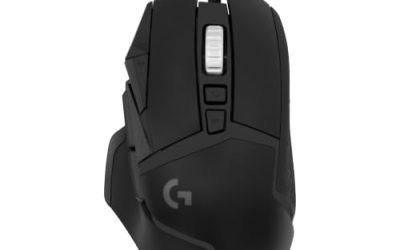
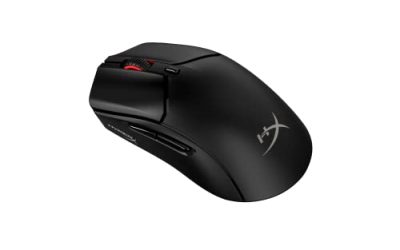
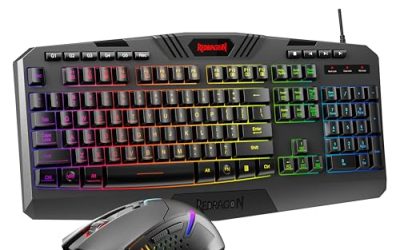
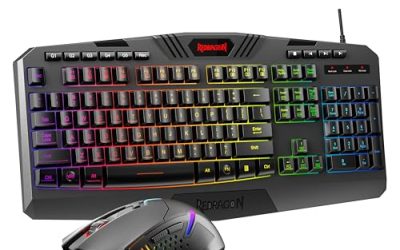
Buying a cheap gaming keyboard and mouse combo is really one decision, not two. The keyboard and the mouse arrive in the same box, share the same cable or receiver, and have to suit your hands together, so a board that feels right with a mouse that feels wrong still leaves you frustrated every session. The choice that matters most is how the keys feel under your fingers during long matches, whether the mouse shape fits your grip, and whether the layout gives you a number pad and media keys or trades them away for a smaller footprint.
This guide is for first-time PC gamers, console players moving to a desktop, students setting up a first desk, and anyone replacing a worn office set with something built for games. Each pick below is a complete keyboard-and-mouse combo listed on Amazon, selected from the names and specifications shown on its Amazon product page, so you can compare real features instead of guessing from a box photo.
Quick Picks
As an Amazon Associate we earn from qualifying purchases
| Product | Best for | Key spec from title |
|---|---|---|
| Redragon S101-3 PRO | A first full setup with software macros | 800-7200 DPI mouse |
| Redragon Updated S107 | High mouse sensitivity on a wired set | 10000 DPI mouse |
| HAVIT Mechanical Keyboard and Mouse Combo | Clicky mechanical keys with a metal board | Blue switches, 104 keys |
| MageGee K1 | A bright RGB desk setup with a matching mouse | 104-key RGB LED keyboard |
| Redragon S107KS Wireless | A cable-free desk with one wireless set | Tri-mode wireless, 10000 DPI mouse |
How to Choose
Keyboard Feel: Membrane or Mechanical
Most cheap combos use membrane keys, which press quietly and feel soft under your fingers, while a smaller group uses real mechanical switches that click and give a sharper response with each press. Membrane boards suit shared rooms and late sessions because they stay quiet, and they usually include a wrist rest that helps during long nights. Mechanical boards suit players who type a lot or want a crisper feel, though the click can carry through thin walls. Neither type is wrong, and the right pick depends on who else hears your keyboard. Picture your room at midnight before you choose, because the feel you enjoy at noon can become the noise that wakes a housemate.
Mouse Sensitivity and Shape
The mouse in a combo matters more than the keyboard, because it controls your aim in every match. Sensitivity is listed as a DPI range, and a higher ceiling lets you move the cursor across a wide monitor with a small wrist movement, while a lower setting gives steadier control for careful aiming. Every mouse here offers DPI steps, so you can switch between fast movement and careful aim with a button press. Shape matters as much: a tall, palm-filling mouse suits a relaxed grip, while a light, low mouse suits players who lift and reposition often. Check the listed weight and button count before you commit, since a combo gives you no second mouse to swap in.
Wired or Wireless Connection
Wired combos are the safe default for gaming, because a cable removes charging from your routine and keeps the connection steady through long sessions. The trade-off is desk clutter, since two cables run from your board and mouse to the same computer, and a short cable can limit where the keyboard sits. Wireless combos clean up the desk and let you shift the keyboard freely, but they add batteries or charging to your routine, and a dead mouse mid-match is a real frustration. A tri-mode set that also works wired gives you a fallback. Match the connection to your habits: if you hate charging, wired wins, and if your desk doubles as a study space, wireless earns its place.
Lighting, Layout, and Desk Space
RGB lighting looks great in photos, but it is the least important feature on a cheap combo, and it should never decide the purchase on its own. What matters more is the layout: a full-size board with 104 keys keeps the number pad for inventory shortcuts and everyday typing, while a compact board saves desk space for wide mouse sweeps. A wrist rest helps during long sessions, and a foldable stand lets you change the typing angle to suit your wrists. Measure your desk first, because a full-size board plus a large mouse pad can crowd a small surface. Lighting modes and brightness controls are a bonus, not a reason to accept keys or a mouse shape you dislike.
The 5 Best Options
Redragon S101-3 PRO

The S101-3 PRO is the classic first combo for a reason: it covers the whole desk in one box, with a full-size RGB keyboard, a programmable mouse, and a wrist rest, so a new player can go from unboxing to a first match without hunting for extra parts. The keyboard offers several lighting modes with adjustable brightness, and the mouse steps through a wide DPI range with a dedicated button, which makes it easy to tune sensitivity for different games. Software support lets you record macros and adjust the lighting. It is a wired set, so it suits a fixed desk where the cables stay put.
Specs
- Full-size RGB backlit keyboard with 7 lighting effects and 4 brightness levels
- Mouse with 800 to 7200 DPI, adjustable with a dedicated DPI button
- 10 mouse lighting effects
- Programmable keys with macro recording through Redragon software
- Multimedia keys and a wrist rest
- Wired USB connection for Windows PC
Best for: A first full gaming setup that needs keyboard, mouse, and software control in one box.
Watch out for: The keyboard uses membrane keys, so it feels soft rather than clicky, and the wired cables need desk space.
Redragon Updated S107

The Updated S107 is the pick for players who care most about mouse tuning. Its mouse reaches a high DPI ceiling through the Redragon software, with a 1000 Hz polling rate that keeps cursor movement smooth during fast play, while the keyboard covers 25-key anti-ghosting so multi-key combinations register during frantic moments. The board carries 6 RGB lighting modes and 12 multimedia keys, plus a foldable stand and floating keycaps that give it a cleaner look than most budget boards. A skin-friendly coating keeps the keys comfortable over long sessions, and the wired connection means there is nothing to charge before a match.
Specs
- Mouse adjustable up to 10000 DPI through software, with 1000 Hz polling rate
- 25-key anti-ghosting on the keyboard
- 6 RGB lighting modes on the keyboard and 8 lighting effects on the mouse
- 12 multimedia function keys
- Foldable stand and floating keycaps
- Wired USB connection for PC and laptop
Best for: Players who want the highest mouse sensitivity and tuning options in a wired combo.
Watch out for: The top DPI setting needs the software installed, and the mouse reaches its full range only through that software.
HAVIT Mechanical Keyboard and Mouse Combo

HAVIT’s mechanical combo is the one to choose if you want real switches instead of a membrane board. Blue switches give each press a clear click and a crisp response, and the aluminum backplate with a floating key design makes the board feel solid on the desk. The detachable wrist rest helps during long typing and gaming sessions, and the keyboard keeps a full 104-key layout with n-key rollover so held keys never drop during complex inputs. The programmable mouse steps through six DPI levels up to 4800, which covers everyday play and careful aiming. It is the loudest board here, so it suits a room of your own.
Specs
- 104-key mechanical keyboard with blue switches and full n-key rollover
- Aluminum backplate with a floating key design
- RGB backlighting with preset lighting modes
- Detachable wrist rest
- Programmable mouse with 6 DPI levels from 800 to 4800 DPI
- Wired USB connection for PC
Best for: Players who want a clicky mechanical feel and a sturdy metal board in one combo.
Watch out for: Blue switches are loud, so check who shares your room before you commit.
MageGee K1

The MageGee K1 is the most colorful pick here, and it suits a desk where looks matter as much as play. The 104-key board lights up with RGB backlighting across 8 colors and 5 lighting modes, with adjustable brightness and speed, while the matching mouse carries a 7-color LED glow that completes the look. Multimedia and gaming hotkeys sit within reach, and the ergonomic layout with high and low keycaps is shaped to reduce hand fatigue during long sessions. A spill-resistant design adds a little insurance against a knocked-over drink, and the wired connection keeps setup simple: plug both parts in and play.
Specs
- 104-key RGB LED backlit keyboard with 8 light colors and 5 light modes
- Adjustable brightness levels and light speeds
- 7-color LED backlit gaming mouse
- Multimedia and gaming hotkeys
- Ergonomic design with a spill-resistant build and transparent base
- Wired USB connection for PC and laptop
Best for: A bright, matching RGB desk setup that also needs a full-size board for typing.
Watch out for: The keyboard uses membrane keys, so it feels soft rather than mechanical, and the look depends on the lighting being switched on.
Redragon S107KS Wireless

The S107KS is the wireless answer to the S107, and it is the pick when cables are the problem. It connects in three ways, wired, 2.4G wireless, or Bluetooth, so it works with a desktop, a laptop, or a second device without swapping hardware. The mouse is light at 65 grams and reaches up to 10000 DPI, which suits players who lift and reposition the mouse often, while the keyboard keeps 25-key anti-ghosting and RGB backlighting for late-night sessions. Software support covers DPI, lighting, and button changes. It is the only wireless set in this guide, and the only one that can tidy a shared desk completely.
Specs
- Three connection modes: wired, 2.4G wireless, and Bluetooth
- Mouse up to 10000 DPI with a lightweight 65-gram design
- 25-key anti-ghosting keyboard with RGB backlighting
- Programmable buttons with Redragon software support
- Wired mode available as a fallback while the battery charges
Best for: A cable-free desk, or a setup shared between a desktop and a laptop.
Watch out for: Wireless mode needs charging, so keep the cable handy for long sessions.
Which One Fits Your Situation
Your First Gaming PC
You are building a first setup and need everything at once. Take the Redragon S101-3 PRO, because it covers keyboard, mouse, wrist rest, and macro software in a single box, and the wide DPI range lets you experiment with sensitivity until you find what suits your aim. Nothing else on this list gives a new player that much in one purchase.
Late Nights in a Shared Room
You play after everyone else is asleep, so quiet keys matter more than a click. Choose the Redragon Updated S107 or the MageGee K1, both membrane boards that stay quiet, and use the lighting controls to dim the board instead of leaving it at full brightness. Save the HAVIT mechanical combo for a room of your own.
Fast Shooters and Quick Flicks
You play shooters where aim decides the match, so the mouse is the whole decision. Take the Redragon Updated S107 for its high DPI ceiling and 1000 Hz polling rate, or the S107KS Wireless if you want the same tuning in a light 65-gram mouse. Either way, set a lower DPI for careful aiming and a higher one for fast turns.
A Desk That Doubles as a Study Space
Your desk is for school or work by day and games by night, so cables and clutter get in the way. Take the Redragon S107KS Wireless, the only set here that runs without cables and switches between devices, and pair it with a full-size layout that still handles typing and number work. Keep the cable in a drawer for charging days.
Common Mistakes
- Choosing a combo for its lighting alone, then finding the mouse shape or key feel uncomfortable after a week of play.
- Ignoring the layout and losing the number pad, then missing it every time you type numbers or use inventory shortcuts.
- Buying a loud mechanical board for a shared bedroom, then having to type softly during every late session.
- Setting the mouse to its highest DPI on day one, then fighting an oversensitive cursor instead of learning one comfortable setting first.
- Forgetting to check the cable length and USB ports, then finding the keyboard cannot reach a comfortable spot on the desk.
Frequently Asked Questions
Do I need software to use a gaming keyboard and mouse combo?
No. Every combo in this guide works as soon as you plug it in, with lighting and DPI controls available on the hardware itself. Software adds extra control, such as macros, custom lighting profiles, and the highest DPI settings on the Redragon sets, so install it when you want those extras, not before your first match.
Is a membrane keyboard good enough for gaming?
Yes, for most players. Membrane boards in this guide cover anti-ghosting, RGB lighting, and media keys, and they stay quiet during late sessions. A mechanical board feels crisper and gives clearer feedback with each press, so choose one if you type a lot or prefer a click, but a membrane board will not hold your games back.
What DPI should I use for gaming?
Most players settle between 800 and 3200 DPI for everyday play, with lower settings for careful aiming and higher ones for fast turns across a wide monitor. The combos in this guide all offer several steps, so try a middle setting for a few days before changing it, and change one step at a time.
Can I use a gaming combo for work and school too?
Yes. Every set here is a full-size board with a number pad, media keys, and a standard layout, so typing, spreadsheets, and browsing all work normally. The RGB lighting can be dimmed or switched off during work hours, and the wireless S107KS is the easiest to move between a gaming desk and a laptop.