A gaming laptop already has a keyboard and a trackpad, so adding an external set is a decision about comfort and control rather than necessity. The built-in keyboard sits close to a hot chassis, the keys feel cramped during long sessions, and a trackpad cannot match a mouse for aiming or camera work. A separate keyboard and mouse let you push the laptop back, raise the screen to eye level, and play with your hands in a relaxed position.
This guide is for laptop gamers who play at a desk, in a dorm room, or in a shared living space, and for buyers who want one matched set instead of hunting down two separate peripherals. Every combo below is a keyboard and mouse sold together under one Amazon listing, chosen from the product names and specifications shown on Amazon, with attention to connection type, layout, mouse sensitivity, and software support.
Quick Picks
As an Amazon Associate we earn from qualifying purchases.
| Product | Best for | Key spec from title |
|---|---|---|
| Redragon S101-3 PRO | First full-size wired set for a laptop desk | RGB backlit programmable keyboard and mouse combo with software |
| Redragon S101M-KS | Cutting cables while keeping a full-size layout | Tri-mode wireless RGB keyboard and 4800 DPI gaming mouse |
| Redragon Updated S107 | Adjustable sensitivity and lighting controls | RGB gaming keyboard and 10000 DPI mouse combo with software |
How to Choose
Wired or Wireless for a Laptop Desk
A wired combo is the simplest match for a gaming laptop because it draws power through USB and never needs charging, which suits a fixed desk. Two cables can clutter a small surface, though, so check how many free USB ports your laptop has and whether a hub will sit between the set and the machine. A wireless combo removes that tangle and lets you slide the keyboard aside when you need desk space for notes or a controller. Tri-mode sets add a wired fallback, so a dead battery never ends a session. Match the choice to how often the laptop leaves the desk: mostly docked means wired is fine, while frequent moves argue for wireless.
Keyboard Feel and Layout
Most laptop gamers move from a shallow built-in keyboard to a taller external one, and the change in key travel takes a few days to feel natural. Membrane boards in these combos feel soft and quiet, with a cushioned press that suits shared rooms and late sessions. Full-size layouts keep the number pad for inventory shortcuts, macros, and everyday work, while the extra width demands more desk space beside the laptop. Look for dedicated multimedia keys and a wrist rest, since both reduce strain during long play. Anti-ghosting matters too: it lets the keyboard register several keys pressed at once, so movement and ability keys fire together instead of dropping inputs.
Mouse Sensitivity and Shape
Mouse sensitivity, measured in DPI, decides how far the cursor travels for a given hand movement, and a combo mouse should let you change it on the fly. Low settings suit careful aiming in shooters, while high settings cover a wide screen with small wrist movements. A dedicated DPI button beats opening software mid-match, though software unlocks the highest settings on some models. Shape matters as much as sensor numbers: a right-handed ergonomic mouse supports the palm during long sessions, while a symmetrical body suits either hand and claw grips. Check the button count as well, because side buttons carry reload, melee, or push-to-talk without moving your left hand off the keyboard.
Software, Lighting, and Desk Space
Companion software turns a basic combo into a configurable one, letting you remap keys, record macros, tune DPI steps, and set lighting effects from one place. If you dislike installing extra programs, pick a set whose lighting and DPI controls work from the hardware itself. RGB backlighting is more than decoration on a laptop setup: it makes keys readable in a dark room and marks the set as your gaming station. Measure the desk before ordering, since a full-size keyboard plus a mouse and pad needs more width than the laptop alone. A compact room also benefits from a single shared wireless receiver, which leaves a USB port free for a headset or external drive.
The 3 Best Options
Redragon S101-3 PRO

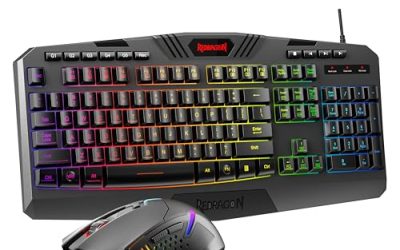
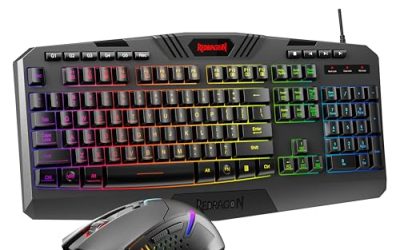
The S101-3 PRO is the straightforward first choice for a laptop gamer who wants a complete desk set without learning new software on day one. Its full-size RGB backlit keyboard carries five macro keys and a wrist rest, so movement, abilities, and shortcuts sit within easy reach during long sessions. The matching mouse adjusts up to 7,200 DPI, which covers casual shooters, strategy games, and everyday browsing with one device. Programmable keys and lighting controls run through Redragon software when you want them, yet the set works as soon as it plugs in.
Specs
- Full-size RGB backlit membrane keyboard with five macro keys
- Integrated wrist rest on the keyboard
- Matching wired mouse adjustable up to 7,200 DPI
- Programmable keyboard and mouse controls through Redragon software
- Wired USB connection for keyboard and mouse
- Compatible with Windows PCs and laptops
Best for: A first full-size wired set for a laptop desk at home or in a dorm room.
Watch out for: The keyboard uses membrane switches rather than mechanical ones, so key presses feel soft and quiet instead of crisp and clicky.
Redragon S101M-KS

The S101M-KS suits laptop owners who want the desk clear of cables but still want a full-size keyboard with a number pad. Its tri-mode design connects through a wired USB cable, a 2.4G wireless receiver, or Bluetooth, and one shared 2.4G receiver controls both the keyboard and the mouse, which saves a USB port on a laptop that may only have two or three. The RGB keyboard includes ten multimedia keys for volume, playback, and shortcuts, while the mouse reaches 4,800 DPI for aiming and general use. Switching between modes takes seconds, so the set follows the laptop from desk to couch without replugging anything.
Specs
- Tri-mode connection: wired USB-C, 2.4G wireless, and Bluetooth
- One shared 2.4G receiver controls both keyboard and mouse
- Full-size RGB backlit keyboard with ten independent multimedia keys
- Wireless gaming mouse adjustable up to 4,800 DPI
- RGB backlighting on keyboard and mouse with adjustable patterns
- Compatible with Windows PCs and laptops
Best for: Laptop gamers who move between rooms and want one wireless set for play and everyday work.
Watch out for: Wireless mode needs charging, so keep the USB-C cable nearby and confirm the battery level before a long session.
Redragon Updated S107

The Updated S107 is the pick for laptop gamers who like to tune sensitivity and lighting rather than accept fixed defaults. Its 104-key RGB keyboard provides six lighting modes with adjustable speed and brightness, plus twelve multimedia function keys and 25-key anti-ghosting for crowded key combinations. The mouse adjusts up to 5,000 DPI with its own button and reaches 10,000 DPI through the Redragon software, which also handles macros, polling rate up to 1,000 Hz, and lighting effects. A foldable keyboard stand and floating keycaps add comfort during extended play, and the wired connection keeps input steady.
Specs
- 104-key RGB backlit keyboard with six lighting modes
- Mouse with eight lighting effects and adjustable DPI up to 5,000 DPI by button
- DPI up to 10,000 through Redragon software, with polling rate up to 1,000 Hz
- 25-key anti-ghosting and twelve multimedia function keys
- Software support for macros, DPI, polling rate, and lighting
- Foldable keyboard stand and floating keycaps
- Wired USB connection, compatible with Windows PCs and laptops
Best for: Players who want software control over DPI, macros, and lighting on a wired laptop setup.
Watch out for: The highest DPI setting and macro editing require the Redragon software, so install it before expecting the full range.
Which One Fits Your Situation
A Small Desk or Dorm Room
Pick the Redragon S101M-KS when desk space is tight and the laptop shares the surface with books or a second screen. Its wireless design removes two cables from the workspace, and the shared receiver leaves a USB port free for a headset. Slide the keyboard aside when you need room, then pull it back for a match without replugging anything.
Competitive Shooters on a Laptop
Pick the Redragon Updated S107 when aiming precision and fast key combinations matter most. Its mouse reaches the highest DPI in this guide through software, the polling rate goes up to 1,000 Hz, and 25-key anti-ghosting keeps movement and ability presses registering together. The wired connection also removes wireless lag from the equation entirely.
One Set for Games and Coursework
Pick the Redragon S101-3 PRO when the same desk handles lectures, essays, and evening matches. The full-size layout keeps the number pad for spreadsheets and shortcuts, the wrist rest eases long typing sessions, and the macro keys double as productivity shortcuts. It plugs in and works, with software available only when you want extra control.
Late Sessions in a Shared Room
Pick the Redragon S101-3 PRO or the S101M-KS when quiet keys matter more than clicky feedback. Both use membrane keyboards that press softly, and their RGB lighting lets you see keys in a dark room without switching on a desk lamp. The wireless S101M-KS adds the freedom to play from a couch or bed without dragging cables across the floor.
Common Mistakes
- Buying a full-size keyboard without measuring the desk, then finding the mouse has no room to move beside the laptop.
- Choosing a wireless combo and forgetting to charge it, leaving the set dead at the beginning of a planned session.
- Ignoring USB port count on the laptop, so the keyboard, mouse, headset, and drive cannot all connect at once.
- Setting the mouse to maximum DPI immediately, which makes aiming twitchy instead of precise for most games.
- Skipping the companion software on the S107, then wondering why the highest DPI and macro options never appear.
Frequently Asked Questions
Does a gaming laptop need an external keyboard and mouse?
No, a gaming laptop works on its own, but an external set improves comfort and aim during long sessions. It lets you push the laptop back, raise the screen, and rest your hands in a natural position. A mouse also gives finer control than a trackpad for aiming, camera movement, and precise clicks in strategy games.
Is a wireless keyboard and mouse combo good for gaming on a laptop?
Yes, when the wireless link is stable and the set includes a wired fallback. Tri-mode combos such as the S101M-KS connect through 2.4G wireless for low delay, Bluetooth for travel, and a cable when the battery runs low. Keep the receiver close to the set and charge the devices between sessions.
What DPI should I use for a gaming laptop mouse?
Begin near the middle of the mouse range, around 800 to 1,600 DPI, and adjust from there based on screen size and game type. Lower settings suit careful aiming in shooters, while higher settings help cover large displays with small wrist movements. Change DPI in small steps and give each setting a full session before judging it.
Can one keyboard and mouse combo work for both games and schoolwork?
Yes, a full-size combo with a number pad and multimedia keys handles both roles well. The number pad speeds up spreadsheets and data entry, multimedia keys control volume and playback during study breaks, and macro keys can store shortcuts for documents. Pick a quiet membrane board if you type near roommates.