

A Mac Mini or a small Windows mini PC can make a neat dedicated cloud-gaming box for a living room television or a desk monitor. The box does not run the games itself: it connects to a cloud service, decodes the video stream, and sends your controller inputs back to a remote server, so local hardware matters far less than it would for a gaming PC.
This guide is device by device: the Mac Mini first, then Windows mini PCs built around low-power Intel and AMD chips, and a side-by-side comparison so you can pick the right box for the services you use.
As an Amazon Associate, we earn from qualifying purchases.
Quick Answer
Yes, a Mac Mini or a Windows mini PC works well as a dedicated cloud-gaming box, because the games run on remote servers and the box only decodes video. Use wired Ethernet, a modern browser or the service app, and a paired controller. The Mac Mini suits browser-based services best, while a Windows mini PC supports more native cloud apps.
Cloud Gaming on a Mac Mini
The Mac Mini is a strong cloud-gaming box because it is quiet, small, and always ready. It sits beside a television, wakes from sleep in seconds, and drives a 4K television over HDMI. Cloud gaming needs no powerful graphics card in the box: the Mac Mini only runs a browser or an app, decodes video, and keeps a steady connection.
Setup is straightforward: HDMI to the television, Ethernet to the router if you can, then sign in to your cloud service in a browser. GeForce Now offers a native macOS app as well as a browser option, while Xbox Cloud Gaming and Amazon Luna are browser based on a Mac. Storage matters least, because cloud games are not installed locally.
1. Apple Mac Mini with M4 Chip, 16GB Unified Memory, 512GB SSD
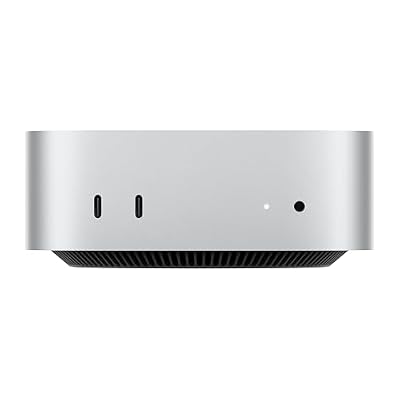
The standard M4 Mac Mini is the sensible starting point. Its 10-core CPU and 10-core GPU are far more than a video stream needs, so decoding never struggles and the fan stays quiet. The compact five-by-five-inch chassis fits on a television stand, with front USB-C ports and a headphone jack for a wired controller or headset. Thunderbolt 4, HDMI, and Gigabit Ethernet sit on the back, with Wi-Fi 6E and Bluetooth 5.3 for wireless play.
Specs
| Feature | Detail |
|---|---|
| Processor | Apple M4 chip, 10-core CPU |
| Graphics | Apple M4, 10-core GPU |
| Memory | 16GB unified memory |
| Storage | 512GB SSD |
| Display output | HDMI, Thunderbolt 4 |
| Network | Gigabit Ethernet, Wi-Fi 6E, Bluetooth 5.3 |
2. Apple Mac Mini with M4 Pro Chip, 24GB Unified Memory, 512GB SSD
The M4 Pro Mac Mini is the premium option, and for cloud gaming alone it is more machine than you need. Its 12-core CPU and 16-core GPU, plus 24GB of unified memory, give it headroom for a browser with many tabs, a chat app, or a second display beside the game. If the box will also serve as a household computer, that extra power starts to make sense. Thunderbolt 5 ports step up connectivity, while the compact design, HDMI output, and Gigabit Ethernet stay the same.
Specs
| Feature | Detail |
|---|---|
| Processor | Apple M4 Pro chip, 12-core CPU |
| Graphics | Apple M4 Pro, 16-core GPU |
| Memory | 24GB unified memory |
| Storage | 512GB SSD |
| Display output | HDMI, Thunderbolt 5 |
| Network | Gigabit Ethernet, Wi-Fi 6E, Bluetooth 5.3 |
Cloud Gaming on a Windows Mini PC
A Windows mini PC is the more flexible cloud-gaming box, because Windows supports native apps from more cloud services alongside browser play. GeForce Now and Xbox Cloud Gaming both have a presence on Windows, and browser-based services such as Amazon Luna work the same way they do on a Mac. Windows also gives you wider controller support and easier access to display and network settings.
The hardware bar is low. A low-power Intel N100 or N95 chip, or an older Core i3, can decode a cloud stream without breaking a sweat, because the heavy work happens in a data centre. Look instead for a wired Ethernet port, dual display output, Wi-Fi 6, and enough memory to keep Windows responsive: 8GB is workable, while 16GB is more comfortable. Setup matches the Mac Mini. Many models include a VESA mount for hiding the box behind a monitor.
3. Beelink Mini S12 Pro Mini PC, Intel N100, 16GB RAM, 500GB SSD

The Beelink Mini S12 Pro is a budget-friendly Windows mini PC built around the Intel N100, a four-core, four-thread chip that runs at up to 3.4GHz. For cloud gaming that is plenty: the chip only decodes video and runs a browser, while using very little power. Sixteen gigabytes of DDR4 memory keeps Windows responsive with a streaming app open, and the 500GB SSD leaves room for apps and media. Dual 4K HDMI, Wi-Fi 6, and Bluetooth 5.2 round out the connections.
Specs
| Feature | Detail |
|---|---|
| Processor | Intel N100, 4 cores, up to 3.4GHz |
| Graphics | Intel UHD Graphics, integrated |
| Memory | 16GB DDR4 RAM |
| Storage | 500GB SSD |
| Display output | Dual HDMI, 4K at 60Hz |
| Network | Wi-Fi 6, Bluetooth 5.2, Ethernet port |
4. GMKtec NucBox G3 Pro Mini PC, Intel Core i3-10110U, 8GB RAM, 256GB SSD
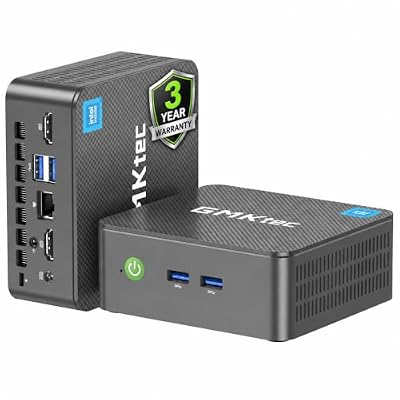
The GMKtec NucBox G3 Pro is a mid-range mini PC with an Intel Core i3-10110U processor, 8GB of DDR4 memory, and a 256GB SSD. The older Core i3 chip is still more than enough for decoding cloud streams, and the box adds four USB 3.2 ports, dual 4K output, and an Intel i226-V Ethernet port for a wired router connection. A VESA mount is included, so the box can hide behind a monitor. Eight gigabytes is the workable minimum for a Windows cloud box, so keep background apps low.
Specs
| Feature | Detail |
|---|---|
| Processor | Intel Core i3-10110U |
| Graphics | Intel UHD Graphics, integrated |
| Memory | 8GB DDR4 RAM |
| Storage | 256GB SSD |
| Display output | Dual 4K display output |
| Network | Intel i226-V Ethernet, Wi-Fi 6, Bluetooth 5.2 |
5. Minisforum UM690L Slim Mini PC, AMD Ryzen 9 6900HX, 32GB RAM, 1TB SSD

The Minisforum UM690L Slim is the premium Windows pick, overpowered for cloud gaming. Its AMD Ryzen 9 6900HX processor has eight cores and sixteen threads with a boost clock of up to 4.9GHz, paired with 32GB of LPDDR5 memory and a 1TB PCIe 4.0 SSD. As a cloud box, it never slows down, no matter how many apps or displays you have open around the stream. HDMI 2.1, DisplayPort 1.4, and USB4 support up to three displays, with Wi-Fi 6E, Bluetooth 5.3, and 2.5 Gigabit Ethernet.
Specs
| Feature | Detail |
|---|---|
| Processor | AMD Ryzen 9 6900HX, 8 cores, up to 4.9GHz |
| Graphics | AMD Radeon 680M, integrated |
| Memory | 32GB LPDDR5 RAM |
| Storage | 1TB PCIe 4.0 SSD |
| Display output | HDMI 2.1, DisplayPort 1.4, USB4 |
| Network | 2.5 Gigabit Ethernet, Wi-Fi 6E, Bluetooth 5.3 |
Mac Mini vs Windows Mini PC: A Side-by-Side Comparison
| Feature | Mac Mini | Windows Mini PC |
|---|---|---|
| Cloud access | Browser based, plus GeForce Now app | Native apps and browser |
| Controller support | Bluetooth controllers | Bluetooth and USB |
| Wired network | Gigabit Ethernet | Gigabit or 2.5 Gigabit Ethernet |
| Display output | HDMI plus Thunderbolt | HDMI plus DisplayPort or USB4 |
| Best for | Apple households, quiet rooms | Flexibility and ports |
How to Choose
Start with the services you use, not the box. If you play mostly through GeForce Now, Xbox Cloud Gaming, or Amazon Luna in a browser, either platform works, and the Mac Mini is the quieter choice. If you want native Windows apps, wider controller support, or a VESA mount, a Windows mini PC is the better fit. Check each service’s supported-devices page before you buy. Next, look at your network: a wired Ethernet connection matters more than any processor in this guide. Match memory to use: 8GB is enough for a single-purpose box and 16GB is the comfortable middle ground, while storage barely matters.
Who Should Skip
Skip a dedicated mini-PC cloud box if you already have a device that does the same job. A smart television with a built-in cloud gaming app, a streaming stick, or a games console already handles cloud play without another box to update. Adding a mini PC only makes sense when you want a full desktop browser, a wider choice of services, or a computer that does other jobs too. Skip it as well if your internet connection is slow or unstable, because no mini PC can fix a line that drops out. Skip the premium models too if cloud gaming is all you will do: a budget box streams the same game at the same quality when the network is good.
FAQ
Can a Mac Mini run cloud gaming services?
Yes. A Mac Mini runs cloud gaming services through a browser, and GeForce Now also offers a native app for macOS. Xbox Cloud Gaming and Amazon Luna work in the browser on a Mac. The games run on remote servers, so the Mac Mini only decodes the video stream.
Do I need a powerful mini PC for cloud gaming?
No. Cloud gaming moves the heavy work to remote servers, so the local box only decodes video and keeps a steady network connection. A low-power chip such as the Intel N100 is enough for streaming. Focus on a wired Ethernet connection and a good controller instead.
Is a wired Ethernet connection really necessary for cloud gaming?
It is not strictly necessary, but it is the single best upgrade for cloud gaming on a mini PC: a wired connection avoids wireless interference and keeps latency steadier. Without a cable, use the 5GHz band and keep the box close to the router.
Can I use a PlayStation or Xbox controller with a mini PC?
Yes. Modern Xbox and PlayStation controllers pair with Mac and Windows mini PCs over Bluetooth, and also work over USB. Most cloud services recognise them automatically, so you can start playing without extra software.
Final Verdict
A Mac Mini or a Windows mini PC makes a fine dedicated cloud-gaming box, and the right choice depends on your services and your living room rather than on raw power. The standard M4 Mac Mini is the best pick for most people: quiet, compact, and more than fast enough for streaming. A Windows mini PC such as the Beelink Mini S12 Pro is the better choice when you want native apps and wider controller support, while the Minisforum UM690L Slim suits anyone who wants one small box for every job.










