

- Top Pick: GL.iNet GL-MT6000 (Flint 2) Wi-Fi 6 Router
- Runner-up: ASUS RT-AX86U Pro (AX5700) Gaming Router
- Also consider: TP-Link ER605 V2 Omada Gigabit VPN Router
Plenty of Linux gamers consider a VPN for sensible reasons: a shared or untrusted network, an internet provider that seems to treat game traffic badly, remote play back to a home machine, or a virtual LAN for older games with friends. Gaming VPN marketing promises much more, usually lower ping, and that is where expectations and reality part company. Linux itself is not the obstacle: WireGuard lives in the kernel, OpenVPN is a mature native citizen, and NetworkManager handles both.
The honest summary is that a VPN changes the path your traffic takes and who can see it. It does not change the physical distance between you and a game server, and it cannot repair a weak connection at your end. This guide covers what a VPN changes, the protocol reality on Linux, split tunnelling in plain words, the router-level option that suits a Steam Deck better than any app, what publishers and anti-cheat systems think about VPN use, and the hardware behind each setup.
As an Amazon Associate, we earn from qualifying purchases.
Quick answer
A VPN on Linux is easy to run and genuinely useful for privacy on untrusted networks, safer remote access to your own machines, and virtual LAN play. It is not a latency tool: expect the same or slightly worse ping, occasionally better when your provider routes poorly. Set it up per app, or at the router.
What a VPN changes, and what it cannot
A VPN moves your traffic through an encrypted tunnel to an exit server run by the provider, and services on the internet see that server’s address instead of yours. On a hotel or campus network, that encryption is the real product: the local operator can no longer read your traffic or see which servers you connect to. A VPN also changes the route: your provider’s path to a game server might be shorter or less congested than your own provider’s, and when that happens, latency can genuinely improve. That is a routing accident in your favour, not a promised feature.
What it cannot do matters just as much. It cannot shorten the distance between your house and the server. It cannot fix jitter from a weak Wi-Fi signal or a failing line, because your traffic still crosses that same weak link first. And the tunnel costs something: encapsulation adds overhead to every packet, and the trip to the exit and back adds distance unless the exit sits near the game server. The honest default expectation is latency about the same or slightly worse.
The protocol reality on Linux
WireGuard is the protocol to build on. It has been part of the Linux kernel for years, the tooling is small and auditable, and NetworkManager supports it natively, so on most distributions a WireGuard connection is a settings panel entry rather than a project. Its overhead is low because the work happens in the kernel. OpenVPN remains the fallback: supported everywhere, able to cross restrictive networks, and offered by every serious provider, at the cost of a userspace process doing the encryption.
The provider’s own Linux app is the variable part: some ship a full graphical client, some a command-line tool only, and some simply hand you WireGuard configuration files, which many Linux users prefer, since a file dropped into NetworkManager behaves like any other connection. The Steam Deck is the awkward case: SteamOS offers no tidy VPN switch in Game Mode, so Deck owners use Desktop Mode or, more cleanly, the router.
Split tunnelling, in plain words
Split tunnelling means deciding which traffic goes through the tunnel and which travels normally. The useful shapes for a gamer are few. You might send everything except the game through the VPN, so a ranked match keeps its direct route while browsing and downloads stay private. You might do the reverse for one specific tool, such as a voice app. Or you might keep the gaming PC entirely off the tunnel and give the VPN to the rest of the house. On Linux this is routing policy rather than magic: provider apps expose it as an app list, WireGuard configurations express it through the AllowedIPs setting on each peer, and a router can decide per device instead of per application, the shape the hardware section below is built around.
The router-level option
Running the VPN on the router covers everything behind it with one configuration: the gaming PC, the Steam Deck that never made VPN setup easy, and any console in the house.
The trade-off is that the router’s processor becomes the ceiling. WireGuard is light, but a small router CPU can still cap tunnel throughput well below what your connection delivers, and the maker’s headline VPN figures are laboratory numbers, not a promise about your line. Scope is the other decision: a whole-home tunnel sends every device through the exit, including games you might prefer direct. Better firmware answers that with per-device policy, so the Deck uses the tunnel while the desktop playing ranked matches does not.
The honesty section: bans, regions and anti-cheat
This is the part VPN advertising tends to leave out. Using a VPN is not, by itself, cheating, and no anti-cheat system bans players merely for encrypted traffic. But publishers write their own rules. Many game terms of service prohibit using a VPN or proxy to access a game from a region where you do not live, to reach region-locked content, or to take advantage of regional pricing, with account penalties up to termination. Using one to evade an account ban or a regional restriction is a terms violation in the same way, and this guide does not present it as a route around anything.
Two consequences follow. First, anti-cheat is a separate question: whether a game runs on Linux at all is decided by its anti-cheat support for Proton, and a VPN changes nothing about that. Second, expect friction: some services challenge logins from well-known VPN exit addresses, so a launcher may ask for extra verification while the tunnel is up.
How to choose
Match the setup to the machine in front of you. A single Linux desktop is the easy case: import a WireGuard configuration into NetworkManager, or install the provider’s client, and leave the game direct unless you have a reason to tunnel it. A desktop plus a Steam Deck points at the router, because the Deck resists per-device setup. A household with mixed needs points at a router with per-device policy, or a dedicated VPN gateway. Regular travel points at a pocket travel router.
Who should skip this
Skip the VPN if your goal is lower ping in competitive games and your current connection is wired on a competent provider: there is nothing for the tunnel to fix, and it adds a hop. Skip it if your real problem is in-home Wi-Fi, because the tunnel rides on that same Wi-Fi. And skip it if the plan involves region locks, store pricing in another country, or an account you were told not to use.
The hardware that makes it practical
GL.iNet GL-MT6000 (Flint 2) Wi-Fi 6 Router

The Flint 2 is the whole-home option: OpenWrt-based firmware, WireGuard and OpenVPN client and server, and per-device routing, so the gaming PC can stay direct while the rest of the house uses the tunnel. Its processor is the strongest here, and the router CPU sets the tunnel ceiling.
Specs:
– Wi-Fi 6 dual-band, AX6000 class
– MediaTek MT7986 quad-core processor at 2.0 GHz
– 1 GB DDR4 memory, 8 GB eMMC storage
– Two 2.5 gigabit ports and four gigabit ports
– OpenWrt-based firmware; WireGuard and OpenVPN client and server
ASUS RT-AX86U Pro (AX5700) Gaming Router

ASUS builds the per-device idea into its gaming router line as VPN Fusion, which lets one device use a VPN connection while others stay on the normal route. ASUSWRT supports OpenVPN, WireGuard and IPSec clients, and the router doubles as a capable gaming router in its own right.
Specs:
– Wi-Fi 6 dual-band, AX5700 class
– One 2.5 gigabit port plus gigabit Ethernet ports
– VPN Fusion per-device VPN routing
– OpenVPN, WireGuard and IPSec client support
– AiMesh compatible for later expansion
TP-Link ER605 V2 Omada Gigabit VPN Router

The ER605 is the dedicated-gateway shape: a wired-only VPN router that sits behind your existing wireless setup and does nothing but routing and tunnels. Note that Omada cloud management changes which VPN features are configurable, so standalone management is the mode to plan around for home VPN client use.
Specs:
– Wired gigabit router, no Wi-Fi radios
– Up to three WAN ports plus one USB WAN port
– OpenVPN, WireGuard, IPSec, L2TP and PPTP support
– Omada SDN integration; standalone management available
– SPI firewall and load balancing across WAN links
GL.iNet GL-MT3000 (Beryl AX) Travel Router

The Beryl AX is the pocket option for travel: a small Wi-Fi 6 router that joins whatever network a hotel or rental offers and re-shares it through your own VPN tunnel, so a handheld, a laptop and a phone all land on one network you control. It runs OpenVPN and WireGuard as client or server and is powered over USB-C.
Specs:
– Wi-Fi 6 dual-band; 574 Mbps (2.4 GHz) and 2402 Mbps (5 GHz), maker-stated
– One 2.5 gigabit WAN port, one gigabit LAN port
– USB 3.0 port for tethering or storage
– OpenVPN and WireGuard client and server
– USB-C powered, pocket-sized format
GL.iNet GL-AXT1800 (Slate AX) Travel Router
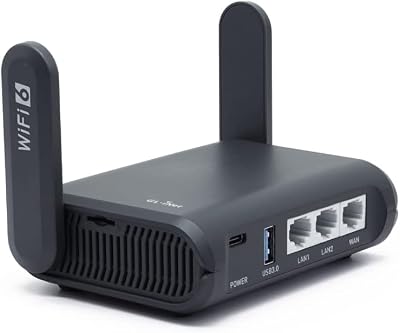
The Slate AX is the larger travel sibling, with a faster processor and full gigabit ports, for people who travel with more than a handheld. It runs the same OpenWrt-based system as the rest of the GL.iNet line, with client and server support and per-device policy.
Specs:
– Wi-Fi 6 dual-band, AX1800 class
– Qualcomm IPQ6000 quad-core processor at 1.2 GHz
– One gigabit WAN port, two gigabit LAN ports
– OpenWrt-based firmware; OpenVPN and WireGuard client and server
– USB 3.0 port and microSD card slot
FAQ
Does a VPN lower ping for Linux gaming?
Usually not. A VPN adds an extra stop on the way to the server, so the honest expectation is similar or slightly higher latency. The exception is a genuinely poor route from your provider, where the VPN path happens to be better.
Can I use a VPN on a Steam Deck?
Yes, but not gracefully inside Game Mode. The practical options are setting it up in Desktop Mode, or letting a router run the tunnel so the Deck simply joins a network that is already covered, which is the route most Deck owners stay with.
Will using a VPN get my game account banned?
A VPN alone is not cheating, and anti-cheat does not decide bans on that basis. Publisher terms are the risk: using a VPN for region-locked content, regional pricing, or ban evasion is prohibited by many games, with account penalties attached.
Final verdict
On Linux, a VPN is a well-supported tool with a narrow honest job: privacy on networks you do not control, a safer path back to your own machines, and virtual LAN play with friends. It is not a latency upgrade, and it is not a key to other regions. If that job matches your need, WireGuard through NetworkManager covers a single desktop, and a router above extends the same tunnel to a Deck, a household, or a hotel room.










