Buying your first gaming keyboard and mouse is not really a specs decision. It is a habits decision. A beginner needs a set that registers every key press during a crowded fight, a mouse that stays predictable while aim is still being learned, and controls simple enough that nothing needs configuring before the first match. A matched combo in one box removes the guesswork of pairing separate devices, and it keeps the keyboard and mouse on the same connection style, lighting controls and support page while you learn what you actually like.
This guide is for first-time PC builders, laptop players adding real controls, people moving over from console, and anyone buying a starter set as a gift. The three picks below cover the main beginner paths: a wired all-rounder, a true mechanical set, and a wireless set sharing one receiver. Each was chosen from the name and specifications on its Amazon listing, and every set is a genuine retail combo with the keyboard and mouse packaged together.
Quick Picks
As an Amazon Associate we earn from qualifying purchases.
| Product | Best for | Key spec from title |
|---|---|---|
| Redragon S101 Gaming Keyboard and Mouse Combo | A first wired setup with macro keys and a wrist rest | Mouse adjustable up to 7,200 DPI |
| Havit HV-KB389L Mechanical Keyboard and Mouse Combo | Beginners who want real mechanical switches from day one | 104 keys with blue mechanical switches |
| RedThunder K10 Wireless Gaming Keyboard and Mouse Combo | A clean desk with no cables to manage | One shared 2.4 GHz receiver for both devices |
How to Choose
Membrane or Mechanical Keys: Decide How Typing Should Feel
Most beginner combos use membrane keys, which feel soft and quiet because a rubber layer sits under each keycap. Mechanical keyboards give every key its own switch, so the press feels firmer and more distinct, and many new players find movement keys easier to judge on them. Neither is automatically better. A membrane board like the Redragon S101 suits shared rooms and late sessions because it stays quiet, while the blue mechanical switches in the Havit set are clicky and audible through a headset microphone. Decide based on where and when you play, not on the assumption that mechanical always wins.
Wired or Wireless: Count the Cables and the Charging
A wired combo plugs in once and never asks for power, which is why two of the three sets here use USB cables. The trade-off is two cables crossing the desk and two USB ports occupied. A wireless combo such as the RedThunder K10 runs both devices from a single shared receiver, freeing a port and clearing the desk, but it introduces batteries: the listing rates roughly eight hours of continuous use with the lighting on, so it needs regular charging over its Type-C port. Beginners who forget maintenance usually get on better with wired; beginners short on ports or desk space usually prefer wireless.
Layout, Anti-Ghosting and the Extras That Actually Matter
All three sets here are full-size boards with a number pad, which helps in strategy games and everyday typing alike. The specification worth checking is anti-ghosting: gaming involves holding several keys at once, and a board that drops inputs will feel broken in exactly the moments that matter. The Havit set lists anti-ghosting across all keys, and the Redragon lists programmable keys with independent macro record keys for players who want to store simple sequences. Media keys, a wrist rest and splash resistance sound minor, yet they are the features a beginner touches every single day.
Mouse DPI, Buttons and Size for Hands Still Learning
Combo mice are simpler than standalone gaming mice, and that is fine for a first year of play. What matters is adjustable DPI so sensitivity can be lowered while aim develops: the mice here range from 3,200 DPI on the RedThunder up to 7,200 DPI on the Redragon, each with steps you can cycle on the mouse itself. Programmable side buttons, offered on the Havit mouse, give new players a home for melee or push-to-talk. Check the mouse size against your hand, because a combo mouse is a fixed shape with no alternative sizes in the box.
The 3 Best Options
Redragon S101 Gaming Keyboard and Mouse Combo

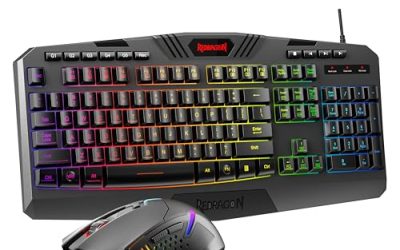
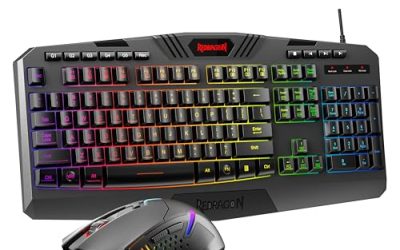
The S101 is the set to start with if you want one wired box that covers the basics properly and leaves room to grow. The full-size keyboard is RGB backlit with a built-in wrist rest, programmable keys and independent macro record keys, so a beginner can record simple sequences without learning separate software first. Its mouse adjusts up to 7,200 DPI, which gives plenty of sensitivity steps to experiment with while aim settles down. Because everything runs over USB cables, there is no charging routine and no receiver to lose, and the keyboard and mouse simply work the moment they are plugged in.
Specs
- Model: S101-3 (S101 series)
- Connectivity: Wired USB
- Keyboard: Full-size layout, RGB backlit, built-in wrist rest
- Keyboard features: Programmable keys, independent macro record keys, 4 independent media keys
- Mouse: Optical sensor, adjustable up to 7,200 DPI
- Package: Keyboard and mouse combo set, 2 units
Best for: First-time PC gamers who want a wired set with macro keys and nothing to charge.
Watch out for: The keyboard uses soft membrane-style keys rather than mechanical switches, and macros depend on Redragon’s downloadable software.
ASIN: B00NLZUM36
Havit HV-KB389L Mechanical Keyboard and Mouse Combo

Choose the Havit set if the feel of the keys is the whole point of upgrading. Its keyboard is a true mechanical board with blue switches under all 104 keys, full anti-ghosting so crowded key combinations register together, and RGB backlighting with 14 modes controlled from the board itself. A detachable wrist rest is included for longer sessions. The matching mouse offers six DPI levels from 800 to 4,800 with programmable buttons, which is enough range for a beginner to find a comfortable sensitivity and bind a spare action or two. Everything is wired over USB and works as soon as it is connected.
Specs
- Model: HV-KB389L
- Connectivity: Wired USB
- Keyboard: 104 keys, blue mechanical switches
- Backlight: RGB with 14 lighting modes
- Anti-ghosting: All keys
- Wrist rest: Detachable, included
- Mouse: 6 DPI levels, 800 / 1600 / 2400 / 3200 / 4000 / 4800
- Mouse buttons: Programmable
Best for: Beginners who want genuine mechanical switches and full anti-ghosting in their first set.
Watch out for: Blue switches are loud and clicky, which can carry into voice chat and annoy people in the same room.
ASIN: B07QS6MG8B
RedThunder K10 Wireless Gaming Keyboard and Mouse Combo

The K10 is the pick for a desk that has to stay tidy. Keyboard and mouse share a single 2.4 GHz USB receiver, stored in the bottom of the mouse, so the whole set takes one port and leaves no cables on show. The full-size keyboard has anti-ghosting mechanical-feel keys with pudding-style keycaps that let the backlight show through, and both halves recharge over Type-C instead of using disposable batteries. The mouse carries seven buttons and adjusts up to 3,200 DPI. The honest compromise is battery life: the listing rates about eight hours of continuous use with the lighting switched on.
Specs
- Model: K10
- Connectivity: 2.4 GHz wireless, one shared USB receiver for both devices
- Keyboard: 104 keys, anti-ghosting, mechanical-feel membrane keys
- Keyboard battery: 3,000 mAh rechargeable
- Mouse: 7 buttons, up to 3,200 DPI
- Mouse battery: 800 mAh rechargeable
- Charging: USB Type-C
- Battery life: Up to 8 hours of continuous use with lighting on, per the listing
Best for: Laptop players and tidy desks that need one receiver and no trailing cables.
Watch out for: Lighting drains the batteries quickly, so expect frequent charging, and keep track of the small receiver stored under the mouse.
ASIN: B0F9P71JLN
Which One Fits Your Situation
You Are Building Your First Gaming PC
Start with the Redragon S101. A first build already involves drivers, settings and new habits, and a wired combo removes charging and pairing from that list entirely. The macro record keys and wide DPI range give you features to grow into over the first year, and the wrist rest makes long sessions kinder while your posture at a desk is still developing.
You Want the Mechanical Feel Right Away
Go straight to the Havit HV-KB389L instead of buying a membrane set you plan to replace. Its blue mechanical switches and all-key anti-ghosting are the two upgrades beginners actually notice in the first week, and the programmable mouse buttons cover the basics. Just be honest about the noise: if you play in a shared room at night, this is the wrong switch type.
Your Gaming Space Is a Laptop on a Small Desk
The RedThunder K10 fits this life best. One receiver serves both devices, which matters when a laptop offers few ports, and the set can be swept into a drawer when the desk returns to work duty. Charge it over Type-C during the day and it will be ready for the evening, as long as you accept the lighting-driven charging routine.
You Are Buying a Starter Set as a Gift
Pick the Redragon S101 when you cannot be there to help with setup. It is wired, so there is nothing to pair and nothing to charge, and the box contains the complete matched set a new player needs. The recipient plugs in two USB cables and plays, and the programmable keys give them something to explore once the basics feel familiar.
Common Mistakes
- Buying a combo for the lighting effects while ignoring anti-ghosting, then losing key presses in busy fights.
- Choosing clicky blue mechanical switches for a shared bedroom or an open microphone without thinking about noise.
- Picking a wireless set and leaving the backlight at full brightness, then blaming the set when it needs charging every day.
- Setting the mouse to its maximum DPI on day one instead of starting low and raising it as control improves.
- Assuming a combo mouse comes in sizes, when the shape in the box is the only shape available.
Frequently Asked Questions
Is a combo or separate keyboard and mouse better for a beginner?
A combo is usually the smarter first purchase. The keyboard and mouse arrive matched, share one support page and one connection style, and cost less effort to set up than researching two separate devices. Separate gear makes sense later, once you know your preferred switch type, mouse shape and grip, and want to upgrade one piece at a time.
Do beginners need a mechanical keyboard to play well?
No. Mechanical switches feel more distinct and are built to last, but a membrane keyboard registers the same commands and is quieter and simpler. Many new players start on a membrane set like the Redragon S101 and play perfectly well. Move to mechanical, as with the Havit set, when you want the firmer key feel, not because games require it.
Is a wireless combo responsive enough for gaming?
A 2.4 GHz receiver-based set like the RedThunder K10 is responsive enough for beginner and casual competitive play, and the single shared receiver keeps setup simple. The real difference is upkeep rather than speed: batteries need charging, and the receiver is small enough to misplace. Players who never want to think about power usually stay with a wired combo.
What DPI should a beginner use on a combo mouse?
Start lower than you expect. Most new players aim better somewhere in the lower DPI steps of their mouse, raising the setting gradually as control improves. Every mouse in this guide adjusts in steps directly on the device, so experiment in a practice range: if small movements overshoot your target, step down; if turning feels sluggish, step up one level.