- Top Pick: Razer DeathAdder V3 Pro
- Runner-up: Logitech G502 X Plus
- Also consider: Razer Basilisk V3 Pro
A 4K monitor packs four times as many pixels as a 1080p display into the same screen area, so the cursor has much further to travel from one edge to the other. A setting that felt calm at lower resolutions can suddenly feel slow and heavy, while a fast setting can become hard to control when every small movement covers more screen space.
You do not need an extreme sensor or a huge DPI number to play well on a 4K display. What matters is the balance between DPI, in-game sensitivity, polling rate, and desk space. This guide explains that balance, then looks at five gaming mice with the sensor range and control options that suit high-resolution play.
As an Amazon Associate, we earn from qualifying purchases.
Quick Answer
For most players on a 4K monitor, a mouse DPI setting between 800 and 1600 works well, paired with low in-game sensitivity for shooters or moderate sensitivity for desktop and strategy play. A sensor rated to at least 18,000 DPI gives plenty of headroom, and a 1000 Hz polling rate keeps movement smooth. Choose a comfortable shape first, then tune DPI in small steps.
Razer DeathAdder V3 Pro

The Razer DeathAdder V3 Pro is a strong fit for 4K play because it pairs a very high sensor ceiling with a light, right-handed ergonomic shape. At 63 grams, it moves easily across a large mousepad, which helps when a 4K screen asks for longer cursor travel. The ergonomic curve supports palm and claw grips and stays comfortable during long sessions.
Its Focus Pro 30K optical sensor gives far more DPI headroom than a 4K setup needs, so you can run a moderate DPI setting without pushing the sensor near its limits. The wireless connection keeps the desk clear, and the long battery life suits extended play. Five programmable buttons cover the essentials. Set DPI in the 800 to 1600 range and adjust in-game sensitivity to taste.
Specs
- Sensor: Razer Focus Pro 30K optical sensor
- Maximum DPI: 30,000 DPI
- Weight: 63 grams
- Connectivity: HyperSpeed wireless and wired
- Buttons: 5 programmable buttons
- Polling rate: 1000 Hz, with support for higher rates with a separate dongle
- Battery life: Up to 90 hours
- Shape: Right-handed ergonomic
Logitech G502 X Plus

The Logitech G502 X Plus takes a different approach to 4K gaming. Instead of chasing the lightest possible weight, it offers many buttons, a dual-mode scroll wheel, and RGB lighting. That combination suits players who want one mouse for gaming and work on a large 4K display.
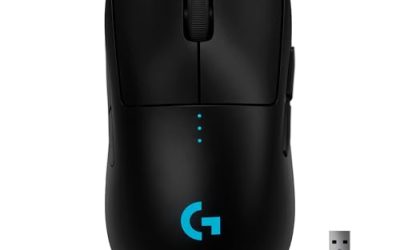
Its HERO 25K sensor provides a high DPI ceiling and consistent tracking across a wide range of sensitivity settings, handling fast flicks and slow, careful aiming with equal steadiness. The scroll wheel can switch between a notched mode for precise selection and a free-spinning mode for fast scrolling through long documents and web pages. The G502 X Plus is heavier and larger than the ultralight mice on this list, so it suits players who like a solid, planted feel. If you play games that benefit from many bindings, such as MMOs and strategy titles, the extra controls are a genuine advantage.
Specs
- Sensor: Logitech HERO 25K optical sensor
- Maximum DPI: 25,600 DPI
- Weight: 106 grams
- Connectivity: LIGHTSPEED wireless and wired
- Buttons: 13 programmable buttons
- Polling rate: 1000 Hz
- Battery life: Up to 130 hours with lighting off
- Shape: Right-handed ergonomic with thumb rest
Razer Basilisk V3 Pro
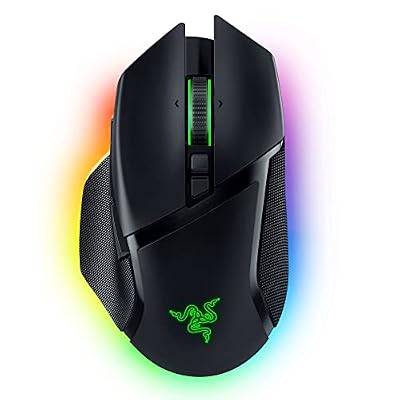
The Razer Basilisk V3 Pro is the most versatile mouse in this roundup. It combines a high-ceiling sensor with a tilting scroll wheel, many programmable controls, and a comfortable ergonomic shape. The extra controls make it easy to bind DPI switching to a button for precise aiming or fast menu navigation.
Its Focus Pro 30K optical sensor tracks cleanly at the moderate DPI settings that suit 4K monitors, and the high polling rate keeps cursor movement responsive. The HyperScroll tilt wheel can scroll quickly through long pages and tilt sideways for horizontal scrolling in creative software, which is useful on a wide 4K display. The Basilisk V3 Pro is a larger mouse with a fuller grip, so it fits medium to large hands best. Players who want one mouse for shooters, single-player adventures, and desktop work will find the feature set hard to fault.
Specs
- Sensor: Razer Focus Pro 30K optical sensor
- Maximum DPI: 30,000 DPI
- Weight: 112 grams
- Connectivity: HyperSpeed wireless, Bluetooth, and wired
- Buttons: 11 programmable buttons
- Polling rate: 1000 Hz, with support for higher rates with a separate dongle
- Battery life: Up to 90 hours
- Shape: Right-handed ergonomic
SteelSeries Aerox 5

The SteelSeries Aerox 5 is the wired option in this roundup, with a light, breathable design. At 66 grams, it is easy to move across a large pad, and the holey shell keeps the weight down without making the mouse feel fragile. The nine-button layout includes a five-button side panel, which gives more binding options than most light mice offer.
Its TrueMove Air optical sensor is rated to 18,000 DPI, which is more than enough for 4K play, and it tracks steadily at the 800 to 1600 DPI settings that suit high-resolution screens. The wired connection removes any concern about battery life, and the detachable USB-C cable is light and flexible, so it does not drag during fast movements. The Aerox 5 suits players who want a light mouse with extra buttons without a flagship wireless model. The right-handed shape fits palm and claw grips.
Specs
- Sensor: SteelSeries TrueMove Air optical sensor
- Maximum DPI: 18,000 DPI
- Weight: 66 grams
- Connectivity: Wired USB-C
- Buttons: 9 programmable buttons
- Polling rate: 1000 Hz
- Shape: Right-handed ergonomic
- Design: Holey shell with AquaBarrier water resistance
Corsair M75 Wireless

The Corsair M75 Wireless rounds out this list with a clean, symmetrical shape and a high-ceiling sensor that suits 4K play. The ambidextrous design works for left-handed and right-handed players, and the swappable side buttons let you configure the mouse for your dominant hand.
Its MARKSMAN optical sensor is rated to 26,000 DPI, giving plenty of room to tune sensitivity for a high-resolution display, and it tracks accurately at moderate DPI settings. The optical switches respond quickly and are built to last through heavy use. The M75 Wireless is light for a symmetrical mouse, and the shape suits claw and fingertip grips. Its software lets you adjust DPI steps, polling rate, and button assignments.
Specs
- Sensor: Corsair MARKSMAN optical sensor
- Maximum DPI: 26,000 DPI
- Weight: 89 grams
- Connectivity: 2.4 GHz wireless, Bluetooth, and wired
- Buttons: Swappable side buttons
- Polling rate: 1000 Hz, with support for 2000 Hz in wired mode
- Battery life: Up to 105 hours
- Shape: Symmetrical, suitable for either hand
How to Choose
Start with the shape, not the DPI number. A mouse that fits your hand and grip style will feel better at any sensitivity, while a poor fit will fight you on a 4K screen where movements are longer. Palm grip players usually prefer larger ergonomic mice, claw grip players suit medium shapes, and fingertip players often prefer lighter, smaller mice.
Next, look at the sensor ceiling as headroom, not as a target. A sensor rated to 18,000 DPI or higher gives you plenty of room to run a moderate DPI setting cleanly. You do not need to use the maximum setting. Running at the top of the range can make the cursor feel twitchy, especially in shooters where small movements matter.
Polling rate is the next detail to check. A rate of 1000 Hz means the mouse reports its position to the computer one thousand times per second, which keeps cursor movement smooth on a high-refresh 4K display. Higher rates exist, but the difference is subtle for most players.
Think about desk space as well. A 4K monitor rewards a larger mousepad, because lower DPI settings need more physical room for the same on-screen movement. Finally, check the software. Good software lets you set DPI in fine steps, save profiles for different games, and bind a DPI switch button for quick changes.
Who Should Skip
Players who are happy with their current mouse at 1080p or 1440p may not need a new mouse just because they bought a 4K monitor. A DPI adjustment and a larger mousepad often solve the problem, and a familiar shape is worth more than a higher sensor number. If your current mouse already has a sensor rated to 10,000 DPI or higher, try tuning it first.
Players with very small desks should think carefully before choosing a low DPI setting, since low sensitivity needs room to move. A moderate DPI setting with a compact mouse may work better. Finally, players who mainly play slow-paced games or use their computer for office work do not need a flagship gaming sensor for 4K use.
Frequently Asked Questions
What DPI should I use for a 4K monitor?
A setting between 800 and 1600 DPI works well for most players on a 4K monitor. Start at 800 DPI for shooters and 1200 DPI for general use, then adjust in small steps until small movements feel precise. Your in-game sensitivity matters as much as DPI, so tune both together.
Is higher DPI better for 4K gaming?
Not always. Higher DPI moves the cursor further with less hand movement, which can help on a large screen, but it can also make aiming feel twitchy. A moderate DPI setting with a low in-game sensitivity usually gives better control in shooters.
Does polling rate matter on a 4K monitor?
Yes, but only up to a point. A polling rate of 1000 Hz keeps cursor movement smooth and responsive on a high-resolution display. Higher rates can feel slightly smoother, but the difference is small for most players.
Do I need a new mouse when I switch to 4K?
Not always. Many existing gaming mice already have enough sensor range for 4K play. Try raising your DPI setting and using a larger mousepad first. Consider a new mouse only if your current one feels uncomfortable or lacks the sensor range you need.
Final Verdict
The best mouse DPI for 4K monitors is a moderate setting, not a maximum one. A range of 800 to 1600 DPI, paired with a sensible in-game sensitivity and a polling rate of 1000 Hz, gives most players the control they need. The shape of the mouse matters more than the headline DPI number, so choose a fit that suits your hand and grip first.
Among the five mice in this guide, the Razer DeathAdder V3 Pro is the best all-round pick for 4K gaming, thanks to its light weight, high sensor ceiling, and comfortable ergonomic shape. The Logitech G502 X Plus suits players who want many buttons, the Razer Basilisk V3 Pro suits players who want versatility, the SteelSeries Aerox 5 suits players who want a light wired mouse, and the Corsair M75 Wireless suits players who want a symmetrical design. Pick the shape that fits, set a moderate DPI, and tune in small steps.