🛒 Best Price Today on Amazon
Prime members get fast, free shipping on everything above, plus member-only deals. New members get a 30-day free trial — cancel anytime.
Top Mmo Gaming Mice Multi Button Picks for 2026
Here are our current top mmo gaming mice multi button picks, compared on real Amazon owner reviews, price, and features. Live prices update below.
As an Amazon Associate we earn from qualifying purchases at no extra cost to you.





Top Picks at a Glance

UtechSmart
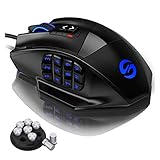
UtechSmart Venus Pro RGB Wireless MMO Gaming Mouse, 16,000 DPI Optical Sensor, 2.4 GHz Transmission Technology, Ergonomic Design, 16M Chroma RGB Lighting, 16 programmable Buttons, Up to 70 Hours
REDRAGON
Prime
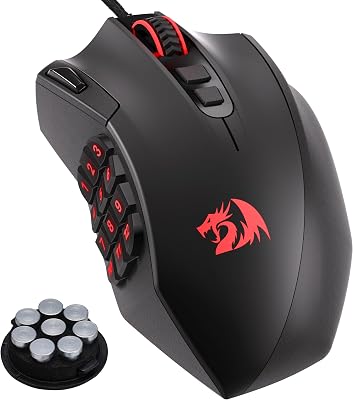
Redragon M908 Wired MMO RGB Gaming Mouse 12400 DPI Remapping Keys | Stable Lag-Free Connection, Redefine Keybinding Macro, Vibing Backlight, Ergonomic Grip Body Comfort
REDRAGON
Prime
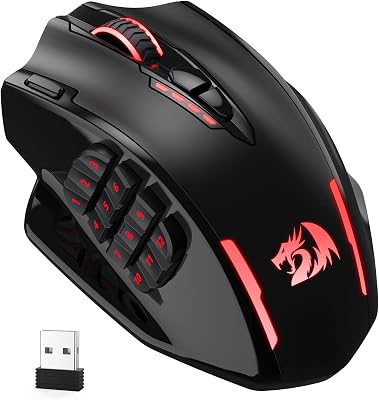
Redragon Wireless Gaming Mouse, MMO Gaming Mouse UP 16,000 DPI, 16 Macro Programmable Buttons, RGB Rechargeable with 12 Side Buttons, 70Hrs for PC Laptop MOBA FPS, M901P-KS
Prime
Corsair Scimitar RGB Elite Wired MOBA/MMO Gaming Mouse – 18,000 DPI – 17 Programmable Buttons – iCUE Compatible – PC, Mac, PS5, PS4, Xbox – Black

Razer Naga V2 Pro Wireless MMO Gaming Mouse: 19+1 Programmable Buttons w/Swappable Side Plates – HyperScroll Pro Wheel – Focus 30K Optical Sensor – Mouse Switches Gen-3-300 Hr Battery

REDRAGON
Prime
Redragon M811 Aatrox MMO Gaming Mouse, 15 Programmable Buttons Wired RGB Mouse w/Ergonomic Natural Grip Build, 10 Side Macro Keys, Software Supports DIY Keybinds & Backlit
As an Amazon Associate we earn from qualifying purchases. Product prices and availability are accurate as of the date/time indicated.
Why MMO Mice Exist — and Who Actually Needs One
Standard gaming mice have 5-7 buttons. MMO mice have 12 to 19+. That difference is the entire point. In World of Warcraft, Final Fantasy XIV, Lost Ark, or any ability-dense MOBA, you’re managing dozens of keybinds simultaneously. Reaching across a keyboard mid-fight costs reaction time and can cause repetitive strain over long sessions. Mapping your most-used abilities to a thumb grid on your mouse lets your hand stay on the mouse while your thumb handles ability activation — a genuine ergonomic and performance advantage.
The side-button grid is the defining feature, but it’s not the only one. Sensor quality, button actuation weight, grip shape, and wireless latency all matter for a mouse you’ll use for hours at a time. Here’s what to consider before buying.
Key Buying Factors for MMO Mice
Button Grid Layout and Feel
Most MMO mice use a 3×4 grid of 12 side buttons. The best ones have distinct tactile separation between buttons so your thumb can navigate by feel without looking. Flat grids with minimal texture between buttons are harder to use accurately. Test or read reviews specifically about side-button distinguishability before buying.
Sensor and DPI Range
MMO play doesn’t demand extreme DPI — most players game between 800-1600 DPI. However, a quality optical sensor ensures consistent tracking when you do need to reposition or kite enemies. 16,000+ DPI headroom is nice to have; sensor accuracy at your preferred DPI is what actually matters.
Wired vs. Wireless
Wireless MMO mice have improved dramatically. At $35-$46, you can get wireless with 16,000 DPI sensors and full button arrays. At $179 (Razer Naga V2 Pro), you get near-zero-latency 2.4GHz wireless with swappable button panels. For MMO play where you’re seated and stationary, wired is perfectly fine — wireless is a quality-of-life upgrade, not a performance necessity.
Weight and Grip Shape
MMO mice tend to be larger and heavier than esports mice due to the button array and battery. Palm and claw grip styles suit most players. If you have smaller hands, check the dimensions — some MMO mice are designed for larger hand sizes.
Software and Macro Support
All MMO mice come with software for button remapping and macro recording. Razer Synapse, Corsair iCUE, and Redragon’s software all work, though quality varies. Check that the software runs at startup automatically and saves profiles onboard if your game PC doesn’t have the software installed.
Best MMO Gaming Mice in 2026
Redragon M908 Impact RGB — Best Budget MMO Mouse
At just with a solid 4.4/5 rating, the Redragon M908 Impact is the starting point for anyone new to MMO mice. Twelve side buttons cover all major ability slots, the RGB lighting satisfies gaming aesthetics, and the sensor is competent for MMO play. At this price, you’re not getting premium build quality or the lightest switches, but for a first MMO mouse or a spare for a secondary setup, it’s outstanding value.
Redragon M811 Aatrox — 15-Button Budget Step-Up
At (4.2/5), the Redragon M811 adds 15 programmable buttons — three more than the standard 12-button layout. That extra column gives MMO players more thumb-accessible binds without going wireless. The naming (Aatrox is a League of Legends champion) makes clear this is aimed squarely at MOBA and MMO players. A logical upgrade from the M908 for players who’ve maxed out 12 buttons.
Redragon Wireless MMO Mouse 16,000 DPI — Best Value Wireless
Priced at (4.4/5), this Redragon wireless model delivers 16,000 DPI sensor performance and wireless freedom for under $40. The fact that wireless MMO mouse quality exists at this price point in 2026 is remarkable. Battery life is adequate for full gaming sessions, and the 2.4GHz connection is responsive enough for MMO play. If you want wireless without the Razer or Corsair price tag, this is where to look.
UtechSmart Venus Pro Wireless — Mid-Range Wireless Pick
At with a 4.4/5 rating, the UtechSmart Venus Pro offers a refinement step up from the budget Redragon wireless. The 16,000 DPI sensor, wireless connectivity, and full RGB make this a complete mid-range package. The ergonomic shape suits palm-grip players, and the button actuation quality is noticeably more premium than sub-$35 options. Strong choice for dedicated MMO players who want wireless reliability without overspending.
Corsair Scimitar RGB Elite — Wired Pro-Grade MMO Mouse
At (4.2/5), the Corsair Scimitar RGB Elite introduces a key differentiator: the side button slider mechanism lets you physically reposition the 12-button grid forward or backward to fit your thumb’s natural resting position. This adjustability is a real ergonomic advantage for players whose thumb alignment doesn’t match the default button position. iCUE software integration is excellent, and Corsair’s build quality is a noticeable step up from the budget tier.
Razer Naga V2 Pro — Best Premium Wireless MMO Mouse
At $179 (4.1/5), the Razer Naga V2 Pro is in a different league. The party trick: swappable side panels let you switch between a 12-button MMO grid, a 6-button MOBA layout, and a standard 2-button configuration — one mouse for multiple genres. Razer’s HyperSpeed 2.4GHz wireless is among the fastest available, the Focus Pro sensor is class-leading, and the overall build quality is exceptional. At this price, it’s a serious investment, but players who switch between MMO, MOBA, and FPS titles get real versatility from the swappable panel system.
The Verdict
Budget players should start with the Redragon M908 at $23 — it covers all MMO fundamentals. The Corsair Scimitar RGB Elite at $60 is the wired step-up with genuine ergonomic advantages. For wireless without overspending, the Redragon Wireless at $36 is the value champion. The Razer Naga V2 Pro justifies its price only for players who actively use multiple button configurations across game genres.
Related Guides
- Best PS4 Gaming Controller 2026: DualShock 4, Third-Party, and PC Compatibility
- Govee LED monitor backlight gaming ambianc
- Best Gaming PC Black Friday Deals 2026: Save on Pre-Builts and Components
Frequently Asked Questions
Are MMO mice good for other games besides MMOs?
Yes — MOBA players, RTS gamers, and even some FPS players who bind grenades or ability keys to the thumb grid find MMO mice useful. The extra buttons are genuinely versatile. The trade-off is that MMO mice are larger and heavier than dedicated esports mice, so if you’re playing competitive FPS primarily, a lighter standard mouse is more appropriate.
How many side buttons do I actually need?
For most MMO players, 12 buttons cover the core ability bar plus cooldowns. If you play a class with many off-GCD abilities or want to bind movement/emotes as well, 15 buttons gives useful headroom. Beyond 15, you’re in diminishing returns territory — the Razer Naga V2 Pro’s 19+1 configuration is overkill for most players.
Do MMO mice work on console?
MMO mice can be connected to PCs used with consoles (for streaming or party voice chat), but they don’t natively function as controllers on PS5 or Xbox without a USB adapter like the XIM or Titan. On PC-based games via console (Game Pass on PC, etc.) they work normally as standard mice with full button remapping.