

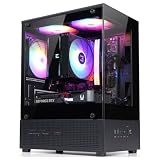
- Top Pick: Okinos Aqua UNO Micro ATX Case, No Radiator Support, Max GPU Length 309mm, Quick-Release Panoramic Tempered Glass Front & Side, 3x120mm ARGB Fans Pre-Installed, Type-C 5Gbps, Black
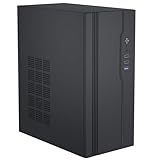
- Best Value: Zalman CUBIX-G Micro-ATX MATX Compact Mini Tower Gaming PC Case, Black | Includes 3x 120mm FRGB Fans, Panoramic View Tempered Glass Panels, USB Type-C, Up to 280mm GPU Support
- Premium Choice: Okinos Genuine Walnut Wood Micro ATX Case, MATX PC Case with 4 × 120mm 3 Pin Non-PWM Case Fans Pre-Installed, Temper Glass Side Panel, with Type-C, Black, Cypress 3 Wood
A micro ATX case is the compromise that keeps showing up in budget and mid-range builds: smaller than a standard mid tower, yet roomy enough for a full-size graphics card, a tower cooler or a 360mm liquid loop in the right model. Shoppers searching for one are usually trading desk space for fewer expansion slots, and the question is how much airflow and clearance survive the squeeze. The answer varies enormously from one shell to the next, and the spec lines in the titles are the quickest way to sort real differences from styling.
This 2026 guide covers seven micro ATX cases, from glass-fronted showpieces to a wood-trimmed A3 and a plain unbranded box. An eighth listing was dropped because it is an ATX mid tower rather than a micro ATX model. Every point below relies on what the listing titles state, such as GPU length, fan count and radiator support, so use it as a clearance checklist, not a performance forecast. If your motherboard, cooler and graphics card are already chosen, read the clearance figures first and the styling second.
Quick Picks
As an Amazon Associate we earn from qualifying purchases at no extra cost to you.



| Product | Best for | Key spec from the title |
|---|---|---|
| Okinos Aqua UNO | Showcase builds | 309mm GPU, 3x120mm ARGB fans, Type-C 5Gbps |
| Zalman CUBIX-G | Compact gaming PCs | 280mm GPU, 3x120mm fans, Type-C |
| Okinos Cypress 3 Wood | Warm, natural look | 4x120mm non-PWM fans, Type-C |
| Lian Li A3-mATX | Large GPUs and AIOs | 415mm GPU, 360mm AIO support, no fans |
| Rosewill Micro ATX | Water cooling fans | Dual 360mm radiators, 3x120mm PWM fans |
| MOROVOL MATX V3 | Glass-wrap looks | 270 degree glass, 3 fans, USB 3.0 |
| Unbranded Micro ATX case | Simple storage-friendly build | 3.5-inch HDD and 2.5-inch SSD support |
How to Choose
Graphics card length and thickness
Start with the longest card you might ever install. The listings here span 280mm, 309mm and 415mm of stated GPU clearance, which is the gap between a mid-size dual-fan card and a flagship triple-fan model. Thickness matters too: a triple-slot card can block a front intake. Leave at least 10mm of margin beyond the card length, and check whether a front radiator reduces the figure. Cards with a power connector on the end of the board need extra room for the cable bend, which is easy to forget in a compact shell.
Cooling: radiators, fans and intake
Count the fans already installed, then the radiator support. Titles mention 360mm AIO support, dual 360mm radiators and one case with no radiator support at all. Panoramic glass fronts look striking but can starve intake, so prefer mesh when thermals matter most. Non-PWM three-pin fans run at fixed speed from a header, while PWM fans adjust to load. If you want a quiet desktop, count how many fans you will actually plug in, because a pile of fixed-speed fans can add noise even when the system is idle.
Front I/O and motherboard fit
A USB Type-C front port is now worth having for headsets, drives and phones. Check whether the case lists USB 3.0, USB 3.2 Gen 2 or a 5Gbps Type-C link, and confirm your motherboard has a matching header. Mini-ITX boards fit most micro ATX shells, but verify standoff and PSU space before ordering. A small case also limits cable length, so check PSU size and whether a modular unit would make routing easier.
Where budget cases cut corners
Expect thinner steel, fewer dust filters, tighter cable routing space and little in the way of thermal tuning at the low end. Plain steel boxes may skip tool-free panels and cable covers. Ignore the number of RGB modes and focus on filters, clearance and PSU placement. If a title omits GPU length, ask for it before buying. A seller who cannot supply the number is telling you something about how much support to expect after the sale.
The 7 Best Options
Okinos Aqua UNO
A showcase micro ATX build for anyone who wants a view of the hardware. The title lists quick-release panoramic tempered glass on the front and side, three pre-installed 120mm ARGB fans and 309mm of GPU clearance. It is the sort of case you build in when the finished machine will sit on top of the desk in plain view.
- A Type-C 5Gbps front port is included.
- Pre-installed fans mean you can build without extra purchases.
- Trade-off: the title states no radiator support, which rules out liquid cooling.
Skip it if you plan a 240mm or 360mm AIO, or if you would rather save the glass for a stealthier, mesh-fronted build.
Zalman CUBIX-G
This one is for builders who want a compact tower with glass panels and a modest footprint. The title lists three 120mm FRGB fans, panoramic tempered glass, a USB Type-C port and up to 280mm of GPU space. It suits first-time builders who want a neat, small tower and a standard graphics card.
- Three included fans cover basic airflow.
- The case is described as a mini tower, which suits small desks.
- Trade-off: 280mm is shorter than the clearance on several rivals.
Skip it if you want a triple-fan flagship graphics card, a large radiator or more headroom for future upgrades.
Okinos Genuine Walnut Wood Cypress 3
For people who want a warm, furniture-like case in a gaming build. The title lists genuine walnut wood trim, four pre-installed 120mm three-pin non-PWM fans, a tempered glass side panel and Type-C. The look pairs naturally with a light desk, a wood-grain setup or a living-room media corner.
- Four fans are the highest count among these cases.
- The wood look stands apart from black metal boxes.
- Trade-off: the fans are three-pin and non-PWM, so they will not follow motherboard curves.
Skip it if quiet, curve-controlled fans matter more than looks, or if you intend to run liquid cooling, since the title lists no radiator details.
Lian Li A3-mATX
The enthusiast choice. The title lists 415mm of GPU clearance, 360mm AIO support, a modular design, a wood and black mesh finish and a DAN Cases collaboration, and it fits M-ATX or ITX boards. It appeals to builders who treat the case as a platform and plan to choose their own fans and cooler.
- 415mm of GPU space is the roomiest on this list.
- Mesh panels favor airflow.
- Trade-off: the title states no fans are included.
Skip it if you want a case ready to build with out of the box, or if buying separate fans is more effort than you want.
Rosewill Micro ATX Gaming Case
Meant for people who want to run liquid cooling in a small build. The title lists a walnut-finished mesh front, three 120mm PWM fans, support for dual 360mm radiators and a front-mounted PSU. That mix suits a compact system where cooling headroom matters more than a quick, simple build.
- Dual 360mm radiator support is rare in this size.
- PWM fans can follow motherboard temperature curves.
- Trade-off: a front-mounted PSU asks for careful cable planning.
Skip it if you want the simplest possible build or maximum GPU length, which the title does not state, so confirm that figure with the seller if you own a long card.
MOROVOL MATX V3
A glass-heavy case for shoppers who want a display-focused build. The title lists 270 degree panoramic tempered glass, three pre-installed fans and USB 3.0 on the front. It suits a build where you want to see the lighting and the components from the side and the front.
- The wraparound glass makes the interior visible from two sides.
- Three fans are included.
- Trade-off: the title leaves out GPU length and radiator support.
Skip it if you need confirmed clearance numbers before ordering, and consider mesh alternatives if your graphics card runs warm.
Unbranded Micro ATX Case
A plain, no-name shell for a simple build or a storage-friendly office PC. The title lists support for Micro ATX, MATX and ITX motherboards, USB 3.0, a 3.5-inch HDD and a 2.5-inch SSD. It fits a family or office computer where drive bays matter more than style.
- It can hold both hard drives and SSDs.
- The title is straightforward about board support.
- Trade-off: no brand, fan count or GPU details are stated.
Skip it if you plan a high-end gaming card or care about manufacturer support, warranty service and a documented installation guide.
Which One Fits Your Situation
You own a very large graphics card
Go to the Lian Li A3-mATX first, since its 415mm of stated clearance is the largest here. Bring your own fans, because the title says none are included. A set of three 120mm fans is a small addition to the build.
You want liquid cooling in a small case
The Rosewill Micro ATX Gaming Case lists support for dual 360mm radiators, and the Lian Li lists 360mm AIO support. The Okinos Aqua UNO states the opposite, so avoid it for loops.
You care mostly about looks
The Okinos Genuine Walnut Wood Cypress 3 or the MOROVOL MATX V3 both lean on appearance, one with wood and one with wraparound glass. Choose the Aqua UNO if you want ARGB fans too, and pick the wood model if you want the most distinctive finish.
You need basic storage and a low-key build
The unbranded Micro ATX case lists room for a 3.5-inch drive and a 2.5-inch SSD. It suits an office or media machine rather than a showcase gaming build, and it works as a low-pressure first project for learning to assemble a PC.
Common Mistakes
- Buying a case before measuring the graphics card, then discovering it only fits once the front fans or a drive cage are removed.
- Assuming a glass front gives good airflow, when mesh usually breathes better, especially on a graphics card that dumps heat into a small volume.
- Ignoring radiator thickness and tube position when planning an AIO in a compact shell, where a thick radiator plus fans can collide with memory or a tall cooler.
- Forgetting that three-pin fans do not respond to motherboard speed curves, which can leave a small build louder than expected.
- Skipping the front I/O check, then finding the board has no spare USB-C header, leaving a nice front port that connects to nothing.
Related guides
- Aio Liquid Coolers For High Performance Gaming
- How To Lower Input Delay In Competitive Shooters
- External Hard Drives For Music Production
Frequently Asked Questions
Can a micro ATX case hold a mini-ITX board?
Usually yes. Micro ATX cases tend to have standoffs for smaller boards, though cable routing may look odd and some standoffs may need to be moved. The listing should name ITX support, as the Lian Li and unbranded cases do.
Is a micro ATX case good for gaming?
It can be. Look for stated GPU clearance and fan count. Several listed cases accept full-size cards and large radiators, provided the build is planned carefully. Compare the GPU length, fan count and radiator support lines before anything else.
Do I need to buy extra fans?
Several cases include three or four 120mm fans, while the Lian Li A3-mATX lists none. Count the included fans against your cooling needs before ordering, and remember that extra fans usually need extra motherboard headers or a small hub.
What power supply do I need?
A standard ATX power supply fits most of these cases, but the Rosewill uses a front-mounted layout, so confirm length and cable reach. Check each listing for PSU details, and leave room for cables behind the motherboard tray.

















