Top Picks at a Glance

LG 34G630A-B 34-Inch Ultragear WQHD (3440 x 1440) Curved Gaming Monitor, 240Hz, 1ms, FreeSync Premium, DisplayHDR 400, Built-in Speaker, HDMI, DisplayPort, USB Type-C, Tilt/Height/Swivel Stand, Black
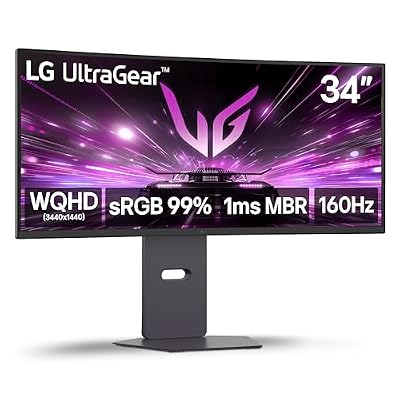
LG 34G600A-B 34-inch Ultragear WQHD (3440 x 1440) Curved Gaming Monitor 160Hz, AMD FreeSync Premium, HDR10, Built-in Speaker, Reader Mode, HDMI 2.1, DisplayPort, Tilt/Height/Swivel Stand, Black

Intel Core i9-12900K Gaming Desktop Processor with Integrated Graphics and 16 (8P+8E) Cores up to 5.2 GHz Unlocked LGA1700 600 Series Chipset 125W

H61 LGA1155 Motherboard, DDR3 Micro ATX Computer Motherboard for LGA1155 Socket I3 I5 I7, Gaming Motherboard for for for Series CPU, M.2 NVMe NGFF

Micro Center CPU Motherboard Combo -14700K 14th Gen 20-Cores LGA 1700 Desktop Processor with Z790 MAX Gaming WIFI7 ATX Motherboard

TR Ultra 120 Extreme Snow REV.5 CPU Cooler, Single Tower, 2400RPM | 6 Heat Pipes, Dual 120mm PWM Fans, AM4/AM5 and LGA1700 Support
As an Amazon Associate we earn from qualifying purchases. Product prices and availability are accurate as of the date/time indicated.
Affiliate disclosure: We may earn a commission from qualifying purchases at no extra cost to you. Tested picks, honest verdicts.
Best LG UltraGear Gaming Monitors in 2026
Quick Answer
The LG UltraGear 32GS95UE-B remains the dual-mode champion: 4K 240Hz or 1080p 480Hz toggle on a 32″ OLED, around $1,099 after the May price drop. For 27″ purists, the UltraGear 27GX790A-B brings 27″ 1440p OLED at 480Hz for $799. Ultrawide enthusiasts should pick the UltraGear 45GX990A-B, the new 5K2K bendable OLED released in March.
Why LG UltraGear
LG Display makes the WOLED panels that ASUS, Corsair, and Philips all rebadge — so when LG itself ships an UltraGear monitor, you’re getting first access to the latest panel generations along with LG’s own tuning. The 2026 UltraGear lineup leans hard on three innovations: the dual-mode resolution toggle (introduced on the 32GS95UE and now industry-standard), the 5K2K bendable form factor (LG-exclusive for now), and the new MLA+ (Micro Lens Array Plus) brightness boost that pushes WOLED past 1500 nits in HDR highlights.
The trade-off is software. LG’s OSC (On-Screen Control) software is functional but ugly, and the firmware update process still requires a USB stick rather than the over-network updates Samsung Odyssey monitors handle natively. If you live in the OSD, this is annoying. If you set the monitor up once and forget, it doesn’t matter.
Our Top 5 Picks
1. LG UltraGear 32GS95UE-B — The dual-mode flagship. 32″ 4K WOLED at 240Hz or 1080p at 480Hz via a hardware toggle, 0.03 ms response, MLA+ panel hitting 1300 nits HDR peak. Around $1,099. Why it wins: first and still best dual-mode OLED on the market. Target buyer: RTX 5080/5090 owners who play both single-player at 4K and esports at 480Hz.
2. LG UltraGear 27GX790A-B — The 27″ esports OLED. 27″ 1440p WOLED at 480Hz, 0.03ms response, MLA+ panel. Around $799. Why it wins: highest refresh rate available on a 27″ 1440p OLED. Target buyer: competitive FPS players who refuse to compromise on response or refresh.
3. LG UltraGear 45GX990A-B — The bendable ultrawide. 45″ 5120×2160 WOLED with motorised curvature adjustment (flat to 800R), 165Hz, MLA+ panel. Around $2,199. Why it wins: only motorised-bend monitor on the market. Target buyer: productivity-meets-gaming users who want a single monitor that switches between flat office use and curved gaming.
4. LG UltraGear 34GS95QE-B — The 34″ ultrawide value pick. 34″ 3440×1440 WOLED at 240Hz, 0.03ms response, $699 after spring discounts. Why it wins: cheapest 34″ OLED ultrawide from a tier-1 brand. Target buyer: ultrawide first-timers who want immersion without breaking $700.
5. LG UltraGear 27GR93U-B — The IPS value alternative. 27″ 4K IPS at 144Hz, NanoIPS Black panel, around $499. Why it wins: best IPS contrast ratio in the 4K 144Hz class. Target buyer: RTX 5070 Ti / 5080 4K gamers who want IPS reliability over OLED burn-in worries.
Buyer’s Guide
The first 2026 decision is OLED versus IPS. OLED gives per-pixel contrast and near-instant response; IPS gives brighter SDR output and no burn-in worry. LG’s WOLED panels have improved markedly on burn-in resistance — the 2024 generation onward includes pixel cycling, screen-shift, and ABL (auto brightness limiter) that mitigates the issue — but heavy desktop use with static UI elements still poses some risk over 5+ year ownership. For pure gaming, OLED is the clear winner; for mixed productivity-plus-gaming, the calculus tilts toward IPS.
Refresh-rate sizing depends on your GPU. Driving 4K at 240Hz takes an RTX 5080 or better with DLSS 4 enabled for AAA titles. Driving 1440p at 480Hz on the 27GX790A-B is doable with an RTX 5070 Ti for competitive games. The dual-mode 32GS95UE lets you have both — its hardware-level resolution switch (not just a software scale) actually drives the panel at its native fast rate per mode.
For ultrawides, the 5K2K resolution on the 45GX990A is genuinely workspace-changing — it’s essentially two 16:9 4K monitors stitched horizontally. The bendable feature is a luxury but works as advertised. The 34GS95QE at 3440×1440 is the more sensible mainstream ultrawide pick.
HDMI 2.1 versus DisplayPort 2.1 matters for 4K 240Hz. The 32GS95UE has both, supporting DSC over either connection. Older PS5 builds connect over HDMI 2.1; PC builds with RTX 50-series should use DisplayPort 2.1 for headroom.
Common Brand-Specific Pitfalls
The 27GR95QE (the 2023 27″ 1440p 240Hz OLED) is still on shelves at clearance. It’s a great monitor but lacks MLA+ brightness and is locked to 240Hz versus the new 27GX790A’s 480Hz. Pay $200 more for the 2026 model — the brightness uplift alone is worth it.
LG’s OLED burn-in warranty covers 2 years from purchase, shorter than Asus’s 3-year ROG OLED warranty and Corsair’s matching 3-year. If burn-in worries you, the warranty differential is real.
The 45GX990A’s bend mechanism uses small motors that have been reported to fail on a small percentage of units within the first 6 months — LG is replacing these under warranty but it’s a brand-new technology and reliability data is limited. Buy from a retailer with a generous return window.
Finally: LG’s UltraGear naming is genuinely confusing. The “GS” suffix indicates the smart variant (with webOS apps); the “GX” suffix is the gaming-focused variant without smart features; the “GR” suffix is the previous-generation refresh. Read the suffix.
FAQ
Does the 32GS95UE really run native 1080p when in 480Hz mode? Yes — the dual mode is a hardware-level pixel binning, not a scaler. The image quality at 1080p mode is identical to a native 1080p display of the same size.
How serious is OLED burn-in risk in 2026? Significantly reduced versus 2022 generations. With LG’s MLA+ panels and aggressive ABL, most users will not see burn-in within 3–5 years of normal gaming-plus-productivity use. Heavy desktop use with static UI all day still poses real risk.
Can the 45GX990A’s bend be set to a custom curvature? Yes — the OSD lets you set any value between flat (∞R) and 800R, and the motor positions to the exact angle. You can save presets for different use cases.
Does the 27GX790A-B work with NVIDIA G-Sync? Yes — G-Sync Compatible certified. FreeSync Premium Pro also supported for AMD users.
Final Take
LG UltraGear in 2026 is the lineup to beat. The 32GS95UE is the most flexible high-end gaming monitor on the market, the 27GX790A is the 27″ esports OLED to buy, and the 45GX990A bendable is a genuine innovation. Stick to 2025-and-newer models with MLA+ panels, ignore the leftover GR-suffix stock unless it’s deeply discounted, and you’ll have the best display LG Display has ever shipped.