

- Top Pick: HP 15.6" Portable Laptop, HD Display, Intel Quad-Core N200 Processor, 16GB RAM, 128GB Storage, Wi-Fi 6, Webcam, HDMI, Numeric Keypad, Windows 11 Home, Silver
- Best Value: HP 15.6" Portable Laptop (Include 1 Year Microsoft 365), HD Display, Intel Quad-Core N200 Processor, 8GB RAM, 128GB Storage, Wi-Fi 6, Webcam, HDMI, Numeric Keypad, Windows 11 Home, Silver
- Premium Choice: Lenovo V15 Gen 4 Business Laptop, 15.6" FHD Display, Intel Core i5-13420H (Beat i7-1355U), HDMI, RJ45, Webcam, Numeric Keypad, Wi-Fi, Windows 11 Pro, Black (16GB RAM | 512GB SSD)
Anyone who types invoices, spreadsheets or inventory codes all day knows how slow a laptop without a number pad feels. Reaching for the top number row burns seconds on every entry, and those seconds pile up. A full-size keyboard with a dedicated numeric keypad is the single feature this guide is built around, and it narrows the field to 15.6-inch, 16-inch and 17-inch bodies, because compact laptops drop the pad to conserve width.
The ten laptops below all state a numeric keypad in the title, so the real choice is among memory, storage, processor class and ports. This 2026 list is aimed at accountants, students, home-office workers and anyone who enters data for a living. Judgments come only from the listed specs, and the biggest spread is memory, which runs from 4GB to 16GB.
Quick Picks
As an Amazon Associate we earn from qualifying purchases at no extra cost to you.





| Product | Best for | Key spec from the title |
|---|---|---|
| HP 15.6″ N200 (16GB) | Light office multitasking | 16GB RAM, 128GB, Wi-Fi 6 |
| HP 15.6″ N200 (8GB, Microsoft 365) | Everyday documents | 8GB RAM, 1 year Microsoft 365 |
| Lenovo V15 Gen 4 | Business work with wired network | Core i5-13420H, 16GB, 512GB SSD, RJ45 |
| HP 17 Business Laptop | Large-screen spreadsheets | Ryzen 5, 17.3″ FHD, 512GB SSD |
| HP 15.6″ (1.1TB storage) | Cloud-first note taking | 128GB plus 1TB OneDrive, 4GB DDR5 |
| HP 15.6″ N150 | Battery-minded travelers | 4-core N150, 128GB UFS, 1TB cloud |
| Lenovo V15 (Ryzen 5) | Fast SSD on a business chassis | Ryzen 5 5500U, 16GB, 512GB SSD |
| HP 15.6″ N200 (4GB) | Entry-level typing machine | N200, 4GB, 128GB SSD |
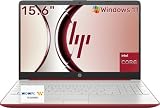
| HP 15.6″ (Red) | Students who want portability | 10 hours battery, 128GB |
| Morostron 16-inch | Expandable storage | AMD A9-9400, 8GB, 9000mAh |
How to Choose
Memory is the first filter
Windows 11 and a browser with a few tabs strain 4GB of RAM, so treat 8GB as the working minimum and 16GB as the comfortable level for spreadsheets with many sheets. Three of these listings are 4GB, and they will feel slow beyond basic typing. Ignore storage-plus-cloud totals when judging speed, because a cloud allowance adds no local space.
Storage type and real capacity
An SSD is the baseline. The Lenovo V15 models list 512GB SSDs, while the HP N150 lists 128GB of UFS, a flash type that is common in phones and thin laptops. Titles that headline “1.1TB” combine 128GB local storage with 1TB of OneDrive, so real offline space is the smaller number.
Screen, keyboard and ports
Full HD is 1920 by 1080 pixels, which the Lenovos and the 17-inch HP list, while others say only HD. HD is acceptable for text but looks coarse. A numeric keypad needs width, so a 15.6-inch body is the sensible floor, and the 16-inch and 17-inch bodies leave room for wider keys and a gap between the pad and the main block. Check that the keypad is full size rather than squeezed, which is hard to tell from a title alone. If you work at a desk with a wired network, an RJ45 port, found on both Lenovos, matters more than extra thinness. HDMI appears across the HP lineup.
Processor class and where budgets cut corners
Intel N200 and N150 chips are low-power parts meant for light work, the Ryzen 5 and Core i5 entries sit above them, and the AMD A9 on the 16-inch is an older design. Budget laptops cut corners on RAM, panel resolution and storage speed, in that order. Disregard stacked Office or AI labels, which say nothing about the hardware. Compare RAM, storage type and display resolution line by line instead, and note which titles leave one of them out.
The 10 Best Options
HP 15.6″ Portable Laptop (N200, 16GB)
The best-balanced HP among the budget group for someone who wants memory headroom. It lists an Intel quad-core N200, 16GB of RAM, 128GB of storage, Wi-Fi 6, a webcam, HDMI and a numeric keypad on Windows 11 Home.
- 16GB of RAM is the highest on any N200 model here.
- Wi-Fi 6 and HDMI cover modern connections.
- Trade-off: the HD display and 128GB drive are modest.
Skip it if you plan to store many local files or want a sharp screen. The title does not mention Full HD, so expect text that looks softer than on the Lenovo models, and keep a USB drive handy for archives.
HP 15.6″ Portable Laptop (N200, 8GB, Microsoft 365)
Nearly the same chassis with less memory and a bundled year of Microsoft 365. It lists 8GB of RAM, 128GB of storage, Wi-Fi 6, a webcam, HDMI and a numeric keypad.
- A year of Microsoft 365 is included in the title.
- 8GB is enough for documents and web apps.
- Trade-off: only 128GB of storage.
Skip it if you want heavier multitasking, in which case the 16GB sibling fits better. Anyone who already owns an Office license gets less from the bundled year and can put that attention on memory instead.
Lenovo V15 Gen 4 Business Laptop
The strongest all-around option for desk work. The title lists a 15.6-inch FHD display, Core i5-13420H, 16GB of RAM, a 512GB SSD, HDMI, RJ45, a webcam, a numeric keypad and Windows 11 Pro.
- Core i5, 16GB and 512GB form a balanced base.
- RJ45 allows a wired connection.
- Trade-off: it is a business chassis rather than an ultra-thin design.
Skip it if you need the lightest laptop you can find. The Pro edition of Windows also adds features most home users never touch, so a home-office buyer may not need what that label implies.
HP 17 Business Laptop (Ryzen 5)
For people who live in spreadsheets and want the extra screen space. The title lists a Ryzen 5 chip, 16GB of RAM, a 512GB SSD, a 17.3-inch FHD display, a numeric keypad, long battery life and Office 365 for the web.
- A 17.3-inch FHD screen shows many more cells.
- 16GB and 512GB match the Lenovo specs.
- Trade-off: a 17-inch laptop is bulky to carry.
Skip it if you commute daily or work in cramped spaces. A larger chassis also needs a bigger bag and a bigger desk, and the title gives no weight to judge it by.
HP 15.6″ Laptop (1.1TB Storage)
Built around cloud storage. The title lists 128GB local plus 1TB OneDrive, Microsoft Office 365, an Intel CPU, 4GB of DDR5 RAM, Windows 11 and Copilot AI.
- DDR5 memory is a newer type.
- Cloud space helps if you work online.
- Trade-off: 4GB of RAM is limiting.
Skip it if you work offline or run many tabs. Without a stated processor model in the title, it is also harder to compare against the Ryzen and Core options.
HP 15.6″ Laptop (Intel N150)
A newer-chip alternative aimed at business and portability. It lists an Intel 4-core N150, 128GB UFS storage, 1TB cloud storage, Microsoft 365, long battery life and Windows 11 Home.
- The N150 is a more recent low-power chip.
- Long battery life is listed, though no hour count is given.
- Trade-off: UFS storage is limited in size and the title omits RAM.
Skip it if RAM is critical and you cannot verify it. Because the memory amount is missing, ask the seller or read the maker page before treating it as a multitasking machine.
Lenovo V15 (Ryzen 5 5500U)
A hexa-core business pick with a fast drive. The title lists a 15.6-inch FHD display, Ryzen 5 5500U, 16GB of RAM, a 512GB SSD, HDMI, RJ45, a numeric keypad and Windows 11 Pro.
- Six cores help with spreadsheet recalculation.
- FHD, 16GB and 512GB form a solid trio.
- Trade-off: the 5500U is an older chip family than the Gen 4 above.
Skip it if you prefer the newest processor generation. It makes the most sense for buyers who value core count and a wired port over having the freshest chip name on the spec list.
HP 15.6″ Laptop (N200, 4GB)
The simplest typing machine of the group. It lists an N200 quad-core processor, 4GB of RAM, a 128GB SSD, Wi-Fi 6, a webcam, HDMI, a numeric keypad and bundled accessories.
- SSD storage keeps startup quick.
- Wi-Fi 6 and HDMI are included.
- Trade-off: 4GB of RAM means little room to multitask.
Skip it if you need more than a word processor and a browser. If your day involves large workbooks, step up to a 16GB listing here rather than hoping software tweaks will fix a memory shortage.
HP 15.6″ Laptop (Red)
Aimed at student and college use. The title lists 4GB of RAM, 128GB of storage, an Intel processor, Windows 11, a full-size keyboard with numeric keypad and 10 hours of battery life.
- A 10-hour battery claim is stated in the title.
- The red finish and thin build stand out.
- Trade-off: 4GB of RAM again limits multitasking.
Skip it if you need workstation power. The title names an Intel processor without a model, so you cannot judge how it compares with the N200 or N150 listings from the title alone.
Morostron 16-inch Laptop
The odd one out, with a 16-inch body and expandable storage. It lists 8GB of DDR memory, a 256GB SSD expandable to 1TB, an AMD A9-9400 with Radeon R5, a 9000mAh battery, USB 3.0, dual-band WiFi and a webcam.
- Storage is expandable to 1TB.
- A 16-inch screen adds working space.
- Trade-off: the A9-9400 is an older processor and the brand is little known.
Skip it if you want recent silicon or established support. Buyers who depend on quick warranty service should weigh the unknown brand carefully against the larger storage ceiling.
Which One Fits Your Situation
You want one laptop for office work
The Lenovo V15 Gen 4 offers the best mix of memory, SSD space, Full HD and wired networking.
You live in spreadsheets
The HP 17 Business Laptop gives you a 17.3-inch FHD canvas, 16GB of RAM and a 512GB SSD.
You need the lowest-demand typing laptop
The HP 15.6″ with the N200 and 8GB, bundled with a year of Microsoft 365, covers documents with software already included. The N200 chip is a low-power part, so expect steady but unhurried performance.
You want maximum local storage later
The Morostron 16-inch is the one that lists expansion to 1TB. Treat it as a secondary machine for data entry and archives rather than a main workhorse, given its older processor.
Common Mistakes
- Choosing 4GB of RAM for a laptop that will run Windows 11 and spreadsheets.
- Counting cloud storage as local space.
- Skipping the RJ45 port when you work on a wired network.
- Assuming every 15.6-inch screen is Full HD.
- Confusing newer chip names with faster performance across classes.
Related guides
- Combination Smoke And Carbon Monoxide Detectors
- Aio Liquid Coolers For High Performance Gaming
- Graphics Cards For Low Wattage Power Supplies
Frequently Asked Questions
Why do some laptops lack a numeric keypad?
Compact 13- and 14-inch bodies drop it to conserve width. A 15.6-inch or larger chassis usually has room for the full layout.
Is 8GB of RAM enough?
For documents, web apps and a few browser tabs, yes. Heavy spreadsheets and many open programs favor 16GB.
What is UFS storage?
UFS is a flash storage type common in phones and thin devices. It is quick for its size but usually limited in capacity.
Does a Microsoft 365 bundle matter?
It replaces a separate subscription for a year, but it does not change the hardware. Compare memory and storage first, then treat the software bundle as a tiebreaker.








