

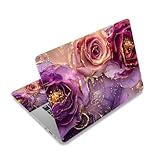
- Top Pick: 12" 13.1" 13.3" 14" 15" 15.4" 15.6" Laptop Netbook Skin Sticker Cover Decel | Laptop Art Decal Vinyl Sticker Skin Cover, Notebook PC Protector ( 2 Wrist Pad Included), Removable Reusable, Marble Flowers
- Best Value: Laptop Skin Sticker Decal for 12" 13" 13.3" 14" 15" 15.4" 15.6 inch Laptop | Art Skin Sticker Cover Protector Notebook (2 Wrist Pad Skins Included), Decorative Removable, Sunset Beach
- Premium Choice: Laptop Decal Sticker Skin Cover for 11.6”12" 13" 13.3" 14" 15" 15.4" 15.6" | Laptop Netbook Vinyl Skin Sticker Cover Art Notebook Protector ( 2 Wrist Pad Skins), Removable Reusable, Abstract Mountain
Pick a vinyl skin from a brand such as dbrand, Skinit or Slickwraps if you mainly want a custom look and scratch resistance on a laptop you carry in a bag, and pick a snap-on hard shell cover such as the Speck SmartShell or Incase Hardshell if you want real impact protection for a MacBook. Gamers with a heavy 15-inch or 17-inch gaming notebook usually end up with a skin plus a padded sleeve, because gaming laptops rarely have a wide range of fitted hard shells. This guide explains the difference between the four kinds of laptop coverings, how to match one to your machine, and where each one falls short.
As an Amazon Associate we earn from qualifying purchases at no extra cost to you.


Skin, cover, case or sleeve: what is the difference?
The words get mixed up in shop listings, so it helps to separate them before you buy.
- Skins are thin adhesive vinyl wraps cut to the lid, palm rest or full body of a specific model. They change the look and guard against light surface scratches, but they add almost nothing in drop protection.
- Hard shell covers are snap-on polycarbonate shells that clip around the lid and base. They add a little thickness and take some of the impact from bumps and scuffs.
- Sleeves are padded pouches the laptop slides into. They protect in a bag, but not while you are using the machine.
- Keyboard covers are thin silicone sheets over the keys. They keep out crumbs and splashes but can leave marks on some screens when the lid is closed, so many makers advise checking the thickness before use.
Reviewers and forum users commonly describe the trade-off in the same way: a skin keeps the laptop slim and light, while a case gives better protection but adds bulk. Some owners say a case makes their laptop feel bulky, and a few worry about extra weight on the hinge, so the right choice depends on how and where the laptop is used.
At a glance: the main options
| Option | Best for | What the maker or reviewers say | Limits |
|---|---|---|---|
| dbrand skins | Precise fit, textured materials, gaming looks | MacRumors users often rate the selection and quality highly; some report skins that stayed in place for years | Installation is fussy; there is little relief at edges, so placement must be accurate |
| Skinit skins | Licensed art, team and character designs | Skinit describes its skins as thin and light, with a large library of designs | Thin vinyl; some comparisons say durability trails other brands |
| Slickwraps and similar | Plain colours, carbon or wood textures | Named by forum users as a well-liked alternative | Fit depends on your exact model number |
| Speck SmartShell | MacBook owners wanting a clip-on shell | Speck lists versions for current 13-inch and 15-inch MacBook Air models in clear and coloured finishes | MacBook-focused; adds thickness and can trap grit between shell and body |
| Incase Hardshell | Raised-edge bumpers on a slim shell | Macworld picks the Incase Edge Hardshell as its hard shell choice | Matched to specific MacBook sizes |
| Padded sleeve (Tomtoc, STM, Bellroy) | Bag transport for any size | Reviewers describe Tomtoc sleeves with 360-degree padding as strong everyday protection | No protection while the laptop is out of the sleeve |
Laptop skins in detail
dbrand
dbrand is the name that comes up most often in forum threads about skins. Users on MacRumors describe the cuts as precise and the materials as long lasting, with one reporting that skins never peeled on their own across several MacBooks. The recurring complaint is installation. Because the cut leaves little margin at the edges, a misaligned application is hard to correct. If you are patient, dbrand suits gamers who want matte black, carbon-style or textured finishes that match a desk setup.
Skinit
Skinit leans on licensed artwork: sports teams, film and game franchises, and a large catalogue of general designs. The company describes its skins as thin, light and simple to apply, and offers a money-back window. Independent comparison pages suggest it may not be as hard wearing as premium rivals, which matters less if you like to change designs every year.
Other skin makers
Slickwraps, EasySkinz and several smaller shops are mentioned by users as alternatives. When comparing them, look for a cut made for your exact model number rather than a generic size, since cutouts for vents, logos and cameras vary between laptop generations.
Fit and care for skins
- Match the model number printed on the underside of the laptop, not just the screen size.
- Clean the surface with a lint-free cloth and a little isopropyl alcohol before applying, as the maker’s guide usually instructs, and wait until fully dry.
- Apply slowly from one edge, pressing out bubbles; a hair dryer on low is often suggested to soften vinyl around curves, though you should follow the maker’s instructions.
- Never cover vents. Gaming laptops move a lot of air through the base and rear, so choose a skin with vent cutouts or leave the base alone.
- Peel slowly when removing. Pulling fast can leave adhesive residue on painted or anodised surfaces.
Hard shell covers and sleeves
If you carry the laptop daily or work in busy spaces, a case does what a skin cannot. For MacBook owners, Speck lists SmartShell versions for the 13-inch and 15-inch MacBook Air in several colours, including a clear option that lets the Apple logo show. Macworld highlights the Incase Edge Hardshell for its raised edge bumpers. Both are snap-on designs, so they cover lid and base but leave ports and vents open.
Sleeves protect a laptop in transit. Tomtoc, STM, Bellroy, Native Union and Orbitkey all appear in current roundups, and designs differ: some are slim felt pouches, some include a handle, and some fold into a stand. One bag-reviewer states that a sleeve with all-round padding outperforms a thin polycarbonate shell in a waist-height drop, which is a reasonable reason to pair a skin with a sleeve rather than rely on a skin alone.
Note that hard shells can trap fine grit and scuff the aluminium over time. Remove the shell every few weeks and wipe both surfaces.
Budget tiers
| Tier | What you typically get | Watch out for |
|---|---|---|
| Budget | Generic fit sleeves, plain snap-on shells, basic vinyl skins | Loose cutouts, thin padding, shells that do not fit the newest chassis |
| Mid-range | Fitted skins from dbrand or Skinit, SmartShell-style covers, Tomtoc or STM sleeves | Confirm the model number and ports before ordering |
| Premium | Leather or wool-felt sleeves, convertible stand sleeves, hybrid briefcase cases | Design appeal can outweigh actual protection; read the padding description |
Pick X if…
| If you… | Pick | Why |
|---|---|---|
| Want a custom look and keep the laptop slim | A fitted vinyl skin | Adds almost no thickness or weight |
| Own a MacBook Air and often carry it unprotected | Speck SmartShell or Incase Hardshell | Shell fitted to the exact size and model |
| Travel with a gaming laptop | Skin plus padded sleeve | Fitted hard shells are rare for gaming models |
| Hate bulk and mostly work at a desk | Skin only | Protects against light scratches, nothing more |
| Commute by bike, train or on foot | 360-degree padded sleeve | Cushions against knocks in a bag |
| Want to change designs often | Skinit or other licensed-art skins | Large design catalogue, easy to swap |
Common mistakes
- Buying by screen size only. A 15-inch laptop from one maker can have a different footprint from another.
- Covering vents with a skin on a gaming laptop. Heat build-up is a legitimate concern, so keep air paths clear.
- Assuming a skin protects against drops. It does not.
- Leaving a hard shell on for months without cleaning underneath.
- Placing a keyboard cover on a laptop with a tight lid gap without checking the thickness against the maker’s guidance.
Alternatives
- A protective backpack with a padded laptop compartment such as those from STM, UAG or Bellroy, if you want protection without changing the laptop’s look.
- A stand sleeve such as MOFT or Orbitkey convertibles, which double as a desk stand and carry sleeve.
- Screen protectors and palm rest covers for people who only care about wear on the touchpad or display.
Frequently Asked Questions
Do laptop skins protect against drops?
No. A vinyl skin is only a few tenths of a millimetre thick, so it protects against light scratches and scuffs but not impact. For drops, use a hard shell or a padded sleeve, and treat the skin as a cosmetic layer.
Will a skin or case make my laptop overheat?
A skin that covers vents or a case that blocks airflow can reduce cooling, which matters most on gaming laptops. Choose products with proper vent cutouts, and remove anything that keeps the machine unusually hot. Check the laptop maker’s guidance if you are unsure.
Can I remove a skin without damaging the laptop?
Usually, yes, if you peel slowly from a corner, ideally after gently warming the vinyl. Sudden pulling can leave sticky residue or lift paint on some finishes. Residue can normally be removed with a small amount of isopropyl alcohol on a cloth.
Is a hard shell cover safe for a MacBook?
Makers such as Speck and Incase design them for this purpose. Grit can collect between shell and body, so take it off and wipe the surfaces from time to time to avoid scuffing the aluminium.
How do I find the right skin or case for my laptop?
Look up the exact model number, printed on the underside or in the system settings, and compare it with the product listing. Size alone is not enough because revisions often change vent, port and camera positions.
Should I use a skin and a case together?
Many users do. A skin covers the lid for looks, and a padded sleeve handles transport. A snap-on shell over a skin works only if the shell is designed for the laptop and the skin is thin, and some owners find the combination bulky.







