

- Top Pick: Acer Nitro 5 Gaming Laptop, 9th Gen Intel Core i5-9300H, NVIDIA GeForce GTX 1650, 15.6" Full HD IPS Display, 8GB DDR4, 256GB NVMe SSD, Wi-Fi 6, Backlit Keyboard, Alexa Built-in, AN515-54-5812
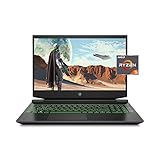
- Best Value: HP Pavilion Gaming Laptop 15-dk0096wm – Core i5-9300H – 8 GB RAM – 256 GB SSD – GTX 1650 4 GB Graphics Card – 15.6"" Full HD 1920×1080 LCD – Webcam – Wireless – Bluetooth – Windows 10, Black
- Premium Choice: HP Pavilion Gaming 15 Laptop, NVIDIA GeForce GTX 1650, AMD Ryzen 5 4600H, 8GB DDR4 RAM, 512 GB PCIe NVMe SSD, 15.6" Full HD, Windows 10 Home, Backlit Keyboard (15-ec1010nr, 2020 Model)
A GTX 1650 gaming laptop suits a buyer who mostly plays esports and older titles and finds one very cheaply, used or refurbished, while anyone with a bit more room in the budget will get a clearly stronger experience from an RTX 3050 or RTX 4050 machine. The GTX 1650 is a previous-generation chip with 4GB of VRAM, so this guide explains where it still makes sense, what to look for in a unit, and which newer entry-level options reviewers point to instead.
- What the GTX 1650 Laptop Can and Cannot Do
- At a Glance: GTX 1650 and Its Closest Rivals
- What to Look for in a GTX 1650 Laptop
- Models and Types You Will Encounter
- Budget Tiers
- Pick X If… Decision Table
- Alternatives Worth Considering
- Care and Setup Notes
- Settings That Help a 4GB Graphics Card
- Frequently Asked Questions
As an Amazon Associate we earn from qualifying purchases at no extra cost to you.



What the GTX 1650 Laptop Can and Cannot Do
The GTX 1650 Laptop GPU belongs to Nvidia’s Turing-era GTX line. It has no ray-tracing hardware and no DLSS support, and it comes with 4GB of video memory. Comparison pages put typical power draw at around 50W, against about 80W for the RTX 3050 Laptop, which is why the older chip fits thin, quiet and inexpensive designs.
Reviewers and comparison sites agree on the broad picture. One roundup places the RTX 3050 Laptop roughly 43 percent ahead in general performance, and other benchmark collections claim even larger gaps at 1080p. A buying guide from GPU101 calls the 4GB memory limit practically dead for modern AAA gaming in 2026, while noting that esports titles can still run at high frame rates. Treat exact percentages loosely, since comparison sites use different test sets, but the direction is consistent.
- Good fit: competitive shooters, MOBAs, older AAA games, indie titles, emulation, and schoolwork with some gaming.
- Poor fit: recent AAA games at high texture settings, ray tracing, and anything that relies on DLSS to reach playable speeds.
At a Glance: GTX 1650 and Its Closest Rivals
| Option | Best for | Key stated traits | Limits |
|---|---|---|---|
| GTX 1650 Laptop (used or refurbished) | Esports, older games, very tight budgets | 4GB VRAM; about 50W typical per comparison sites; no DLSS | Weak in modern AAA games; older platform, aging battery |
| RTX 3050 Laptop | Entry-level 1080p with DLSS support | Ray tracing and DLSS support; about 80W typical per comparison sites | 4GB or 6GB VRAM depending on version |
| RTX 4050 Laptop | Best entry-level value for most buyers | 6GB VRAM; DLSS 3 frame generation | 6GB can limit new games over time |
| RTX 5050 or RTX 5060 Laptop | Buyers who want the newest entry platform | RTX 50 series features; RTX 5060 lists 8GB GDDR7 | Costs more; check the power limit |
What to Look for in a GTX 1650 Laptop
Memory and storage
Aim for at least 16GB of system RAM and an SSD. Many GTX 1650 laptops shipped with 8GB of memory and a hard drive or a small SSD, and both choke modern Windows and game loading. Check whether the RAM is upgradeable, since a second memory module is often the cheapest improvement.
Processor
Pair the GPU with a six-core processor such as a Core i5 or Ryzen 5 from the same era. A quad-core chip can bottleneck even a modest GPU in many games. If an Intel Core i7 is offered at the same cost, it helps with multitasking and streaming, though the GPU stays the limit in games.
Display
A 1080p panel with a 120Hz or 144Hz refresh rate suits the GTX 1650 well in esports. Avoid 60Hz panels with weak color if you also want to watch video or edit photos. A matte IPS panel is the safe choice.
Cooling and battery
Thin and light GTX 1650 models stay cooler than power-hungry machines, but dust buildup in used units can still cause throttling. Ask about battery health, because older lithium batteries lose capacity, and ask to see the charger that comes with the laptop.
Models and Types You Will Encounter
Many mainstream makers sold GTX 1650 laptops, including the Acer Nitro 5, Lenovo IdeaPad Gaming 3 and Legion 5 lines, the HP Pavilion Gaming and Victus lines, the Asus TUF and VivoBook lines, the Dell G series and the MSI GF and Katana lines. These are previous-generation models, so stock is mostly used, refurbished or clearance, and specifications differ widely by region. Because there is no single current GTX 1650 flagship, judge each unit by its RAM, SSD, CPU and display instead of by name.
If you want a newer entry-level laptop
Two budget models come up repeatedly in recent reviews. The Acer Nitro V 15 pairs a Core i7-13620H with an RTX 4050 in the configuration that Tom’s Hardware reviewed, and that outlet reports its 75W RTX 4050 outperformed the 45W version in a competing MSI laptop. Notebookcheck’s 2026 review of a newer variant with an RTX 5050 notes a display covering under 70 percent of sRGB, so colors look pale, but otherwise sees no major missteps. The MSI Thin 15 is lighter and slimmer, and Device Diary reports that its RTX 4050 version is capped at 45W, which lowers frame rates versus thicker machines.
Budget Tiers
Budget tier
This is where a used GTX 1650 laptop lives, along with entry RTX 3050 models on clearance. Get one only if the price is very low, and favor units with 16GB of RAM and an SSD. For this tier, GPU101 and other guides conclude the 1650 saves little compared with a 3050 and gives up DLSS and ray tracing.
Mid-range tier
New RTX 4050 and RTX 5050 laptops fit here. One buying guide suggests at least 85W of graphics power, 16GB of RAM and a 144Hz IPS display, and cautions that 6GB of VRAM may become limiting in later years.
Premium tier
For buyers who want the laptop to last, an RTX 5060 machine such as the Lenovo Legion 5i Gen 10 is described by reviewers as strong for its class. Tom’s Guide reports it measures 13.6 by 10.1 by 0.8 inches and weighs 4.1 pounds, with fan noise under load as its weak point.
Pick X If… Decision Table
| Pick this | If you… |
|---|---|
| Used GTX 1650 laptop | play esports and older games, have a very small budget, and accept no DLSS |
| RTX 3050 laptop | want DLSS and ray-tracing support at a small step up in cost |
| RTX 4050 laptop | want the best balance of price and performance for 1080p gaming |
| RTX 5050 or 5060 laptop | plan to keep the laptop for years and want current features |
| Console or cloud gaming | mainly play big releases and do not need a laptop for work |
Alternatives Worth Considering
RTX 4050 laptops
These still appear on shelves and are often discounted as the RTX 50 series takes over. They add DLSS 3 frame generation, which the GTX 1650 cannot use, and 6GB of VRAM.
Refurbished business laptops with a dedicated GPU
For mixed work and light gaming, a refurbished business laptop with a modern integrated GPU can run older and esports titles. It will not match a gaming laptop, but it is quieter and lighter.
Handheld gaming PCs and consoles
If the goal is simply to play recent games on a small budget, handheld PCs and consoles are worth a look, since they are built around a fixed hardware target and avoid the memory limits of a 4GB laptop GPU.
Care and Setup Notes
- Use the charger supplied for the model and follow the maker’s battery guidance.
- Keep vents clear and use a hard, flat surface while gaming.
- Update graphics drivers from the chip maker’s own site.
- Lower texture quality in games first if you run out of 4GB of video memory.
Settings That Help a 4GB Graphics Card
Four gigabytes of video memory is the main limit, so settings matter. Lower texture quality first, since textures consume the most memory, then reduce shadows and effects. Running at 900p or using the game’s own resolution scaling can lift frame rates at a small cost in sharpness. Close browsers and launchers before playing, because background apps use both system memory and sometimes graphics memory. Capping the frame rate near the screen’s refresh rate also lowers heat and fan noise, which helps older cooling systems. Buyers who expect to play new releases should treat these steps as routine rather than occasional fixes.
Frequently Asked Questions
Can a GTX 1650 laptop run modern games?
It can run many of them at low settings and 1080p, but 4GB of video memory is a real limit. Recent AAA titles may need reduced textures and resolution scaling. Esports and older games run much better.
Is the GTX 1650 better than integrated graphics?
Yes, a GTX 1650 is clearly faster than the integrated graphics in most older laptops. Newer integrated chips have narrowed the gap, so compare the exact processor before deciding.
Does the GTX 1650 support DLSS or ray tracing?
No. DLSS and hardware ray tracing begin with the RTX line. That is a major reason reviewers steer buyers toward the RTX 3050 or RTX 4050.
How much RAM should a GTX 1650 laptop have?
Sixteen gigabytes is the sensible target, and eight is the bare minimum. Because many of these laptops allow RAM upgrades, you can often raise the memory later for a small cost.
Is a used gaming laptop worth buying?
It can be if the price is low, the seller offers a return window, and the battery and cooling are in good shape. Ask for clear photos and any repair history. Any battery swelling or electrical fault should go to a qualified technician.
Should I buy a GTX 1650 or an RTX 3050?
Most reviewers favor the RTX 3050 when the price gap is small, since it adds DLSS, ray tracing and more performance. The GTX 1650 only wins on lower power draw and a lower entry cost.







