

mGBA is the best GBA emulator for most people in 2026. It is accurate, fast, actively maintained, and runs on Windows, macOS, Linux, Android and nearly every emulation handheld. VisualBoyAdvance-M still matters for old save files, RetroArch cores suit handhelds and shader work, and Pizza Boy leads on Android.
- Best GBA Emulators in 2026 Compared
- mGBA: The Accuracy-First Default
- VisualBoyAdvance-M: The Legacy Option
- RetroArch Cores: mGBA, gpSP and the Rest
- Android and Handheld Options
- Accuracy vs Speed: What the Trade-off Costs
- Save Files: Formats and Migration
- Link Cable Emulation for Trading and Multiplayer
- Shaders That Make a GBA Look Right
- GBA-Style Handheld Hardware: The Other Route
- The Emulator Is Legal. The Game Files Must Be Yours
- Troubleshooting
- Frequently Asked Questions
GBA hardware is fully understood by now, but the emulators are not interchangeable. They differ in audio and timing precision, in link cable support, in how they store saves, and in what they do about the fact that a 2001 reflective LCD and a 2026 OLED do not show the same colors.
Best GBA Emulators in 2026 Compared
| Emulator | Platforms | Accuracy | Link cable | Shaders | Best for |
|---|---|---|---|---|---|
| mGBA | Windows, macOS, Linux, Android, BSD, handhelds | Very high | Yes – multiple local instances and sockets | Yes (OpenGL) | Almost everyone; the default pick |
| VisualBoyAdvance-M | Windows, macOS, Linux | Moderate | Yes – LAN and local | Basic filters | Legacy saves, old cheat databases, ROM hacking tools |
| mGBA (libretro core) | Anywhere RetroArch runs | Very high | Limited | Full RetroArch shader stack | Handhelds, TV setups, heavy shader users |
| gpSP (libretro core) | Low-power ARM devices, older handhelds | Low to moderate | No | Depends on frontend | Weak hardware that cannot hold 60fps otherwise |
| Pizza Boy GBA | Android | High | Local and online link | Yes, GPU filters | Phones and Android handhelds wanting speed plus battery life |
| Analogue Pocket (FPGA hardware) | Standalone device | Hardware-level | Yes, real link port | Display modes, not shaders | Playing your original cartridges with no software layer |
mGBA: The Accuracy-First Default
mGBA, written by endrift, is the one to install unless you have a specific reason not to. It gets the audio mixer right, handles timing edge cases older emulators fudged, and supports the awkward hardware corners: the real-time clock in Pokemon Ruby and Sapphire, tilt and rumble cartridges, solar sensors and e-Reader dot codes. It also plays Game Boy and Game Boy Color titles, so one program covers the whole handheld line.
It ships a high-level BIOS reimplementation, so games run without dumping a BIOS image, and it is light enough that a ten-year-old laptop or a cheap mini PC holds full speed – a good companion to the kind of machine in our budget gaming PC build guide.
VisualBoyAdvance-M: The Legacy Option
VBA-M is the maintained fork of the emulator everyone used in the 2000s. It is not the accuracy leader, but it survives because huge libraries of saves and cheat codes target it and some ROM-hacking toolchains assume its behavior. Start fresh with mGBA; reach for VBA-M only when resuming something old.
RetroArch Cores: mGBA, gpSP and the Rest
RetroArch is a frontend that loads emulator cores, and for GBA the choice is short. The mGBA core is the same engine as standalone mGBA and should be your default. The gpSP core trades accuracy for a dynamic recompiler that keeps weak ARM devices at 60fps – use it only when mGBA stutters. VBA-Next and Beetle GBA are historical rather than recommended.
What justifies the setup overhead is everything around the core: per-game shader presets, run-ahead that cuts input latency below original hardware, rewind, and one configuration that follows you from desktop to handheld to TV. If you already run it for other systems, as most do after a RetroArch setup walkthrough, adding GBA takes five minutes.
Android and Handheld Options
On Android, mGBA now has an official app – free, open source, accurate. Pizza Boy GBA is the speed-and-battery pick: GPU rendering, easy 60fps on modest phones, link play included. Lemuroid wraps libretro cores in a phone-first interface if RetroArch’s menus annoy you.
On dedicated handhelds, any reasonably modern ARM chip runs the mGBA core at full speed; only the cheapest old devices need gpSP. Screen shape matters more than raw power, since a 4:3 or 3:2 panel wastes far less space on the GBA’s 3:2 image than a 16:9 one – see our handheld emulation device comparison.
Accuracy vs Speed: What the Trade-off Costs
On a modern PC there is nothing to trade: mGBA is both the accurate option and fast enough. The trade-off only bites on constrained hardware, where a fast emulator approximates parts of the audio pipeline and cuts corners on timing. That shows up as wrong sound in games with complex mixing, glitches in titles that abuse hardware timing, and a few games that misbehave outright. Hearing crackle? Switch to the accurate core – 30fps accurate beats 60fps inaccurate.
Save Files: Formats and Migration
GBA cartridges stored progress in battery-backed SRAM, EEPROM or flash, and every emulator dumps that memory to a file. The key distinction is between battery saves (the game’s own save slot) and save states (a snapshot of the whole emulator).
- Battery saves are portable. mGBA and VBA-M use
.sav; RetroArch writes.srm. Renaming one to the other so it matches the ROM filename usually just works. - Save states are not. mGBA writes
.ss1to.ss9, VBA-M writes.sgm, RetroArch writes.state. Each stores that emulator’s internal structures, so none are readable elsewhere.
Two things break migrations. Size padding: a save may be 32KB, 64KB or 128KB depending on the cartridge, and an emulator expecting a different size can reject or corrupt it. RTC data: clock-equipped games like Pokemon Ruby append extra data past the end of the save, which a strict emulator may refuse. So: save in-game, quit cleanly so the file flushes, copy only the battery save, and keep a backup.
Link Cable Emulation for Trading and Multiplayer
Link cable emulation works, and it is the feature people most often assume is impossible. In mGBA you open several instances and join them to one multiplayer session; each window is a player’s GBA, up to four. That covers Pokemon trading and trade evolutions, Mario Kart: Super Circuit races and other cable multiplayer. VBA-M offers a comparable LAN link across two machines.
It is timing-sensitive, so instances on one machine beat a network link, and wireless causes desyncs. The GBA Wireless Adapter and single-cartridge multiboot modes have patchier support than the plain cable. A wired pad per player, of the kind in our USB controller roundup, removes another layer of lag.
Shaders That Make a GBA Look Right
Raw GBA output looks wrong on a modern display for a historical reason: the original screen was unlit and dim, so artists authored bright, high-contrast palettes to compensate. On a calibrated OLED they look garish. Three fixes:
- Color correction. Any shader emulating the AGB or GBA SP panel gamut pulls the palette back toward what the artists actually saw. This does more for authenticity than everything else combined.
- An LCD grid. Handheld shaders draw a faint pixel grid so the image does not look like flat upscaled blocks.
- Integer scaling. The GBA renders 240×160; scaling by a whole number keeps pixels square. Non-integer scaling makes uneven pixel widths that shimmer when the screen scrolls.
Start with color correction and integer scaling, then add a grid only if you like it. On a high-refresh panel, enable run-ahead too – see our guide to monitor settings for gaming.
GBA-Style Handheld Hardware: The Other Route
Software is not the only option. A retro handheld with real shoulder buttons and a 3:2 or 4:3 screen fits GBA games better than a phone with touch controls, and an FPGA device such as the Analogue Pocket reproduces the hardware at logic level and accepts your original cartridges directly – no emulator and no ROM file involved.


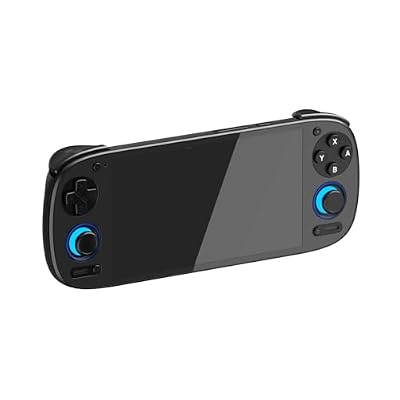

Weigh screen shape and button feel above raw specs: a GBA game needs a D-pad, four face buttons and two shoulders, nothing more. Our retro gaming console overview compares the categories.
The Emulator Is Legal. The Game Files Must Be Yours
Every emulator named here is legal software, openly distributed, and most are open source. The game files are a separate question. A GBA ROM is a copy of a copyrighted game, and the only copy you should be using is one you dumped yourself from a cartridge you own. Downloading games you do not own a physical copy of is copyright infringement, whatever the site hosting them claims, and this article will not point you to any such source.
Dumping your own carts is straightforward with a USB cartridge reader: devices such as the GB Operator and comparable cart dumpers read the cartridge you insert and write both the game file and your existing battery save to your PC. That save transfer is worth doing by itself, since it rescues a childhood file off a twenty-year-old battery.
There is also a large, entirely legal library of GBA homebrew – games written by hobbyists and released for free, including community game jam entries and independent releases on open platforms. They are free to download, they verify a new setup nicely, and several beat the shovelware on retail shelves, much like building a free game library on PC.
Troubleshooting
Game runs but does not save. The emulator guessed the wrong save type. Set it manually per game (SRAM, EEPROM or flash, 64K or 128K) and reload.
Audio crackles or stutters. Increase the audio buffer, or check that the emulator syncs to audio rather than video. On handhelds this often means you are on a fast-but-inaccurate core.
A save from another emulator is rejected. Check its size and extension, and confirm the name matches the ROM exactly.
Link multiplayer desyncs. Run all instances on one machine, close background downloads, and match emulator versions and regional releases across players.
Frequently Asked Questions
Is mGBA better than VisualBoyAdvance?
For nearly every use, yes. mGBA is more accurate in audio and timing, actively developed, and handles hardware features like the real-time clock, tilt sensors and solar sensors properly, on far more platforms including Android. VisualBoyAdvance-M is worth keeping only for legacy saves, old cheat databases and ROM-hacking workflows built around its specific behavior.
Are GBA emulators legal to use?
The emulators are legal software, openly distributed, many as open source projects. The legal question attaches to the game files, not the program. Only run ROMs you created yourself by dumping cartridges you own, or freely licensed homebrew. Downloading copies of commercial games you do not own is copyright infringement, and no emulator’s legality changes that.
Can I trade Pokemon between two emulators?
Yes. mGBA emulates the link cable by running several instances on one computer joined into a single multiplayer session, which covers trading, trade evolutions and battles. VisualBoyAdvance-M offers a LAN equivalent across two machines. Keep both sides connected through the whole trade animation, and run locally rather than over wireless to avoid desyncs.
How do I move my save file to a different emulator?
Move the battery save, not the save state. Save inside the game, close the emulator cleanly so the file is written, then copy the .sav or .srm and rename it to match the ROM filename in the new emulator. Save states never transfer between emulators. Back up the original, and if it is rejected, check for a save-size or clock-data mismatch.
Do I need a GBA BIOS file to play?
Not with mGBA, which includes a high-level reimplementation and boots games without one. A real BIOS image dumped from a console you own is marginally more accurate for a small number of titles and restores the original boot animation, but it is optional. Some other emulators and cores are stricter and will ask for one before launching anything.
















