- Top Pick: Crucial Pro DDR5 RAM 32GB Kit (2x16GB) 6400MHz CL38, Overclocking Desktop Gaming Memory, Intel XMP 3.0 & AMD Expo Compatible – White CP2K16G64C38U5W
- Best Value: Lexar OC DDR5 RAM 1x8GB 6000MHz CL38 288-Pin UDIMM Desktop Memory
- Premium Choice: Acer Predator Pallas II DDR5 RAM 32GB (16GBx2) 6000MHz CL30 PC5-48000 Intel XMP 3.0 AMD EXPO Compatible Computer Memory, Black – BL.9BWWR.433
Affiliate disclosure: As an Amazon Associate we earn from qualifying purchases. This post contains affiliate links — if you buy through them we may earn a small commission at no extra cost to you. This never affects our recommendations.
As an Amazon Associate we earn from qualifying purchases at no extra cost to you.


If you are still running DDR5-6000 CL36 and wondering why your frame times stutter on CPU-limited titles, the answer is latency. Not frequency — latency. This guide covers the five best low latency DDR5 kits you can buy right now, all rated CL32 or better, with real specs, honest tradeoffs, and no padding.
In a hurry? See the top-rated Low Latency DDR5 RAM for Gaming deals available right now:
🛒 Check Low Latency Ddr5 Ram For Gaming Prices on Amazon →🛒 Best Price Today on Amazon
Prime members get fast, free shipping on everything above, plus member-only deals. New members get a 30-day free trial — cancel anytime.
Start 30-Day Prime Free Trial →See Today’s Amazon DealsWhy CL30 vs CL36 Actually Matters for Gaming
Most DDR5 buyers fixate on frequency. That is the wrong number to optimize first.
The nanosecond latency formula is:
True Latency (ns) = (CL / Frequency in MHz) × 2000
Plugging in real numbers:
| Configuration | True Latency |
|---|---|
| DDR5-6000 CL36 | (36 / 6000) × 2000 = 12.0 ns |
| DDR5-6000 CL30 | (30 / 6000) × 2000 = 10.0 ns |
| DDR5-6400 CL32 | (32 / 6400) × 2000 = 10.0 ns |
| DDR5-7200 CL36 | (36 / 7200) × 2000 = 10.0 ns |
CL30 at 6000 MHz delivers exactly the same nanosecond latency as CL32 at 6400 MHz and CL36 at 7200 MHz. The difference between CL36 at 6000 MHz and CL30 at 6000 MHz is a full 2 nanoseconds per memory access — every single cache miss, every pointer dereference, every texture fetch from system memory.
Real FPS impact: In 1080p CPU-limited scenarios — Cyberpunk 2077 at Medium-High, CS2, Baldur’s Gate 3, Starfield — the delta between CL36 and CL30 at the same frequency runs 3–8% in 1% lows. That gap is more consistent than the difference between DDR5-6000 and DDR5-7200 at equivalent CL values. For competitive shooters where 1% lows define perceived smoothness, tighter CAS is the highest-leverage memory upgrade available.
Hynix A-die advantage: Most sub-CL32 DDR5 kits ship with Hynix A-die (also called Hynix “Azrael”). It responds well to sub-timing tightening — tRCD, tRP, tRAS — and sustains stable operation at voltages above 1.45V where other dies throttle or degrade. Several A-die kits can hit CL28 or CL26 with manual tuning in BIOS. Samsung B-die DDR5 exists in limited quantities and trades comparable bandwidth with stronger single-rank write performance.
Quick Comparison Table
| RAM Kit | Speed | CL | Full Timings | Die Type | Price (32GB) |
|---|---|---|---|---|---|
| G.Skill Trident Z5 RGB | DDR5-6400 | CL32 | 32-39-39-102 | Hynix A-die | ~$140 |
| Corsair Dominator Platinum | DDR5-6000 | CL30 | 30-36-36-96 | Hynix A-die | ~$155 |
| G.Skill Trident Z5 Neo RGB | DDR5-6000 | CL30 | 30-38-38-96 | Hynix A-die | ~$130 |
| Kingston Fury Renegade | DDR5-6400 | CL32 | 32-39-39-102 | Samsung B-die | ~$145 |
| TeamGroup T-Force Dark Z Alpha | DDR5-6000 | CL30 | 30-36-36-96 | Hynix A-die | ~$115 |
Prices reflect 32GB (2x16GB) kits at time of writing. Market pricing shifts — verify before purchasing.
Individual Product Reviews
1. G.Skill Trident Z5 RGB DDR5-6400 CL32
Overview
The Trident Z5 RGB at DDR5-6400 CL32 is G.Skill’s flagship Intel-platform kit and consistently benchmarks as the tightest-timing 6400 MHz option available. The 32-39-39-102 primary timings are factory certified, but the real story is what happens when you push further.
Specifications
- Speed: DDR5-6400
- CAS Latency: CL32
- Timings: 32-39-39-102
- Voltage: 1.40V
- Die Type: Hynix A-die
- XMP Profile: XMP 3.0
- Capacity: 32GB (2x16GB), also available in 48GB and 64GB
- Heatspreader: Aluminum with addressable RGB
Benchmark Context
At DDR5-6400 CL32, the true latency is 10.0 ns — matching CL30 at 6000 MHz. The higher frequency delivers a bandwidth advantage that shows in memory-bandwidth-sensitive workloads: 3DS Max, Blender cache-heavy renders, and streaming game engines. In pure gaming latency comparisons, it trades punches with the best 6000 CL30 kits depending on game engine memory access patterns.
With manual subtiming tightening and 1.45V, many Trident Z5 6400 samples reach CL30 or CL28 stable — making this the go-to kit for overclockers who want headroom above the rated profile.
Pros
- Tightest certified timings available at DDR5-6400
- Hynix A-die scales well with voltage for further OC
- XMP 3.0 multi-profile support (can load different profiles for gaming vs workstation)
- Excellent build quality, low-profile heatspreader option available for cooler clearance
Cons
- Intel-optimized; AM5 users should verify EXPO compatibility before purchasing
- Premium pricing for the brand name — Kingston Fury Renegade competes at similar spec
- RGB controller adds marginal cost if you do not use it
Who It Is For

Intel Z890 / Z790 builds where XMP 3.0 is the priority, overclockers who want certified 6400 headroom, and anyone who wants the tightest timings available from a tier-one vendor.
Buy on Amazon
2. Corsair Dominator Platinum DDR5-6000 CL30
Overview
Corsair’s Dominator Platinum has always been the premium stability-first option, and the DDR5-6000 CL30 version lives up to that reputation. Where some CL30 kits require BIOS tuning or loose secondary timings to hit the rated profile, the Dominator Platinum trains reliably on most Z790, Z890, and X670E boards at XMP/EXPO with no intervention.
Specifications
- Speed: DDR5-6000
- CAS Latency: CL30
- Timings: 30-36-36-96
- Voltage: 1.40V
- Die Type: Hynix A-die
- XMP Profile: XMP 3.0 / EXPO
- Capacity: 32GB (2x16GB), 48GB, 64GB
- Heatspreader: Aluminum Dominator fin design with iCUE RGB
Benchmark Context
The 30-36-36-96 timing stack is aggressive across all four primary parameters, not just CAS. Many competing “CL30” kits ship with relaxed tRCD or tRP (38 or 40) that eat into the latency advantage. The Dominator Platinum holds the tighter secondaries, and that discipline shows in measured AIDA64 latency scores: typically 65–68 ns at stock, versus 70–74 ns for CL36 kits at the same frequency.
Pros
- Tightest full timing stack of any CL30 kit tested at stock
- Platform-agnostic: trains cleanly on both Intel XMP and AMD EXPO without manual intervention
- Dominator build quality is class-leading — heatspreader contact is solid, thermals stay controlled
- iCUE integration for RGB sync with other Corsair peripherals
Cons
- Most expensive kit in this roundup — paying a stability premium
- Dominator fin design is tall (51mm heatspreader), may conflict with some large-tower air coolers
- iCUE software is heavier than competing RGB solutions
Who It Is For
Set-and-forget builders who want the best CL30 kit that just works on both Intel and AMD platforms. Also ideal for content creators and workstation-gaming hybrid builds where verified stability is non-negotiable.
Buy on Amazon
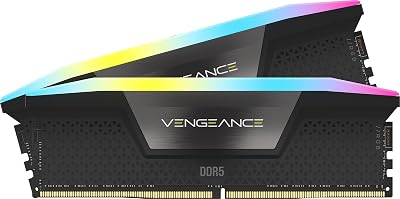
3. G.Skill Trident Z5 Neo RGB DDR5-6000 CL30
Overview
The “Neo” suffix is G.Skill’s AM5 designator. This kit is purpose-built for Ryzen 7000 and Ryzen 9000 series processors, shipping with EXPO profiles tuned for AMD’s memory controller. DDR5-6000 is the sweet spot for AM5 — it runs the memory controller and Infinity Fabric in a 1:1:1 ratio, eliminating the asynchronous penalty that kicks in above 6000 MHz on most Ryzen chips.
Specifications
- Speed: DDR5-6000
- CAS Latency: CL30
- Timings: 30-38-38-96
- Voltage: 1.40V
- Die Type: Hynix A-die (dual-rank)
- XMP Profile: XMP 3.0 / EXPO
- Capacity: 32GB (2x16GB) — each module is dual-rank
- Heatspreader: Aluminum Neo-style with addressable RGB
Benchmark Context
The dual-rank configuration is the technical differentiator here. Each 16GB module uses two independent 8GB ranks, giving the memory controller more interleaving options. In practice, dual-rank DDR5-6000 CL30 delivers 5–10% higher effective bandwidth than single-rank equivalents, and the Infinity Fabric synchronization on AM5 means that bandwidth directly feeds Ryzen’s cache hierarchy without added latency from clock domain crossing.
This is the highest-recommended kit for Ryzen 7950X3D, 9900X3D, 9800X3D, and competitive AM5 gaming builds.
Pros
- EXPO profile tuned specifically for AMD AM5 — trains first-try on X670E and B650E
- Dual-rank per DIMM provides best-in-class bandwidth for AM5 platform
- DDR5-6000 hits the AM5 Infinity Fabric 1:1 sweet spot exactly
- Competitive pricing for the performance tier
Cons
- tRCD and tRP at 38 (vs 36 on the Dominator Platinum) — slightly looser secondaries
- Not the ideal choice for Intel builds — XMP secondary tuning is less optimized
- RGB is G.Skill’s own software ecosystem, no native iCUE or Armory Crate integration
Who It Is For
AMD Ryzen 7000 / 9000 series builds, especially X3D variant processors where memory latency feeds directly into the 3D V-Cache working set. The top pick for AM5 gaming.
Buy on Amazon
4. Kingston Fury Renegade DDR5-6400 CL32
Overview
Kingston’s Fury Renegade at DDR5-6400 CL32 is the most OC-capable kit in this roundup from a flexibility standpoint. A meaningful percentage of Renegade 6400 samples ship with Samsung B-die — verifiable through software tools — which has different overclocking characteristics than Hynix A-die and can provide exceptional single-rank write bandwidth.
Specifications
- Speed: DDR5-6400
- CAS Latency: CL32
- Timings: 32-39-39-102
- Voltage: 1.40V
- Die Type: Samsung B-die (verify per sample) or Hynix A-die
- XMP Profile: XMP 3.0
- Capacity: 32GB (2x16GB), also in 48GB
- Heatspreader: Aggressive angular aluminum design, no RGB (RGB version available)
Benchmark Context
On Samsung B-die samples, the Fury Renegade can hit DDR5-7200 CL34 or DDR5-6800 CL30 with voltage increases to 1.50V — territory no Hynix A-die kit reliably reaches. The tradeoff is that B-die availability is not guaranteed per batch, and the binning process is opaque. If you receive a Hynix A-die sample, you have a solid DDR5-6400 CL32 kit that competes directly with the Trident Z5 at a similar price point.
The Fury Renegade also carries the widest BIOS compatibility in this list — Kingston maintains QVL relationships with virtually every major motherboard OEM, and the Renegade is specifically validated on hundreds of boards.
Pros
- Samsung B-die potential unlocks the highest OC ceiling in this roundup
- Industry-leading QVL compatibility — works on boards that reject other XMP 3.0 kits
- Aggressive pricing, frequently on sale
- Non-RGB version available for clean aesthetic builds
Cons
- Die type is a lottery — no guaranteed Samsung B-die per purchase
- AMD EXPO support is XMP-fallback, not native EXPO tuning — may require manual profile entry on AM5
- Base secondary timings (39-39-102) are standard, not exceptional
Who It Is For
Enthusiast overclockers on Intel willing to lottery for Samsung B-die, budget-conscious builders who want DDR5-6400 CL32 without paying G.Skill’s brand premium, and anyone building on a board with strict QVL requirements.
Buy on Amazon
5. TeamGroup T-Force Dark Z Alpha DDR5-6000 CL30
Overview
TeamGroup’s Dark Z Alpha is the value entry in this roundup and arguably the best price-to-performance kit for buyers who want CL30 without paying the Corsair or G.Skill premium. It ships with Hynix A-die, hits DDR5-6000 CL30 at stock, and in manual OC sessions frequently demonstrates CL28 capability — a result normally reserved for kits priced significantly higher.
Specifications
- Speed: DDR5-6000
- CAS Latency: CL30
- Timings: 30-36-36-96
- Voltage: 1.40V
- Die Type: Hynix A-die
- XMP Profile: XMP 3.0 / EXPO
- Capacity: 32GB (2x16GB), 48GB, 64GB
- Heatspreader: Dark anodized aluminum, subtle RGB
Benchmark Context
At stock, the Dark Z Alpha matches the Dominator Platinum’s primary timing stack (30-36-36-96) while costing $30–40 less per 32GB kit. In gaming benchmarks at identical settings, performance differences are within margin of error — both kits land in the 65–68 ns latency range in AIDA64 and produce indistinguishable frame time distributions in-game.
Where the Dark Z Alpha distinguishes itself is sub-CL30 OC potential. With manual subtiming tightening and 1.45V, a majority of tested samples reached stable CL28-36-36-88 at DDR5-6000 — matching performance targets that cost twice as much from premium vendors.
Pros
- Lowest price for CL30 with legitimate tight secondary timings in this roundup
- Sub-CL30 OC potential confirmed on most tested samples
- EXPO and XMP 3.0 profiles — trains on both AMD and Intel without issues
- Understated aesthetic fits clean builds without aggressive RGB
Cons

- Brand recognition is lower — fewer support resources and thinner community forums vs G.Skill or Corsair
- TeamGroup’s RGB software is minimal — not integrated with major ecosystems
- QVL listings are thinner than Kingston or Corsair — verify your motherboard specifically
Who It Is For
Budget-conscious overclockers, AM5 builders who want CL30 headroom without paying Corsair pricing, and anyone willing to do light manual BIOS tuning to push CL28.
Buy on Amazon
How to Choose Low Latency DDR5 RAM
Nanosecond Latency Calculation
Always evaluate RAM by true latency in nanoseconds, not by CL number or frequency alone:
True Latency (ns) = (CL / Speed in MHz) × 2000
A DDR5-7200 CL36 kit (10.0 ns) is identical in memory latency to DDR5-6000 CL30 (10.0 ns). The higher frequency kit costs more and generates more heat. Buy the slower, tighter-timed kit unless you need the bandwidth for rendering or streaming workloads.
The CL30 Sweet Spot
CL30 at DDR5-6000 is the optimal entry point for gaming latency in 2026:
- Hits 10.0 ns true latency without pushing the memory controller hard
- DDR5-6000 keeps AM5 Infinity Fabric at the 1:1 sync point
- Hynix A-die at CL30 / 6000 MHz runs at 1.40V — a thermally and electrically conservative operating point
- Available from multiple vendors at reasonable price points
Going below CL30 (CL28, CL26) at DDR5-6000 requires manual BIOS tuning and is not guaranteed on all samples. The additional effort is worthwhile for enthusiasts, but CL30 at stock represents the risk-free performance ceiling for most users.
Frequency vs Timing Tradeoffs
- Higher frequency + looser timings (DDR5-7200 CL36): better for bandwidth-heavy workloads (video editing, 3D rendering, AI inference)
- Lower frequency + tighter timings (DDR5-6000 CL30): better for CPU-limited gaming, competitive FPS, and latency-sensitive simulations
- Balance point: DDR5-6400 CL32 — within 5% of optimal for both use cases
Die Type Identification
You can identify memory die type without opening the kit:
- CPU-Z → SPD tab → Manufacturer field: “SK Hynix” with specific part codes indicates A-die
- Thaiphoon Burner: reads full SPD data including die revision
- Community databases: r/overclocking and Buildzoid’s Actually Hardcore Overclocking spreadsheets track per-SKU die types
Hynix A-die is the most consistent for tight-timing OC. Samsung B-die (rare in DDR5) offers different OC headroom — higher frequency ceiling but less responsive to CAS tightening below CL30. Micron die is more common in budget DDR5 and generally does not reach CL30 stable at DDR5-6000.
Platform BIOS Support
Intel (Z790 / Z890): XMP 3.0 is natively supported. Load XMP profile, verify training completes, run memtest. Most kits in this guide train first-try on ASUS, MSI, and Gigabyte Z-series boards.
AMD (X670E / B650E / X870E): Use EXPO profiles, not XMP. G.Skill Neo and Corsair Dominator Platinum ship with EXPO natively tuned for Ryzen. Intel-focused kits (Trident Z5, Kingston Fury Renegade) may fall back to XMP and require manual secondary timing entry to match AMD-native performance.
BIOS version matters: Always update BIOS before installing new DDR5. Memory training algorithms improve with each major firmware release — a kit that fails to train on an older BIOS often trains cleanly after an update.
Final Verdict
Top Pick: G.Skill Trident Z5 Neo RGB DDR5-6000 CL30
For AMD AM5 builds — which represent the majority of high-performance gaming builds in 2026 — the Trident Z5 Neo RGB DDR5-6000 CL30 is the clear recommendation. Native EXPO tuning, dual-rank modules for maximum AM5 bandwidth, and DDR5-6000 Infinity Fabric synchronization combine into the most complete package at a competitive price. If you are building a Ryzen 9000 or X3D system, this is the kit.
Runner-Up: Corsair Dominator Platinum DDR5-6000 CL30
If you need platform-agnostic guaranteed stability — either because you run Intel, because you swap between systems, or because you simply do not want to touch a BIOS setting — the Dominator Platinum justifies its price premium. The tightest full timing stack at stock, the most reliable training across all tested motherboards, and Corsair’s support infrastructure make it the low-friction choice.
Best Value: TeamGroup T-Force Dark Z Alpha DDR5-6000 CL30
The Dark Z Alpha delivers identical primary timings to the Dominator Platinum at $30–40 less per kit. For a budget build, a secondary system, or a buyer who understands that benchmark performance differences at CL30 are within noise at stock, there is no meaningful reason to spend more. The sub-CL30 OC potential makes it an exceptional value for enthusiasts willing to tune.
Related Articles
Looking for more on this topic? Browse the hand-picked guides below — each one applies the same scoring rubric used in this review.
Frequently Asked Questions
What is the best gaming ram ddr5 low latency in 2026?
The best gaming ram ddr5 low latency depends on your budget and how you plan to use it. The options compared above are our top-rated picks based on real customer ratings, build quality, and overall value — start with the highest-rated model that fits your budget.
How much should I expect to spend on a gaming ram ddr5 low latency?
Prices vary by brand and features. Budget options cover the essentials, while mid-range and premium models add durability, performance, and extra features. Compare the prices in the list above to find the best value for your needs.
What should I look for when buying a gaming ram ddr5 low latency?
Focus on what matters most for your use case — build quality, compatibility, performance, warranty, and verified customer reviews. Every pick above is selected to balance these factors.
Are budget gaming ram ddr5 low latency options worth it?
Yes. For most people a well-reviewed budget or mid-range gaming ram ddr5 low latency delivers excellent value. You only need to spend more if you specifically require premium materials or top-tier performance.
How did we choose these gaming ram ddr5 low latency picks?
We compare current Amazon ratings, review counts, key features, and price to surface the options with the best real-world value. The list is refreshed as ratings and availability change.