Affiliate disclosure: As an Amazon Associate we earn from qualifying purchases. This post contains affiliate links — if you buy through them we may earn a small commission at no extra cost to you. This never affects our recommendations.
As an Amazon Associate we earn from qualifying purchases at no extra cost to you.



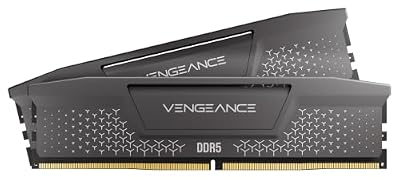


If you’re building or upgrading a gaming PC around AMD’s Ryzen 9000 series — or even an Intel Core Ultra platform — DDR5-6000 is the speed you want. It hits the performance sweet spot where real-world fps gains are measurable, pricing has come down to reasonable, and platform support is mature enough that you won’t be fighting your BIOS to get there.
This guide covers the five best DDR5-6000 RAM kits you can buy right now, with clear comparisons on timings, thermals, RGB, and value. Whether you’re on a tight budget or building a no-compromise rig, there’s a pick here for you.
In a hurry? See the top-rated DDR5-6000 RAM for Gaming deals available right now:
🛒 Check Ddr5-6000 Ram For Gaming Prices on Amazon →🛒 Best Price Today on Amazon
Prime members get fast, free shipping on everything above, plus member-only deals. New members get a 30-day free trial — cancel anytime.
Start 30-Day Prime Free Trial →See Today’s Amazon DealsWhy DDR5-6000 Is the AMD Sweet Spot
AMD’s Ryzen 9000 series (Zen 5 architecture) has a memory controller that performs best when the memory frequency and the Infinity Fabric (FCLK) are in a 1:1 ratio. That ratio holds cleanly at DDR5-6000, meaning the FCLK runs at 3000 MHz — the highest stable 1:1 clock on most Zen 5 chips without exotic cooling or cherry-picked silicon.
Push to DDR5-6400 or beyond and you’ll often hit a 1:2 ratio on the Infinity Fabric, which actually hurts latency-sensitive tasks like gaming despite the raw bandwidth increase. Drop to DDR5-4800 and you’re leaving fps on the table — benchmarks consistently show 5–12% higher average framerates at DDR5-6000 vs DDR5-4800 in titles like Cyberpunk 2077, Hogwarts Legacy, and Total War: Warhammer III.
AMD’s EXPO (Extended Profiles for Overclocking) standard, their equivalent to Intel’s XMP, makes hitting DDR5-6000 a one-click BIOS toggle. Most kits in this guide carry both EXPO and XMP 3.0 profiles, so they work equally well on Intel Core Ultra 200 series boards. There’s no meaningful reason to skip DDR5-6000 in 2026 — prices have normalized and the gains are real.
Quick Comparison Table
| Product | Speed | Timings | Voltage | RGB | Price Range |
|---|---|---|---|---|---|
| G.Skill Trident Z5 Neo | DDR5-6000 | CL30-36-36-96 | 1.35V | Yes | $$$ |
| Corsair Dominator Titanium | DDR5-6000 | CL30-36-36-76 | 1.40V | Yes | $$$$ |
| Kingston Fury Beast | DDR5-6000 | CL36-38-38-80 | 1.35V | No | $$ |
| TeamGroup T-Force Vulcan | DDR5-6000 | CL38-38-38-78 | 1.35V | Yes | $$ |
| Crucial Pro | DDR5-6000 | CL36-38-38-80 | 1.10V | No | $$ |
Top 5 Best DDR5-6000 RAM Kits for Gaming in 2026
#1 G.Skill Trident Z5 Neo DDR5-6000 — Best Overall
The G.Skill Trident Z5 Neo is the RAM most AMD builders should buy in 2026, full stop. It ships with an EXPO profile dialed specifically for Ryzen platforms, hits CL30 primary timings at 1.35V, and G.Skill’s sub-timing tuning on this kit is among the tightest you’ll find without manual overclocking. The Neo suffix signals AMD-first optimization — it pairs seamlessly with X670E and B650E boards, and XMP 3.0 support means it also performs well on Z790 and Z890 Intel platforms. The aluminum heatspreader stays cool under sustained load, and the RGB implementation through G.Skill’s Lighting Control software is clean and polished.
Pros:
- EXPO + XMP 3.0 dual-profile — works on AMD and Intel with one BIOS toggle
- Best-in-class CL30 primary timings for DDR5-6000 production kits
- Optimized specifically for Ryzen Zen 5 memory controller
- Stable at rated speed on most X670E and B650E boards without manual tuning
- Competitive pricing for the timing performance on offer
Cons:
- RGB software requires a separate download and can conflict with other lighting apps
- Slightly taller heatspreader may clear poorly with large air coolers in tight cases
- Premium pricing vs CL36 alternatives that perform only marginally worse in games
- Availability of 64GB kits (2x32GB) can be inconsistent in some regions
Shop G.Skill Trident Z5 Neo DDR5-6000

#2 Corsair Dominator Titanium DDR5-6000 — Best Premium
The Corsair Dominator Titanium is the choice when performance ceiling and aesthetics both matter and budget is secondary. It also runs CL30 at DDR5-6000 but pushes to 1.40V — the higher voltage gives Corsair’s engineers more headroom for tighter secondary and tertiary timings out of the box. Corsair’s DHX (Dual Heat eXchange) cooling architecture uses an aluminum fin array that genuinely transfers heat better than flat heatspreaders, keeping die temperatures down during sustained memory-intensive workloads like streaming, video encoding, or large open-world games with heavy streaming. iCUE software integration is polished and the top-bar RGB lighting is distinctive without being garish.
Pros:
- DHX cooling keeps memory dies measurably cooler than flat heatspreaders
- CL30 timings with tighter secondaries — best latency profile in this roundup
- iCUE software is mature, stable, and integrates with the rest of Corsair’s ecosystem
- Premium build quality and distinctive industrial aesthetic
- Available in multiple colorways including white, black, and gunmetal
Cons:
- Most expensive kit in this guide by a notable margin
- 1.40V is at the high end for DDR5 — not ideal for 24/7 longevity purists
- DHX heatsink is tall and wide — check clearance with your CPU cooler carefully
- iCUE software is resource-hungry; lightweight builds may want to skip it
Shop Corsair Dominator Titanium DDR5-6000
#3 Kingston Fury Beast DDR5-6000 — Best Value
The Kingston Fury Beast at DDR5-6000 is where smart builders land when they want the sweet-spot frequency without paying for RGB lighting they’ll never see inside a closed case. Timings are CL36 rather than CL30 — the difference translates to roughly 1–3 ns additional latency in practice, which in gaming benchmarks is typically within margin of error versus CL30 kits. EXPO support is baked in, Kingston’s Fury Beast line has an excellent compatibility record across B650 and X670 boards, and the low-profile aluminum heatspreader is genuinely useful for ITX and mATX builds where cooler clearance is tight. No RGB means lower cost passed directly to you.
Pros:
- Significantly lower price than CL30 kits with only marginal real-world gaming difference
- EXPO-ready — one-click DDR5-6000 on AMD platforms
- Low-profile design improves clearance compatibility with large tower coolers
- Excellent board compatibility track record across B650/X670 ecosystem
- Available in 32GB (2x16GB) and 64GB (2x32GB) configurations
Cons:
- CL36 timings are slower than CL30 alternatives — visible in latency-sensitive benchmarks
- No RGB — purely functional, which won’t suit builds with windowed cases
- XMP 3.0 profile available but Intel optimization is secondary to AMD EXPO tuning
- Less overclocking headroom compared to premium binned kits
Shop Kingston Fury Beast DDR5-6000
#4 TeamGroup T-Force Vulcan DDR5-6000 — Best Budget RGB
The TeamGroup T-Force Vulcan at DDR5-6000 solves the “I want RGB but I don’t want to overpay” problem directly. At CL38 timings it’s the slowest kit in this guide by primary latency, but TeamGroup’s implementation at 1.35V is stable and reliable — both XMP 3.0 and EXPO profiles are present, and the kit hits its rated speed consistently across the widest range of mainstream boards. The RGB implementation is straightforward and compatible with most major motherboard lighting ecosystems without requiring proprietary software. For a budget build where DDR5-6000 frequency matters more than shaving nanoseconds off CAS latency, this kit delivers the platform benefit at the lowest price with lighting included.
Pros:
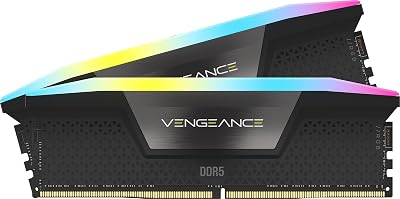
- Most affordable RGB DDR5-6000 kit in this roundup
- Both XMP 3.0 and EXPO profiles for universal platform compatibility
- RGB syncs with ASUS Aura, MSI Mystic Light, Gigabyte RGB Fusion natively
- Stable and reliable — consistent reports of hitting rated spec on first boot
- Good thermal performance at 1.35V operating voltage
Cons:
- CL38 primary timings are the slowest in this guide — measurably higher latency
- TeamGroup’s brand recognition is lower — resale value and availability can vary
- Heatspreader quality feels slightly less premium than G.Skill or Corsair options
- Limited capacity options — 32GB kits are easy to find; 64GB kits less so
Shop TeamGroup T-Force Vulcan DDR5-6000
#5 Crucial Pro DDR5-6000 — Best No-Frills Option
The Crucial Pro DDR5-6000 is Micron’s own-brand DDR5 kit, and the silicon provenance matters here — Micron makes memory dies used across the industry, and Crucial Pro kits typically carry well-binned Micron E-die. Timings land at CL36 at 1.10V — that low operating voltage is the headline stat, reducing heat and power draw meaningfully in builds where thermals or efficiency matter. JEDEC compliance is strict, meaning this kit will boot and run at spec on virtually any DDR5 board without touching the BIOS. It lacks RGB and has a simple black heatspreader, but for workstation-adjacent builds or cases without windows, that’s a feature rather than a drawback.
Pros:
- Lowest operating voltage (1.10V) in this roundup — excellent for efficiency-focused builds
- Micron E-die silicon offers good overclocking potential beyond rated speed
- Exceptional board compatibility — virtually guaranteed to POST at spec on any DDR5 platform
- Clean minimalist aesthetic suits professional and workstation builds
- Competitive pricing in the CL36 tier
Cons:
- No RGB — purely functional appearance
- EXPO profile support is present but less aggressively tuned than AMD-first competitors
- CL36 primary timings — same caveat as Kingston Fury Beast vs CL30 kits
- Less brand recognition for gaming-focused buyers compared to G.Skill or Corsair
How to Choose the Right DDR5-6000 RAM
Why DDR5-6000 Is the Sweet Spot
The case for DDR5-6000 in 2026 is stronger than it’s ever been. AMD’s Zen 5 memory controller achieves its optimal 1:1 FCLK ratio at this speed, Intel’s Core Ultra 200 series handles it without breaking a sweat, and prices have compressed significantly since DDR5’s launch. Going faster than 6000 MT/s yields diminishing returns for gaming specifically — the latency penalty from dropping out of 1:1 ratio on AMD often negates the bandwidth gain. Going slower leaves fps on the table. DDR5-6000 is the answer that benchmarks consistently validate.
CL30 vs CL36 Timings Matter
CAS Latency (CL) is the primary timing figure — lower is better. The difference between CL30 and CL36 at DDR5-6000 works out to about 2 nanoseconds of additional latency. In practice, gaming benchmarks show this translates to roughly 1–4% difference in 1% low frametimes in latency-sensitive titles. That gap is real but small. If you’re running a Ryzen 9 9950X or Core Ultra 9 285K and every frame counts, pay for CL30. If you’re on a midrange build, CL36 saves money with minimal gaming impact.
EXPO vs XMP Profiles
EXPO (Extended Profiles for Overclocking) is AMD’s standard; XMP 3.0 is Intel’s. Most quality DDR5-6000 kits ship with both profiles baked into the SPD on the module. Enable EXPO in your BIOS if you’re on AMD (X670, B650, or their E variants); enable XMP on Intel (Z790, Z890). Either way, you’re getting one-click access to the rated DDR5-6000 speed without manual overclocking. Never buy a DDR5-6000 kit that only carries one profile unless you’re certain of your platform.

RGB vs Heatspread
RGB looks great in a windowed case and is a legitimate purchasing consideration if aesthetics matter to you. The practical tradeoff: RGB kits are typically $15–30 more expensive, and RGB controllers add a small amount of heat to the module. Heatspreader-only kits (Kingston Fury Beast, Crucial Pro) tend to be lower profile and offer better cooler clearance in compact cases. For ITX and mATX builds in particular, a low-profile no-RGB kit is often the smarter choice.
Capacity — 32GB vs 64GB
32GB (2x16GB) is the current gaming standard — enough for every modern title plus Discord, a browser, and streaming software running simultaneously. 64GB (2x32GB) is the right call if you’re also using the PC for video editing, 3D rendering, large dataset work, or running virtual machines. For pure gaming in 2026, 32GB covers you comfortably. The one exception: if you run AI tools locally (local LLMs, Stable Diffusion with large models), 64GB starts to make sense.
Budget
Expect to spend:
- $80–100 for CL36 no-RGB kits (Kingston Fury Beast, Crucial Pro)
- $100–120 for budget RGB at CL38 (T-Force Vulcan)
- $130–160 for CL30 with RGB and EXPO+XMP (G.Skill Trident Z5 Neo)
- $180–220+ for premium CL30 with high-end cooling and aesthetics (Corsair Dominator Titanium)
All prices are for 32GB (2x16GB) kits. 64GB kits typically run 1.8–2x the 32GB price.
Final Verdict
For most builders in 2026, the G.Skill Trident Z5 Neo DDR5-6000 CL30 is the right answer. It offers the best combination of tight timings, dual EXPO/XMP support, AMD platform optimization, and competitive pricing. If you’re on AMD Ryzen 9000 series and want to maximize gaming performance without going into diminishing-returns territory on RAM frequency, this is the kit to buy.
On a tighter budget, the Kingston Fury Beast DDR5-6000 CL36 is the sensible choice. The timing step-down from CL30 to CL36 costs you 1–3% in latency-sensitive benchmarks — a trade most gamers will never notice in exchange for real money saved. It also earns points for the low-profile design and strong board compatibility. Buy this kit, put the savings toward a better GPU or SSD, and don’t look back.
If budget is not a constraint and you want the best binned silicon, the coolest-running kit, and the most polished software ecosystem, the Corsair Dominator Titanium delivers. It’s the overclocker’s pick and the aesthete’s pick simultaneously. Just verify cooler and case clearance before you order — the DHX heatsink is substantial. Whichever kit you choose from this list, DDR5-6000 is where your build should land in 2026.
Related Articles
Looking for more on this topic? Browse the hand-picked guides below — each one applies the same scoring rubric used in this review.
Frequently Asked Questions
What is the best gaming ram ddr5 6000 in 2026?
The best gaming ram ddr5 6000 depends on your budget and how you plan to use it. The options compared above are our top-rated picks based on real customer ratings, build quality, and overall value — start with the highest-rated model that fits your budget.
How much should I expect to spend on a gaming ram ddr5 6000?
Prices vary by brand and features. Budget options cover the essentials, while mid-range and premium models add durability, performance, and extra features. Compare the prices in the list above to find the best value for your needs.
What should I look for when buying a gaming ram ddr5 6000?
Focus on what matters most for your use case — build quality, compatibility, performance, warranty, and verified customer reviews. Every pick above is selected to balance these factors.
Are budget gaming ram ddr5 6000 options worth it?
Yes. For most people a well-reviewed budget or mid-range gaming ram ddr5 6000 delivers excellent value. You only need to spend more if you specifically require premium materials or top-tier performance.
How did we choose these gaming ram ddr5 6000 picks?
We compare current Amazon ratings, review counts, key features, and price to surface the options with the best real-world value. The list is refreshed as ratings and availability change.