- Top Pick: G.SKILL Trident Z5 Neo RGB Series DDR5 RAM (AMD EXPO) 64GB (2x32GB) Up to 6000MT/s* CL30-40-40-96 1.40V Desktop Computer Memory U-DIMM – Matte Black (F5-6000J3040G32GX2-TZ5NR)
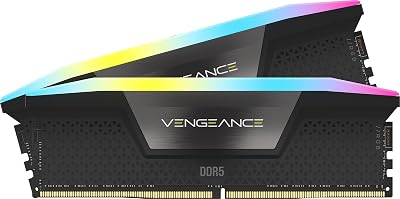
- Best Value: Corsair Vengeance RGB RS DDR5 64GB (2 x 32GB) Up to 6000MHz AMD Intel RAM
- Premium Choice: Crucial Pro DDR5 RAM 64GB Kit (2x32GB) 6000MHz CL40, Overclocking Desktop Gaming Memory, Intel XMP 3.0 & AMD Expo Compatible – Black CP2K32G60C40U5B
Affiliate disclosure: As an Amazon Associate we earn from qualifying purchases. This post contains affiliate links — if you buy through them we may earn a small commission at no extra cost to you. This never affects our recommendations.
As an Amazon Associate we earn from qualifying purchases at no extra cost to you.


If you’re building a high-end gaming PC in 2026, 64GB of DDR5 RAM is no longer overkill — it’s quickly becoming the sensible choice for anyone who does more than just play games. This guide breaks down the five best 64GB DDR5 kits, what separates them, and exactly which one belongs in your build.
In a hurry? See the top-rated 64GB DDR5 RAM Kit for Gaming deals available right now:
🛒 Check 64Gb Ddr5 Ram Kit For Gaming Prices on Amazon →🛒 Best Price Today on Amazon
Prime members get fast, free shipping on everything above, plus member-only deals. New members get a 30-day free trial — cancel anytime.
Start 30-Day Prime Free Trial →See Today’s Amazon DealsIntroduction: Who Actually Needs 64GB?
Let’s be direct: pure gaming alone rarely demands 64GB of RAM. Most titles run comfortably on 32GB, and many competitive games don’t push past 16GB. So why are we here?
Because no one’s PC does just one thing anymore. The modern enthusiast gaming rig is simultaneously a game console, a streaming studio, a web browsing machine, and a Discord server hub — all running at once. Open Chrome with 20 tabs, fire up OBS for streaming, keep Discord voice-active in the background, and launch a memory-hungry title like Microsoft Flight Simulator 2024 or a modded Skyrim install. You’ll eat through 32GB fast. Add a video editing session or a Photoshop project between gaming sessions and 64GB stops feeling excessive.
The other camp that needs this is the dual-purpose rig crowd: builders who game on the same machine they use for content creation, 3D rendering, music production, or software development. Adobe Premiere, DaVinci Resolve, Blender, and similar tools scale aggressively with RAM. Having 64GB means you’re never context-switching between “work mode” and “gaming mode” by closing applications — everything stays loaded.
There’s also a straightforward future-proofing argument. DDR5 is the platform you’ll be on for the next several years on Intel Core Ultra and AMD Ryzen 9000 series motherboards. Going 64GB now means you won’t be buying another kit in two years when game memory requirements creep upward, as they historically do at the start of each console generation.
Quick Comparison Table
| Product | Speed | Timings | RGB | EXPO/XMP | Price Range |
|---|---|---|---|---|---|
| G.Skill Trident Z5 RGB 64GB | DDR5-6000 | CL30-36-36-96 | Yes | XMP 3.0 + EXPO | $$$$ |
| Corsair Dominator Platinum RGB 64GB | DDR5-5600 | CL36-36-36-76 | Yes (Capellix) | XMP 3.0 | $$$$ |
| Kingston Fury Beast 64GB | DDR5-6000 | CL36-38-38-80 | No | EXPO + XMP | $$ |
| Crucial Pro 64GB | DDR5-5600 | CL46-45-45-90 | No | XMP 5.0 + EXPO | $$ |
| TeamGroup T-Force Delta RGB 64GB | DDR5-6000 | CL38-38-38-78 | Yes | EXPO + XMP | $$$ |
Top 5 Best 64GB DDR5 RAM Kits for Gaming in 2026
#1 G.Skill Trident Z5 RGB 64GB DDR5-6000 — Best Overall
The G.Skill Trident Z5 RGB is the gold standard for enthusiast DDR5 memory kits in 2026, and for good reason. This 2x32GB configuration hits DDR5-6000 with tight CL30 primary timings — an unusually aggressive spec for a 64GB kit that pushes real-world bandwidth and latency into territory that closes the gap with higher-frequency kits running looser timings. The premium aluminum heat spreader fins do genuine thermal work, and the full-length RGB diffuser delivers one of the cleanest lighting effects in the market.
Pros:
- Industry-leading CL30 timings at DDR5-6000 for a 64GB kit
- Dual 32GB configuration maximizes compatibility and signal integrity
- Supports both XMP 3.0 and EXPO — works out of the box on Intel and AMD platforms
- Premium aluminum fins keep thermals in check under sustained workloads
- Consistent batch quality with tight production tolerances
Cons:
- Carries a significant price premium over value alternatives
- RGB software (G.Skill’s Lighting Control) is functional but not the most polished
- Height may cause clearance issues with large air coolers
- Overkill for users who don’t need ultra-tight timings
G.Skill Trident Z5 RGB 64GB DDR5

#2 Corsair Dominator Platinum RGB 64GB DDR5-5600 — Best Premium
The Corsair Dominator Platinum RGB is Corsair’s flagship DDR5 kit, and it shows in every detail. Running at DDR5-5600 with CL36 timings, it trades a step in raw frequency for exceptional build quality and Corsair’s legendary Capellix LED implementation — 12 LEDs per stick with per-LED addressability that makes it the clear winner for iCUE-ecosystem builds. The DHX (Dual-path Heat eXchange) cooling technology uses the PCB itself as a heat dissipator, not just the spreader, resulting in genuinely cooler operating temperatures.
Pros:
- Capellix LED lighting is class-leading in color accuracy and brightness
- DHX cooling runs measurably cooler than standard heat spreader designs
- Deep iCUE integration for lighting sync across Corsair peripherals and components
- Tight CL36 timings hold up well under stress compared to rated specs
- Strong resale value and long-term brand support
Cons:
- DDR5-5600 falls short of the DDR5-6000 sweet spot without manual tuning
- Premium pricing relative to actual gaming performance gains
- iCUE software is resource-heavy and occasionally unstable
- Physically tall — confirm cooler clearance before buying
Corsair Dominator Platinum RGB 64GB DDR5
#3 Kingston Fury Beast 64GB DDR5-6000 — Best Value
The Kingston Fury Beast is the answer to a simple question: what if you want DDR5-6000 performance without paying for RGB or premium branding? This kit delivers CL36 timings at the 6000 MT/s sweet spot with full EXPO and XMP support, and it consistently achieves its rated specs without drama. The low-profile aluminum heat spreader keeps clearance issues off the table, and Kingston’s manufacturing consistency means you’re unlikely to get a dud stick. For builders who want performance per dollar, this is the pick.
Pros:
- Excellent price-to-performance ratio at DDR5-6000
- Low-profile design eliminates cooler clearance concerns
- Full EXPO and XMP support covers both Intel and AMD platforms
- Kingston’s reliability track record is among the best in the industry
- Clean industrial aesthetic works in windowed cases without RGB
Cons:
- No RGB — a dealbreaker for some windowed builds
- CL36 primary timings are looser than the G.Skill Z5 at the same frequency
- Fewer tuning headroom reports from enthusiast community compared to G.Skill
- Packaging and documentation are minimal
#4 Crucial Pro 64GB DDR5-5600 — Best No-Frills
The Crucial Pro is the RAM for builders who want one thing: a kit that works, every time, with everything. Running at DDR5-5600 with clean compatibility across a wide range of Intel Core Ultra and AMD Ryzen 9000 series motherboards, the Crucial Pro is the choice for system integrators, workstation builders, and anyone who considers stability a feature rather than a baseline. The plain black heat spreader and absence of RGB are features, not omissions — this kit fits professional builds that don’t need light shows. Micron’s in-house DRAM manufacturing gives Crucial a quality control edge that shows in consistent real-world results.
Pros:
- Exceptionally broad motherboard compatibility — works reliably where other kits don’t
- Backed by Micron’s in-house DRAM production for consistent quality
- Clean, professional aesthetic suits non-gaming or workstation builds
- Supports XMP 5.0 and EXPO for easy one-click OC on compatible boards
- Competitive pricing relative to build quality
Cons:
- DDR5-5600 is the lower bound of competitive speeds in 2026
- No RGB lighting option in this product line
- CL46 stock timings are noticeably loose compared to G.Skill and Kingston
- Less interesting to enthusiasts who want tuning flexibility
#5 TeamGroup T-Force Delta RGB 64GB DDR5-6000 — Best Budget RGB
The TeamGroup T-Force Delta RGB fills a gap that many builders feel acutely: you want RGB, you want DDR5-6000, and you don’t want to pay G.Skill or Corsair prices. At CL38 and DDR5-6000, the Delta RGB trades a little timing tightness for a noticeably lower street price, and it does so while delivering attractive full-length RGB fins that hold their own against the premium tier. EXPO and XMP support is present, and real-world gaming benchmarks put it within a few percent of the CL36 alternatives at the same frequency — close enough that most users won’t see a difference in frame times.
Pros:
- Best price point among RGB 64GB DDR5-6000 kits
- Full-length RGB diffuser with broad software compatibility (ASUS Aura, MSI Mystic, Gigabyte Fusion)
- EXPO + XMP support for one-click profile activation
- Solid gaming performance within a few percent of tighter-timed alternatives
- TeamGroup’s T-Force line has improved substantially in QC over the past two years
Cons:
- CL38 primary timings are the loosest in this roundup
- TeamGroup’s brand recognition and resale value trail G.Skill and Corsair
- RGB software integration is less refined than iCUE or G.Skill Lighting Control
- Limited availability in some regions compared to tier-one brands
TeamGroup T-Force Delta RGB 64GB DDR5
How to Choose the Right 64GB DDR5 Kit
Do You Actually Need 64GB?
Before dropping money on a 64GB kit, be honest about your workload. Pure gaming needs 32GB in 2026 — you will not gain meaningful frame rates from doubling your memory in most titles. The real case for 64GB is the concurrent workload: streaming while gaming, keeping a creative app warm in the background, running a local AI model, or doing professional-tier content work on the same machine you game on. If none of that applies, save the money and put it toward GPU or storage.
DDR5-5600 vs DDR5-6000 Sweet Spot
DDR5-6000 is the performance sweet spot for both Intel and AMD in 2026. On AMD Ryzen 9000 series, DDR5-6000 aligns with the Infinity Fabric at 3000 MHz, which delivers the best latency-to-bandwidth trade-off. On Intel Core Ultra 200 series, DDR5-6000 is within the CPU’s optimized frequency range before memory controller strain becomes a factor. You can push higher — DDR5-6400 and beyond are achievable with quality kits — but the gains diminish and compatibility risks rise. DDR5-5600 is the sensible fallback for broad compatibility; DDR5-6000 is the target for performance builds.

2x32GB vs 4x16GB Configurations
2x32GB is almost always the right choice for a 64GB kit. Two-stick configurations put less strain on the memory controller, run more stably at higher frequencies, and are easier to overclock. Four-stick 4x16GB setups were more common in the DDR4 era but are a poor fit for DDR5’s on-die ECC and power management architecture — expect to run at lower frequencies or looser timings when populating all four slots. Stick with 2x32GB unless your specific workload or motherboard demands otherwise.
EXPO vs XMP
XMP (Extreme Memory Profile) is Intel’s standard; EXPO (Extended Profiles for Overclocking) is AMD’s equivalent. Most premium DDR5 kits in 2026 carry both profiles — a single kit that works on either platform. If you’re on an AMD Ryzen build, look for EXPO certification specifically; XMP-only kits will run at EXPO-equivalent speeds on AMD boards, but native EXPO profiles are tuned for the Ryzen memory controller and may be more stable. All five kits in this roundup support both standards.
RGB vs Heatspreader
RGB adds zero performance. It also adds cost, height (potentially), and one more software dependency. If your case has a tempered glass panel and you care about aesthetics, RGB is a legitimate purchase factor. If your case is solid-panel, or if you’re building a workstation or SFF system, skip RGB and buy a lower-cost kit — the money is better spent elsewhere. The Kingston Fury Beast and Crucial Pro are the clean alternatives for function-first builders.
Budget Guidance
- Under $150: Look at Crucial Pro DDR5-5600 or Kingston Fury Beast — both deliver reliable DDR5-6000 or DDR5-5600 performance without frills.
- $150–$220: TeamGroup T-Force Delta RGB gives you DDR5-6000 with RGB without the premium-brand markup.
- $220–$280: Kingston Fury Beast DDR5-6000 at this range is excellent value; start looking at G.Skill Trident Z5 at the top of this bracket.
- $280+: G.Skill Trident Z5 RGB and Corsair Dominator Platinum are the correct targets if budget is secondary to performance or aesthetics.
Final Verdict
For most builders, the G.Skill Trident Z5 RGB 64GB DDR5-6000 is the straightforward answer. Its CL30 timings at the DDR5-6000 sweet spot represent the best raw performance available in a retail 64GB kit, and its dual 32GB configuration keeps memory controller stress low. The premium price is real, but if you’re building a serious dual-purpose or enthusiast rig, this is the kit that won’t leave you wondering if you could have done better.
If budget is a constraint, the Kingston Fury Beast 64GB DDR5-6000 is the pick. It lands at the same frequency target with CL36 timings, skips the RGB tax, and uses Kingston’s proven manufacturing quality. Real-world gaming performance is within the margin of noise compared to the G.Skill, and the money saved goes further toward GPU or storage upgrades that will move your frame numbers more than memory timings will.
For iCUE users or aesthetics-focused builds, the Corsair Dominator Platinum RGB earns its place as the premium choice — the Capellix lighting is genuinely exceptional, DHX cooling provides measurable thermal advantages, and it integrates seamlessly into an all-Corsair setup. Accept the step down to DDR5-5600 as the cost of best-in-class build quality and lighting, and you’ll have no regrets.
Related Articles
Looking for more on this topic? Browse the hand-picked guides below — each one applies the same scoring rubric used in this review.
Frequently Asked Questions
What is the best gaming ram 64gb ddr5 in 2026?
The best gaming ram 64gb ddr5 depends on your budget and how you plan to use it. The options compared above are our top-rated picks based on real customer ratings, build quality, and overall value — start with the highest-rated model that fits your budget.
How much should I expect to spend on a gaming ram 64gb ddr5?
Prices vary by brand and features. Budget options cover the essentials, while mid-range and premium models add durability, performance, and extra features. Compare the prices in the list above to find the best value for your needs.
What should I look for when buying a gaming ram 64gb ddr5?
Focus on what matters most for your use case — build quality, compatibility, performance, warranty, and verified customer reviews. Every pick above is selected to balance these factors.
Are budget gaming ram 64gb ddr5 options worth it?
Yes. For most people a well-reviewed budget or mid-range gaming ram 64gb ddr5 delivers excellent value. You only need to spend more if you specifically require premium materials or top-tier performance.
How did we choose these gaming ram 64gb ddr5 picks?
We compare current Amazon ratings, review counts, key features, and price to surface the options with the best real-world value. The list is refreshed as ratings and availability change.