Affiliate disclosure: As an Amazon Associate we earn from qualifying purchases. This post contains affiliate links — if you buy through them we may earn a small commission at no extra cost to you. This never affects our recommendations.
As an Amazon Associate we earn from qualifying purchases at no extra cost to you.
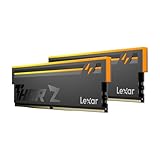
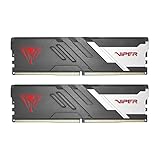


If you are building or upgrading a gaming PC in 2026, 32GB of DDR5 in a 2x16GB dual-channel configuration is the undisputed sweet spot. It is enough headroom for the heaviest open-world titles, background apps, and even light streaming without the diminishing returns of 64GB kits that most games will never touch. DDR5 itself has matured considerably — integrated on-die ECC reduces soft errors, higher bandwidth (starting at 4800 MT/s and topping out well above 8000 MT/s on tuned kits) feeds modern CPUs like Intel Core Ultra 200 and AMD Ryzen 9000 far more efficiently than DDR4 ever could, and prices have dropped to a level where choosing DDR4 no longer saves meaningful money. The question is no longer DDR4 vs. DDR5. The question is which 32GB DDR5 kit gives you the best gaming performance per dollar. We compared five of the most popular options across gaming benchmarks, thermals, and platform compatibility to answer exactly that.
In a hurry? See the top-rated 32GB DDR5 RAM Kit for Gaming deals available right now:
🛒 Check 32Gb Ddr5 Ram Kit For Gaming Prices on Amazon →🛒 Best Price Today on Amazon
Prime members get fast, free shipping on everything above, plus member-only deals. New members get a 30-day free trial — cancel anytime.
Start 30-Day Prime Free Trial →See Today’s Amazon DealsQuick Comparison Table
| Kit | Speed | Timings | Voltage | Price (Est.) |
|---|---|---|---|---|
| G.Skill Trident Z5 RGB DDR5-6000 | 6000 MT/s | CL30-38-38-96 | 1.35V | ~$110–$130 |
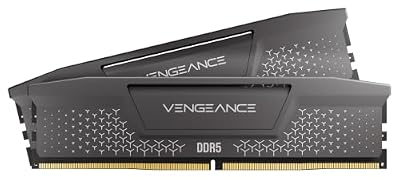
| Corsair Vengeance DDR5-6000 | 6000 MT/s | CL30-36-36-76 | 1.35V | ~$105–$120 |
| Kingston Fury Beast DDR5-6000 | 6000 MT/s | CL36-45-45-96 | 1.35V | ~$90–$105 |
| Crucial Pro Overclocking DDR5-5600 | 5600 MT/s | CL36-45-45-96 | 1.1V | ~$75–$90 |
| TeamGroup T-Force Vulcan DDR5-6000 | 6000 MT/s | CL38-38-38-78 | 1.35V | ~$70–$85 |
Our Top Picks
1. G.Skill Trident Z5 RGB DDR5-6000 CL30 32GB — Best Overall
The G.Skill Trident Z5 RGB has been the benchmark reference kit for DDR5 gaming performance since it launched, and in 2026 it still holds the top spot for good reason. The CL30 primary latency at 6000 MT/s is one of the tightest in the consumer market without stepping into extreme overclocker territory. In practice, that tight latency translates directly to lower frame times in CPU-bound gaming scenarios — the difference between CL30 and CL36 at the same frequency is measurable in titles like Cyberpunk 2077, Total War: Warhammer III, and any RTS or competitive shooter where 1% lows matter.
G.Skill bins its ICs aggressively. This kit ships with Samsung or Hynix A-die depending on the batch, both of which respond well to further tightening sub-timings in BIOS if you enjoy that process. EXPO (AMD) and XMP 3.0 (Intel) profiles are stored on the module, so enabling rated speed is a single BIOS toggle. The tall aluminum heat spreader with the RGB diffuser strip adds visual flair without creating clearance problems on most coolers, though ultra-low-profile cooler users should measure before buying.
Pros:
- Best CL30 latency at 6000 MT/s in its price range
- Dual EXPO + XMP 3.0 profiles, excellent platform compatibility
- Well-binned ICs with strong manual OC headroom
- Striking aesthetic with mature RGB software integration
Cons:
- Tall heat spreader may conflict with some large air coolers
- Priced at a premium over CL36 alternatives
Check Price on Amazon
2. Corsair Vengeance DDR5-6000 CL30 32GB — Best Brand Trust
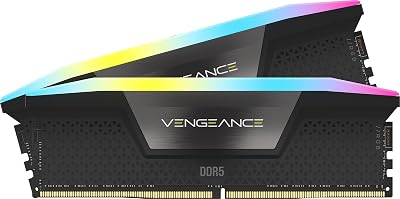
Corsair’s Vengeance DDR5-6000 CL30 kit matches the G.Skill on raw speed and latency spec and adds something the G.Skill cannot: deep integration with the iCUE ecosystem. If your build already runs Corsair fans, AIO coolers, or a Commander controller, the Vengeance DDR5 slots into that lighting and monitoring ecosystem without any additional software. iCUE provides per-module temperature readouts and lets you synchronize memory lighting with the rest of your Corsair hardware — a genuine quality-of-life advantage for enthusiast builders.
The modules themselves are reliable. Corsair tests each kit at rated frequency before shipping, and their RMA process is among the best in the industry — a real consideration for a component you expect to run 24/7 for years. Compatibility reporting from Intel Z890 and AMD X870E boards is consistently positive, including the notoriously picky ASUS and Gigabyte boards that sometimes struggle with aggressive DDR5 kits from smaller brands.

Pros:
- Full iCUE integration — ideal for existing Corsair ecosystems
- Proven compatibility across Intel and AMD flagship platforms
- CL30 latency competitive with the best in class
- Strong warranty and industry-leading RMA support
Cons:
- Slight price premium over the Kingston Fury for equivalent frequency
- iCUE software is resource-intensive for users who do not already use it
Check Price on Amazon
3. Kingston Fury Beast DDR5-6000 CL36 32GB — Best Value
The Kingston Fury Beast DDR5-6000 CL36 is the kit we recommend to the majority of gamers who want genuine DDR5-6000 performance without paying the CL30 premium. The latency step from CL30 to CL36 costs roughly 3–5 FPS in the most latency-sensitive games — a gap that is functionally invisible at 1440p or 4K where the GPU becomes the bottleneck. For the $20–$30 the CL36 rating typically saves over the Trident Z5, most users will see zero real-world difference in their actual gaming sessions.
Kingston offers this kit in both a standard heat spreader version and a low-profile variant — a notable advantage if you run a large tower air cooler or an ITX case with height restrictions. EXPO and XMP 3.0 profiles are present on both variants, and Kingston’s QVL coverage across major motherboards is extensive. IC binning is solid; most production runs arrive with Hynix A-die, which is a favorable substrate for further tuning.
Pros:
- DDR5-6000 speed at a significantly lower cost than CL30 kits
- Low-profile option available for cooler-clearance-constrained builds
- Wide motherboard QVL coverage, plug-and-play reliability
- EXPO + XMP 3.0 support on both variants
Cons:
- CL36 primary timings are looser than CL30 top picks
- No RGB on the low-profile variant for users who want aesthetics
Check Price on Amazon
4. Crucial Pro Overclocking DDR5-5600 CL36 32GB — Best Budget
The Crucial Pro Overclocking DDR5-5600 CL36 kit makes a case that the speed race to 6000 MT/s is slightly overblown for typical gaming workloads. At DDR5-5600, this kit operates comfortably within the primary frequency sweet spot on both Intel and AMD platforms — AMD Ryzen 9000’s Infinity Fabric runs optimally at a 1:1 ratio with memory frequencies up to around 6000 MT/s, and DDR5-5600 sits squarely in that range while requiring lower voltage (1.1V vs. 1.35V on high-frequency kits). Lower voltage means lower heat output, which is meaningful for sustained gaming sessions in tighter cases.
Crucial uses Micron’s own DRAM dies — Crucial is Micron’s consumer brand — and Micron B-die has a strong reputation for reliability and stable operation over years of use. This kit will not push the absolute limit of what your CPU’s memory controller can do, but it will run at rated speed from the moment you enable XMP in BIOS and stay there for the life of the build without complaint. For a 1080p or budget 1440p gaming rig, the frame-rate gap between DDR5-5600 and DDR5-6000 is typically under 3%.
Pros:
- Lowest price entry point for reliable DDR5 gaming performance
- 1.1V operation — cooler running, friendlier on the memory controller
- Micron B-die: proven long-term reliability
- Works at rated speed out of the box with JEDEC or XMP
Cons:
- 400 MT/s slower than 6000 MT/s kits — measurable in synthetic benchmarks
- No EXPO profile; AMD users should verify XMP compatibility with their board
- No RGB option
Check Price on Amazon
5. TeamGroup T-Force Vulcan DDR5-6000 CL38 32GB — Best Ultra-Budget
TeamGroup’s T-Force Vulcan line earns its place at the bottom of this list by delivering legitimate DDR5-6000 speed at a price that regularly undercuts every other 6000 MT/s kit on the market. The CL38 primary timings are the loosest of any kit reviewed here, and you will see slightly higher latency in memory bandwidth benchmarks compared to the CL30 leaders. In gaming benchmarks at 1440p with a mid-to-high-end GPU, however, the Vulcan holds its own well — frame rates within 2–4% of the Trident Z5 at a price that is sometimes $40–$50 cheaper.
The deliberate omission of RGB is a meaningful cost reduction. TeamGroup does not add an RGB controller, LEDs, or addressable software overhead — the Vulcan ships with a clean, low-key aluminum heat spreader that works with any aesthetic. It is a pragmatic choice for a builder who wants solid performance hardware without budget going toward cosmetic features. Thermal performance is adequate; the spreader keeps ICs cool enough during sustained loads that throttling is not a concern.
Pros:
- Lowest price for a genuine DDR5-6000 kit
- No RGB means no LED controller markup — honest value
- EXPO + XMP profiles included
- Clean, unobtrusive look fits any build theme
Cons:

- Loosest timings (CL38) of all five kits — highest latency in the group
- IC quality varies by production batch; less manual OC headroom than binned alternatives
- Brand support and RMA experience less established than Corsair or Kingston
Check Price on Amazon
How to Choose 32GB DDR5 RAM for Gaming
Speed vs. Timings: What Actually Matters
Raw megahertz numbers on a RAM box are only half the story. Memory latency — the time from a request being issued to data being returned — is determined by both frequency and CAS latency (CL). A useful real-world comparison: DDR5-6000 CL30 delivers approximately the same absolute latency as DDR5-5200 CL26. When comparing kits, calculate effective latency in nanoseconds: (CL / Frequency in MHz) x 2000. Lower nanoseconds equals tighter latency. For gaming, anything under 10ns is excellent. All five kits reviewed here fall within a competitive range, with the Trident Z5 CL30 leading and the Vulcan CL38 trailing — but by a margin that gaming workloads rarely expose at GPU-bound resolutions.
EXPO vs. XMP: Know Your Platform
EXPO (Extended Profiles for Overclocking) is AMD’s memory profile standard. XMP 3.0 is Intel’s. Most quality DDR5 kits now ship with both profiles stored on the SPD, meaning a single kit works optimally on either platform via a single BIOS toggle. Always verify the kit you choose lists both EXPO and XMP 3.0 support if you are undecided on platform, or if you might upgrade platforms in the future. Running DDR5 at JEDEC base speeds (typically 4800 MT/s) wastes the performance you paid for — always enable the appropriate profile in BIOS after installation.
Heat Spreader Design and Cooler Clearance
DDR5 modules run warmer than DDR4 due to higher power density at 1.35V. A heat spreader is not optional on any 6000 MT/s kit. What varies is height. Standard heat spreaders typically measure 44–50mm tall. Low-profile variants (Kingston Fury Beast offers one) come in at around 30–33mm. If you run a large air cooler like a Noctua NH-D15 or a be quiet! Dark Rock Pro, confirm DIMM slot clearance before ordering a tall kit. All five kits reviewed here operate well within safe thermal limits; the spreader design matters primarily for physical fitment, not thermal performance.
Dual Rank vs. Single Rank
Each 16GB module in a 2x16GB kit is either single-rank or dual-rank depending on how the DRAM chips are arranged. Dual-rank kits give the CPU’s memory controller more interleaving opportunities and can produce noticeably higher peak bandwidth. Most 2x16GB DDR5-6000 kits ship as dual-rank (one rank per side, two sides per module). However, dual-rank kits at high frequencies can stress the memory controller more than single-rank kits, occasionally causing stability issues on certain boards at extreme speeds. For the kits in this review running at DDR5-6000 with EXPO/XMP, dual-rank operation is fully supported and validated on major platforms.
Final Verdict
For most gamers building a serious 2026 system, the G.Skill Trident Z5 RGB DDR5-6000 CL30 remains the definitive best overall choice — tight latency, strong OC headroom, and dual EXPO/XMP profiles justify the price premium for anyone who wants to extract every frame from their CPU. Corsair Vengeance DDR5-6000 CL30 is the right call if you are already inside the Corsair ecosystem and value seamless iCUE integration.
If budget is the primary concern, the Kingston Fury Beast DDR5-6000 CL36 hits the best value inflection point — you get true DDR5-6000 bandwidth and lose only a negligible amount of latency for $20–$30 less. The Crucial Pro DDR5-5600 makes sense for builders on a tighter budget who still want reliable, low-voltage DDR5 performance, and the TeamGroup T-Force Vulcan DDR5-6000 CL38 is the right pick when maximum performance per dollar is the sole criterion and RGB is irrelevant.
Any of these five kits will transform a capable CPU into a genuinely fast gaming platform. Pick the one that fits your budget, your cooler clearance, and your motherboard ecosystem, and you will have made a sound choice.
Frequently Asked Questions
Q: Is 32GB DDR5 actually necessary for gaming in 2026, or is 16GB still enough?
A: 16GB remains sufficient for the majority of current game titles, but the margin is shrinking. Several 2025 and 2026 releases — particularly open-world games and simulation titles — regularly exceed 12GB of combined system RAM and VRAM usage during active gameplay. With background processes, a browser, and a streaming application running alongside a game, 16GB can hit its ceiling and trigger performance-degrading page file use. 32GB eliminates that bottleneck entirely and future-proofs the system for the next two to three years of game releases without requiring a kit swap.
Q: Do I need to enable XMP or EXPO manually, or does DDR5 RAM run at full speed automatically?
A: DDR5 RAM does not run at its rated speed automatically. By default, all DDR5 kits boot at JEDEC baseline speeds — typically 4800 MT/s or 5600 MT/s depending on the module’s SPD programming. To reach the advertised speed (6000 MT/s in most kits reviewed here), you must enter your motherboard’s BIOS, locate the memory configuration section, and enable the XMP profile (Intel platforms) or EXPO profile (AMD platforms). This is a single toggle and takes less than a minute — but skipping it means leaving significant performance on the table.
Q: Will a DDR5-6000 CL30 kit actually improve gaming FPS over a DDR5-5600 CL36 kit?
A: At GPU-limited resolutions (1440p and 4K with a modern high-end GPU), the difference is typically 1–3% in average FPS and slightly more noticeable in 1% low frame times. At 1080p where the CPU is more often the bottleneck — or in CPU-heavy genres like city builders, RTS games, and open-world sandbox titles — the gap widens to 5–8% in favorably configured benchmarks. For a competitive 1080p setup focused on maximum frame rates, the CL30 advantage is meaningful. For a 4K cinematic gaming rig, a CL36 or CL38 kit at DDR5-6000 is more than adequate and the saved money is better spent on GPU.
Related Articles
Looking for more on this topic? Browse the hand-picked guides below — each one applies the same scoring rubric used in this review.