- Top Pick: MSI MAG B850 Tomahawk MAX WiFi Motherboard, ATX – Supports AMD Ryzen 9000/8000 / 7000 Processors, AM5-80A SPS VRM, DDR5 Memory Boost 8400+ MT/s (OC), PCIe 5.0 x16, M.2 Gen5, Wi-Fi 7, 5G LAN
- Best Value: MSI B850 Gaming Plus WiFi Motherboard, ATX – Supports AMD Ryzen 9000/8000 / 7000 Processors, AM5 – DDR5 Memory Boost 8200+ MT/s (OC), PCIe 5.0 x16 & 4.0 x16, M.2 Gen5, Wi-Fi 7, 5G LAN
- Premium Choice: ASUS ROG Strix B850-A Gaming WiFi AMD AM5 B850 ATX Motherboard 14+2+2 Power Stages, DDR5 AEMP, 2.5G LAN, WiFi 7 with Q-Antenna, 4X M.2, PCIe® 5.0, USB 20Gbps Type-C, AI Networking II, ASUS AI Advisor
Affiliate disclosure: As an Amazon Associate we earn from qualifying purchases. This post contains affiliate links — if you buy through them we may earn a small commission at no extra cost to you. This never affects our recommendations.
- B850 vs X870 vs B650: What’s the Difference in 2026?
- Quick Comparison Table
- 1. ASUS ROG Strix B850-F Gaming WiFi
- 2. MSI MAG B850 Tomahawk WiFi
- 3. Gigabyte B850 Aorus Elite AX WiFi
- 4. ASRock B850 Pro RS WiFi
- 5. ASUS TUF Gaming B850-Plus WiFi
- How to Choose a B850 Motherboard
- Final Verdict
- Frequently Asked Questions
- Related Articles
- Related Articles
As an Amazon Associate we earn from qualifying purchases at no extra cost to you.


If you’re building a gaming PC around AMD’s Ryzen 9000 series in 2026, the B850 chipset sits in the sweet spot. It delivers features that used to require X670E — PCIe 5.0 as standard, USB4, DDR5 — without the premium price tag of X870. But not every B850 board is built equal. VRM quality, M.2 slot count, and thermal design vary significantly across the lineup.
This guide covers the five best B850 motherboards for gaming right now, with clear specs, honest assessments, and a buying recommendation for every budget tier.
In a hurry? See the top-rated B850 Motherboard for Gaming deals available right now:
🛒 Check B850 Motherboard For Gaming Prices on Amazon →🛒 Best Price Today on Amazon
Prime members get fast, free shipping on everything above, plus member-only deals. New members get a 30-day free trial — cancel anytime.
Start 30-Day Prime Free Trial →See Today’s Amazon DealsB850 vs X870 vs B650: What’s the Difference in 2026?
B850 vs B650: B650 never guaranteed PCIe 5.0 on the primary GPU slot — many boards shipped with PCIe 4.0 x16. B850 mandates PCIe 5.0 x16 for the top GPU slot and adds USB4 (40 Gbps) as a required feature. If you’re pairing a next-gen GPU or fast external storage with a Ryzen 9000 build, B650 leaves performance on the table.
B850 vs X870: X870 adds more PCIe 5.0 lanes, supports AMD EXPO overclocking, and typically carries more robust VRM configs for the 9950X and 9900X. If you’re pushing a flagship CPU with aggressive PBO overclocking, X870 makes sense. For the 9700X, 9600X, or midrange 9800X3D builds, B850 gives you everything you need at a lower cost. X870’s premium is only worth paying when you need multi-GPU bandwidth, dual PCIe 5.0 M.2 storage, or extreme OC headroom.
What B850 gives you over B650:
- PCIe 5.0 x16 GPU slot (required by spec)
- USB4 40 Gbps (required by spec)
- Better platform longevity for upcoming GPU generations
- Wider DDR5 EXPO support across the board
Quick Comparison Table
| Motherboard | VRM Stages | M.2 Slots | USB4 | WiFi | Est. Price |
|---|---|---|---|---|---|
| ASUS ROG Strix B850-F Gaming WiFi | 16+2 | 5 | Yes (2x) | WiFi 7 | ~$299 |
| MSI MAG B850 Tomahawk WiFi | 14+2+1 | 4 | Yes (1x) | WiFi 7 | ~$199 |
| Gigabyte B850 Aorus Elite AX WiFi | 16+2+1 | 4 | Yes (1x) | WiFi 7 | ~$229 |
| ASRock B850 Pro RS WiFi | 12+2+1 | 4 | Yes (1x) | WiFi 6E | ~$169 |
| ASUS TUF Gaming B850-Plus WiFi | 16+2 | 4 | Yes (1x) | WiFi 7 | ~$219 |
1. ASUS ROG Strix B850-F Gaming WiFi
Overview
The ROG Strix B850-F is the premium pick in the B850 stack. It borrows heavily from the ROG Strix X870-F’s design philosophy — robust VRM, premium thermals, and a dense feature set — and brings it down to a more accessible price point.
Key Specs
- Socket: AM5 | Form Factor: ATX
- VRM: 16+2 power stages (105A each)
- Memory: 4x DDR5 slots, up to 192GB, 6400+ MT/s EXPO
- PCIe: 1x PCIe 5.0 x16 (GPU), 1x PCIe 4.0 x4, 1x PCIe 3.0 x1
- Storage: 5x M.2 (2x PCIe 5.0, 3x PCIe 4.0), 4x SATA
- USB: 2x USB4 40 Gbps, 4x USB 3.2 Gen 2, rear + front headers
- Networking: 5 Gbps Intel LAN, WiFi 7 (Intel BE200)
- Audio: ROG SupremeFX ALC4082
Pros
- Best-in-class VRM for B850 — handles 9950X with headroom to spare
- Two USB4 ports on the rear panel (most B850 boards offer one)
- Five M.2 slots including two PCIe 5.0 — future-proof for fast NVMe
- ROG BIOS is intuitive with AI overclocking and EXPO one-click setup
- Excellent thermal solution on VRM with large heatsink coverage
- DisplayPort Alt Mode via USB-C
Cons
- Most expensive board in this roundup (~$299)
- Premium features are overkill for 9600X or 9700X builds
- Overkill VRM doesn’t benefit gaming performance directly over cheaper boards
Who It’s For
Enthusiast builders pairing a Ryzen 9 9900X or 9950X with a high-end GPU, or anyone who wants the best B850 board without stepping to X870E pricing. Also ideal if you need dual USB4 for Thunderbolt peripherals or multiple fast NVMe drives.
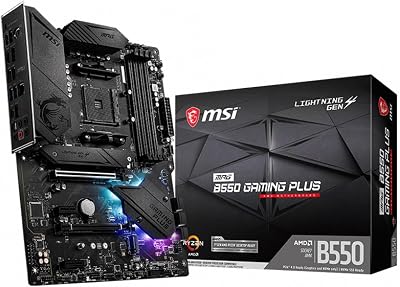
2. MSI MAG B850 Tomahawk WiFi
Overview
The MAG B850 Tomahawk is the board most builders should seriously consider. MSI’s Tomahawk line has consistently delivered excellent value across chipset generations, and the B850 version continues that tradition. It hits a price-to-feature ratio that’s hard to beat.
Key Specs
- Socket: AM5 | Form Factor: ATX
- VRM: 14+2+1 power stages (80A SPS)
- Memory: 4x DDR5 slots, up to 192GB, 6400+ MT/s EXPO
- PCIe: 1x PCIe 5.0 x16 (GPU), 1x PCIe 4.0 x4
- Storage: 4x M.2 (1x PCIe 5.0, 3x PCIe 4.0), 6x SATA
- USB: 1x USB4 40 Gbps, 2x USB 3.2 Gen 2×2, multiple 3.2 Gen 1/2
- Networking: 2.5 Gbps Intel LAN, WiFi 7 (MediaTek MT7925)
- Audio: Realtek ALC897
Pros
- Excellent VRM for the price — handles 9700X and 9800X3D with no thermal throttling
- Six SATA ports is rare at this tier — great for media/storage builds
- Solid BIOS with MSI’s Simplified/Advanced toggle
- PCIe 5.0 GPU slot covered
- USB4 present; strong front panel USB-C header
- Competitive EXPO support up to 6400+ MT/s
Cons
- Audio codec (ALC897) is a step below premium options
- 2.5G LAN is adequate but not 5G like the ROG board
- One PCIe 5.0 M.2 slot only (rest are PCIe 4.0)
- Slightly basic aesthetic for enthusiast builds
Who It’s For
The go-to recommendation for 9700X and 9800X3D gaming builds at the midrange. Builders who want a reliable, well-cooled platform without paying for features they won’t use. The six SATA ports also make this a strong pick for NAS-adjacent gaming rigs.
3. Gigabyte B850 Aorus Elite AX WiFi
Overview
Gigabyte’s Aorus Elite AX positions itself squarely between the ROG Strix and the Tomahawk. The VRM configuration is competitive, feature density is high for the price, and the BIOS has improved significantly with recent firmware updates.
Key Specs
- Socket: AM5 | Form Factor: ATX
- VRM: 16+2+1 power stages (70A each)
- Memory: 4x DDR5 slots, up to 192GB, 6400+ MT/s EXPO
- PCIe: 1x PCIe 5.0 x16 (GPU), 1x PCIe 4.0 x4, 1x PCIe 3.0 x1
- Storage: 4x M.2 (1x PCIe 5.0, 3x PCIe 4.0), 4x SATA
- USB: 1x USB4 40 Gbps, 2x USB 3.2 Gen 2, front USB-C header
- Networking: 2.5 Gbps Realtek LAN, WiFi 7 (Realtek RTL8952BE)
- Audio: Realtek ALC1220-VB
Pros
- 16+2+1 power stage count rivals the ROG Strix at lower cost
- ALC1220-VB audio is a notch above most B850 competitors
- Strong PCIe 5.0 GPU slot plus good M.2 coverage
- Aorus BIOS is mature with clear memory tuning tools
- Good thermal design on VRM heatsinks
- WiFi 7 on board
Cons
- 70A per stage means total amperage is lower than ROG Strix despite similar stage count
- Realtek WiFi chip performs slightly below Intel BE200 in real-world latency
- BIOS still less polished than ASUS or MSI for first-time builders
- Limited to four SATA ports
Who It’s For
Builders who want a high stage count VRM at a sub-$230 price, especially if the build includes a mid-to-high Ryzen 9000 CPU like the 9700X. Also a good pick if audio quality matters — the ALC1220-VB is the best onboard audio in this roundup.
4. ASRock B850 Pro RS WiFi
Overview
The ASRock B850 Pro RS WiFi is the budget entry point of this roundup without being a compromised product. ASRock has a history of over-engineering boards at the low end, and the Pro RS continues that pattern. It’s not glamorous, but it’s capable.
Key Specs
- Socket: AM5 | Form Factor: ATX
- VRM: 12+2+1 power stages (60A each)
- Memory: 4x DDR5 slots, up to 192GB, 6000+ MT/s EXPO
- PCIe: 1x PCIe 5.0 x16 (GPU), 1x PCIe 4.0 x4
- Storage: 4x M.2 (1x PCIe 5.0, 3x PCIe 4.0), 4x SATA
- USB: 1x USB4 40 Gbps, 2x USB 3.2 Gen 2
- Networking: 2.5 Gbps Realtek LAN, WiFi 6E
- Audio: Realtek ALC897
Pros
- Lowest price entry to the B850 platform (~$169)
- PCIe 5.0 GPU slot and USB4 are present — no spec compromises on the core features
- VRM is sufficient for 9600X and 9700X at stock and light PBO
- ASRock BIOS has improved markedly; EXPO support works reliably
- Four M.2 slots including one PCIe 5.0
Cons
- WiFi 6E instead of WiFi 7 — lower throughput ceiling
- 12+2+1 VRM at 60A per stage limits headroom for 9900X or 9950X builds
- Audio codec is basic (ALC897)
- No debug LED display or POST code readout
- Less robust capacitor and thermal quality than higher-tier options
- EXPO ceiling is 6000 MT/s vs 6400+ on competitors
Who It’s For
Budget-conscious builders pairing a Ryzen 5 9600X or Ryzen 7 9700X with a mid-tier GPU. If you’re spending $169 on the motherboard and putting the savings toward a better GPU, this is a sensible trade-off. Not recommended for 9900X or 9950X builds where VRM thermal headroom matters.

5. ASUS TUF Gaming B850-Plus WiFi
Overview
The TUF Gaming B850-Plus occupies the midrange segment alongside the Gigabyte Aorus Elite AX. ASUS’ TUF line is known for its military-grade capacitors and component longevity claims, and the B850-Plus backs that reputation with a solid VRM configuration and consistent build quality.
Key Specs
- Socket: AM5 | Form Factor: ATX
- VRM: 16+2 power stages (75A each)
- Memory: 4x DDR5 slots, up to 192GB, 6400+ MT/s EXPO
- PCIe: 1x PCIe 5.0 x16 (GPU), 1x PCIe 4.0 x4, 1x PCIe 3.0 x1
- Storage: 4x M.2 (1x PCIe 5.0, 3x PCIe 4.0), 4x SATA
- USB: 1x USB4 40 Gbps, 2x USB 3.2 Gen 2×2, front USB-C
- Networking: 2.5 Gbps Realtek LAN, WiFi 7 (Intel BE200)
- Audio: Realtek ALC4080
Pros
- Strong 16+2 VRM at 75A per stage — well-suited to 9700X and 9800X3D at PBO
- Intel BE200 WiFi 7 chip delivers better real-world wireless performance than Realtek alternatives
- ALC4080 audio is a step above ALC897
- Military-grade capacitors add to long-term reliability
- ASUS BIOS with AI overclocking — easier for less experienced builders
- Two USB 3.2 Gen 2×2 front headers (20 Gbps each)
Cons
- Slightly higher price than Gigabyte Aorus Elite AX with similar specs
- VRM amperage (75A) is lower than stage count implies compared to ROG Strix
- Only one PCIe 5.0 M.2 slot
- Aesthetic is more subdued — no RGB on heatsinks by default
Who It’s For
Builders who want ASUS build quality and BIOS polish without ROG pricing. The TUF B850-Plus is a strong all-rounder that pairs well with Ryzen 7 9700X and 9800X3D builds. The Intel WiFi chip is a differentiator if wireless stability matters for your setup.
How to Choose a B850 Motherboard
VRM Quality for Ryzen 9000
Ryzen 9000 CPUs respond well to clean power delivery, especially when using Precision Boost Overdrive (PBO). A 9600X or 9700X runs comfortably on a 12+2 or 14+2 VRM. A 9900X or 9950X benefits from 16+2 configurations with 80A+ per stage to sustain boost clocks under extended loads without throttling. Check both stage count and amperage per stage — stage count alone is misleading.
M.2 Slot Count
For a gaming build with an OS drive and a secondary storage drive, two M.2 slots are sufficient. Four slots give you room to grow. If you’re running video editing or content creation alongside gaming, prioritize boards with at least one PCIe 5.0 M.2 slot for future sequential read speeds above 12,000 MB/s.
PCIe 5.0 GPU Slot
All B850 boards include a PCIe 5.0 x16 GPU slot by specification — this is a key improvement over B650 where it was optional. Current GPUs don’t saturate PCIe 4.0 bandwidth in practice, but PCIe 5.0 ensures the board won’t become a bottleneck when next-gen GPUs with higher bandwidth demands launch.
USB4 Value
USB4 40 Gbps is required on B850 by AMD spec. In practice, this means you can connect Thunderbolt 4 docks, fast external NVMe enclosures (up to ~3,200 MB/s read), and high-refresh DisplayPort Alt Mode monitors. If you use external storage or a docking station, USB4 is a real-world benefit. Most boards offer one rear USB4 port — the ROG Strix B850-F stands out with two.
WiFi 7 vs WiFi 6E
WiFi 7 (802.11be) offers multi-link operation (MLO), higher throughput ceiling, and lower latency over 6E. For gaming, the latency improvement from MLO is the practical benefit — not raw throughput. WiFi 7 with an Intel BE200 chip performs measurably better than Realtek 6E implementations in congested RF environments. If wireless matters to your build, prioritize Intel BE200 over Realtek 6E.
Form Factor: ATX vs mATX
All five boards in this roundup are ATX. If you’re building a compact system, B850 mATX options exist (check MSI and Gigabyte’s mATX SKUs), but you’ll sacrifice M.2 slot count and sometimes VRM quality. For a primary gaming PC in a mid-tower or full-tower case, ATX is the right call.

Final Verdict
Top Pick: ASUS ROG Strix B850-F Gaming WiFi
The best B850 board available. Two USB4 ports, five M.2 slots, top-tier VRM, and the most mature BIOS on the platform. Worth the $299 price for high-end 9900X/9950X builds or anyone who wants the definitive B850 experience.
Runner-Up: MSI MAG B850 Tomahawk WiFi
The board most builders should buy. $199 gets you a 14+2+1 VRM that handles Ryzen 9000 through the 9700X and 9800X3D without compromise, six SATA ports, and a reliable platform. It’s the Tomahawk — it just works.
Best Budget: ASRock B850 Pro RS WiFi
At $169, the Pro RS delivers the B850 spec essentials — PCIe 5.0 x16, USB4, four M.2 slots — at the lowest cost in this roundup. VRM limits it to 9600X/9700X builds, but for a budget gaming rig that needs platform longevity, it’s the honest choice.
Prices are estimated based on market data at time of writing and may vary. Always verify current pricing and availability before purchasing.
Frequently Asked Questions
What is a B850 motherboard?
B850 is an AM5 chipset positioned as the mainstream choice for Ryzen 9000 builds. It offers a strong balance of features, including PCIe 5.0 support, at a more affordable price than X870.
B850 or X870 for a gaming build?
B850 is the better value for pure gaming, covering everything most gamers need. X870 adds more high-speed USB and PCIe lanes that mainly benefit heavy multitaskers and creators.
Does B850 support Ryzen 9000 out of the box?
Yes. B850 boards launched alongside the Ryzen 9000 era and support these CPUs natively, typically with no BIOS update needed before first boot.
Is a B850 motherboard good for future upgrades?
Yes. As an AM5 board it benefits from AMD long-term socket support, and PCIe 5.0 plus DDR5 give it headroom for future GPUs and faster memory.
Related Articles
Looking for more on this topic? Browse the hand-picked guides below — each one applies the same scoring rubric used in this review.