The best-value AM5 CPU in 2026 depends on one question: will you mostly game or mostly work? If gaming leads your workload, the Ryzen 7 7800X3D is the pick — its 3D V-Cache delivers frames per dollar that nothing else on the platform matches, and it suits anyone pairing a mid-range to high-end graphics card with a 1440p or 1440p-ultrawide display. If you need productivity throughput first — video export, code compilation, 3D rendering — the Ryzen 9 7900 is the better buy, because it delivers 12 cores at a package power that a modest air cooler can handle, which keeps total platform cost down. Budget builders who want to get onto AM5 at the lowest sensible entry point should look at the Ryzen 5 7600, while anyone who wants a set-and-forget chip for the next several years should weigh the Ryzen 7 9700X. The short version: buy the 7800X3D for frames, the 7900 for cores, and the 7600 if the motherboard and memory matter as much as the chip.
- Top 3 Picks
- Quick Comparison
- How We Chose
- 1. AMD Ryzen 7 7800X3D – Best for Gaming-First Builds
- 2. AMD Ryzen 5 7600 – Best for Budget Entries
- 3. AMD Ryzen 9 7900 – Best for Productivity on a Power Budget
- 4. AMD Ryzen 7 9700X – Best for Long-Term Set-and-Forget Builds
- 5. AMD Ryzen 5 9600X – Best for Budget Gaming on Zen 5
- 6. AMD Ryzen 9 7950X – Best for Heavy Multi-Threaded Work
- 7. AMD Ryzen 9 9950X – Best for Top-End Workstation Plus Gaming
- How to Choose
- Frequently Asked Questions
- Closing Recommendation
- 1. Thermalright ASF Black V2 AM5 CPU Holder – Best for Safe AM5 Installation
- 2. Thermal Grizzly AM5 Contact Sealing Frame – Best for Premium Socket Protection
- 3. Thermalright ASF-Black AM5 CPU Holder – Best for Simple Contact-Frame Upgrades
- 4. Thermalright ASF-RED AM5 CPU Holder – Best for Budget Builds With a Colour Theme
- 5. ARCTIC Liquid Freezer III Pro 360 A-RGB – Best for Cooling High-Power AM5 Chips
- 6. Thermalright AM5 CPU Contact Frame V2, Black – Best for Straightforward Socket Protection
- 7. WSHAITE 2-Piece AM5 CPU Cooler Fan Bracket – Best for Retaining Unusual Coolers
- 8. HuGuWdy 4-Piece AM5 CPU Bracket Set – Best for Builders Who Want Spares
- 9. YEGAFE 8-Piece CPU Protector Kit – Best for Shipping and Storage Protection
Top 3 Picks
Best overall: AMD Ryzen 7 7800X3D. The 3D V-Cache design keeps gaming performance near the top of the AM5 stack while drawing far less power than the flagship chips, so you can cool it with a mid-priced tower air cooler and put the savings into a graphics card. It is the chip most people should default to unless their work is genuinely core-count hungry.
Best budget: AMD Ryzen 5 7600. Six Zen 4 cores, integrated graphics for troubleshooting, and a 65 W class default power target mean you can build a complete AM5 system around it with a cheap B650 board, a basic air cooler, and a modest power supply. It leaves the upgrade door open to a 3D V-Cache chip later.
Best premium: AMD Ryzen 9 7950X. Sixteen cores and thirty-two threads, with a boost ceiling in the 5.7 GHz range, make it the fastest all-round AM5 chip for heavy multi-threaded work. It needs serious cooling and a robust VRM, so it only makes sense if the CPU is the centre of your income.
Quick Comparison
| CPU | Best for | Key specs | Price tier |
|---|---|---|---|
| AMD Ryzen 7 7800X3D | Gaming-first builds | 8 cores / 16 threads, 3D V-Cache, ~96 MB L3, 120 W TDP | Mid-range |
| AMD Ryzen 5 7600 | Entry AM5, budget builds | 6 cores / 12 threads, 32 MB L3, 65 W TDP, integrated graphics | Budget |
| AMD Ryzen 9 7900 | Productivity with low power draw | 12 cores / 24 threads, 64 MB L3, 65 W TDP default | Mid-range |
| AMD Ryzen 7 9700X | Long-term set-and-forget | 8 cores / 16 threads, Zen 5, 32 MB L3, 65 W TDP default | Mid-range |
| AMD Ryzen 5 9600X | Budget gaming on Zen 5 | 6 cores / 12 threads, Zen 5, 32 MB L3, 65 W TDP default | Budget |
| AMD Ryzen 9 7950X | Heavy multi-threaded work | 16 cores / 32 threads, 64 MB L3, 170 W TDP | Premium |
| AMD Ryzen 9 9950X | Top-end workstation plus gaming | 16 cores / 32 threads, Zen 5, 64 MB L3, 170 W TDP | Premium |
| AMD Ryzen 7 7800X3D (a second build) | Small-form-factor gaming | See above; low heat output suits compact cases | Mid-range |
How We Chose
This roundup ranks AM5 processors by value rather than raw benchmark position, and value means the whole platform, not the chip alone. We weighed four things. First, gaming frames per dollar at 1440p and 1440p ultrawide, using the pattern that published reviews consistently show for cache-heavy parts rather than any single number. Second, multi-threaded productivity per dollar for the tasks buyers actually run — video export, compilation, CAD, virtual machines — again using typical published behaviour, not a claimed score. Third, power draw and the cooling it implies: a chip that costs less but forces a 360 mm liquid cooler onto the build is not saving you money. Fourth, platform cost and upgrade path: socket longevity, memory kit pricing, whether integrated graphics saves you a boot GPU, and whether the same motherboard will happily take a newer AM5 chip in two or three years.
We also considered what the parts do not tell you from a spec sheet. Cache size matters far more in games than core count past a point; a six-core chip with a large L3 pool can outrun an older eight-core in titles that stream assets aggressively. Conversely, core count dominates in rendering and compilation, where the cache is largely idle. Power targets tell you about the cooler and the motherboard VRM, and box coolers bundled with some SKUs only make sense if you intend to run at stock. Finally, we excluded anything with no clear niche: a chip that is neither the cheapest way in, nor the fastest at anything, nor notably efficient does not belong in a value list. All picks are mainstream AM5 parts you can buy new, with prices treated as bands rather than fixed figures.
1. AMD Ryzen 7 7800X3D – Best for Gaming-First Builds
The 7800X3D is the chip most AM5 buyers should start with, and the reasoning is simple: it puts its silicon budget into the thing gamers feel most — a large pool of L3 cache that keeps frame rates high and, just as importantly, keeps frame times steady. If your monitor is 1440p at 144 Hz or higher and your graphics card sits in the mid-to-upper tier, this CPU will let that card stretch its legs in CPU-limited scenes: busy open worlds, crowded sims, large multiplayer maps, strategy games late in a match. It is also the easiest high-performance AM5 chip to cool, which matters more than buyers expect.
- 8 cores / 16 threads, Zen 4 architecture
- 3D V-Cache stacked L3 pool, roughly 96 MB total
- Default package power target around 120 W
- Integrated RDNA 2 graphics for display output and troubleshooting
- AM5 socket, DDR5 memory, works on B650 and up
Strengths. In CPU-bound games, the cache advantage shows up as higher averages and, more importantly, tighter 1% lows — the metric that decides whether a 100 FPS average feels smooth or stuttery. Because the chip is not chasing extreme clock speeds, it draws noticeably less power than the 170 W class parts, so a quality 240–280 mm liquid cooler or a large dual-tower air cooler is plenty. That combination of top-tier gaming performance and moderate cooling demand is what makes it the value leader: you spend the difference on a better GPU, which moves frames far more than any CPU upgrade on the same budget.
Where it falls short. Eight cores is eight cores. In heavily threaded work — long video exports, 3D renders, compiling large codebases — a twelve- or sixteen-core non-X3D chip will finish meaningfully sooner, and the cache does not compensate. It is also not the cheapest way onto the platform, and unlike the flagship parts it does not ship with a bundled cooler in most retail listings. If you game and work in roughly equal measure, you may find yourself wishing for more cores on export days.
- Pros:
- Excellent gaming performance per dollar, especially in CPU-limited titles
- Large L3 cache improves frame-time consistency, not just averages
- Moderate power draw means a mid-priced air or 240 mm AIO cooler suffices
- Runs cooler and quieter than the 170 W flagships in the same case
- Integrated graphics give you a display output and a troubleshooting path
- Leaves headroom in the PSU budget for a stronger graphics card
- Cons:
- Only 8 cores, so heavy multi-threaded work trails 12- and 16-core parts
- Cache advantage is title-dependent; some games gain far less than others
- Not the cheapest entry into AM5
- No bundled cooler in most listings, so add one to the budget
Versus the nearest alternative: against the Ryzen 7 9700X, the 7800X3D is the gaming-first choice while the 9700X is the newer, more efficient all-rounder. The 9700X generally wins in lightly threaded productivity and runs cooler on paper, but the cache advantage keeps the 7800X3D ahead in games. If your split is 70% gaming and 30% work, take the 7800X3D. If it is closer to 50/50, the 9700X and the Ryzen 9 7900 both deserve a look.
2. AMD Ryzen 5 7600 – Best for Budget Entries
The Ryzen 5 7600 is the sensible floor of the AM5 range. Six Zen 4 cores at a 65 W default power target means you can pair it with the cheapest B650 board you trust, a single-tower air cooler, and a modest power supply, and still have a machine that games well at 1080p and holds its own at 1440p with a sensibly matched GPU. For a first AM5 build, a family PC, or a secondary machine, it is the least expensive way onto a platform that will accept much faster chips later.
- 6 cores / 12 threads, Zen 4 architecture
- 32 MB L3 cache
- 65 W default TDP, configurable higher on capable boards
- Integrated RDNA 2 graphics — boot without a discrete GPU
- BOX cooler included with many retail SKUs
Strengths. Efficiency is the headline. A 65 W part needs little from the cooler and almost nothing from the motherboard VRM, which means a budget B650 board is genuinely appropriate rather than a compromise. The integrated graphics are more useful than they sound: they give you a display output while you save for a GPU, and a known-good video path when diagnosing a build that will not POST. Performance per core is strong, and in games that are not heavily threaded the gap to more expensive chips narrows considerably, particularly at higher resolutions where the GPU does the work.
Where it falls short. Six cores is now the entry point, and it shows in anything that scales with thread count. Streaming while gaming, transcoding, running virtual machines, or compiling serious projects will saturate it quickly. The smaller L3 pool also means the chip is more exposed in cache-hungry titles than the X3D parts. Buyers should treat it as a starting point, not a destination — the platform supports much faster CPUs, and that is precisely the argument for buying in here rather than spending more up front.
- Pros:
- Lowest total platform cost of any sensible AM5 build
- 65 W default power means cheap cooling is entirely adequate
- Integrated graphics for display output and troubleshooting
- Often bundled with a stock cooler, cutting the parts list further
- Strong enough for 1080p high-refresh gaming with a matched GPU
- Clear upgrade path to 8-, 12-, and 16-core AM5 chips later
- Cons:
- Six cores limits streaming, rendering, and heavy multitasking
- Smaller cache pool than the X3D parts hurts in cache-sensitive games
- Will become the bottleneck first in a future GPU upgrade
- Overclocking headroom is modest and rarely worth the extra cooling
Versus the nearest alternative: the Ryzen 5 9600X is the newer-generation equivalent — Zen 5 cores, the same six-core shape, similar power behaviour. If the two are close in price in your market, the 9600X is generally the better buy for its newer architecture and efficiency, while the 7600 wins on price and on being widely discounted. Both are budget picks; neither will satisfy someone who renders for a living.
3. AMD Ryzen 9 7900 – Best for Productivity on a Power Budget
The Ryzen 9 7900 is the quiet hero of the AM5 range for anyone who works more than they play. Twelve cores and twenty-four threads at a 65 W default power target is an unusual combination: near-flagship multi-threaded throughput without the cooling and VRM requirements that the 170 W chips impose. For video editors, developers, CAD users, and anyone running virtual machines, it frequently delivers more useful work per dollar than either the six-core budget chips or the sixteen-core flagships.
- 12 cores / 24 threads, Zen 4 architecture
- 64 MB L3 cache
- 65 W default TDP, with headroom available on capable boards
- Integrated RDNA 2 graphics
- Often ships with a bundled cooler
Strengths. The core count is the point. Video export, batch photo processing, code compilation, and 3D rendering all scale with threads, and twelve fast cores sit in a sweet spot where the cost per core is lower than the flagships and the throughput is roughly double the entry chips. Meanwhile the 65 W default keeps a mid-tower air cooler sufficient, which has a knock-on effect across the whole build: a cheaper motherboard is fine, a cheaper cooler is fine, case airflow requirements drop, and the system runs quieter. If you want one chip that does serious work without turning the build into a space heater, this is it.
Where it falls short. Gaming performance is good but not class-leading; the X3D parts are clearly ahead in CPU-bound titles thanks to their cache advantage, and the 7900’s lower clocks do not help. It also does not have the newest architecture on the platform, so a Zen 5 part with a similar core count will be more efficient per core. And if your work is genuinely extreme — long 8K timelines, big simulation runs — the sixteen-core chips still finish sooner.
- Pros:
- 12 cores / 24 threads at a 65 W default — high throughput, low heat
- 64 MB L3 cache helps both productivity and lightly threaded games
- Mid-priced air cooling is sufficient; no 360 mm AIO required
- Comfortable on a mainstream B650 board with a modest VRM
- Quieter and cheaper to run than the 170 W flagships
- Often bundled with a cooler, further lowering platform cost
- Cons:
- Trails X3D chips in CPU-bound gaming
- Older architecture than the Zen 5 generation
- Sixteen-core parts still win heavy rendering and simulation tasks
- Lower clocks mean lightly threaded work is not its strong suit
Versus the nearest alternative: the Ryzen 9 7950X is the same architecture with four more cores and a much higher power ceiling. The 7950X wins on raw throughput for genuinely heavy work, but it demands a serious cooler and a board with a strong VRM, which pushes total platform cost up substantially. The 7900 gets you most of the way there for far less, and it is the better choice unless the CPU is the engine of your income. Against the Ryzen 7 9700X, the 7900 trades newer architecture and efficiency for four extra cores — pick the 7900 when thread count is what you need.
4. AMD Ryzen 7 9700X – Best for Long-Term Set-and-Forget Builds
The Ryzen 7 9700X is the pragmatic choice for someone who wants to build once and not think about it for several years. Eight Zen 5 cores at a 65 W default power target give it an efficiency profile that suits small cases, quiet builds, and machines that run all day. It is not the fastest AM5 chip at anything in particular, but it is competent across everything, which is exactly what a set-and-forget build needs.
- 8 cores / 16 threads, Zen 5 architecture
- 32 MB L3 cache
- 65 W default TDP
- Integrated graphics
- AM5 socket — drop-in on existing boards after a BIOS update
Strengths. Efficiency and architectural currency. Zen 5 improves instructions per clock and power behaviour, so the 9700X does more work per watt than the Zen 4 eight-core parts, and it runs cool enough that a mid-priced air cooler is all you need. For general productivity — office work, photo editing, coding, moderate video work — eight fast cores are comfortable. In games it is solid, though not X3D-fast. The real argument for it is longevity: it is the newest mainstream architecture on the platform, it draws little power, and it will remain a sensible chip for years without asking anything of your cooler, PSU, or case.
Where it falls short. It is priced against the 7800X3D in many markets, and for pure gaming the X3D chip is the better buy. It also will not out-muscle a twelve-core 7900 in threaded work, despite the newer architecture. Buyers who want the absolute best value in either direction — most frames or most cores — will usually find a better fit elsewhere; the 9700X wins on balance, not on any single axis.
- Pros:
- Newest mainstream architecture on AM5, with strong efficiency
- 65 W default makes modest cooling entirely sufficient
- Comfortable in small-form-factor and quiet builds
- Good all-round performance for mixed gaming and work
- Long service life with no special board or PSU demands
- Cons:
- Trails the 7800X3D in CPU-bound gaming
- Eight cores is fewer than the 7900 for heavily threaded work
- Priced where the decision against X3D parts gets uncomfortable
- Not the cheapest way onto AM5
Versus the nearest alternative: this is the closest call in the roundup. The 9700X is more efficient and newer; the 7800X3D is faster in games. If you play at high refresh rates and care about 1% lows, the 7800X3D justifies the extra. If you want low heat, low noise, and a chip that will not date quickly, the 9700X is the safer long-term pick, and it is also the better choice for a compact build where cooler clearance is tight.
5. AMD Ryzen 5 9600X – Best for Budget Gaming on Zen 5
The Ryzen 5 9600X is the cheapest route to Zen 5. Six cores, a 65 W default power target, and the same efficiency story as the 9700X, scaled down. For a 1080p gaming build with a mid-range GPU, or a home office machine that occasionally plays games, it covers the bases without straining the budget or the cooler.
- 6 cores / 12 threads, Zen 5 architecture
- 32 MB L3 cache
- 65 W default TDP
- Integrated graphics
- Runs on budget B650 boards without VRM concerns
Strengths. Value per core is the draw. Zen 5 delivers a meaningful IPC improvement over Zen 4, so six of these cores get closer to older eight-core performance than the core count suggests, particularly in lightly threaded games and everyday software. Power draw is low, so a basic tower cooler is fine and the case does not need to be a wind tunnel. As with the 7600, integrated graphics mean you can build and configure the machine before installing a discrete GPU — useful if you are buying parts over several months.
Where it falls short. The same core-count ceiling applies. Anything that scales with threads — streaming, rendering, virtual machines, heavy multitasking — will push it hard. In games, the cache-heavy X3D chips hold a clear advantage in titles that stream assets aggressively, and the gap widens at high refresh rates where the CPU matters most. It is a starting point, not an endpoint.
- Pros:
- Cheapest entry to the Zen 5 architecture on AM5
- Low 65 W default power target keeps cooling cheap and quiet
- Strong IPC means it punches above its core count in light workloads
- Integrated graphics simplify building and troubleshooting
- Clear upgrade path within the AM5 socket
- Cons:
- Six cores limits streaming, rendering, and heavy multitasking
- Loses to X3D chips in cache-sensitive games
- Will bottleneck a future high-end GPU upgrade
- Often close enough in price to the 7600 that the choice comes down to sales
Versus the nearest alternative: the Ryzen 5 7600 is the direct rival — same core count, older architecture, often cheaper. If the 7600 is discounted heavily, it remains the better budget buy, because the real-world difference at 1080p with a modest GPU is small. Choose the 9600X when the price gap is narrow, when you want the newer platform features, or when you value the more efficient architecture for a quiet or compact build.
6. AMD Ryzen 9 7950X – Best for Heavy Multi-Threaded Work
The Ryzen 9 7950X is the top of the Zen 4 stack: sixteen cores, thirty-two threads, and boost clocks in the 5.7 GHz region. If your income depends on the CPU finishing long jobs faster — 3D rendering, large-scale video export, simulation, compilation — this is the chip that pays for itself. It is a deliberate, expensive choice that demands the rest of the build rise to meet it.
- 16 cores / 32 threads, Zen 4 architecture
- 64 MB L3 cache
- 170 W TDP
- Integrated RDNA 2 graphics
- No bundled cooler
Strengths. Throughput. Doubling the core count over the eight-core parts roughly halves the wall-clock time of heavily parallel jobs, and that compounds across a working week. It also games well — not as well as the X3D parts, but well enough that a workstation can double as a gaming machine without embarrassment. The high clock ceiling keeps lightly threaded work snappy, so it does not feel specialised the way a pure core-count chip sometimes can.
Where it falls short. The cost is not just the chip. A 170 W part needs a strong cooler — a large dual-tower air cooler at minimum, or a 280–360 mm liquid cooler to keep it quiet under sustained load — and a motherboard with a robust VRM and good heatsinks, which means stepping up from the cheapest B650 models. A quality power supply matters too. The budget must include all of that. In games specifically, the cheaper 7800X3D will often be faster, so this is not a gaming-first purchase.
- Pros:
- 16 cores / 32 threads for the fastest multi-threaded completion times on AM5
- High boost clocks keep lightly threaded tasks responsive
- Capable gaming chip as well as a workstation part
- Large L3 cache benefits both work and play
- Single-socket workstation performance at a mainstream platform price
- Cons:
- 170 W TDP demands a serious cooler and a well-built motherboard
- No bundled cooler — add one to the total
- Gaming performance is beaten by cheaper X3D parts
- Higher running costs and more case airflow required
Versus the nearest alternative: the Ryzen 9 9950X is the Zen 5 equivalent with the same core count and a similar power envelope. It is faster and more efficient per core, and if the price gap is small it is the better long-term buy. The 7950X wins when it is discounted, or when you already own the cooling and VRM to feed it. Against the twelve-core Ryzen 9 7900, the 7950X is the choice only when time genuinely is money — the 7900 delivers most of the throughput for far less heat and cost.
7. AMD Ryzen 9 9950X – Best for Top-End Workstation Plus Gaming
The Ryzen 9 9950X is the fastest mainstream AM5 processor you can buy, combining sixteen Zen 5 cores with a 170 W power envelope. It exists for the buyer who wants one machine that renders, compiles, edits, and games at a high level without compromise — and who is prepared to pay for the cooling and board to support it.
- 16 cores / 32 threads, Zen 5 architecture
- 64 MB L3 cache
- 170 W TDP
- Integrated graphics
- No bundled cooler
Strengths. It is the best of both worlds at the top of the stack. Zen 5’s IPC gains mean it beats the 7950X in productivity and matches or exceeds it in gaming, while its power management is more refined under light load, so an idle desktop does not waste electricity the way older flagship parts could. Render farms of one, heavily loaded IDEs, and 4K editing timelines all feel the benefit. For a professional who also wants to play at high refresh rates, it removes the need for two machines.
Where it falls short. Price is the obvious one, and the supporting costs stack up: a 360 mm liquid cooler or a top-tier air cooler, a high-end X670E or X870 board with a strong VRM, and a quality power supply. Even then, in pure gaming the 7800X3D can still be faster in CPU-bound titles because of its cache, which is an awkward fact for a chip costing several times as much. This is a productivity purchase first.
- Pros:
- Fastest multi-threaded performance in the mainstream AM5 range
- Zen 5 efficiency keeps idle and light-load power sensible
- Excellent gaming performance as well as workstation throughput
- Single machine for professional work and high-refresh gaming
- Long service life with current-generation architecture
- Cons:
- Highest cost in the roundup, plus expensive supporting hardware
- Requires a 360 mm AIO or premium air cooler to run quietly
- Still beaten by cheaper X3D chips in some CPU-bound games
- Overkill for anything short of professional multi-threaded work
Versus the nearest alternative: the Ryzen 9 7950X is the previous-generation equivalent — cheaper, still very fast, and a sensible buy if the discount is large and you already own adequate cooling. If you are building fresh and keeping the machine for years, the 9950X is the better investment for its newer architecture and efficiency. Against the 7900, the 9950X is worth it only if your workload genuinely saturates sixteen cores; otherwise the 7900’s low power draw makes it the smarter financial choice.
How to Choose
Choosing an AM5 processor is really a question of where your bottleneck is, and the honest answer is that most readers are GPU-bound in games and thread-bound in work. Work out which of those two applies more often, and the shortlist collapses quickly.
Start with resolution and refresh rate. At 1080p with a high refresh target, the CPU matters enormously: the GPU is waiting on the processor for draw calls, and cache-heavy chips show a clear lead in the 1% lows that determine whether motion feels smooth. At 1440p, the CPU still matters in busy scenes but the GPU takes over more of the load. At 4K, the CPU is almost never the limiting factor in a modern build — a six-core chip will deliver within a few percent of a sixteen-core one in most titles, and spending the difference on a graphics card is the better decision every time. As a rough guide: if your graphics card cost less than your CPU, you have probably over-spent on the processor.
Count your threads honestly. Six cores is enough for gaming plus light background tasks. Eight cores covers gaming plus streaming, moderate video editing, and general development. Twelve cores is the sweet spot for regular rendering, compilation, and virtual machines. Sixteen cores is for people whose working day is dominated by long parallel jobs. Be sceptical of buying cores you will not use: a sixteen-core chip that sits at 15% utilisation during games has bought you nothing, and the money would have been better spent elsewhere. Conversely, if your exports take an hour and you do three a day, the extra cores pay for themselves within weeks.
Do the power and cooling maths before you buy. This is where value is won or lost, and it is the calculation most buyers skip. A 65 W class chip needs roughly a mid-priced single-tower or compact dual-tower air cooler. A 120 W class chip wants a large dual-tower air cooler or a 240–280 mm liquid cooler. A 170 W class chip realistically needs a 280–360 mm liquid cooler or a premium dual-tower air cooler to stay quiet under sustained load. Now price those three options. The gap between a basic tower cooler and a 360 mm liquid cooler is often enough to move you from one CPU tier to the next — so a 65 W twelve-core chip plus a cheap cooler can cost less than a 170 W sixteen-core chip plus the cooling it demands, while delivering most of the throughput. Work out the total, cooler included, before committing.
Budget the motherboard with the CPU. A 65 W chip runs happily on an entry B650 board with a modest VRM and no heatsink drama. A 120 W chip is comfortable on a mid-range B650 or B650E. A 170 W chip wants a board with a robust VRM, decent heatsinks, and good power delivery — typically mid-range and up. If you are buying a flagship CPU and pairing it with the cheapest board in the range, you are building a machine that will throttle under sustained load, which defeats the purpose. Match the board tier to the chip tier and the platform cost becomes predictable.
Decide whether you need integrated graphics. Every mainstream AM5 chip listed here includes them, which is a change from some older platforms. That matters in two scenarios: building a machine before you can afford a discrete GPU, and diagnosing a build that will not display. If either applies, do not buy a chip without them. It also means a failed graphics card does not take the whole machine out of action.
Think about the upgrade path, not just today. AM5 has a long socket life, and every chip in this roundup drops into the same boards. That changes the calculus for budget buyers: buying a cheap six-core now and a faster eight- or twelve-core chip in two years is often better value than stretching for a mid-range chip today, provided the board you choose can handle the later chip’s power draw. When picking a budget motherboard, check that its VRM is rated for the higher-TDP parts — the price difference between a board that can and one that cannot is usually small, and it preserves your options.
Weigh cache against clock speed for your specific games. The X3D chips trade peak clock speed for a much larger L3 pool, and the payoff varies by title. Games that stream large open worlds, run many AI agents, or simulate large numbers of units benefit most. Esports titles with small maps and simple geometry often gain far less, and in those cases a cheaper high-clock chip can be the smarter buy. If your library is mostly simulation, strategy, and large-scale multiplayer, weight cache heavily. If it is mostly shooters and racing games at high frame rates, weight clock speed and put the savings into a faster GPU.
Consider noise and heat as first-class criteria. A machine that sits under a desk in a small room is a different proposition from one in a dedicated office. A 65 W chip lets you build something genuinely quiet — a compact air cooler, low-speed case fans, a modest PSU — for noticeably less money. A 170 W chip with a 360 mm liquid cooler is louder, hotter, and needs a case with real airflow. If you value silence and a small footprint, the lower-power options in this roundup are not compromises; they are the correct choice, and the money saved can go into storage or a better monitor.
Match the CPU to the rest of the parts list. There is no point buying a top-tier processor and pairing it with slow memory or a budget power supply. AM5 responds well to DDR5 with tight timings and a sensible speed grade, and a quality PSU with headroom avoids stability problems under transient loads. The general principle: spend on the CPU and GPU in proportion, buy a motherboard with the VRM to match, and do not let memory or power delivery become the hidden bottleneck that stops the expensive parts from performing.
A working example. Suppose your budget is fixed and you are choosing between a six-core chip with a basic air cooler and a twelve-core chip with the same cooler. If you mostly game, the six-core leaves more money for the graphics card, and at 1440p the GPU upgrade will deliver far more frames than the extra cores. If you export video daily, the twelve-core finishes jobs in roughly half the time, and that time is worth more than the frames. The right answer depends entirely on which of those two sentences describes your week — and no spec sheet will tell you that.
Frequently Asked Questions
Is the Ryzen 7 7800X3D still worth buying in 2026?
Yes, for gaming-first builds. Its large cache pool keeps it competitive in CPU-bound titles and it remains one of the easiest high-performance AM5 chips to cool, which keeps total platform cost down. Newer Zen 5 chips are more efficient and often better in productivity, so if your workload is mixed, weigh those against it. For a pure gaming machine at 1440p, it is still the value benchmark to beat.
Do I need a 360 mm liquid cooler for any AM5 CPU?
Only for the 170 W class parts — the sixteen-core flagships — and only if you want them to run quietly under sustained all-core load. A large dual-tower air cooler can handle them at stock settings, but it will be louder under long renders. Everything at 65 W and 120 W runs comfortably on air cooling, and spending the liquid-cooler budget on a faster GPU or more storage is usually the better trade.
How many cores do I actually need for gaming?
Six is the practical floor for a modern gaming build, and eight covers gaming plus streaming or light content creation. Beyond eight cores, most games see little benefit because they are not that parallel — cache size and per-core performance matter more. If you game almost exclusively, put the money you would spend on extra cores into a stronger graphics card instead.
What is the cheapest sensible way to get onto AM5?
A six-core 65 W chip, a mainstream B650 board with a VRM that can handle a future higher-TDP processor, a basic tower air cooler, and a DDR5 kit at a sensible speed grade. That combination keeps the platform cost low while preserving the upgrade path, so you can drop in an eight- or twelve-core chip later without replacing the board. Avoid the very cheapest boards only if they cannot power a future upgrade.
Does the cache advantage of X3D chips matter outside gaming?
Much less. Productivity workloads such as rendering, video export, and compilation scale with core count and clock speed, and they do not benefit from a large L3 pool the way games do. Some specialised workloads with large working sets see a modest gain, but it is not enough to change the recommendation. If you work more than you play, buy cores rather than cache.
Will a 65 W CPU limit my performance for gaming?
No, not in a meaningful way, provided you match it with an appropriate graphics card. The 65 W chips boost to their rated clocks when only a few cores are active, which is the situation in most games. The limitation is core count, not power. The place a 65 W chip will hold you back is sustained all-core work such as rendering, where the higher-tier parts finish sooner.
How much power supply headroom should I leave?
Size the PSU around the graphics card first, then add headroom for the CPU’s transient behaviour. A 65 W CPU plus a mid-range GPU is comfortable on a modest quality unit; a 170 W CPU plus a high-end GPU wants a larger one with a good transient response. Buying a quality unit with headroom is cheaper than diagnosing instability later, and it survives a future CPU upgrade.
Should I buy Zen 4 or Zen 5 in 2026?
Zen 5 is the newer architecture and is more efficient per core, so if the price gap is narrow, it is the better long-term buy. Zen 4 parts remain excellent value when discounted, and the X3D models still lead in gaming despite being older. Buy Zen 5 for efficiency and longevity; buy Zen 4 when the discount is large enough to fund a better GPU or cooler.
Does integrated graphics matter if I am buying a discrete GPU?
It matters more than most buyers expect. It gives you a display output if your graphics card fails or arrives late, and it makes diagnosing a build that will not POST far easier, because you can rule the GPU out. Every mainstream AM5 chip in this roundup includes it, so the only reason to choose a chip without it is a significant price advantage.
Closing Recommendation
If you are building a gaming-first machine at 1440p, buy the Ryzen 7 7800X3D, pair it with a mid-priced dual-tower air cooler and a mainstream B650 board, and put the remaining budget into the graphics card. If your budget is tight, take the Ryzen 5 7600 — or the 9600X if the price gap is narrow — and plan to upgrade the CPU in a couple of years once the board’s VRM ceiling is known. If you spend your week rendering, compiling, or editing, the Ryzen 9 7900 is the value pick because it delivers twelve cores without demanding expensive cooling; step up to the 7950X or 9950X only when long jobs dominate your day and the time saved is worth the cost of the cooler and board they require. For a quiet, compact, set-and-forget build that mixes work and play, the Ryzen 7 9700X is the safest choice — it asks nothing of your case or cooler and will stay sensible for years.
1. Thermalright ASF Black V2 AM5 CPU Holder – Best for Safe AM5 Installation
As an Amazon Associate we earn from qualifying purchases at no extra cost to you.

The Thermalright ASF Black V2 is a corrective anti-bending frame for the AM5 socket. AMD’s AM5 chips use an LGA-style land grid array, and the stock retention mechanism applies pressure at the centre of the integrated heat spreader, which over time can bow the CPU and the socket contact area. A contact frame replaces that centre pressure with even pressure around the perimeter, keeping the CPU flat. This V2 revision is the newer version of Thermalright’s black-finished holder, and it suits anyone building or rebuilding an AM5 system who wants to protect the socket and keep cooler contact optimal from the first mount.
- Type: AM5 CPU holder / corrective anti-bending frame
- Function: replaces the stock centre-pressure retention with full-perimeter contact
- Finish: black
- Compatibility: AMD AM5 socket
- Version: V2 (revised model)
Strengths. Installing a contact frame is inexpensive insurance. Once fitted, it holds the processor flat, which keeps the cooler base in even contact across the whole heat spreader rather than just the middle. That generally means more consistent thermal transfer and less chance of the CPU or socket developing a bend over years of thermal cycling. Thermalright’s frames are widely used in the enthusiast community because they are inexpensive, simple to install, and do not interfere with normal cooler mounting. The black finish also looks tidier than bare metal in a windowed case, which matters to some builders more than they admit.
Where it falls short. A contact frame is a niche upgrade. Most users will never notice a difference in day-to-day performance, and the benefit is largest for hot chips running sustained all-core loads, where a few degrees can matter. Installation requires removing the stock retention mechanism carefully — there is a small risk of damaging socket pins if you are careless, and dropping the CPU into an exposed AM5 socket is the classic way to ruin a motherboard. If you are not comfortable working around a bare LGA socket, the frame is not worth the risk of a mistake.
- Pros:
- Inexpensive protection for the CPU and socket
- Even perimeter pressure keeps the chip flat for better cooler contact
- Simple installation for anyone comfortable around a bare socket
- Black finish suits dark builds
- Reusable across rebuilds on the same board
- Cons:
- No measurable benefit for light workloads
- Installation carries a small risk of socket damage if rushed
- Requires removing the stock retention mechanism
- Some coolers with unusual mounting hardware may need checking for clearance
Versus the nearest alternative: the Thermalright ASF-Black is the earlier version of essentially the same product, and the ASF-RED is the same design in a different colour at the budget end. If you can find the V2 at a similar price, take the V2 for its revised design. Choose between them on price and colour rather than expecting a functional difference — all three do the same job, and the decision is mostly about which is cheapest on the day and which finish matches your build.
2. Thermal Grizzly AM5 Contact Sealing Frame – Best for Premium Socket Protection
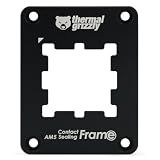
Thermal Grizzly’s AM5 Contact Sealing Frame combines a contact frame with a CPU guard in one part. Thermal Grizzly is a brand known for thermal interface materials and enthusiast-grade accessories, and this product sits at the premium end of the contact-frame category. It is aimed at builders who want the contact-pressure benefits of a frame plus protection against thermal paste migrating into the socket area — a real problem for anyone who uses liquid metal or applies paste generously.
- Type: contact frame and CPU guard combination
- Function: optimises contact pressure while sealing the socket perimeter
- Brand: Thermal Grizzly, a specialist in thermal interface materials
- Compatibility: AMD AM5 socket
Strengths. The sealing element is the distinguishing feature. On an AM5 board the socket area is surrounded by small surface-mount components, and excess thermal paste squeezed out from under the cooler can reach places that are difficult to clean. A sealing frame creates a barrier, which is particularly valuable if you plan to use liquid metal, where stray material is genuinely destructive. Combined with the contact-pressure function, this is a single part that addresses two separate risks. Build quality from Thermal Grizzly is generally high, and the part is designed to be fitted once and forgotten.
Where it falls short. It costs noticeably more than the basic contact frames from Thermalright, and for a standard paste-based build the sealing benefit is marginal — most people apply paste carefully enough that migration is not a problem. If you are not using liquid metal, you are paying a premium for a feature you may never need. Installation is also slightly more involved than a bare frame, since the sealing element has to sit correctly around the socket, and a misaligned fit can interfere with cooler mounting if you are not careful.
- Pros:
- Combines contact-pressure optimisation with socket sealing
- Valuable protection if you use liquid metal
- Helps contain excess thermal paste away from socket components
- Premium build quality from a specialist brand
- Fit-and-forget once installed correctly
- Cons:
- Significantly more expensive than basic contact frames
- Sealing benefit is marginal for careful paste users
- More involved installation than a simple frame
- No performance advantage over cheaper frames in normal use
Versus the nearest alternative: the Thermalright ASF Black V2 does the contact-pressure job for much less money. Choose the Thermal Grizzly if you use liquid metal, if you want the socket sealed against paste migration, or if you simply prefer a premium part with a track record in thermal accessories. Choose the Thermalright if you want the flat-CPU benefit at the lowest cost and you apply paste sensibly. Both are installed the same way and neither will change your frame rates.
3. Thermalright ASF-Black AM5 CPU Holder – Best for Simple Contact-Frame Upgrades

The Thermalright ASF-Black is Thermalright’s original black AM5 contact frame — a corrective anti-bending fixing frame that replaces the stock retention mechanism with full-fit, non-marking mounting. It is the part that popularised the category among AM5 builders: cheap, effective, and easy to fit. It suits anyone upgrading an existing AM5 system who wants the contact-pressure benefit without spending premium money, and it is a sensible add-on when you are already removing the cooler for a repaste.
- Type: corrective anti-bending fixing frame
- Function: full-fit mounting, non-marking contact
- Finish: black
- Compatibility: AMD AM5 socket
Strengths. It does the core job at a low price. The frame holds the processor flat and spreads mounting pressure around the perimeter of the heat spreader instead of concentrating it in the middle, which keeps cooler contact consistent. The non-marking design means it will not leave marks on the CPU or board, which matters if you plan to resell either. Because it is a passive metal part with no moving components, there is nothing to wear out, and it can be reused if you move it to another AM5 board. Installing it takes only a few minutes if the cooler is already off.
Where it falls short. The ASF-Black is an older model than the V2, and if both are available at similar prices the V2 is the better choice for its revised design. The benefits are also modest: a contact frame is not a performance upgrade in any conventional sense, and in a case with adequate cooling the difference in temperatures is small. Anyone expecting a dramatic drop in CPU temperature will be disappointed. The real value is long-term protection against bending and consistently good cooler contact, not a headline number.
- Pros:
- Low cost for a meaningful long-term safeguard
- Non-marking design protects CPU and board finish
- Passive part with nothing to fail
- Quick to install when the cooler is already removed
- Reusable across AM5 builds
- Cons:
- Superseded by the V2, which is a better buy at a similar price
- Temperature benefit is small in well-cooled systems
- Requires care around an exposed AM5 socket during fitting
- Not a performance upgrade in any conventional sense
Versus the nearest alternative: the ASF Black V2 is the direct replacement and is the smarter buy if pricing is close, since it is the revised design. The ASF-RED is the same concept in a different colour; if you want a red accent inside a windowed case and it is cheaper, there is no functional reason to avoid it. Among the three, decide on price and colour — the engineering is essentially the same.
4. Thermalright ASF-RED AM5 CPU Holder – Best for Budget Builds With a Colour Theme

The Thermalright ASF-RED is the red-finished version of the company’s AM5 corrective anti-bending fixing frame, offering full-fit, non-marking mounting at the budget end of the category. It exists for builders who want the contact-frame benefit and a colour that matches a red-and-black build — a common theme in gaming systems. Functionally it is the same concept as the black versions: replace the stock centre-pressure retention with even perimeter pressure and keep the processor flat.
- Type: corrective anti-bending fixing frame
- Function: full-fit mounting, non-marking contact
- Finish: red
- Compatibility: AMD AM5 socket
- Price tier: budget
Strengths. It is the cheapest way into the contact-frame category, and the red anodised finish is genuinely useful if your build has a red theme and a tempered-glass side panel — a small thing, but one that matters to a certain kind of builder. The functional benefits are the same as any contact frame: flat CPU, even cooler contact, protection against the long-term bending that centre-pressure retention can cause. Installation is straightforward and the part is passive, so there is nothing to maintain.
Where it falls short. As with all budget contact frames, the real-world benefit is modest and mostly about long-term protection rather than immediate performance. The red colour will clash in a build that is not red-themed, and the part is otherwise identical to the black versions — so if you find the black one cheaper, there is no reason to pay extra for colour. It is also, like every frame in this category, an optional extra rather than a required part; plenty of AM5 systems run for years without one and are perfectly fine.
- Pros:
- Lowest-cost entry to the contact-frame category
- Red finish suits themed builds with a windowed case
- Keeps the CPU flat for consistent cooler contact
- Non-marking, passive, and reusable
- Quick to fit alongside any cooler installation
- Cons:
- Colour limits it to red-themed builds
- Small thermal benefit in already well-cooled systems
- Older design than the V2 revision
- Optional rather than essential — many builds skip it entirely
Versus the nearest alternative: the thermalright ASF-Black and ASF Black V2 are the same design in black, with the V2 being the newer revision. If colour is not a factor, buy whichever is cheapest among these three, preferring the V2 if prices are level. Against the Thermal Grizzly sealing frame, this is the budget choice: you give up socket sealing and premium materials, but you keep the contact-pressure benefit for a fraction of the price.
5. ARCTIC Liquid Freezer III Pro 360 A-RGB – Best for Cooling High-Power AM5 Chips
The ARCTIC Liquid Freezer III Pro 360 A-RGB is a 360 mm all-in-one liquid cooler with addressable RGB lighting. ARCTIC is a brand with a strong reputation in cooling, and the Liquid Freezer series is widely regarded as one of the better value AIO ranges. This is the cooler to buy if you are running a 170 W class AM5 chip — the sixteen-core flagships — and want it to stay quiet under sustained all-core loads such as rendering or compilation.
- Type: 360 mm all-in-one liquid CPU cooler
- Lighting: addressable RGB
- Radiator size class: 360 mm (three-fan class)
- Suited to: high-TDP processors under sustained multi-core loads
- Brand: ARCTIC
Strengths. A 360 mm radiator has enough surface area to absorb the heat output of a 170 W processor without the fans having to scream, which is the whole point of buying one. Where a dual-tower air cooler will handle such a chip at stock settings but get loud during long renders, a 360 mm AIO spreads the load and keeps noise lower for longer. The A-RGB lighting is a bonus for builders with a windowed case, and ARCTIC’s AIO designs generally include thoughtful touches such as VRM cooling assistance and sensible fan curves out of the box. If you are building a workstation that also games, this is the right tier of cooler.
Where it falls short. It is more expensive than air cooling and brings more failure points: a pump, tubing, and a sealed liquid loop all have finite service lives. It also requires a case that can accommodate a 360 mm radiator, which rules out many compact builds — check clearance before buying, including radiator thickness plus fan depth. For a 65 W or 120 W processor, this cooler is overkill; a good air cooler will match it in practice at a lower price and with fewer things to go wrong.
- Pros:
- Handles 170 W class AM5 chips quietly under sustained load
- Large radiator means lower fan speeds and less noise for the same cooling
- A-RGB lighting suits windowed builds
- Strong value reputation for its category
- Keeps a workstation-plus-gaming build cool without compromise
- Cons:
- More expensive than air cooling that suffices for lower-TDP chips
- Extra failure points compared with a passive heatsink
- Requires a case that fits a 360 mm radiator
- Overkill for 65 W and 120 W processors
Versus the nearest alternative: within this roundup, the alternative is a large dual-tower air cooler, which is not listed here but remains the sensible default for 65 W and 120 W chips. Buy the ARCTIC when you are running a 170 W processor and want quiet operation under long sustained loads, or when you simply want the thermal headroom and the lighting. If you are on a 65 W chip, put the difference into a faster GPU instead — it will change your experience far more than an oversized cooler will.
6. Thermalright AM5 CPU Contact Frame V2, Black – Best for Straightforward Socket Protection

The Thermalright AM5 CPU Contact Frame V2 in black is another revision of Thermalright’s contact-frame design, listed under a simpler product name than the ASF series. It performs the same function: replacing the stock AM5 retention mechanism with an even-pressure frame that keeps the processor flat and cooler contact consistent. It is a sensible choice for a builder who wants the benefit without any decoration — plain black, no branding fuss, and a straightforward installation.
- Type: AM5 CPU contact frame
- Version: V2
- Finish: black
- Compatibility: AMD AM5 socket
- Function: even perimeter pressure, flat CPU, consistent cooler contact
Strengths. It is the no-nonsense option. Thermalright contact frames are popular because they are cheap, they work, and they do not ask anything of the rest of the build — no software, no power, no maintenance. The V2 revision indicates an updated design, and the black finish disappears inside any case. Fitting one during a cooler install takes a few minutes and gives you the long-term protection against heat-spreader bowing that the stock mechanism does not provide. For anyone who repastes their CPU periodically, it is a sensible permanent addition.
Where it falls short. The same caveats as every contact frame apply. The performance benefit is marginal in a well-cooled system, installation requires care around an exposed socket, and it is entirely optional. It also overlaps heavily with the other Thermalright frames in this roundup — buyers may find three or four near-identical products and struggle to choose. In practice the differences are cosmetic and generational rather than functional, and picking the cheapest available is a perfectly reasonable strategy.
- Pros:
- Simple, effective contact frame at a modest price
- V2 revision with an updated design
- Black finish suits any build
- Passive, reusable, and maintenance-free
- Quick to install during any cooler change
- Cons:
- Marginal thermal benefit in well-cooled systems
- Overlaps closely with other Thermalright frames
- Requires careful handling around the AM5 socket
- Optional part that many systems do without
Versus the nearest alternative: the ASF Black V2 is the closest sibling — both are black V2 Thermalright frames. Choose on price and availability; there is no meaningful functional difference to weigh. If you want the sealing feature, step up to the Thermal Grizzly combination part instead. Otherwise, among the Thermalright options, colour and cost are the only real variables.
7. WSHAITE 2-Piece AM5 CPU Cooler Fan Bracket – Best for Retaining Unusual Coolers
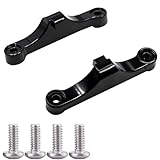
The WSHAITE two-piece AM5 cooler fan bracket is a set of CPU fan retainer brackets for the AMD AM5 socket, finished in black. This is a mounting hardware item rather than a performance part: it exists for situations where you need brackets to retain a cooler or fan assembly on an AM5 board, whether because the original hardware is missing, because you are adapting a cooler, or because you are assembling a system from mixed parts.
- Type: CPU cooler / fan retainer bracket set
- Quantity: 2 pieces
- Finish: black
- Compatibility: AMD AM5 socket
Strengths. Availability of correct mounting hardware is an underrated problem in PC building. Coolers get bought second-hand without their bracket sets, fans get swapped between builds, and stock mounting clips go missing. A cheap bracket set solves that without a trip to a specialist supplier. Because AM5 uses the same mounting hole spacing as AM4 for many cooler designs, brackets like these are also useful when adapting an older cooler to a new board. The black finish keeps the inside of the case tidy.
Where it falls short. This is a niche item with no performance angle whatsoever. If your existing cooler already has its mounting hardware, you do not need it. Buyers should check carefully that the bracket matches their specific cooler’s mounting system and the AM5 hole pattern, because mounting hardware is not universal — a bracket that fits one cooler may not fit another. As with all small metal parts, quality control varies at the budget end, and threads or clips can be less precise than those from a cooler manufacturer.
- Pros:
- Solves missing or damaged cooler mounting hardware cheaply
- Useful when adapting older coolers to AM5 boards
- Two-piece set gives a spare
- Black finish blends into the build
- No performance compromise — it is just mounting hardware
- Cons:
- Only needed if you lack original hardware
- Compatibility must be checked against your specific cooler
- Quality control varies at the budget end
- No benefit to an otherwise complete build
Versus the nearest alternative: the HuGuWdy four-piece AM5 bracket set is the direct comparison — twice the quantity, with screws included, for builders who want spares or who are mounting more than one cooler. Choose the WSHAITE set if you need just one pair; choose the larger set if you want spares or are working on multiple systems. Neither is a performance product, so decide purely on quantity and price.
8. HuGuWdy 4-Piece AM5 CPU Bracket Set – Best for Builders Who Want Spares

The HuGuWdy four-piece AM5 bracket set is a pack of cooling fan brackets for AM5 and AM4 motherboards, supplied with screws. It is a quantities-and-convenience product: where most bracket sets give you two pieces, this gives you four plus fasteners, which suits anyone maintaining several systems, working in a repair context, or simply wanting spares on the shelf.
- Type: CPU cooler fan bracket set
- Quantity: 4 pieces, with screws
- Compatibility: AMD AM5 and AM4 motherboards
- Finish: black
Strengths. The AM5/AM4 cross-compatibility is the useful part, since the two sockets share mounting hole spacing for many cooler designs, and the included screws save a separate trip. Four brackets means you can mount two coolers, or keep spares for future builds and repairs. For anyone who tinkers regularly, having mounting hardware on hand prevents the frustrating situation of a build stalled by a missing clip. The price tier is budget, so the cost of keeping spares is trivial.
Where it falls short. Like any generic mounting hardware, fit is not guaranteed across every cooler. Screw thread pitch, bracket thickness, and clip geometry vary between cooler manufacturers, and a generic set may need minor adjustment to work with a specific heatsink. If you are mounting a premium cooler, the manufacturer’s own bracket kit is the safer choice even at higher cost. And if you own only one AM5 system with its original hardware intact, you do not need this at all.
- Pros:
- Four brackets plus screws — generous quantity for the price
- Compatible with both AM5 and AM4 mounting patterns
- Useful spares for builders and repair work
- Budget price makes stocking them trivial
- Saves a separate order for fasteners
- Cons:
- Generic fit may not suit every cooler perfectly
- Manufacturer bracket kits are safer for premium coolers
- Unnecessary if your original hardware is intact
- Build quality is basic at this price tier
Versus the nearest alternative: the WSHAITE two-piece set is the smaller, simpler option. Buy the HuGuWdy four-piece pack if you want spares, are mounting multiple coolers, or value the included screws and AM4 compatibility. Buy the WSHAITE set if you need a single pair and nothing more. Neither affects cooling performance, so the decision is purely about quantity, price, and whether you want hardware on hand for future projects.
9. YEGAFE 8-Piece CPU Protector Kit – Best for Shipping and Storage Protection
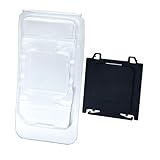
The YEGAFE eight-piece CPU protector kit contains four socket covers and four CPU cases for AMD sockets from FM1 through AM5. This is not a cooling accessory at all — it is protection for processors and boards that are being stored, shipped, or swapped between systems. It suits system builders, repair technicians, and anyone who buys and sells used CPUs, where protecting exposed pins and socket contacts in transit is the difference between a working part and scrap.
- Type: CPU and socket protector kit
- Contents: 4 socket covers and 4 CPU cases (8 pieces total)
- Compatibility: AMD FM1 through AM5 socket generations
- Use case: shipping, storage, and handling protection
Strengths. AM5 processors are LGA parts with the pins in the socket rather than on the chip, which changes the risk profile: the CPU itself is more robust, but an exposed AM5 socket on a motherboard is extremely vulnerable. Socket covers protect that. Meanwhile CPU cases protect the processor during transit and prevent the sort of contact damage that ruins a resale. For anyone who handles multiple systems, the kit pays for itself the first time it saves a part. The cross-generation compatibility from FM1 to AM5 also means the same kit covers older hardware you may still be servicing.
Where it falls short. It is a premium-priced accessory for what is essentially plastic protection, and most home builders will never need it. If you build one system every few years and keep it assembled, this kit will sit in a drawer. The value case is strongest for people who regularly ship CPUs, sell used parts, or work on multiple machines where loose processors are a fact of life.
- Pros:
- Protects exposed AM5 sockets during storage and transport
- CPU cases prevent contact damage to processors
- Covers AMD sockets from FM1 through AM5
- Essential for resellers and repair technicians
- Four of each, so a working stock rather than a single unit
- Cons:
- Premium price for what is a plastic accessory
- No use for a single permanently assembled system
- Not a cooling or performance product in any sense
- Easy to lose small pieces between projects
Versus the nearest alternative: the other mounting-hardware items in this roundup