As an Amazon Associate we earn from qualifying purchases.
Saints Row is the 2022 reboot of the open-world series, set in the fictional city of Santo Ileso. It is a demanding game for a laptop: a large open city full of traffic, pedestrians and destruction, and long draw distances. A laptop that only just meets the minimum specs will load the game, but it will not deliver smooth 60 frames per second play.
The official requirements are forgiving, and every laptop in this guide clears the recommended tier. Volition published four tiers, from minimum 1080p to Ultra 4K, and the sensible target is the recommended or high tier: a modern multi-core processor, 16GB of memory, a graphics card with 8GB of video memory, and a solid-state drive. All five laptops below carry an RTX 4060 laptop card with 8GB of GDDR6 video memory.
Saints Row Official System Requirements
Minimum targets 1080p at 30 frames per second, recommended 1080p at 60, high 1440p at 60, and Ultra 4K at 60. For the desktop side of the same specs, see our guide to gaming PC requirements.
| Tier | Target | CPU | GPU | Video memory | RAM | Storage |
|---|---|---|---|---|---|---|
| Minimum | 1080p, 30 fps | Core i3-3240 / Ryzen 3 1200 | GTX 970 / RX 480 | 4GB | 8GB | 50GB |
| Recommended | 1080p, 60 fps | Core i7-6700K / Ryzen 5 1500X | GTX 1070 / RX 5700 | 8GB | 12GB | 50GB SSD |
| High | 1440p, 60 fps | Core i7-10700K / Ryzen 5 5600X | RTX 2080 / RX 6700 XT | 8GB | 16GB | 50GB SSD |
| Ultra | 4K, 60 fps | Core i5-12600 / Ryzen 7 5800X | RTX 3080 Ti / RX 6800 XT | 12GB | 16GB | 50GB SSD |
Two details deserve attention. First, the jump from minimum to recommended is mostly about video memory: 4GB at minimum, 8GB at every tier above it. A card with 8GB of video memory is the single most important line item, because the game streams a whole city of textures. Second, every tier above minimum asks for the game to live on a solid-state drive.
Tom’s Hardware reported that graphics cards at RTX 2060 level and above clear 60 frames per second at 1080p in Saints Row. An RTX 4060 laptop card sits above that level.
What a Laptop Needs for Saints Row
The recommended tier asks for a GTX 1070 or RX 5700, and the high tier for an RTX 2080 or RX 6700 XT. A current RTX 4060 laptop card with 8GB of video memory matches the high-tier class, and it brings DLSS support the older cards in the official list lack. Every laptop here carries a current eight-core or high-core-count processor.
Memory is the next line to check. The recommended tier asks for 12GB, and the high tier for 16GB. Buy 16GB as the floor, and treat 32GB as a cushion if you keep a browser, voice chat and a game launcher open alongside the game.
Saints Row needs 50GB, and the recommended tier and above ask for a solid-state drive. Check for a second M.2 slot if you plan to add storage later. On display, all five laptops here use high-refresh panels, from 144Hz to 165Hz. None ships with a 1440p panel, so connect an external monitor through HDMI or USB-C for the high tier at 1440p.
Power limits decide how much of the graphics card you actually get, because laptop cards with the same name can run at different wattages. Where the listing or the maker states the graphics power limit, this guide states it; where it does not, the guide says so plainly, and you should confirm it on the listing before buying. The same rule applies to warranty terms.
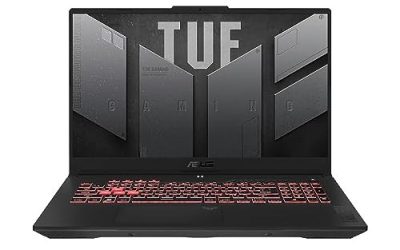
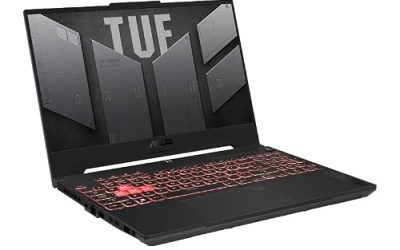
1. ASUS TUF Gaming A15 (2023) FA507NV-EH74

The ASUS TUF Gaming A15 is the most complete package in this guide. It pairs an AMD Ryzen 7 7735HS processor with an RTX 4060 laptop graphics card running at up to 140W with Dynamic Boost, the full-power version of this card in a 15.6-inch chassis. The display is a 15.6-inch Full HD panel at 144Hz with 100 percent sRGB coverage, G-Sync, and a MUX switch. Upgrades: two DDR5 slots up to 32GB, plus a second M.2 slot; 1-year warranty per the listing.
Specs
- AMD Ryzen 7 7735HS, 8 cores, up to 4.75 GHz; NVIDIA GeForce RTX 4060 Laptop GPU, 8GB GDDR6, up to 140W with Dynamic Boost; 16GB DDR5-4800; 1TB PCIe SSD; 15.6-inch FHD (1920 x 1080) IPS-level, 144Hz, 100 percent sRGB, G-Sync, MUX Switch; Wi-Fi 6, Bluetooth 5.2; HDMI 2.1, 2x USB-A, USB-C with DisplayPort and power delivery, USB 4 Type-C, RJ45 LAN, 3.5mm combo audio; Windows 11 Home; 1-year warranty; ASIN B0CJSY4PLN.
2. Lenovo LOQ 15 15AHP9

The Lenovo LOQ 15 15AHP9 is the memory and storage champion of this guide. The configuration sold on this listing ships with 64GB of DDR5 memory and a 2TB PCIe NVMe solid-state drive, four times the memory and twice the storage of the high-tier requirement. Under the hood it is a familiar combination: an AMD Ryzen 7 8845HS processor with eight cores and boost speeds up to 5.1 GHz, and an RTX 4060 laptop graphics card with 8GB of GDDR6 video memory. Ports cover the essentials: three USB-A ports, one USB-C port, HDMI, an RJ-45 Ethernet port and a headphone and microphone combo jack, plus a backlit keyboard and a numeric keypad. The listing bundles a laptop cooler with the machine. Note that the 64GB memory and 2TB storage figures describe the configuration sold on this listing, not the base factory configuration, so match the model number 15AHP9 and the ASIN before ordering. The listing does not state the warranty term or the graphics power limit, so confirm both on the listing before buying. Upgrades: two memory slots and two M.2 slots.
Specs
- AMD Ryzen 7 8845HS, 8 cores, up to 5.1 GHz; NVIDIA GeForce RTX 4060, 8GB GDDR6; 64GB DDR5 (as listed); 2TB PCIe NVMe SSD; 15.6-inch FHD (1920 x 1080) IPS, 144Hz; 3x USB-A, 1x USB-C, HDMI, RJ-45, headphone and microphone combo; backlit keyboard, numeric keypad; Wi-Fi 6, Bluetooth; Windows 11 Home; bundle includes a laptop cooler; ASIN B0FL84WCCH.
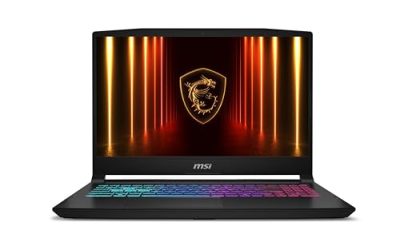
3. MSI Katana A15 AI B8VF-448US
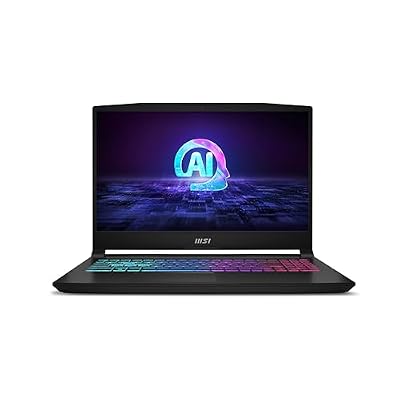
The MSI Katana A15 AI is the balanced pick for buyers who want 32GB of memory without stepping up to a flagship chassis. It pairs the same AMD Ryzen 7 8845HS processor as the Lenovo above with an RTX 4060 laptop graphics card and 32GB of DDR5-5600 memory, double the high-tier requirement. The display is a 15.6-inch Full HD panel at 144Hz. Cooling comes from the Cooler Boost 5 system. Connectivity includes Wi-Fi 6E and Bluetooth 5.3, an Ethernet port, HDMI and three USB ports. The battery is a 52Wh unit, and the listing states a 1-year limited manufacturer warranty. The listing does not state the graphics power limit, so confirm it on the listing before buying. Upgrades: two memory slots with support for up to 64GB, per the listing.
Specs
- AMD Ryzen 7 8845HS, 8 cores, up to 5.1 GHz; NVIDIA GeForce RTX 4060, 8GB GDDR6; 32GB DDR5-5600, 2 slots, up to 64GB; 1TB SSD; 15.6-inch FHD (1920 x 1080), 144Hz; Wi-Fi 6E, Bluetooth 5.3; Ethernet, HDMI, 3x USB; backlit RGB keyboard; 52Wh battery; Windows 11 Home; 1-year limited manufacturer warranty; ASIN B0CXVGSY2H.
4. HP Victus 16

The HP Victus 16 is the only laptop in this guide with an Intel processor and the only one with a 16.1-inch display, and both differences are genuine advantages for Saints Row. The Intel Core i7-14700HX has 20 cores and boost speeds up to 5.5 GHz, the strongest processor in this guide, leaving plenty of headroom for the physics and crowd simulation. The larger 16.1-inch Full HD IPS display at 144Hz gives you more screen for the same 1080p resolution. It pairs that processor with an RTX 4060 laptop graphics card with 8GB of GDDR6 video memory and 32GB of DDR5 memory. Ports include three USB-A ports, one USB-C port, HDMI, an RJ-45 Ethernet port and a headphone and microphone combo jack, with an RGB backlit keyboard and a numeric keypad. Wi-Fi 6 and Bluetooth are fitted. The listing bundles a 512GB external solid-state drive with the laptop. The listing does not state the graphics power limit or the warranty term, so confirm both on the listing before buying. Upgrades: two memory slots and a second M.2 slot.
Specs
- Intel Core i7-14700HX, 20 cores, up to 5.5 GHz; NVIDIA GeForce RTX 4060, 8GB GDDR6; 32GB DDR5; 1TB PCIe SSD; 16.1-inch FHD (1920 x 1080) IPS, 144Hz; RGB backlit keyboard, numeric keypad; 3x USB-A, 1x USB-C, HDMI, RJ-45, headphone and microphone combo; Wi-Fi 6, Bluetooth; Windows 11 Home; bundle includes a 512GB external SSD; ASIN B0DBJ28HTK.
5. Acer Nitro 16 AN16-41-R4CY

The Acer Nitro 16 closes this guide with the fastest display and the tallest screen. Its 16-inch WUXGA panel runs at 1920 x 1200 and 165Hz, giving you a little more vertical room than a standard 1080p panel and a refresh rate above every other laptop here. That suits Saints Row, where the extra vertical space helps with the open-city view. Inside, an AMD Ryzen 7 7840HS processor with eight cores and boost speeds up to 5.1 GHz drives an RTX 4060 laptop graphics card with 8GB of GDDR6 video memory at 140W, the full-power version of the card. Memory is 16GB of DDR5, which meets the high-tier requirement exactly. Networking is strong too, with Wi-Fi 6E and a Killer Ethernet E2600 port for wired play. The listing does not state the warranty term, so confirm it on the listing before buying. Upgrades: two memory slots and two M.2 slots.
Specs
- AMD Ryzen 7 7840HS, 8 cores, up to 5.1 GHz; NVIDIA GeForce RTX 4060 Laptop GPU, 8GB GDDR6, 140W; 16GB DDR5; 1TB PCIe Gen 4 SSD; 16-inch WUXGA (1920 x 1200) IPS, 165Hz; Wi-Fi 6E, Killer Ethernet E2600; RGB backlit keyboard; Windows 11; ASIN B0CY3SS4VL.
Compare the Five Laptops
Every laptop here clears the recommended tier and matches the high-tier class, so the choice comes down to what you value beyond the game itself. The ASUS TUF Gaming A15 is the best all-rounder: a full-power 140W card, a color-accurate display and the strongest port selection. The Lenovo LOQ 15 is the pick for memory and storage. The MSI Katana A15 AI is the balanced middle ground at 32GB of memory. The HP Victus 16 is the pick for the strongest processor and the biggest screen. The Acer Nitro 16 is the pick for the fastest display and the full-power card in a taller chassis. Match the exact model number and ASIN on the listing before ordering.
Frequently Asked Questions
Can a laptop with an RTX 4060 run Saints Row at 1080p and 60 frames per second?
Yes. The official recommended tier asks for a GTX 1070 or RX 5700 with 8GB of video memory, and an RTX 4060 laptop card with 8GB of GDDR6 video memory sits a full tier above that requirement. Tom’s Hardware reported that cards at RTX 2060 level and above clear 60 frames per second at 1080p in Saints Row.
How much RAM does Saints Row need on a laptop?
The official minimum is 8GB, the recommended tier asks for 12GB, and the high tier asks for 16GB. Buy 16GB as the floor, and consider 32GB if you run a browser, voice chat and a launcher alongside the game.
Does Saints Row need an SSD on a laptop?
Yes, for anything above the minimum tier. The official requirements ask for the 50GB game to live on a solid-state drive at the recommended, high and Ultra tiers. A solid-state drive keeps load times short and texture streaming smooth.
Is 8GB of video memory enough for Saints Row on a laptop?
Yes. The official requirements ask for 4GB of video memory at minimum and 8GB at every tier above it, up to the high tier at 1440p. All five laptops here carry 8GB of video memory, which matches the high-tier requirement.
Conclusion
Saints Row does not ask for a flagship laptop, but it rewards the right choices: a graphics card with 8GB of video memory, 16GB of memory, a solid-state drive and a high-refresh display. Pick the one that fits how you play, and confirm the warranty and graphics power limit where the listing does not state them.