

- Top Pick: Razer DeathAdder V3 Pro
- Runner-up: Logitech G502 X Plus
- Also consider: Razer Basilisk V3 Pro
A gaming mouse can be a strong productivity tool when it pairs a precise sensor with useful extra buttons, a comfortable shape, and a steady connection. The best options let you move between spreadsheets, documents, design tools, and browser tabs without reaching for the keyboard as often, then switch to a game in the evening without changing hardware. Every pick below was chosen for work first, with gaming performance as a welcome bonus.
Productivity is not only about speed. It is about reducing small frictions that add up across hundreds of clicks and scrolls. A well-placed thumb button can copy, paste, switch windows, or jump back in a browser. A free-spinning scroll wheel can move through a long document in seconds, and a light, balanced shape can keep your wrist comfortable during a long day.
As an Amazon Associate, we earn from qualifying purchases.
Quick Answer
For most people, the Razer DeathAdder V3 Pro is the best gaming mouse for productivity, thanks to its comfortable ergonomic shape, light weight, precise sensor, and dependable wireless connection. If you want more programmable buttons, choose the Logitech G502 X Plus or the Razer Basilisk V3 Pro. The SteelSeries Aerox 5 Wireless and Corsair M75 Wireless are strong alternatives for lighter shapes and flexible connectivity.
1. Razer DeathAdder V3 Pro

The Razer DeathAdder V3 Pro is a natural first pick for productivity because it focuses on comfort, precision, and simplicity. Its right-handed ergonomic shape supports the palm and thumb through long sessions, and its light build makes it easy to move across a large monitor setup without dragging your wrist. If your work involves precise cursor control, such as selecting text or editing images, the smooth glide and accurate tracking help you land on small targets with less effort.
For work, the appeal is quiet competence rather than a wall of buttons. The main clicks feel crisp and consistent, the side buttons are easy to reach without looking down, and the scroll wheel has a defined step that suits careful scrolling. You can assign common actions to the available buttons through Razer software, such as switching desktops or controlling media playback. Battery life lasts through several workdays on a single charge, and a USB-C cable lets you keep working while it charges.
Specs
- Sensor: Focus Pro 30K optical sensor
- Weight: 63 grams
- Buttons: 5 programmable buttons
- Connectivity: HyperSpeed Wireless and USB-C wired
- Battery life: Up to 90 hours
- Polling rate: Up to 1000 Hz
- Shape: Right-handed ergonomic
- Switches: Optical Switches Gen-3
2. Logitech G502 X Plus

The Logitech G502 X Plus is the pick for people who want a gaming mouse that behaves like a productivity control panel. It offers more buttons than most mice in this guide, including a thumb cluster and a DPI-shift button that can be reassigned to a work shortcut. That layout is ideal for spreadsheet work, video editing, design software, and any task where a few custom commands save repeated trips to menus and keyboard shortcuts.
The standout feature for office work is the dual-mode scroll wheel. In ratchet mode, it gives precise, stepped scrolling for careful reading. In free-spin mode, it lets you fly through long documents, web pages, and timelines with a single flick. The wheel can also tilt left and right, which adds two more inputs for horizontal scrolling or custom actions.
Specs
- Sensor: HERO 25K optical sensor
- Buttons: 13 programmable buttons
- Connectivity: LIGHTSPEED Wireless, Bluetooth, and USB-C wired
- Battery life: Up to 130 hours with lighting off
- Scroll wheel: Dual-mode infinite scroll with tilt
- Switches: LIGHTFORCE hybrid optical-mechanical switches
- Lighting: LIGHTSYNC RGB
- Shape: Right-handed ergonomic with thumb rest
3. Razer Basilisk V3 Pro
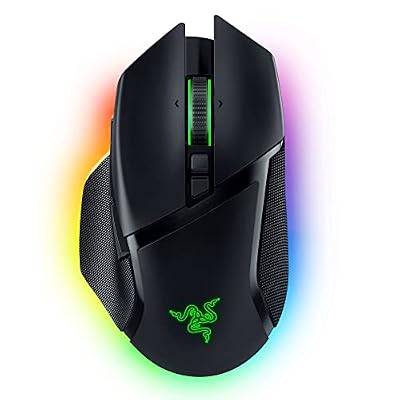
The Razer Basilisk V3 Pro is built for people who want a full-featured mouse with a scroll wheel that does more than scroll. Its HyperScroll tilt wheel can switch between tactile stepping and free spinning, and it can also tilt for side-to-side input. That makes it useful for long documents, wide spreadsheets, and video timelines, where horizontal movement is a regular part of the job. The wheel can even be set to switch modes automatically based on how fast you spin it.
Beyond the wheel, the Basilisk V3 Pro offers a generous set of programmable controls. The thumb buttons, scroll wheel inputs, and additional side controls can be mapped to copy, paste, undo, window switching, or app-specific commands. The shape is right-handed and ergonomic, with a thumb rest that supports longer sessions, and the sensor is precise across two monitors or a large ultrawide display.
Specs
- Sensor: Focus Pro 30K optical sensor
- Buttons: 13 programmable controls
- Connectivity: HyperSpeed Wireless, Bluetooth, and USB-C wired
- Battery life: Up to 90 hours on HyperSpeed Wireless
- Scroll wheel: HyperScroll tilt wheel with free-spin mode
- Switches: Optical Switches Gen-3
- Lighting: Chroma RGB with 13 zones
- Shape: Right-handed ergonomic with thumb rest
4. SteelSeries Aerox 5 Wireless

The SteelSeries Aerox 5 Wireless is a light, airy mouse that suits people who move their hand a lot during the day. Its perforated shell keeps the weight down, and its nine buttons give you more shortcuts than a basic office mouse without turning the layout into a puzzle. That balance makes it a good fit for work that mixes typing, browsing, and precise pointing, such as research, writing, and light design work.
The nine-button layout is the key productivity feature here. Two side buttons, a CPI button, and a dedicated up and down button near the thumb can be assigned to useful actions in SteelSeries software. Connectivity is flexible, with both a fast wireless mode and Bluetooth, and battery life is long in Bluetooth mode. The mouse is water resistant, which adds reassurance against small desk spills.
Specs
- Sensor: TrueMove Air 18K DPI optical sensor
- Weight: 74 grams
- Buttons: 9 programmable buttons
- Connectivity: 2.4 GHz wireless and Bluetooth
- Battery life: Up to 180 hours on Bluetooth
- Shape: Right-handed ergonomic
- Design: Holey shell, water resistant
- Compatibility: PC, Mac, Xbox, and PlayStation
5. Corsair M75 Wireless

The Corsair M75 Wireless is a clean option for people who want a simple shape, swappable side buttons, and dependable wireless performance. Its symmetrical design suits left-handed and right-handed users who prefer a neutral shape, and the side buttons can be swapped or removed to match your grip. That flexibility is useful in a shared workspace or for anyone who has struggled with a fixed thumb cluster.
For productivity, the M75 Wireless keeps things straightforward. The sensor is precise, the clicks are crisp, and the wireless connection stays steady during long sessions. You can assign common shortcuts to the side buttons through Corsair software, and the mouse works well for document work, browsing, and general office tasks. Battery life is solid for a full workday and beyond.
Specs
- Sensor: MARKSMAN 26K DPI optical sensor
- Buttons: Swappable side buttons
- Connectivity: SLIPSTREAM Wireless, Bluetooth, and USB-C wired
- Battery life: Up to 105 hours on SLIPSTREAM Wireless
- Switches: Optical switches
- Lighting: RGB
- Shape: Symmetrical, ambidextrous-leaning
- Software: iCUE compatible
How to choose
Start with your hand and your grip. A palm grip suits a larger, ergonomic mouse such as the DeathAdder V3 Pro or the Basilisk V3 Pro. A claw or fingertip grip suits a lighter, smaller shape such as the Aerox 5 Wireless. If you share a desk or switch hands, a symmetrical shape such as the M75 Wireless is worth a closer look. The best sensor will not help if the shape makes your wrist ache by mid-afternoon, so comfort comes first.
Next, count the actions you repeat. If you only need back, forward, and one custom shortcut, a five-button mouse is enough. If you regularly switch windows, copy and paste, or trigger app commands, look for nine or more programmable buttons, as on the Aerox 5 Wireless, the G502 X Plus, or the Basilisk V3 Pro. A dual-mode or free-spinning scroll wheel is also worth prioritising if you read long documents or edit timelines. Finally, favour a mouse with both a fast wireless mode and Bluetooth, long battery life, and USB-C charging, so it can move between a desktop and a laptop.
Who should skip
A gaming mouse is not the right tool for everyone. If you do most of your work on a laptop trackpad and rarely use a mouse, a dedicated gaming mouse may add clutter without adding value. If you need a vertical mouse for wrist pain, a trackball for limited desk space, or a silent mouse for a shared office, a standard gaming shape may not solve that problem. You should also skip a button-heavy mouse if you prefer a minimal setup, since extra buttons only help if you take the time to assign them. People with very small hands should also be cautious with the larger ergonomic models in this guide.
Frequently Asked Questions
Can a gaming mouse really help with productivity?
Yes, when it adds useful buttons, a precise sensor, and a comfortable shape. Extra buttons can carry copy, paste, window switching, and other repeated actions, while a good scroll wheel speeds up long documents. The benefit comes from the layout and the software, not from gaming features alone.
How many buttons do I need for work?
Five buttons are enough for basic browsing and document work, with back and forward under your thumb. Nine or more buttons suit people who switch apps often, edit media, or work in software with many shortcuts. More buttons are only useful if you assign them to actions you repeat, so start with a short list of your most common tasks.
Is wireless reliable enough for a full workday?
Yes, modern wireless gaming mice use fast, stable connections that suit office work and gaming. Bluetooth is convenient for laptops and tablets, while a dedicated wireless receiver offers lower latency for a desktop. Battery life varies by model and lighting settings, so keep a USB-C cable nearby for charging.
Should I choose a light mouse or a heavier mouse?
A light mouse reduces fatigue during long sessions and makes large cursor movements easier. A heavier mouse can feel more stable for precise tasks such as selecting text or editing images. Most people adapt quickly to either, so shape and grip matter more than a small difference in weight.
Final verdict
The best gaming mouse for productivity is the one that fits your hand, carries your most repeated actions, and stays comfortable through a long day. The Razer DeathAdder V3 Pro is the safest all-round pick, with a proven ergonomic shape, a precise sensor, and a light build that works for work and play. The Logitech G502 X Plus and Razer Basilisk V3 Pro are better for people who want more buttons and a versatile scroll wheel, while the SteelSeries Aerox 5 Wireless and Corsair M75 Wireless offer lighter, more flexible shapes. Let your hand size, your grip, and your shortcut list make the final call.










